

If you want the deepest blacks, the richest color, and the widest viewing angles money can buy, an OLED panel is still the gold standard. Every pixel makes its own light and switches off completely for true black, which is why these sets look so much punchier than a backlit LCD in a dark room. To build this list of the 6 best OLED TVs for September 2026, we compared the current lineups from the three brands that actually make OLED televisions, then narrowed the field to the models that balance picture quality, gaming performance, and real value across the Samsung, LG, Sony families.
Our top pick is the LG C5 Series for its brighter OLED evo panel, four full-bandwidth HDMI 2.1 ports, and all-around picture quality that suits movies and gaming equally well. Below you will find a shortlist that spans a tiny 42-inch model for a bedroom or desk up to a big-room QD-OLED, so there is a screen here for every setup and budget. If you are cross-shopping other panel types, our roundup of the best TVs overall covers QLED and Mini LED options too.

Pros
- Self-lit OLED evo panel delivers perfect blacks and infinite contrast
- Brighter than older C-series sets for easier daytime viewing
- Four HDMI 2.1 ports with 144Hz, VRR, and very low input lag
- Dolby Vision and Dolby Atmos support for cinematic HDR
- Fast webOS platform with the point-and-click Magic Remote
Cons
- No HDR10+ support, so a few titles fall back to standard HDR
- Peak brightness still trails the best QD-OLED sets in bright rooms
The LG C5 is the model most people should buy if they want one television that does everything well. It uses LG's OLED evo panel, which runs a little brighter than the standard C-series glass of past years, so highlights in HDR movies and games have more pop without giving up the flawless black levels OLED is known for. In a dim room it is genuinely reference-grade, and in a normal living room it still looks superb.
Picture processing is a highlight. The Alpha 9 AI chip does a clean job upscaling regular streams and cable to fill the 4K panel, and motion handling is smooth for sports and fast action. Color is accurate out of the box in Filmmaker Mode, and the set supports Dolby Vision for the many streaming titles mastered in that format.
For gaming it is one of the most complete sets you can buy, with four full-bandwidth HDMI 2.1 ports, a 144Hz panel, variable refresh rate, and a handy Game Optimizer menu. The main gap is HDR10+, which LG leaves out, though this rarely matters in daily viewing since Dolby Vision and HDR10 cover almost everything.
Bottom line: the C5 is the safest recommendation on this list. It balances brightness, color, gaming, and software better than anything near its class, which is why it earns our best overall pick.
- Panel: OLED evo (WOLED), 4K UHD
- Processor: Alpha 9 AI Gen8
- Refresh rate: up to 144Hz with VRR
- HDMI: four HDMI 2.1 ports
- HDR: Dolby Vision, HDR10, HLG
- Smart platform: webOS with Magic Remote
- Audio: Dolby Atmos, WOW Orchestra
- Sizes: 42, 48, 55, 65, 77, and 83 inches
All four HDMI ports are full HDMI 2.1, so you never have to choose which console gets the fast connection. The panel runs up to 144Hz with variable refresh rate and auto low latency mode, and OLED's instant pixel response means no smearing on fast pans. The Game Optimizer overlay lets you tweak settings without digging through menus, and NVIDIA G-SYNC and AMD FreeSync are both supported.
The C5 suits the buyer who wants a single television for everything and does not want to overthink it. If you split your time between prestige dramas, live sports, and console gaming, this set covers all of it at a high level. Shoppers in very bright rooms who watch mostly in the daytime may prefer a brighter QD-OLED, but everyone else is well served here.

Pros
- QD-OLED panel produces bright, richly saturated color
- Holds color and contrast well at wide viewing angles
- 144Hz panel with four HDMI 2.1 ports for gaming
- Tizen Gaming Hub adds cloud gaming without a console
- Strong anti-glare handling for lit living rooms
Cons
- No Dolby Vision support, relies on HDR10 and HDR10+
- Solar remote and menus take some getting used to
The Samsung S90F is the one to beat if your room gets a lot of light or you simply love bold, saturated color. Its QD-OLED panel uses quantum dots to turn out purer reds and greens than a traditional WOLED, and it runs bright enough to keep HDR highlights vivid even with the blinds open. Combined with perfect OLED blacks, the result is a punchy, three-dimensional image.
Off-angle performance is another QD-OLED strength. Color and contrast barely shift as you move to the side, which makes it a great choice for a wide couch or an open living area where not everyone sits dead center. Samsung's anti-glare coating also does a good job taming reflections.
Gamers are well looked after with a 144Hz panel, four HDMI 2.1 inputs, and the Gaming Hub for cloud play. The notable omission is Dolby Vision, which Samsung continues to leave out in favor of HDR10+. Most content still looks fantastic, but Dolby Vision fans should factor that in.
Bottom line: for a bright room, vibrant color, and gaming, the S90F is our favorite QD-OLED, held back only by the lack of Dolby Vision.
- Panel: QD-OLED, 4K UHD
- Processor: NQ4 AI Gen3
- Refresh rate: up to 144Hz with VRR
- HDMI: four HDMI 2.1 ports
- HDR: HDR10, HDR10+, HLG (no Dolby Vision)
- Smart platform: Tizen with Gaming Hub
- Audio: Dolby Atmos, Object Tracking Sound
- Voice: Alexa and Bixby built in
The S90F pairs a 144Hz panel with four HDMI 2.1 ports and support for both FreeSync and standard variable refresh rate. The Gaming Hub gathers your consoles and cloud services in one place, and the Game Bar overlay shows frame rate and lets you switch aspect ratios on the fly. As with any OLED, response time is essentially instant, so motion stays crisp.
Quantum dots let this panel hit a wider, more saturated color volume than typical WOLED sets, and it sustains that color at high brightness rather than washing out. That makes vivid content like animation, nature documentaries, and games look especially rich. In a sunlit room it stays punchy where a dimmer OLED can look flat.

Pros
- XR processor delivers natural, film-like image processing
- Excellent motion clarity and upscaling for movies
- Tailored PlayStation 5 features like auto HDR tone mapping
- Dolby Vision and Dolby Atmos support
- Google TV offers the widest app selection
Cons
- Two HDMI 2.1 ports rather than four
- Tops out at 120Hz instead of 144Hz
Sony's BRAVIA 8 is built for people who care most about how movies and shows look. Its XR processor analyzes the image the way a viewer's eye would, prioritizing focal points for depth and lifelike texture, and its motion handling is among the best in the category. For film and prestige television in a dim room, it is a joy to watch.
The set supports Dolby Vision and Dolby Atmos, and Google TV gives you the broadest app library with Chromecast baked in for casting from a phone. Picture accuracy out of the box is excellent, so you can enjoy content as the creators intended without a lengthy calibration.
For PlayStation 5 owners there is a real bonus: Sony's Perfect for PlayStation 5 features add automatic HDR tone mapping and an auto genre picture mode that optimizes settings when you launch a game. The trade-offs are two HDMI 2.1 ports instead of four and a 120Hz ceiling rather than 144Hz, which matter more to PC gamers than to console players.
Bottom line: if cinematic accuracy and PlayStation 5 synergy top your list, the BRAVIA 8 is the OLED to get, as long as you can live with fewer fast HDMI ports.
- Panel: OLED, 4K UHD
- Processor: XR Processor with AI
- Refresh rate: up to 120Hz with VRR
- HDMI: two HDMI 2.1 ports
- HDR: Dolby Vision, HDR10, HLG
- Smart platform: Google TV with Chromecast
- Audio: Dolby Atmos, Acoustic Surface Audio
- Extras: Perfect for PlayStation 5 features
Connect a PlayStation 5 and the BRAVIA 8 automatically enables HDR tone mapping tuned to the console and switches into a low-latency game picture mode when you start playing, then back to a cinematic mode for movies. It supports 4K at 120Hz and variable refresh rate on its HDMI 2.1 ports, so fast games stay smooth and responsive.
This is where Sony shines. The XR processor renders skin tones, shadow detail, and film grain with a natural, unforced look, and 24p content plays back without judder. Paired with Dolby Vision and perfect OLED blacks, dark scenes reveal detail that lesser sets crush, making it a superb centerpiece for a home theater.

Pros
- Compact 42-inch size fits bedrooms, dorms, and desks
- Full OLED contrast and perfect blacks in a small footprint
- Four HDMI 2.1 ports and a 144Hz panel for gaming
- Dolby Vision and Dolby Atmos support
- Now a strong value as a previous-generation model
Cons
- Small panel gets less bright than larger OLEDs
- 42-inch size is too small for a large living room
Not everyone wants a giant television, and the 42-inch LG C4 proves you do not have to size up to enjoy OLED. In a bedroom, a dorm, or on a desk it brings the same perfect blacks and rich contrast as its bigger siblings, just scaled down to a footprint that fits smaller spaces. It is one of the few genuinely compact OLED options on the market.
As a 2024 model it now sells for less than the latest sets while keeping most of what matters. The Alpha 9 Gen7 processor upscales cleanly, webOS is quick, and it carries the same four HDMI 2.1 ports and 144Hz panel as pricier LG OLEDs. That combination makes it a favorite as an oversized gaming monitor for a PC or console setup.
The main caveat is brightness. A smaller OLED panel does not get as bright as a 65-inch flagship, so it is happiest in a dim to medium-lit room rather than a sun-drenched space. For its intended use in a bedroom or at a desk, that is rarely an issue.
Bottom line: if you want real OLED quality in a small size or a premium gaming monitor, the 42-inch C4 is the smart, value-minded choice.
- Panel: OLED evo (WOLED), 4K UHD
- Processor: Alpha 9 AI Gen7
- Refresh rate: up to 144Hz with VRR
- HDMI: four HDMI 2.1 ports
- HDR: Dolby Vision, HDR10, HLG
- Smart platform: webOS with Magic Remote
- Audio: Dolby Atmos
- Featured size: 42 inches (also up to 83 inches)
At 42 inches the C4 slots into places a typical big-screen television cannot go: a bedroom dresser, a dorm desk, a small apartment, or a computer setup. It delivers the same inky OLED blacks in that compact form, so a dark movie at night looks fantastic even a few feet away. Wall mounting is easy thanks to the slim, light panel.
This one is for anyone who wants OLED quality without a huge screen, or a gamer after a top-tier monitor alternative. Students, apartment dwellers, and second-room setups are the sweet spot. If you are furnishing a large living room, step up to a 55 or 65-inch model instead, since 42 inches will feel small from across a big space.

Pros
- QD-OLED color and perfect blacks at a lower price
- Bright, saturated image that suits lit rooms
- 144Hz panel with four HDMI 2.1 ports
- Tizen Gaming Hub for cloud gaming
- Wide viewing angles hold up on a big couch
Cons
- No Dolby Vision, uses HDR10 and HDR10+
- Panel type can vary by screen size in this lineup
The Samsung S90D was a flagship QD-OLED in 2024, and now that a newer generation has arrived it becomes one of the best values in OLED. You still get the quantum-dot color, high brightness, and perfect blacks that make QD-OLED so appealing, just at a price that has come down as the model matures.
In use it looks a lot like the newer S90F: vivid, saturated, and bright enough for a lit room, with wide viewing angles that keep the picture consistent across a big sofa. It carries a 144Hz panel, four HDMI 2.1 ports, and Samsung's Gaming Hub, so it remains a very capable gaming television.
As with all recent Samsung OLEDs, there is no Dolby Vision, only HDR10 and HDR10+. It is also worth noting that Samsung has used different panel types across sizes in this series, so the flagship experience is strongest on the mainstream sizes. For most buyers chasing value, none of that dims the appeal.
Bottom line: if you want QD-OLED quality and are happy buying last year's flagship to save money, the S90D is a smart, budget-aware choice.
- Panel: QD-OLED, 4K UHD
- Processor: NQ4 AI Gen2
- Refresh rate: up to 144Hz with VRR
- HDMI: four HDMI 2.1 ports
- HDR: HDR10, HDR10+, HLG (no Dolby Vision)
- Smart platform: Tizen with Gaming Hub
- Audio: Dolby Atmos, Object Tracking Sound
- Model year: 2024
Buying a previous-generation flagship is one of the oldest tricks for getting premium quality on a budget. The S90D delivers nearly everything its successor does, and because it is a year older it regularly sells for noticeably less. If you do not need the very latest processor tweaks, the savings make this an easy call.
This set is for the value hunter who still wants QD-OLED color and brightness rather than an entry OLED. It is a great fit for a bright living room on a budget, or for anyone who is happy to shop last year's flagship to stretch their money further. Dolby Vision devotees should look at an LG or Sony instead.

Pros
- Lowest-priced way into a true OLED panel
- Perfect blacks and self-lit contrast like pricier sets
- Clean NQ4 Gen3 processing and 4K upscaling
- Tizen smart platform with Gaming Hub
- Good all-round picture for movies and streaming
Cons
- Dimmer than flagship QD-OLED and OLED evo models
- No Dolby Vision, uses HDR10 and HDR10+
The Samsung S85F exists to answer one question: what is the cheapest way into a real OLED? It is Samsung's entry OLED, and it delivers the headline benefit that draws people to the technology in the first place, namely self-lit pixels that switch fully off for perfect blacks and infinite contrast. Movies in a dim room look dramatically better than on any LCD at this price.
To hit its friendlier price, the S85F trims the extras rather than the fundamentals. It is not as bright as the QD-OLED S90 line or LG's evo panels, so it is happiest in a dim to medium-lit room. The NQ4 Gen3 processor still upscales cleanly, and Tizen with the Gaming Hub keeps the software experience modern.
Like every recent Samsung OLED, it skips Dolby Vision and relies on HDR10 and HDR10+. For most streaming and cable viewing that is a non-issue, and the core OLED picture quality remains excellent for the money.
Bottom line: if you want genuine OLED contrast without paying flagship prices, the S85F is the best value on this list and an easy entry point.
- Panel: OLED (WOLED), 4K UHD
- Processor: NQ4 AI Gen3
- Refresh rate: up to 120Hz with VRR
- HDMI: HDMI 2.1 support
- HDR: HDR10, HDR10+, HLG (no Dolby Vision)
- Smart platform: Tizen with Gaming Hub
- Audio: Dolby Atmos, Object Tracking Sound Lite
- Positioning: entry-level OLED
The S85F is the pick when budget matters most but you refuse to give up OLED contrast. You lose some brightness and a few premium features compared with the flagship sets here, but you keep the perfect blacks and inky shadow detail that make OLED special. For a dim living room or a home theater on a budget, it punches well above its price.
To get the most from the S85F, use it in a room where you can control the light, since its lower peak brightness rewards darker conditions. Enable Filmmaker or Movie mode for accurate color, keep the panel care features on to protect against image retention, and pair it with a soundbar to round out the built-in speakers.
What to Look for in the Best OLED TVs
Every television on this list uses a self-lit OLED panel, so all of them deliver perfect blacks and effectively infinite contrast. The differences come down to how each set is tuned, the panel technology inside, and the features that matter for how you actually watch. Use the criteria below to match a model to your room and your habits.
Panel Technology: WOLED vs QD-OLED
There are two flavors of OLED on the market right now. Traditional WOLED panels, used by LG and in Sony and Samsung entry models, pair blue and yellow OLED material with a white sub-pixel to boost brightness. QD-OLED panels, found in the Samsung S90 line and Sony’s premium sets, add a layer of quantum dots that convert light into purer red and green. In practice, QD-OLED tends to look a little more saturated and holds color better at an angle, while modern WOLED evo panels have closed much of the old brightness gap.
For most living rooms the difference is subtle, and both technologies crush any LCD on contrast. If you sit off to the side a lot or watch in a colorful, well-lit space, a QD-OLED set has a slight edge. If you mostly watch films in a dim room, a well-tuned WOLED like the LG C5 will look every bit as stunning.
Longevity is comparable between the two as well. Both panel types use the same organic light-emitting layers, and both brands ship the same wear-evening routines, so you should not choose one over the other out of durability worries. Judge them on color, brightness, and price instead.
Brightness and Room Lighting
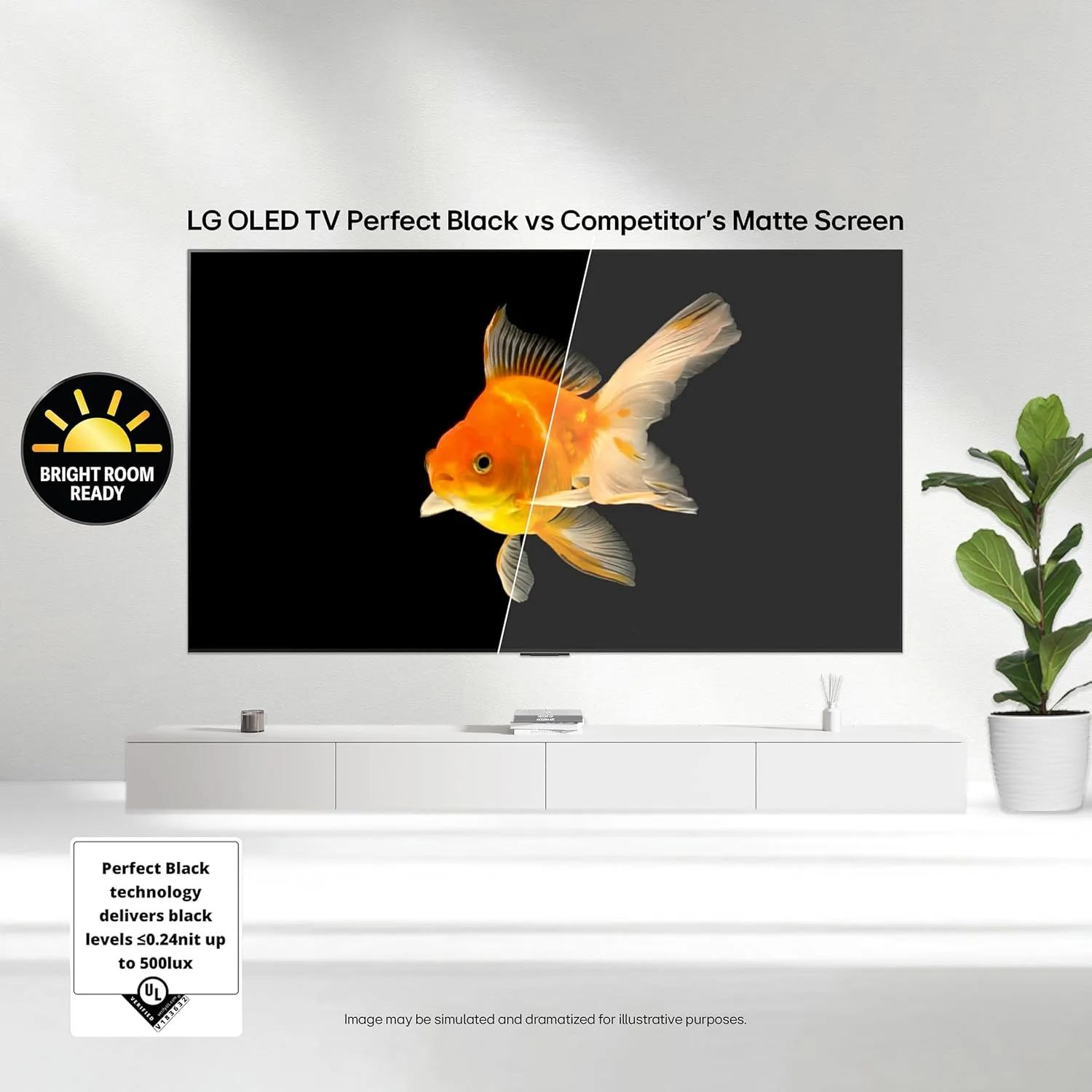
OLED used to lose ground to LCD in bright rooms, but the newest panels have pushed peak brightness high enough to handle daytime viewing with the curtains open. The premium QD-OLED and OLED evo models here get noticeably brighter than budget OLEDs, which helps highlights in HDR content pop and keeps the image punchy under overhead lights. Entry OLED models are still plenty bright for a dim or medium-lit room but can look a touch flatter in direct sunlight.
Think honestly about your space before you spend up. A den or basement with controlled light lets even the most affordable OLED shine, while a sunny open-plan living room rewards the extra brightness of a flagship panel.
Gaming Features and Refresh Rate
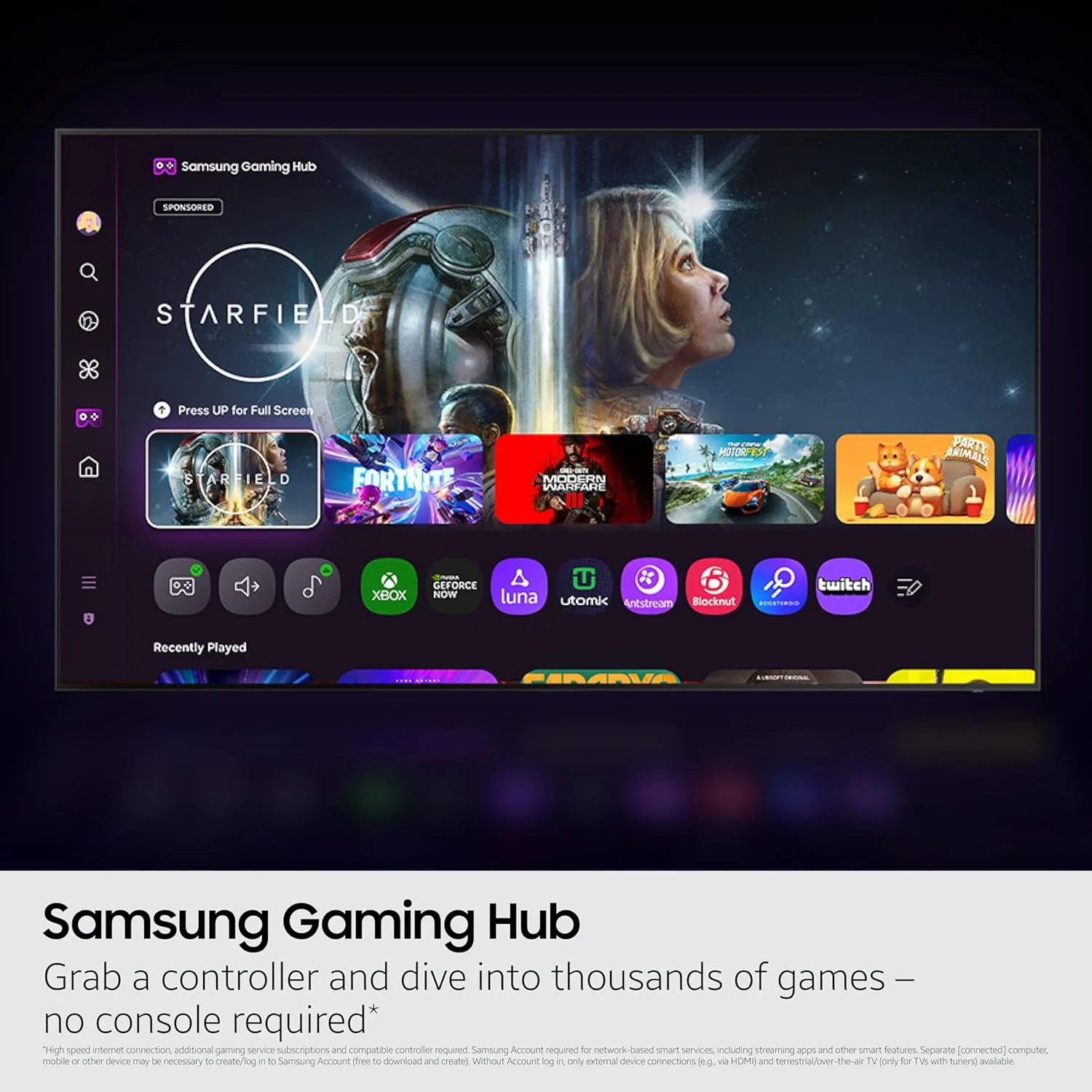
OLED is a natural fit for gaming thanks to near-instant pixel response and no motion blur. Look for HDMI 2.1 ports that support 4K at 120Hz or higher, variable refresh rate, and auto low latency mode. LG and Samsung sets here run their panels at up to 144Hz and carry four HDMI 2.1 inputs, so you can plug in a PlayStation 5, an Xbox Series X, and a gaming PC without swapping cables. Sony focuses on tailored PlayStation 5 features instead of the highest refresh rate, with automatic HDR tone mapping and a genre-based picture mode.
If gaming is your main use, count the full-bandwidth HDMI ports and confirm the refresh rate, since some cheaper OLEDs cap out at 120Hz or offer only two fast inputs. Serious PC players who want the absolute lowest latency may also want to compare these against dedicated gaming monitors before deciding.
Smart Platform and HDR Support
The smart platform shapes your daily experience. LG uses webOS with the point-and-click Magic Remote, Samsung runs Tizen with its Gaming Hub for cloud play, and Sony ships Google TV with the deepest app selection and Chromecast built in. All three are responsive on these models, so pick the one whose layout you prefer.
HDR format support is the other thing to check. LG and Sony back Dolby Vision, which many streaming titles use for dynamic, scene-by-scene HDR. Samsung skips Dolby Vision in favor of HDR10+. It is worth knowing which your favorite services use, though every set here still looks excellent with standard HDR10. For more picks across the category, browse our other electronics buying guides.
Sound and Smart Home Features
Because OLED panels are so thin, built-in speakers can only do so much, and most buyers will eventually add a soundbar. That said, the sets here differ in their audio tricks. LG offers WOW Orchestra, which blends the television speakers with a compatible LG soundbar, while Samsung uses Object Tracking Sound to move audio around the panel and Q-Symphony to sync with its own soundbars. Sony leans on its processing to place dialogue precisely on screen. All three decode Dolby Atmos and pass it through to external audio gear.
Smart home support is broad across the board. Every model here has a voice assistant built in and works with Amazon Alexa, so you can dim the lights, check the weather, or pull up a show with a spoken command. If you already run a particular ecosystem, confirm the set plays nicely with your speakers and hubs, though you are unlikely to hit a wall with any of these picks.
Screen Size and Room Placement

OLED scales from compact 42-inch panels up to wall-filling 77-inch and larger sizes. A 42-inch or 48-inch set works beautifully in a bedroom, dorm, or on a desk as an oversized monitor, while 55 and 65 inches hit the sweet spot for most living rooms. Measure your viewing distance and the space on your stand or wall before you commit, because OLED looks best when the screen fills a comfortable portion of your field of view.
The table below sums up how our picks compare so you can spot the right fit at a glance.
| Model | Panel Type | Best For | Max Refresh Rate |
|---|---|---|---|
| LG C5 Series | OLED evo (WOLED) | All-around overall pick | 144Hz |
| Samsung S90F | QD-OLED | Bright rooms and gaming | 144Hz |
| Sony BRAVIA 8 (XR8B) | OLED | Movies and PlayStation 5 | 120Hz |
| LG C4 42-Inch | OLED evo (WOLED) | Compact rooms and desks | 144Hz |
| Samsung S90D | QD-OLED | Value QD-OLED | 144Hz |
| Samsung S85F | OLED | Best value entry OLED | 120Hz |
Why You Should Trust Us
We build these guides by studying the full current lineup from every brand that ships OLED televisions, then cross-referencing published specifications, manufacturer documentation, and verified owner ratings from real customers. Rather than chase every size and model number, we focus on the panels and features that shape picture quality in the real world: contrast, brightness, color technology, gaming inputs, and the smart platform you live with every day.
Our editors follow the display market year round, so we can tell a genuine generational upgrade from a spec-sheet refresh. Every product here earns its place on merit, we update the list as new models arrive, and we only recommend sets we would be happy to put in our own living rooms. We never accept payment to include a product.
We also weigh how each set performs for different viewers rather than crowning a single winner for everyone. A dedicated gamer, a film buff with a dark theater room, and a family in a sunny living space all have different needs, so our picks are grouped by the job they do best. That way you can skip straight to the model that fits your room and your habits instead of buying more television than you need.
Final Thoughts
If you want one set that does everything well, the LG C5 Series is our best overall OLED TVs. Its brighter OLED evo panel, four HDMI 2.1 ports, and polished webOS platform make it a superb choice for a mix of films, sports, and gaming, and it comes in sizes for almost any room. Shoppers who watch in a bright space or care most about gaming should look hard at the Samsung S90F, whose QD-OLED panel adds extra punch and vivid color.
For the best value, the Samsung S85F delivers the signature OLED contrast at the friendliest price, making it the easiest way to get into a true OLED. Movie lovers and PlayStation 5 owners will appreciate the Sony BRAVIA 8 and its class-leading processing, while anyone furnishing a bedroom, dorm, or desk should grab the compact 42-inch LG C4. Whichever you choose, you are getting a picture that a backlit LCD simply cannot match. When you are ready to keep shopping, browse all of our latest reviews and buying guides or revisit our wider TV roundup for other panel types.
Frequently Asked Questions
Are OLED TVs worth it in 2026?
For picture quality, yes. The best OLED TVs deliver perfect blacks, infinite contrast, and wide viewing angles that no LCD can match, and the newest panels are bright enough for daytime viewing. If you watch a lot of movies or game in a dim to medium-lit room, an OLED is the most noticeable upgrade you can make to your setup.
What is the difference between WOLED and QD-OLED?
WOLED panels use a white sub-pixel to lift brightness and power most LG sets and the entry models from Sony and Samsung. QD-OLED panels add quantum dots for purer, more saturated color and better off-angle performance, and they appear in the Samsung S90 line. Both produce perfect blacks, so the choice comes down to color preference, brightness, and price.
Do OLED TVs still suffer from burn-in?
Modern OLED televisions include several safeguards against permanent image retention, such as pixel shifting, logo dimming, and automatic panel refresh routines. For typical mixed viewing of movies, sports, streaming, and gaming, burn-in is very unlikely over the life of the set. Just avoid leaving a single static image on screen at maximum brightness for many hours a day.
Which OLED TV is best for gaming?
Gamers who want the highest refresh rate and the most fast inputs should look at the LG C5 or Samsung S90F, both of which run at up to 144Hz with four HDMI 2.1 ports for a PlayStation 5, Xbox Series X, and a gaming PC at once. PlayStation 5 owners who value tailored features may prefer the Sony BRAVIA 8. If you also game on a desk, compare these to dedicated gaming monitors for the lowest possible latency.
What size OLED TV should I buy?
For most living rooms, a 55 or 65-inch OLED hits the sweet spot between immersion and price. Choose a 42 or 48-inch model for a bedroom, dorm, or desk setup, and step up to 77 inches or larger if you have a big room and sit farther back. Measure your viewing distance first, since OLED looks its best when the screen comfortably fills your field of view.
How long do OLED TVs last?
Manufacturers rate current OLED panels for roughly 100,000 hours to half brightness, which works out to decades of normal viewing at a few hours a day. In practice, most people replace a television long before the panel meaningfully fades. To get the longest life, keep the built-in panel care features enabled, avoid running at maximum brightness all day, and vary what you watch so no single static element sits in one spot for weeks on end.
Write Your Review
No reviews yet. Be the first to share your experience!