

A great display is the single upgrade that changes how every game looks and feels, yet shopping for one means wading through a wall of numbers: refresh rates, response times, resolutions, panel types, and curves. This guide cuts through the noise with 8 of the best gaming monitors you can buy right now, spanning compact 1080p screens for tight desks, mainstream QHD panels built for high frame rates, a sweeping ultrawide, and a next-generation OLED. Every pick here is a monitor real buyers rate highly, chosen from brands like Sceptre, Samsung, LG and more so you can match a screen to your rig and your budget in September 2026 without second-guessing.
Our top pick is the AOC Q27G41ZE for its rare blend of sharp QHD resolution, a blistering 240Hz refresh rate, and an IPS panel that holds color and contrast from any angle. If you want a single monitor that keeps pace with fast shooters while still looking clean on the desktop, that is the one to beat. Below, we break down where each screen shines, then walk through exactly how to choose the right gaming monitors for the way you play. Pair any of these panels with a capable rig from our roundup of the best gaming PCs and your setup is most of the way there.

Pros
- Sharp QHD resolution on a fast 27-inch IPS panel
- Very high 240Hz refresh with overclock headroom
- G-Sync Compatible and HDR Ready for smooth, vivid motion
- Wide viewing angles and accurate color
- Three-year zero-bright-dot coverage for peace of mind
Cons
- QHD at 240Hz rewards a strong graphics card
- No built-in speakers
The AOC Q27G41ZE is a 27-inch QHD gaming monitor built around a fast IPS panel, and it lands in the sweet spot most players are looking for. QHD resolution sharpens every texture and menu compared with 1080p, while the IPS technology keeps colors accurate and viewing angles wide, so the picture stays consistent whether you are leaning in for a headshot or sitting back for a cutscene.
Where this screen pulls ahead is motion. A native 240Hz refresh rate, with overclock headroom to 260Hz, makes fast shooters and racers look fluid, and the 0.3ms response time keeps quick-moving objects clean instead of smeared. G-Sync Compatible support and an HDR Ready mode round out a feature set that punches above its class.
Connectivity covers the essentials with DisplayPort 1.4 and HDMI 2.0, plus a VESA mount for arms and wall setups. The main thing to plan for is your graphics card, since driving QHD at 240Hz rewards a capable GPU, and there are no built-in speakers, so budget for a headset.
Bottom line: for a single monitor that balances resolution, speed, and color without a premium price, the Q27G41ZE is the most complete all-rounder here and our pick for best overall.
- Screen size: 27 inches
- Resolution: QHD 2560 by 1440
- Panel: IPS
- Refresh rate: 240Hz, overclock to 260Hz
- Response time: 0.3ms
- Adaptive sync: G-Sync Compatible
- HDR: HDR Ready
- Ports: DisplayPort 1.4, HDMI 2.0, VESA mount
This is a monitor for players who want one screen to handle everything from ranked shooters to weekend adventures. The 240Hz refresh rate and low response time cater to competitive gamers chasing every advantage, while the QHD IPS panel keeps slower, story-driven games looking rich. If you can buy only one display and refuse to compromise, this is the target.
The fast IPS panel is the headline. IPS delivers accurate color and wide viewing angles that VA panels cannot match, and this one adds the speed usually reserved for pricier screens. At 240Hz native, motion clarity is excellent, and the overclock to 260Hz offers a little extra for the most demanding players. G-Sync Compatible support ties it together by removing tearing across a wide frame-rate range.

Pros
- QD-OLED panel with perfect blacks and vivid color
- Near-instant 0.03ms response time
- 180Hz refresh for smooth, tear-free motion
- G-Sync Compatible and FreeSync support
- Superb for immersive single-player games
Cons
- Premium price versus LCD rivals
- Static on-screen elements need care over long sessions
The Samsung Odyssey OLED G5 brings QD-OLED technology to a 27-inch QHD gaming screen, and the jump in image quality is immediately obvious. Because each pixel produces its own light, blacks are truly black and colors leap off the panel with a richness that traditional LCD screens simply cannot reproduce. For atmospheric, story-driven games, the effect is spectacular.
It is fast, too. A 180Hz refresh rate keeps motion smooth, and the 0.03ms response time is effectively instant, so there is no ghosting behind quick movement. NVIDIA G-Sync Compatible and AMD FreeSync support keep the picture free of tearing whether you game on a PC or a console.
OLED does ask for a little care. It carries a premium over LCD rivals, and you will want to vary what is on screen during marathon sessions to keep static logos from lingering. Samsung builds in protective features to help, and for most players the trade is well worth the image quality.
Bottom line: if picture quality is your priority and you want the most immersive screen here, the Odyssey OLED G5 is the one to covet.
- Screen size: 27 inches
- Resolution: QHD 2560 by 1440
- Panel: QD-OLED
- Refresh rate: 180Hz
- Response time: 0.03ms GtG
- Adaptive sync: G-Sync Compatible and FreeSync
- Standout: self-lit pixels, true blacks, wide color
This screen is made for players who value how a game looks and feels over squeezing out the last frame. Single-player epics, moody horror, and cinematic adventures shine on a panel with perfect blacks and dazzling color. If your library leans toward immersive experiences rather than ranked ladders, the Odyssey OLED G5 will spoil you.
QD-OLED is the star. Self-lit pixels mean infinite contrast, no backlight bleed, and colors that stay saturated even in dark scenes. Pair that with a 180Hz refresh rate and a 0.03ms response time and you get motion that is both fluid and razor clean. It is a different class of picture from any LCD on this list.
Pros
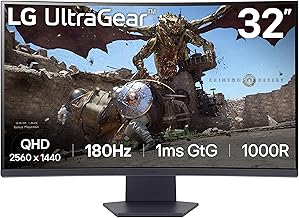
- Large 32-inch QHD panel for immersive play
- Smooth 180Hz refresh with 1ms response
- 1000R curve wraps you into the action
- AMD FreeSync and HDR10 support
- Gaming extras: Black Stabilizer, DAS, crosshair, FPS counter
Cons
- QHD at 32 inches needs a capable graphics card
- Curved VA viewing angles trail flat IPS
The LG UltraGear 32GS60QC pushes gaming onto a big 32-inch canvas without leaving QHD sharpness behind. The 1000R curve is aggressive enough to wrap the edges of the screen toward you, which pulls you into open-world and racing games and keeps the whole picture at a comfortable viewing distance.
Performance keeps up with the size. A 180Hz refresh rate and 1ms response time deliver smooth, clean motion, and AMD FreeSync with HDR10 support handles tearing and adds punch to highlights. LG layers on genuine gaming tools as well, including Black Stabilizer to brighten dark corners, Dynamic Action Sync to reduce lag, and an on-screen crosshair and FPS counter.
As with any 32-inch QHD screen, you will want a graphics card that can drive that resolution at high frame rates, and the VA-based curved panel gives up a little viewing-angle stability compared with flat IPS. In return you get deeper contrast that suits moody games.
Bottom line: a well-rounded big-screen pick for players who want immersion and gaming extras without stepping up to ultrawide or OLED money.
- Screen size: 32 inches
- Resolution: QHD 2560 by 1440
- Curve: 1000R
- Refresh rate: 180Hz
- Response time: 1ms
- Adaptive sync: AMD FreeSync
- HDR: HDR10
- Ports: two HDMI, DisplayPort
This monitor suits players who want a cinematic, immersive setup for single-player and open-world games but still care about competitive extras. If a 27-inch screen feels cramped and you sit a comfortable distance from your desk, the 32-inch curved panel fills your view nicely. Gamers who lean into fast esports on a wide-angle flat screen may prefer an IPS option instead.
The curved VA panel trades a little viewing-angle stability for stronger contrast and deeper blacks, which flatter dark and atmospheric games. A 180Hz refresh rate with a 1ms response time keeps fast action smooth on the large surface, and the 1000R curve is the tightest common curvature, maximizing the wraparound effect at 32 inches.

Pros
- Immersive 34-inch ultrawide 21 by 9 canvas
- Deep 1000R curve for a wraparound view
- Smooth 165Hz refresh with 1ms response
- FreeSync Premium for tear-free motion
- Extra width doubles as a productivity boost
Cons
- Ultrawide format needs a strong graphics card
- Not every game scales to 21 by 9
The Samsung Odyssey G5 34-inch ultrawide is the immersion pick on this list. Its 21 by 9 WQHD panel stretches the picture far into your peripheral vision, and the deep 1000R curve bends that extra width back toward you so the whole scene stays within easy view. In racing sims and open-world adventures, the sense of presence is hard to give up once you have it.
It is a capable gaming screen beyond the spectacle. A 165Hz refresh rate and 1ms response time keep motion smooth, and FreeSync Premium eliminates tearing across a wide range of frame rates. The extra horizontal space is a bonus off the clock, giving you room for several windows when you work.
Two caveats come with the format. Driving an ultrawide resolution asks more of your graphics card than a standard 16 by 9 screen, and a minority of games do not scale cleanly to the wider aspect ratio. For most modern titles, though, the payoff is worth it.
Bottom line: the ultrawide to choose if immersion and a panoramic view top your wish list, and the only ultrawide most players need.
- Screen size: 34 inches ultrawide
- Resolution: WQHD 3440 by 1440
- Curve: 1000R
- Refresh rate: 165Hz
- Response time: 1ms
- Adaptive sync: FreeSync Premium
- Aspect ratio: 21 by 9
This screen is for players who want to feel surrounded by the game. Racing, flight, and open-world titles benefit most from the panoramic 21 by 9 view and the deep curve, which together fill your peripheral vision. If immersion is the whole point of your setup, nothing else on this list matches the sweep of a curved ultrawide.
Choose this if you split time between immersive gaming and multitasking, since the extra width fits several windows side by side for work. It rewards a roomy desk and a graphics card with headroom to spare. Competitive players focused purely on frame rate, or anyone on a tight budget, will be better served by a standard 16 by 9 screen.

Pros
- Fast 240Hz refresh at an accessible price
- 27-inch 1500R curve for added immersion
- Wide 130 percent sRGB color looks vibrant
- HDR and FreeSync support
- 1ms MPRT keeps motion clean
Cons
- 1080p on a 27-inch panel is less sharp than QHD
- VA viewing angles trail IPS
The SANSUI 27-inch curved monitor proves you do not need a big budget to game at a very high refresh rate. Its headline feature is a 240Hz panel, the kind of speed usually reserved for pricier screens, which makes fast shooters and racers feel exceptionally fluid. A 1500R curve adds a touch of immersion at 27 inches.
Color is a pleasant surprise for the class, with wide sRGB coverage and strong contrast giving games real vibrancy. HDR support and AMD FreeSync are on board, and a 1ms MPRT response keeps motion clean while a low blue light mode eases long sessions.
The compromise is resolution. At 1080p on a 27-inch screen, the picture is a little less crisp than QHD, and the VA panel gives up some viewing-angle stability. For competitive players who prize frame rate over pixel count, that is an easy trade.
Bottom line: a smart choice for high-refresh gaming on a budget, especially for fast-paced competitive titles.
- Screen size: 27 inches
- Resolution: 1080p FHD
- Curve: 1500R
- Refresh rate: 240Hz
- Response time: 1ms MPRT
- Color: wide sRGB coverage, strong contrast
- Adaptive sync: AMD FreeSync, HDR
- Ports: HDMI, DisplayPort
This screen is aimed at competitive players who want the smoothest possible motion without spending big. The 240Hz refresh rate is the draw, giving fast shooters an edge that a standard 144Hz panel cannot match. If you play ranked titles where reaction time counts and you would rather put money into speed than resolution, it fits the bill.
Connectivity is straightforward with HDMI and DisplayPort inputs, plus a bundled cable to get you running quickly. Use DisplayPort from a gaming PC to reach the full 240Hz, and the included metal stand keeps the setup stable. A low blue light mode and the gentle curve make longer sessions easier on the eyes.

Pros
- Crisp IPS panel with wide viewing angles
- Accurate 99 percent sRGB color
- 120Hz refresh smooths everyday gaming
- FreeSync Compatible reduces tearing
- Slim design fits any desk
Cons
- 1080p is less detailed than QHD at 27 inches
- No built-in speakers
The Acer KB272 is a clean, no-drama 27-inch monitor that does the fundamentals well. Its IPS panel delivers accurate color and wide viewing angles, and near-complete sRGB coverage means photos, video, and games all look correct rather than washed out. A slim profile helps it blend into any desk.
For gaming, the step up to 120Hz over a standard 60Hz office screen is immediately noticeable, smoothing out motion in everything from platformers to shooters. Adaptive-Sync with FreeSync Compatible support keeps the picture free of tearing, and a 1ms VRB mode helps keep fast movement clean.
It is built to a price, so you get 1080p rather than QHD and HDMI plus VGA rather than DisplayPort, and there are no speakers. None of that undercuts its role as a reliable everyday panel that also handles casual gaming with ease.
Bottom line: a dependable, color-accurate all-rounder for players who want smooth 1080p gaming and a screen that doubles for work.
- Screen size: 27 inches
- Resolution: FHD 1920 by 1080
- Panel: IPS
- Refresh rate: up to 120Hz
- Response time: 1ms VRB
- Color: 99 percent sRGB
- Adaptive sync: FreeSync Compatible
- Ports: HDMI, VGA, tilt stand
This is the pick for players who want one affordable screen that handles casual gaming and daily tasks equally well. Students, home offices, and anyone building a first gaming setup will appreciate the accurate IPS color and smooth 120Hz motion. Competitive players chasing the highest frame rates or QHD sharpness will want to look higher up the list.
Connections cover the basics with HDMI and VGA, so it slots easily into an existing setup or an older system, though a gaming PC will connect over HDMI. The tilt stand lets you dial in a comfortable angle, and the slim, lightweight design makes it simple to position on a crowded desk. There are no speakers, so plan for a headset.

Pros
- Very affordable curved gaming screen
- 24-inch 1500R curve adds subtle immersion
- Vivid 98 percent sRGB color
- Two HDMI inputs plus VGA
- Built-in speakers save desk space
Cons
- Modest refresh rate versus high-refresh panels
- 1080p resolution, no DisplayPort
The Sceptre C248W has earned its reputation as a go-to budget monitor, and for good reason. It packs a curved 24-inch 1080p panel, vivid color, and built-in speakers into a screen that costs a fraction of the premium picks here. For a first gaming display or a secondary screen, the value is hard to argue with.
The 1500R curve is gentle at this size but still adds a hint of immersion, and the compact 24-inch footprint keeps the whole playfield in your central vision, which many casual competitive players actually prefer. Two HDMI inputs plus VGA make it easy to connect a console and a PC or an older machine at the same time.
This is an entry-level screen, so the refresh rate is modest next to the high-refresh panels above, and there is no DisplayPort. For fast-paced esports you would want more speed, but for everyday and console gaming it delivers a lot for the money.
Bottom line: the best value on this list and a smart starting point for anyone building a budget setup.
- Screen size: 24 inches
- Resolution: 1080p FHD
- Curve: 1500R
- Color: 98 percent sRGB
- Ports: two HDMI, VGA
- Audio: built-in speakers
- Mount: VESA wall mount ready
This screen is made for budget-minded players, first-time buyers, and anyone who wants a capable second monitor. Casual gamers and console owners get a vivid curved picture and built-in sound without spending much. If you play fast competitive titles or want QHD sharpness, step up to one of the high-refresh screens above.
The C248W keeps setup simple with two HDMI ports and a VGA input, so a console and a computer can stay plugged in together. Built-in speakers mean you can get sound without extra gear, though a headset will sound better. It is VESA mount ready for arms and wall mounts, and the curved panel sits comfortably on a compact desk.

Pros
- 144Hz refresh at a compact 22-inch size
- Fits tight desks and small setups
- HDMI and DisplayPort inputs
- Built-in speakers included
- Affordable entry to high-refresh gaming
Cons
- Small screen limits immersion
- 1080p resolution only
The Sceptre E225W shows that high-refresh gaming does not have to take over your desk. At a compact 22 inches, it fits small setups and dorm rooms with ease, yet it still runs at up to 144Hz, so fast games feel noticeably smoother than they would on a standard office screen.
Connectivity is better than you might expect at this size and price, with both HDMI and DisplayPort inputs, meaning you can reach the full refresh rate from a gaming PC. Built-in speakers are included, so you can get sound going right away, and the Machine Black finish keeps the look tidy.
The trade-offs are the ones you would expect from the smallest screen here. A 22-inch panel is less immersive than a 27-inch or larger display, and the resolution is 1080p. For a compact, affordable, high-refresh screen, though, it hits its brief squarely.
Bottom line: a great fit for small desks and budget builds that still want the smoothness of 144Hz.
- Screen size: 22 inches
- Resolution: 1080p FHD
- Refresh rate: up to 144Hz
- Ports: HDMI, DisplayPort
- Audio: built-in speakers
- Finish: Machine Black
This screen suits players with limited desk space, budget builders, and anyone who wants smooth high-refresh gaming without a large panel. It works well in dorms, compact battlestations, or as a fast secondary display. If you want a bigger, more immersive picture or QHD detail, one of the larger screens above will serve you better.
The draw here is a 144Hz refresh rate in a compact 22-inch body, a combination that keeps fast games fluid on a screen that fits almost anywhere. It is a meaningful step up from a 60Hz display for competitive play, and DisplayPort support ensures you can hit that full refresh rate from a gaming PC rather than settling for less over other connections.
How to Choose the Best Gaming Monitors
The right monitor depends on the games you play, the graphics card feeding it, and how much desk space you have. Use the criteria below to narrow the field, then match those priorities to the picks above. There is no universally perfect screen, only the best fit for your setup, so weigh each factor against how you actually spend your time on the machine.
Refresh Rate and Response Time
Refresh rate, measured in hertz, is how many times per second the screen redraws the image. A 60Hz office monitor feels sluggish next to a 144Hz or 240Hz gaming panel, where motion looks smoother and aiming feels more direct. For competitive shooters, a high refresh rate is the upgrade you notice first, since more frames on screen mean less delay between what happens in the game and what your eyes register.
Response time, listed in milliseconds, measures how quickly each pixel shifts from one color to the next. Lower is better, because slow pixels leave a smeared trail behind fast-moving objects. Fast IPS and OLED panels now reach response times low enough that ghosting is rarely a problem. Remember that a fast panel only helps if your graphics card can push enough frames to feed it, so balance the monitor against the rest of your hardware and consider a matching upgrade from our guide to the best graphics cards.
Resolution and Screen Size
Resolution sets how many pixels build the image. Full HD, or 1080p, remains the easiest resolution to drive at very high frame rates, which is why budget and esports-focused screens still favor it. QHD, also called 1440p, roughly doubles the detail and hits a sweet spot on 27-inch and 32-inch panels, giving you crisp text and richer scenery without demanding a top-tier graphics card the way 4K does.
Screen size works hand in hand with resolution. A 24-inch panel keeps the whole playfield in your central vision, which many competitive players prefer, while a 27-inch QHD screen is the popular all-rounder. Push to 32 inches and games feel more cinematic, though you will want QHD or higher so the picture stays sharp. Bigger is not automatically better; match the size to how far you sit from the screen and how much room your desk allows.
Above all, pair resolution and size to your graphics card. A powerful GPU can drive QHD or an ultrawide at high frame rates and reward a larger, sharper screen, while a more modest system will feel snappier locked to 1080p on a 24-inch or 27-inch panel. Buying a screen your hardware cannot feed leaves frames on the table, so plan the display and the rig together rather than in isolation.
Panel Type: IPS, VA, and OLED

Panel technology shapes color, contrast, and viewing angles. IPS panels deliver accurate color and wide viewing angles, making them a safe default for most players who also edit photos or watch films. VA panels trade a little viewing-angle stability for deeper blacks and stronger contrast, which flatters dark, atmospheric games and is common on curved screens.
OLED is the newest arrival on gaming desks, and it changes the picture entirely. Because each pixel makes its own light, blacks are truly black and colors pop with a vividness LCD panels cannot match, all with near-instant response times. OLED screens carry a premium and ask you to stay mindful of static logos over long sessions, but for pure image quality they sit at the top of the stack.
Curve, Ultrawide, and Immersion

A curved screen gently wraps the edges of the display toward you so more of the picture sits at a consistent distance from your eyes. On larger panels the effect reduces eye strain and pulls you deeper into open-world and racing games. The curve rating, such as 1500R or 1000R, describes how aggressive the bend is, with a lower number meaning a tighter, more enveloping curve.
Ultrawide monitors stretch the picture horizontally to a 21 by 9 shape, giving you a wider field of view in supported games and room for several windows when you are working. They are a treat for immersion and multitasking, though not every title scales cleanly to the extra width and they ask more of your graphics card. One well-chosen ultrawide belongs on this list; beyond that, most players are better served by a standard 16 by 9 screen.
Ports, Sync, and Connectivity
Check the back panel before you buy. DisplayPort generally carries the highest refresh rates and is the connection to prefer for a gaming PC, while HDMI 2.0 or newer is what you need for current consoles. Screens with two HDMI inputs plus DisplayPort let you keep a PC and a console plugged in at once, and built-in speakers can save desk space even if a dedicated headset sounds far better.
Adaptive sync is the other must-have. AMD FreeSync and NVIDIA G-Sync Compatible modes let the monitor match its refresh rate to your frame output, wiping out the screen tearing that spoils fast motion. Almost every screen worth buying now supports one or both. Once the picture is sorted, round out the setup with audio from our picks for the best gaming headsets.
Setting a Budget Without Cutting Corners

You do not need to spend a fortune to get a genuinely good gaming screen. Entry-level curved 1080p panels deliver smooth casual play and easy console gaming, while the mid-range is where QHD resolution and high refresh rates meet without a painful price. Reserve the top of your budget for OLED or a large ultrawide only if image quality or immersion is your main goal. Decide which single feature matters most to you, spend there, and avoid paying for numbers you will never notice in the games you actually play.
It also helps to think a step ahead. A screen is one of the longest-lived parts of a setup, often outlasting two or three graphics cards, so a slightly better panel today can serve you across future upgrades. If you expect to improve your rig soon, a QHD or high-refresh screen leaves room to grow into, while a purely budget build is better matched with an affordable 1080p panel you can enjoy right away and replace later.
| Monitor | Size | Resolution | Refresh Rate | Best For |
|---|---|---|---|---|
| AOC Q27G41ZE | 27 in | QHD 1440p | 240Hz | All-around and competitive |
| Samsung Odyssey OLED G5 | 27 in | QHD 1440p | 180Hz | Best image quality |
| LG UltraGear 32GS60QC | 32 in | QHD 1440p | 180Hz | Big-screen immersion |
| Samsung Odyssey G5 34 | 34 in | UWQHD ultrawide | 165Hz | Ultrawide immersion |
| SANSUI 27 Curved | 27 in | 1080p FHD | 240Hz | High refresh on a budget |
| Acer KB272 | 27 in | 1080p FHD | 120Hz | Everyday and casual play |
| Sceptre C248W | 24 in | 1080p FHD | Curved value | Tight budgets |
| Sceptre E225W | 22 in | 1080p FHD | 144Hz | Compact desks |
Why You Should Trust Us
Our recommendations start with the monitors people are actually buying and living with every day. We gather current listings across the major brands, then filter for models that earn strong, consistent ratings from a large base of verified customers rather than a handful of early reviews. That focus on real-world feedback keeps flashy but flawed products off the list.
From there we weigh the specifications that matter for gaming, refresh rate, response time, resolution, panel type, and connectivity, against the price each screen commands, and we deliberately spread our picks across sizes, resolutions, and budgets. We do not chase a single winner for everyone, because a competitive shooter fan and a story-driven role-player want different things from a display. Our goal is a shortlist where every entry is the clear best choice for a particular kind of player.
Final Thoughts
If you want one screen that does nearly everything well, the AOC Q27G41ZE is our best overall gaming monitors pick. Its 27-inch QHD IPS panel and 240Hz refresh rate make fast games feel razor sharp while keeping the desktop crisp, and it slots neatly into most modern builds. Players chasing the finest picture should look to the Samsung Odyssey OLED G5, whose QD-OLED panel delivers the deepest blacks and most vivid color on this list for the most immersive single-player sessions.
Shopping with a tight budget in mind, the Sceptre C248W is our best value choice, a curved 1080p screen that makes casual and console gaming look great for far less than the premium models. Want the widest possible view? The Samsung Odyssey G5 34-inch ultrawide wraps racing and open-world games around you like nothing else here. Whichever you pick, a good chair keeps those long sessions comfortable, so browse our roundup of the best gaming chairs to finish the battlestation.
Frequently Asked Questions
What refresh rate do I need for gaming monitors in 2026?
For casual and single-player games, 120Hz or 144Hz feels smooth and responsive and is easy for most graphics cards to reach. Competitive players who live in fast shooters benefit from 240Hz, which sharpens motion and shaves delay off every input. If your graphics card cannot yet feed those higher numbers, a 144Hz screen is the smarter buy today and still leaves room to grow.
Is a 1440p or 1080p monitor better for gaming?
It comes down to your graphics card and priorities. A 1080p panel is easier to drive at very high frame rates, making it ideal for competitive play and lighter systems. A 1440p, or QHD, screen shows noticeably more detail and looks fantastic on larger 27-inch and 32-inch panels, provided your hardware can keep the frame rate up. For most people building a balanced setup today, QHD is the sweet spot.
Are curved gaming monitors worth it?
On larger screens, yes. A curve keeps the edges of a 32-inch or ultrawide panel at a more even distance from your eyes, which eases strain over long sessions and boosts immersion in open-world and racing titles. On smaller 24-inch screens the benefit is subtle. If you mostly play fast competitive games, a flat panel is perfectly fine, so treat the curve as a comfort and immersion feature rather than a requirement.
Do I need G-Sync or FreeSync for a gaming monitor?
Adaptive sync is worth having on any gaming screen. AMD FreeSync and NVIDIA G-Sync Compatible modes let the monitor match its refresh rate to the frames your graphics card produces, which erases the screen tearing that shows up during fast motion. FreeSync typically pairs with AMD cards and G-Sync Compatible with NVIDIA cards, though many modern monitors support both. Nearly every screen on this list includes one or the other, so you can match it to whichever graphics card you own.
Do these gaming monitors work with consoles?
Yes. Every screen here includes HDMI, so any current console will connect and play. Consoles typically target 1080p or 1440p at up to 120Hz, so a QHD screen with a modern HDMI input gives you room to enjoy higher frame rates where a game supports them. If you plan to keep a console and a PC connected at the same time, choose a monitor with two HDMI ports plus DisplayPort.
What else do I need for a complete gaming setup?
A monitor is the centerpiece, but a few companions round out the experience. A capable PC or console supplies the frames, a comfortable chair supports long sessions, and a solid headset delivers positional audio that a monitor speaker cannot. For more buying guides that pair naturally with these screens, browse our full library of gaming and tech articles and build the rest of your station around the display you choose.







Write Your Review
No reviews yet. Be the first to share your experience!