

The moment a side project turns into a shop is usually the moment somebody gets tired of taping printer paper to parcels. A shipping label printer prints a four by six postage label directly, with no ink, no toner and no scissors, and it is the piece of equipment that most obviously buys back time once orders arrive daily rather than weekly. We sorted 9 of them from Rollo, Arkscan, JADENS and more by the things that decide whether one fits your bench in September 2026: how it connects, which computers and platforms it works with, and how it takes its labels.
Our top pick is the Rollo USB Shipping Label Printer for combining the most straightforward setup in this group with a build that keeps up when the orders arrive in a batch. Below we group the field by connection type, because that decision shapes everything else. For the rest of the packing bench, our office products section covers adjacent supplies.

Pros
- Installs as a system printer, so labels print from any program
- Handles a batch without pausing to cool between labels
- Takes standard rolls and fanfold stacks rather than proprietary stock
- Well supported across Windows and macOS
Cons
- Tied to the computer it is plugged into
- Larger footprint than the portable units here
The Rollo USB is the default recommendation in this category because it removes the app layer entirely. It appears in the printer list like any other printer, so a label from a selling platform prints straight from the browser or a PDF viewer with nothing in between.
That matters more than any speed figure. The most common frustration with cheap label printers is a workflow that routes every label through a mobile app, and this simply does not have one.
It is also built for the batch. Where a portable unit is designed around one parcel at a time, this keeps going through a day's orders in a single run, which is the situation that separates a printer that helps from one that becomes a bottleneck.
Bottom line: the pick for anyone packing at a desk with a computer, and the safest first purchase in this category.
- Technology: direct thermal, no ink
- Connection: USB
- Driver: installs as a system printer
- Label size: four by six postage labels
- Feed: rolls and fanfold
- Power: mains
- Platforms: Windows and macOS
- Consumables: standard direct thermal labels
Buy this if you process orders on a computer at a fixed packing bench and want the least complicated setup available. It suits a shop shipping daily, and it scales comfortably as volume grows. It is the wrong choice if you print from a phone away from the desk, or if the printer needs to be shared between machines.
Install the driver before plugging it in, then print one test label and set print density once rather than leaving the default, since a barcode that scans reliably matters more than how dark the text looks. Load labels with the guides snug so the roll cannot wander. Keep a spare roll to hand, because running out mid batch is the only routine interruption here.

Pros
- Wireless setup removes the cable to the laptop
- Compact enough to put away between packing sessions
- Quick initial setup with little configuration
- Covers the standard four by six postage label
Cons
- Prints through the maker's app rather than as a system printer
- Built around single parcels rather than long batches
Nelko is the sensible entry point for a shop that has not yet outgrown its kitchen table. It costs meaningfully less than the commercial units here and covers the same core job for a seller sending a handful of parcels a day.
The wireless connection is the appeal and also the limitation. Printing happens through the maker's app, which means saving a label and opening it there rather than printing directly, and that adds steps per parcel that grow with volume.
For a low volume shop the maths still works. Set against taping printed sheets to boxes, it is a clear improvement, and it can be put away in a drawer when the bench becomes a dining table again.
Bottom line: the value pick and the right first printer for a shop with a modest, steady order flow.
- Technology: direct thermal, no ink
- Connection: Bluetooth
- Printing: via the maker's app
- Label size: four by six
- Form factor: compact
- Power: mains adapter
- Consumables: standard direct thermal labels
- Setup: minimal configuration
This suits a low to moderate volume seller, a shop run from a shared space where the printer gets put away, and anyone who processes orders on a phone. Look at the USB models instead if you print at a computer, ship in daily batches, or want labels to print without an app in the middle.
Before buying, work out where you physically stand when you print a label. If the answer is at a laptop, a USB printer will be faster per parcel and simpler to support. If the answer is anywhere else, this is the cheaper way to get there. Check the app supports your phone platform before ordering.

Pros
- Wireless printing from phone or computer
- Compatible with the common selling platforms
- Compact and easy to store between sessions
- Straightforward label loading
Cons
- App based workflow adds steps for every label
- Not built for long continuous batches
JADENS aims at the multi platform seller, the person listing on more than one marketplace and generating labels in more than one format. The compatibility list is the selling point and it is broadly accurate for standard four by six labels.
Like most wireless units at this level, printing runs through the maker's app. That is workable and well understood, but it is the thing to be clear about before buying, because it defines the workflow rather than being a detail.
Physically it is easy to live with: small, light, simple to load, and easy to store. For a seller who packs in bursts rather than all day, that suits the rhythm.
Bottom line: a solid wireless option for a multi platform seller who is comfortable printing through an app.
- Technology: direct thermal, no ink
- Connection: Bluetooth
- Printing: via the maker's app
- Label size: four by six
- Platforms: common marketplaces
- Form factor: compact
- Power: mains adapter
- Consumables: standard direct thermal labels
Choose this if you sell across several marketplaces and want one printer that handles all their label formats, and if printing from a phone fits how you work. Sellers who print exclusively from a desktop computer will find a USB model simpler and quicker for the same money.
Install the app and print a test label before your first real order, since the first label is where size and orientation settings get sorted out. Save platform labels as PDFs to a consistent folder on the phone so the app finds them quickly. Keep the printer paired to one device rather than reconnecting between two, which is where wireless setups usually go wrong.

Pros
- Established brand with a range of label printers
- Wireless printing suited to phone workflows
- Handles the standard postage label size
- Compact enough for a small bench
Cons
- App based printing rather than a system printer
- Portable focus means it is not a batch machine
Phomemo builds label printers across several sizes, and the 241BT is the shipping label member of that family. For a seller who already uses one of the smaller Phomemo units for product labels, staying in one app is a genuine convenience.
The workflow is the familiar wireless one: labels are saved and printed through the app rather than sent to a system printer. Whether that is acceptable depends entirely on how many parcels pass through your hands each day.
Build and size are aimed at a bench that is not permanently a packing station, which suits shops run alongside something else.
Bottom line: a good fit for phone based sellers, and especially for anyone already inside this maker's app.
- Technology: direct thermal, no ink
- Connection: Bluetooth
- Printing: via the maker's app
- Label size: four by six
- Form factor: compact
- Power: mains adapter
- Brand range: other label sizes available
- Consumables: standard direct thermal labels
This suits a seller who processes orders on a phone, and particularly one who already owns a smaller printer from the same maker and wants one app for everything. If you print at a computer or send a day's orders in one batch, a USB or Wi-Fi model will serve you better.
If you own another printer from this brand, check whether both are supported in the current app version before assuming one app covers everything. Otherwise judge it against the other Bluetooth units here on price and on which app you find least irritating, since the printing hardware in this class is closely matched.

Pros
- Joins the network, so several computers can print to it
- Can sit away from the desk rather than beside a laptop
- Same commercial style build as the USB model
- Prints from computers as well as phones
Cons
- Adds the home network as another thing that can fail
- Costs more than the USB version of the same idea
This is the answer when the printer cannot live next to one laptop. On a network it is reachable from a desktop, a laptop and a phone, which suits a two person operation or a bench where the printer sits across the room from whoever is packing.
The hardware is the familiar commercial style unit, so batch behaviour and label handling match the USB model. What changes is the connection and, with it, the failure modes: a network that drops is a printer that disappears.
For a stable network it is the most flexible option here. For a network that is already the weak link in the house, the cable is the wiser choice.
Bottom line: the pick when more than one machine needs to print, or when the printer must sit away from the desk.
- Technology: direct thermal, no ink
- Connection: Wi-Fi
- Sharing: multiple devices on the network
- Label size: four by six
- Feed: rolls and fanfold
- Power: mains
- Build: commercial style
- Consumables: standard direct thermal labels
Buy this for a shop with more than one person packing, a bench where the printer sits away from the computer, or a household that prints from a mix of devices. Choose the USB version instead if one computer does all the printing and you would rather not involve the network at all.
Give the printer a fixed address on your router during setup so it does not move and disappear from the printer list later, which is the single most common wireless printer complaint. Put it on the band with the better coverage where the printer actually sits, and keep a USB cable in the drawer as a fallback for a day when the network misbehaves.

Pros
- Broadest stated platform support here, including Chromebook
- Works with the major marketplaces and postage services
- Established model with a long track record
- Handles standard label stock rather than proprietary rolls
Cons
- Setup takes more steps than the simplest USB units
- Design is dated next to newer competitors
The 2054A earns its place through compatibility rather than through any headline feature. It lists Windows, Mac, Chromebook and Android support explicitly, which is unusual and makes it the safe answer for a mixed or unusual setup.
Chromebook support in particular is worth noting, since it is the platform most often left out of this category and the one that leaves buyers stuck after the box is open.
The design shows its age next to newer units and setup asks a few more steps. In exchange you get a printer with a long record and the least likelihood of a compatibility surprise.
Bottom line: the pick when your computers are a mixture, or when a Chromebook is doing the packing.
- Technology: direct thermal, no ink
- Connection: USB
- Platforms: Windows, Mac, Chromebook, Android
- Label size: four by six
- Services: major marketplaces and postage providers
- Power: mains
- Consumables: standard direct thermal labels
- Model: long established
This is for a household or small business running a mixture of computers, and specifically for anyone packing on a Chromebook, where most printers in this category simply do not go. If everything you own runs Windows or macOS, the simpler modern units will get you printing faster.
Confirm the current driver situation for your exact operating system version before ordering, since broad support is a claim worth verifying at the version level rather than the platform level. Budget a little more setup time than for a plug and print USB unit, and keep the driver download link somewhere you can find it again.
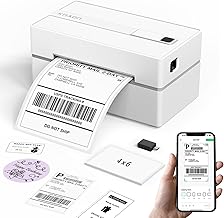
Pros
- Small footprint that suits a shared or temporary bench
- Wireless printing from a phone
- Standard four by six label support
- Simple to store between packing sessions
Cons
- App based workflow rather than a system printer
- Portable design is not intended for long batches
KNAON sits with the compact wireless group and its argument is size. On a bench that is also a kitchen counter, a printer that disappears into a cupboard between sessions is worth more than a specification advantage.
Printing runs through the app as it does across this class, so the same trade applies: fewer cables, more steps per label. At low volume that is a fair exchange and at high volume it is not.
Label handling is standard four by six with ordinary thermal stock, so consumables are easy to source and there is no proprietary lock in to worry about.
Bottom line: a compact wireless option for a shop without a permanent packing station.
- Technology: direct thermal, no ink
- Connection: Bluetooth
- Printing: via the maker's app
- Label size: four by six
- Form factor: compact and portable
- Power: mains adapter
- Consumables: standard direct thermal labels
- Storage: small enough to put away
Choose this if space is the constraint: a shop run from a shared table, a spare room that is also something else, or a bench that must be cleared daily. Sellers with a permanent packing station and a daily batch should buy a mains powered commercial style unit instead.
Store it with the lid closed so dust and adhesive residue stay off the print head, which is what shortens the life of these printers. Keep it out of direct sunlight, and store spare labels flat and covered, since thermal stock darkens with heat and light even before it reaches the printer.

Pros
- Maker specialises in small business shipping hardware
- Wireless printing suited to phone workflows
- Standard four by six label handling
- Compact enough for a small bench
Cons
- App based printing rather than a system printer
- Newer listing with a shorter track record than established models
MUNBYN builds around small business shipping, and this is the wireless four by six member of that range. For sellers already using the maker's scales or other kit, staying with one brand keeps support straightforward.
The workflow is the standard wireless one, printing through the app rather than as a system printer, with the same trade offs that implies for volume.
It is a newer listing than the long established models here, so the track record is shorter. The hardware class is well understood, but that is worth knowing when weighing it against a model that has been in the field for years.
Bottom line: a reasonable wireless choice, particularly if you already use this maker's other shipping equipment.
- Technology: direct thermal, no ink
- Connection: Bluetooth
- Printing: via the maker's app
- Label size: four by six
- Form factor: compact
- Power: mains adapter
- Consumables: standard direct thermal labels
- Focus: small business shipping
This suits a seller who prints from a phone and likes keeping one brand across their shipping kit. It fits a low to moderate parcel count. Anyone printing from a computer, or shipping enough that steps per label start to matter, should look at the USB and Wi-Fi models here instead.
Check which app version supports your phone and whether the same app covers any other equipment from this maker you already own. Compare it against the other Bluetooth units on price and app quality rather than on print specification, since the hardware in this class is closely matched and the software is what you live with.

Pros
- Handles a range of label widths rather than postage size only
- Useful for product and barcode labels alongside shipping
- Standard thermal stock rather than proprietary cartridges
- Compact desktop footprint
Cons
- Fewer owner reports than the long established models here
- Needs label size configuring rather than assuming four by six
The SP310 is the flexible one here. Rather than being built solely around a four by six postage label, it takes a range of widths, which matters for a shop that also labels its own products, jars, boxes or shelf locations.
That flexibility comes with a setup step: you tell it what you are feeding rather than relying on an assumption. It is a one time job but it is the reason this is not the fastest printer here to get running.
It has a shorter public track record than the established models, so there is less accumulated owner reporting to draw on. The technology itself is unremarkable, which in this category is reassuring rather than otherwise.
Bottom line: the pick when postage labels are only part of what you print.
- Technology: direct thermal, no ink
- Label width: adjustable range
- Uses: shipping, product and barcode labels
- Form factor: compact desktop
- Power: mains
- Consumables: standard direct thermal labels
- Setup: label size configured by the user
- Connection: desktop
Buy this if you print more than postage: product labels, barcodes for your own stock, jar or box labels alongside shipping. It suits a maker as much as a reseller. If all you will ever print is four by six postage labels, a printer that assumes that size will be quicker to set up and simpler to live with.
Set the label size and run the calibration routine each time you change stock width, since a printer that thinks it is feeding a different label will skip or misalign. Keep one width as your default and only change when you have a run to do, rather than switching back and forth for individual labels.
How to Choose a Shipping Label Printer
Two decisions matter more than the rest: how it connects, and whether your platform and computer are properly supported. Read those sections even if you skip the others.
Direct Thermal Printing and Why There Is No Ink
Every printer here is direct thermal, which means the print head heats and the coated label darkens. There is no ink, no toner and no ribbon, so the only consumable is the labels themselves. That single fact is why these cost so little to run compared with putting postage labels through an office inkjet.
The trade is that thermal labels are sensitive to what darkened them in the first place. Heat, direct sunlight and friction all fade them over time, which is fine for a parcel that ships tomorrow and a problem for anything meant to sit in a warehouse for a year. For postage it is the right technology.
Print darkness is adjustable on most of these, either in the driver or in the app, and it is worth setting once rather than living with the default. Too light and the barcode scans unreliably at the depot, which is the failure that actually costs you. Too dark and you wear the head faster and can smudge the label while the adhesive backing is still warm.
The print head is the wear part. It is a strip of tiny heating elements pressed against the label, and it degrades with use and with abrasive label stock. Cheap rough labels wear it faster, which is the main reason the labels you buy matter more than people expect.
USB, Bluetooth, or Wi-Fi

USB is the simplest and the most reliable. The printer is attached to one computer, it appears as a printer, and there is nothing to pair or configure. If your packing happens at a desk with a laptop on it, this removes an entire class of problem, and it is why the USB model here is the top pick.
Bluetooth is the answer when the printing happens from a phone. Sellers who process orders in a mobile app, or who pack away from the computer, get a real workflow advantage. The cost is that Bluetooth printers usually rely on the maker’s own app rather than a system printer driver, which shapes how you print and from where.
Wi-Fi sits between the two. The printer joins the network, several machines can send to it, and it can live somewhere other than beside the laptop. It is the right choice for a bench shared by two people or a printer parked across the room, and the wrong one if your network is already the flaky part of your setup.
Whether It Works With Your Platform
This is where the disappointments happen. Selling platforms generate a label as a document, usually a PDF sized for four by six, and any printer that appears as a normal system printer can print it. Trouble starts when a printer works only through its own app, because that app has to be able to receive the file at all.
On a computer, look for a printer that installs as a driver. Then the label prints from a browser or a PDF viewer the same way anything else does, and the platform does not need to know what hardware you own. Every USB and Wi-Fi model here works this way.
On a phone it is app dependent, and the workflow is usually to save the label as a PDF and open it in the printer’s app. That works, but it is extra steps per parcel, and at twenty parcels a day those steps add up. Match the connection to where you actually stand when you print. Our article archive covers more small business kit.
Postage labels are not the only thing that comes out of these. Return labels, customs declarations for international parcels, barcode labels for your own stock and simple address labels all print the same way, which is worth remembering when comparing models. A printer that handles more than one label width opens up product labelling as well as postage, and that is the reason to look past the four by six figure on the box.
Mac, Windows, Chromebook, and Phone Support

Driver support is stated per platform and it is not uniform. Windows is universal. Recent versions of macOS are usually covered but sometimes lag behind an operating system release, which is worth checking if you update promptly. Chromebook support is the least common and the most specific, so if you pack on one, treat it as a requirement rather than a bonus.
The Arkscan model in this group lists Windows, Mac, Chromebook and Android support explicitly, which is unusually broad and makes it the safe answer for a mixed setup or a shared computer.
Check the label size handling too. Most of these are built around four by six and handle it without configuration, while others expect you to set the size the first time. A printer that assumes four by six saves a support ticket on day one.
Rolls, Fanfold, and Feeding the Labels

Labels come as rolls or as fanfold stacks, and printers differ in what they take gracefully. Rolls are tidier and most printers here accept them internally. Fanfold stacks sit behind the printer and are usually cheaper per label, but they need a flat run of bench and a printer with a rear feed slot that lines up properly.
One model here has a built in bin for the labels, which is the neatest solution for a small bench because nothing sits loose behind the printer. It is a small design decision that changes how much space the whole setup occupies.
Whatever you feed it, buy labels rated for direct thermal printing from a source you can reorder from. Mixed quality stock is the most common cause of faded print, mid label jams and premature print head wear, and it is the cheapest thing to get right.
Speed and What Happens on a Busy Day
Rated speed is quoted in labels per minute and every printer here is far faster than an inkjet. What separates them is behaviour in a batch: sending forty labels at once is a different demand from printing one every few minutes, and a printer that pauses to cool between labels turns a five minute job into a longer one.
Portable Bluetooth units are built around the single parcel workflow and are honest about it. Mains powered commercial style units are built for the batch. If your orders arrive in a daily block, that difference matters more than the headline speed figure.
Power source is part of this too. Battery powered portable units are convenient at a market stall or a pop up, but a battery that dies mid batch is a worse problem than a cable, and mains powered units simply do not have that failure mode. For a fixed bench, mains power is one less thing to think about.
Consider where the printer lives when it is not printing. A compact unit can be put away between sessions, which suits a shop run from a kitchen table, while a larger commercial unit expects to stay set up. Neither is better; they suit different rooms.
| Connection | Best at | Weak at |
|---|---|---|
| USB | Simplest setup, prints from any program as a system printer | Tied to one computer at one desk |
| Bluetooth | Printing from a phone, packing away from the computer | Usually needs the maker’s app, extra steps per label |
| Wi-Fi | Shared between machines, can sit away from the desk | Adds the network as something else that can fail |
It is worth being honest about when one of these pays for itself. At two or three parcels a week, taping a printed sheet to a box is annoying rather than expensive, and the printer is a convenience purchase. Somewhere around a parcel a day the arithmetic changes: no ink, no cutting, no sticky tape over a barcode that then fails to scan, and a label that takes seconds rather than minutes. Sellers usually describe the switch as the point where packing stopped feeling like a chore.
Why You Should Trust Us
We build these lists from published specification and from the pattern of what long-term sellers report rather than from marketing copy. For every printer here we checked how it connects, whether it installs as a system printer or works only through an app, which operating systems the maker lists, what label sizes and feed methods it handles, and whether the labels are a proprietary format or standard stock you can buy anywhere.
We set aside listings that differ only in bundle contents, and we treated platform compatibility as something to verify on the maker’s own specification rather than to infer from a product title. Where a printer works only through its own mobile app, we say so, because that is the single thing most likely to make a purchase disappointing.
Final Thoughts
Best overall is the Rollo USB Shipping Label Printer. It installs as an ordinary system printer, so labels print from any platform or PDF without an app in the way, and it holds up when a day’s orders arrive as one batch.
Best value is the Nelko Bluetooth Thermal Shipping Label Printer. It covers the same core job for a seller shipping a modest number of parcels, and the wireless setup suits a bench where a cable to a laptop would be a nuisance.
For specific needs, the Arkscan 2054A is the pick for a mixed setup because it lists the broadest operating system support here including Chromebook, the Rollo Wireless is the one to buy when the printer must be shared or sited away from the desk, the JADENS and Phomemo units suit sellers who process orders on a phone, the KNAON and MUNBYN printers are compact options for a bench that gets packed away, and the iDPRT SP310 handles a range of label widths if your products need more than postage labels. More picks are indexed across our category index.
Shipping Label Printer FAQs
Do I need special labels, or will any paper do?
You need direct thermal labels. These printers have no ink; they darken a coated surface with heat, so plain paper produces nothing at all. Buy stock described as direct thermal in the four by six size, and buy from a source you can reorder from, since mixed quality stock is behind most complaints about faded print and jams. Labels for thermal transfer printers, which use a ribbon, are a different product and will not work here.
Will this work with my selling platform?
If the printer installs as a system printer on your computer, yes, because the platform generates a standard PDF and any printer can print a PDF. Check the maker’s stated operating system support first, especially for macOS and Chromebook. Printers that work only through their own mobile app are the ones to look at carefully, since the workflow becomes saving the label and opening it in that app rather than printing directly.
How long does a thermal print head last?
Makers quote a life in kilometres of label rather than in years, and for a small shop that usually means a long time. What shortens it is abrasive or poor quality label stock, dust and adhesive residue on the head, and running the printer hard without letting it cool. Wipe the head with an appropriate cleaning swab occasionally, keep the printer covered when it is not in use, and use decent labels.
Why did my label print faded on one side?
Usually uneven pressure or a dirty head. Adhesive builds up on part of the print head and that section stops transferring heat evenly, which shows as a faded band down the label. Clean the head, check the roll is seated straight and the guides are snug, and confirm the label stock is the width the printer expects. If it persists after cleaning, the density setting in the driver or app is the next thing to raise.
Is a Bluetooth printer worth it over USB?
It depends entirely on where you stand when you print. If your orders are processed on a laptop at a desk, USB is simpler, faster per label and has fewer failure points. If you pack away from the computer and work from a phone, Bluetooth removes a trip to the desk for every parcel. Sellers who do both often end up with a Wi-Fi model, which is reachable from either. Our electronics archive covers adjacent gear.
Write Your Review
No reviews yet. Be the first to share your experience!