

Most people land on 850W for the wrong reason. A wattage calculator returns a number, 850 is the next box up, and the decision stops there. Wattage is the easy part of this purchase and the part every unit in the class already gets right. What actually separates them is whether the cable that feeds a modern graphics card is native or an adapter, how the unit behaves at the load a desktop spends most of its life at, and how audible it becomes when the fan finally spins. We looked at 9 units from Cooler Master, MSI, Thermaltake and more, sorted by connector standard, efficiency certification, and physical depth.
Our top pick is the Corsair RM850e for its native 12V-2×6 cable, ATX 3.1 transient headroom, and a fan that stays completely still at desk loads. Below, the field is ranked on the specifications that change how a build behaves rather than the badge on the box, updated for August 2026. If the rest of the parts list is still open, our computers section covers the components that draw the power.

Pros
- Native 12V-2x6 cable, so a modern graphics card needs no adapter
- ATX 3.1 rated, which rides out graphics card power spikes instead of tripping
- Cybenetics Gold efficiency alongside a low noise certification
- Fully modular flat cables that lie flat behind the motherboard tray
- Zero RPM mode keeps the fan completely still at desktop loads
Cons
- Uses a smaller fan than the step up RM850x, so it becomes audible earlier under sustained load
- Flat ribbon cables are practical but plainer than sleeved sets in a windowed case
The RM850e is the version of this unit most people should buy, because it carries the two specifications that actually changed in this category recently and skips the extras that do not affect how a machine runs. It is ATX 3.1 compliant and it ships the 16-pin graphics card cable natively rather than as an adapter.
The native cable is the part you notice on build day. A single lead runs from the supply to the card instead of two or three 8-pin plugs gathered into one head, which frees up a surprising amount of room in the gap between the card and the side panel. It also removes one junction that has to be seated perfectly, which is the connection people worry about most on current cards.
ATX 3.1 compliance is the specification doing the invisible work. Current graphics cards draw brief spikes well above their rated power, and an older supply of the same wattage can shut the machine down on one of those spikes. This unit is designed to absorb them, which is why 850W is enough here for builds that once seemed to demand more.
The honest limitation is the fan. The e line uses a smaller fan than the x line above it, so once the load is sustained it spins up earlier and is more present in the room. At browsing and office loads the zero RPM mode keeps it completely still, so the difference only shows up during long gaming or rendering sessions.
Bottom line: the unit that gets the modern essentials right without charging for the extras, and the default choice for a single card build.
- Output: 850W continuous
- Standard: ATX 3.1, PCIe 5.1 ready
- Graphics cable: native 12V-2x6 included
- Efficiency: Cybenetics Gold
- Cabling: fully modular, flat ribbon style
- Fan: zero RPM mode below load threshold
- Form factor: standard ATX
Buy this for a mainstream gaming or workstation build with one graphics card, especially if that card uses the 16-pin connector and you want it fed directly. It suits anyone who wants the current standard without paying for a flagship platform. Look further up the range if the machine will sit under sustained heavy load for hours at a time and you want the larger, quieter fan, or if the build is a showcase where sleeved cables matter.
Two things to confirm before ordering. First, check the depth of the supply against the basement of your case, since a long unit leaves no room for the 24-pin cable to turn. Second, check that the processor cable reaches the top left corner of your motherboard by the route it actually has to take behind the tray. Both are free to check now and expensive in frustration later. Do not plan on reusing modular cables from an older supply, whatever the brand.

Pros
- Compact body leaves room for cable routing in a mid tower
- Native 12V-2x6 cable, ATX 3.1 and PCIe 5.1 ready
- Japanese capacitors throughout, which hold capacity better when hot
- 80 Plus Gold efficiency with a fully modular cable set
- Long warranty term for the class
Cons
- Fan curve is tuned for cooling rather than for silence at the top of the range
- Cable set is functional rather than decorative for a windowed build
The MPG A850G is MSI's mainstream enthusiast supply and it is built around a compact chassis, which is the specification that decides whether a build goes together easily or fights you. A shorter unit leaves usable space in the basement of a mid tower for the 24-pin cable to make its turn rather than bending hard at the connector.
Internally the headline is the capacitor sourcing. Japanese electrolytics are rated to hold their capacity far longer at the temperatures inside a power supply than cheaper alternatives, and since capacitor ageing is the usual reason an old supply becomes unstable, that is the specification with the longest reach. The warranty term reflects it.
On the connector side it does what a current unit should: ATX 3.1, PCIe 5.1 ready, and a native 12V-2x6 cable in the box. There is no adapter to route and no extra junction behind the graphics card, which matters in exactly the cases this compact body is aimed at.
Where it gives ground is acoustics. The fan profile leans toward keeping temperatures down rather than toward absolute silence, so under a long sustained load it is more present than the units built specifically as quiet products. In a closed case under a desk that is rarely the deciding factor.
Bottom line: the pick when the case is tight and you want current connectors plus good internals in a short body.
- Output: 850W continuous
- Standard: ATX 3.1, PCIe 5.1 ready
- Graphics cable: native 12V-2x6 included
- Efficiency: 80 Plus Gold
- Capacitors: Japanese throughout
- Cabling: fully modular
- Body: compact depth for mid tower and small builds
This is the one for a build where space behind the supply is measured rather than assumed: compact mid towers, cases with a short basement, and small form factor chassis that still take a standard ATX unit. It also suits anyone who buys on internals rather than badges, since the capacitor sourcing is the real story. Skip it if silence is your first priority, because the quiet specialist units run a gentler fan curve.
Fit the native 16-pin cable to the graphics card before the card goes in the slot if clearance is tight, then confirm the plug is fully home by feel and by the latch, not by eye. Route the 24-pin cable through the nearest grommet and let it curve rather than folding it at the connector. Leave the unused modular cables out of the case entirely instead of coiling them in the basement, where they block the supply's own intake.

Pros
- Acoustic design is the brand's whole purpose, not an added feature
- Semi-passive mode keeps the fan still at light loads
- ATX 3.1 and PCIe 5.1 ready with high stated efficiency
- Fully modular cabling
- Efficiency peaks high in the load range for a Gold class unit
Cons
- Warranty term is shorter than the flagship lines from the same maker
- Cable set is plain, aimed at function rather than at a windowed build
be quiet! is a brand that exists because of noise, and Pure Power 13 M is the accessible end of that range. The reason it belongs here is that a power supply is one of the few components that can be made effectively silent, and this is a maker that treats that as the specification rather than as marketing garnish.
The semi-passive mode is the mechanism. Below a load threshold the fan does not turn at all, so a machine doing office work, browsing or media playback contributes nothing from the supply. When the fan does engage, the curve is gentle enough that it stays under the noise floor of most case and graphics card fans.
The electrical side is current rather than dated. It is ATX 3.1 and PCIe 5.1 ready with a Gold class efficiency rating and a high stated peak, and it is fully modular so unused cables stay out of the case. Efficiency and acoustics are linked here: waste heat is what forces a fan to spin, so the two goals reinforce each other.
The compromise sits in the warranty term, which is shorter than what the flagship lines from the same maker carry, and in the plainness of the cables. Neither affects how the machine runs, but both are worth knowing before ordering.
Bottom line: the pick when the machine lives in a quiet room and you want the supply to disappear.
- Output: 850W continuous
- Standard: ATX 3.1, PCIe 5.1 ready
- Efficiency: 80 Plus Gold, high stated peak
- Topology: LLC with DC to DC conversion
- Fan: semi-passive, still at light load
- Cabling: fully modular
- Design focus: acoustics
Buy this for a machine that shares a room with you and needs to be quiet while it does so: a bedroom desk, a recording or streaming setup, or an office where a fan whine is distracting. It is also a sensible choice for a build that idles for long stretches, since that is where the semi-passive mode pays. Look elsewhere if the longest possible warranty is your first criterion.
A semi-passive unit relies on convection while the fan is off, so keep the intake vent clear and do not press unused cables against it. If the supply is mounted fan down, clean the floor filter regularly, especially if the machine sits on carpet, since a clogged filter is what turns a silent unit into an audible one. Never open the case of a power supply: the internal capacitors hold a dangerous charge long after it is unplugged.

Pros
- Native dual-color 12V-2x6 cable, so seating is easy to confirm visually
- Ten year warranty, longer than several units above it in this class
- ATX 3.1 and PCIe 5.1 ready
- Compact body suits mid towers with a short basement
- Fully modular cabling despite sitting below the flagship line
Cons
- Fan and bearing grade sit below the enthusiast lines, so it is audible sooner
- No Cybenetics noise certification to compare acoustics against
The MAG A850GL is the value line rather than the enthusiast one, and the interesting part is what it did not give up. It is ATX 3.1 and PCIe 5.1 ready, it is fully modular, and it ships a native 12V-2x6 cable, which are the three specifications that decide whether a supply is current or dated.
The dual-color cable is a small idea worth naming. The 16-pin connector has to be fully seated to be safe, and a cable with a color change near the head gives you a visual cue when it is home rather than leaving you to judge by feel behind an installed graphics card. That is a design response to the most discussed failure mode on current cards.
The warranty is the other reason it earns the value label. Ten years from the maker on a unit positioned below the flagship line is a real statement about the platform, and it is longer than several more expensive units carry.
What you give up is refinement rather than function. The fan and bearing sit a grade below the enthusiast lines, so under sustained load it makes itself heard sooner, and there is no independent noise certification to compare it against. For a machine in a closed case that is a minor trade.
Bottom line: the modern connector, full modularity and a long warranty without the flagship extras, which makes it the value pick here.
- Output: 850W continuous
- Standard: ATX 3.1, PCIe 5.1 ready
- Graphics cable: native dual-color 12V-2x6
- Efficiency: 80 Plus Gold
- Cabling: fully modular
- Body: compact depth
- Warranty: ten years
This is the first build supply and the mid range upgrade. If the goal is a machine with one current graphics card and you would rather put the money into the card than the box that feeds it, this covers the requirement without cutting the parts that matter. Move up a tier if you need the machine to be quiet under long sustained loads, or if you want a documented noise rating to compare.
Confirm the 16-pin cable is fully seated using the color change on the connector, and re-check it after the side panel goes on, since cable pressure can back a plug out slightly. Measure your case basement before ordering if you run a compact chassis. Keep the box and the cable bag: the ten year warranty is only useful if you can prove the purchase, and the modular cables are keyed to this model alone.

Pros
- Larger fan than the e line, so it stays quieter for longer under load
- Cybenetics Gold efficiency with a low noise rating
- Native 12V-2x6 connector, ATX 3.1 and PCIe 5.1 ready
- Fully modular with a cable set aimed at tidy windowed builds
- Long warranty term reflecting the platform grade
Cons
- Costs more than the e line for gains that only show under sustained load
- Full size body needs more basement clearance than the compact units here
The RM850x is the same idea as the RM850e executed with better parts, and the difference lives almost entirely in the fan and the platform grade. Both units carry ATX 3.1, PCIe 5.1 readiness and a native 12V-2x6 cable, so the connector question is settled identically on either.
The larger fan is the reason to pay the difference. A bigger blade moves the same air at a lower rotational speed, and lower speed is what removes the tonal whine that makes a supply noticeable. Combined with a zero RPM mode at light loads, the result is a unit that stays out of the way through long gaming or rendering sessions rather than only at idle.
The Cybenetics rating is worth reading here because it covers both efficiency and noise. Unlike the fixed load points of the 80 Plus scheme, it samples the whole curve and publishes a decibel figure, which is the closest thing to a comparable acoustic specification in this category.
The trade is money and space. The gains over the e line only show up under sustained load, and the full size body needs more room in the basement than the compact units here. In a case with a short chamber that is a genuine constraint rather than a preference.
Bottom line: the upgrade to make if the machine works hard for hours and you want it to stay quiet doing it.
- Output: 850W continuous
- Standard: ATX 3.1, PCIe 5.1 ready
- Graphics cable: native 12V-2x6 connector
- Efficiency: Cybenetics Gold
- Fan: large diameter low noise with zero RPM mode
- Cabling: fully modular
- Form factor: standard ATX
Choose this over the e line if the machine spends hours at a time under real load, if it sits on the desk rather than under it, or if the build is a windowed showcase where the cable set is part of the look. It is the sensible ceiling for a single card build. If the machine mostly browses and games in short sessions, the e line delivers the same connectors for less.
Mount the supply fan down if the case has a floor vent and clearance, which gives it cool outside air rather than warm case air. Attach only the cables the build actually uses and leave the rest bagged. Run the 16-pin graphics cable with a gentle curve and keep any bend well away from the connector head, since a tight bend right at the plug is what stresses the terminals.

Pros
- Compact 140mm body fits cases that reject full length units
- Native 12V-2x6 cable, ATX 3.1 and PCIe 5.1 ready
- Zero RPM mode for silent operation at light loads
- Japanese capacitors throughout
- Fully modular cabling
Cons
- Brand is less established than the long running lines here
- Compact body means a smaller fan, which spins faster to move the same air
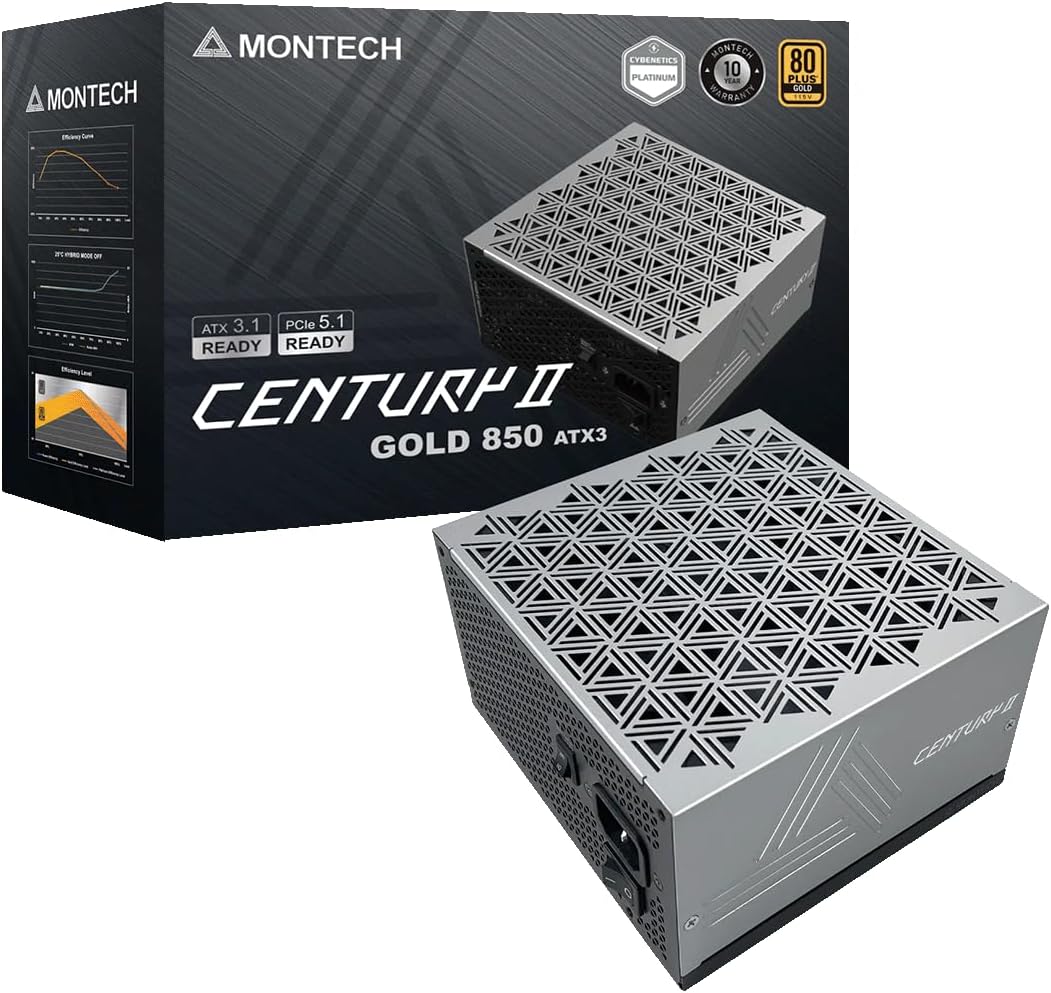
The Century II is the compact specialist in this list. At 140mm deep it is short enough to leave real cable clearance in the basement of a mid tower and to fit chassis that simply will not take a full length unit, which is a constraint that decides the purchase for a lot of builders.
It does not treat compactness as an excuse to skip specifications. It is ATX 3.1 and PCIe 5.1 ready, it ships a native 12V-2x6 cable, it is fully modular, and it uses Japanese capacitors, which is the internal detail that most affects how a supply ages.
The zero RPM mode is standard on the good units now and it is present here, so at browsing and office loads the fan does not turn. That matters more in a small case than a large one, because a small case has fewer other fans to hide behind.
Two honest caveats. The brand is newer than the long running lines it sits beside, so there is less accumulated service history to draw on. And physics does not bend for a short chassis: a compact body houses a smaller fan, which has to spin faster to move the same air once the load is sustained.
Bottom line: the one to buy when the measurement inside the case is the constraint and you still want current connectors.
- Output: 850W continuous
- Depth: 140mm compact body
- Standard: ATX 3.1, PCIe 5.1 ready
- Graphics cable: native 12V-2x6
- Efficiency: 80 Plus Gold
- Fan: zero RPM mode
- Capacitors: Japanese
- Cabling: fully modular
This is the pick for a compact mid tower, a short basement, or a small form factor build that accepts a standard ATX unit but not a long one. It also suits a builder who wants the current connector standard and good internals without paying for a flagship badge. Choose one of the larger units if your case has room and you want the quietest possible behavior under long loads.
Measure twice before ordering a compact unit: the depth of the supply chamber, and the length of the processor cable against the route it has to take to the top of the board. Compact units sometimes ship shorter cables to match their intended cases, so the reach is worth confirming. Check the case manual for the maximum supported supply length, since it is usually stated and usually ignored.

Pros
- ATX 3.1 compliant with a native PCIe 5.1 graphics connector
- Smart Zero Fan keeps the fan still at light loads
- 80 Plus Gold efficiency
- Standard ATX body that fits most mid towers without measuring
Cons
- Native 16-pin cable is rated to 450W rather than the full 600W
- Fan profile is tuned for cooling more than for silence under sustained load
The Toughpower GT sits in the middle of Thermaltake's range and its main claim is straightforward ATX 3.1 compliance with a native graphics connector rather than an adapter. For a build with a mainstream card, that is the specification that decides whether cabling is tidy or crowded behind the card.
One number on the specification sheet deserves attention because it is easy to skim past. The native 16-pin connector here is rated at 450W rather than the 600W the standard allows. For the large majority of cards that is more than the card will ever ask for, but if you are pairing this with a top tier card that expects the full allowance, check the card's requirement against that figure first.
Smart Zero Fan is Thermaltake's name for the same idea everyone else calls zero RPM: below a load threshold the fan does not turn. In practice that covers browsing, office work and media playback, which is most of a typical machine's life.
Under sustained load the fan curve leans toward keeping temperatures down rather than toward silence, so this is not the unit to buy if the machine sits beside you in a quiet room. In a closed case under a desk it is unremarkable in the good sense.
Bottom line: a solid ATX 3.1 unit for a mainstream card, provided you check that 450W connector rating against your card.
- Output: 850W continuous
- Standard: ATX 3.1
- Graphics cable: native PCIe 5.1 connector rated 450W
- Efficiency: 80 Plus Gold
- Fan: Smart Zero Fan mode at low load
- Cabling: modular
- Form factor: standard ATX
Suited to a mainstream gaming build with a mid range or upper mid range card that draws comfortably inside the 450W connector rating, in a case with room for a standard ATX unit. It is a reasonable choice for a machine that lives under the desk. Look elsewhere if you are feeding a top tier card that expects the full 600W allowance, or if the room needs to be quiet during long sessions.
Check your graphics card's stated power requirement against the 450W rating of the native connector before you build, and use the card's own recommended cabling if the card asks for more. Keep the floor filter under the supply clean, since a restricted intake raises internal temperature and shortens capacitor life. Do not open the supply housing under any circumstances, as the capacitors inside hold charge after unplugging.

Pros
- Carries a Cybenetics noise standard as well as an efficiency rating
- Semi-fanless mode keeps the fan still at low load
- Fully modular cabling
- 80 Plus Gold and Cybenetics Gold efficiency
Cons
- No native 12V-2x6 cable, so a current card needs the bundled adapter
- Predates the ATX 3.1 transient specification
The MWE Gold 850 V2 is the established, long serving option in this list rather than the newest one, and it earns its place on acoustics and efficiency documentation. It carries a Cybenetics noise standard alongside its Gold efficiency rating, which is a measured decibel figure rather than a marketing adjective.
Semi-fanless operation covers the light load range, so at idle and during ordinary desktop work the fan is still. Combined with the efficiency rating, that makes it a quiet unit for a machine that is not constantly under heavy load.
The important caveat is the connector. This platform predates the current 16-pin standard, so a graphics card that uses that connector will be fed through the bundled adapter rather than a native cable. The adapter works when it is fully seated, but it takes up more room behind the card and adds a junction.
It also predates the ATX 3.1 transient specification. For a card with modest spike behavior that is a non issue, but for a current top tier card it is the reason to prefer one of the newer units above.
Bottom line: a quiet, well documented Gold unit that makes most sense for a build whose graphics card still uses 8-pin PCIe plugs.
- Output: 850W continuous
- Efficiency: 80 Plus Gold and Cybenetics Gold
- Acoustics: Cybenetics noise standard rated
- Fan: semi-fanless at low load
- Cabling: fully modular
- Graphics power: 8-pin PCIe cables, adapter for 16-pin cards
- Form factor: standard ATX
Buy this for a build whose graphics card still takes 8-pin PCIe plugs, or for a workstation and media machine that values quiet and efficiency over the newest connector. It is also a sound replacement for an ageing supply in an existing system. Choose one of the ATX 3.1 units instead if the machine has, or will soon have, a card using the 16-pin connector.
Check what your graphics card actually plugs into before ordering. If it uses two or three 8-pin PCIe connectors, this unit feeds it natively and the caveat above does not apply to you. If it uses the 16-pin connector, decide whether you are comfortable running the adapter, and check the clearance between the card and the side panel, because the adapter head needs more of it than a native cable does.

Pros
- Zero RPM mode for a silent machine at desktop loads
- Fully modular cable set
- 80 Plus Gold efficiency
- Straightforward standard ATX fit
Cons
- No native 16-pin cable, so current cards run through the adapter
- Predates the ATX 3.1 transient tolerance requirement
The GF1 is the quiet, conventional entry here. It is fully modular, 80 Plus Gold certified, and it runs a zero RPM mode that keeps the fan completely still below a load threshold, which covers most of what a desktop does in a day.
Its virtue is that it is uncomplicated. There is no adapter to reason about if your card uses 8-pin PCIe plugs, the cable set detaches entirely so only what you need goes into the case, and the acoustic tuning is aimed at staying under the noise floor of the case fans.
Like the other established platform in this list, it comes from before the current connector standard. A graphics card with a 16-pin socket has to be fed through the bundled adapter, and the ATX 3.1 transient tolerance clause does not apply to it. Neither is a fault so much as a date stamp.
For a machine built around a card that predates the 16-pin era, or for replacing a failed supply in a system that already runs 8-pin cables, none of that costs you anything. For a new build around a current card, the units higher in this list are the better starting point.
Bottom line: a quiet and simple Gold unit for a conventional 8-pin build, not the one for a brand new card.
- Output: 850W continuous
- Efficiency: 80 Plus Gold
- Fan: zero RPM mode at low load
- Cabling: fully modular
- Graphics power: 8-pin PCIe cables, adapter for 16-pin cards
- Form factor: standard ATX
This suits a straightforward build or an upgrade where the graphics card uses 8-pin PCIe connectors and the priority is a quiet, efficient supply without complications. It is a good fit for office machines, media builds and older gaming systems getting a new supply. Look at the ATX 3.1 units above if the card in the plan uses the 16-pin connector.
Connect only the cables the build needs and keep the rest in the bag, since coiled spare cables in the basement block airflow to the supply's own intake. If you are running the 16-pin adapter, seat every 8-pin plug on the adapter side fully before connecting it to the card, and verify the whole assembly again after fitting the side panel. Never mix cables from another supply into this unit.
How to Choose an 850W Power Supply
Every unit here delivers 850 watts, so the wattage tells you nothing about which one to buy. These six criteria are what the differences actually come down to, and the first one is the criterion that has changed most in the last two years.
ATX 3.1 and the 12V-2×6 Connector
Current graphics cards feed from a single 16-pin connector rather than two or three 8-pin PCIe plugs. A unit that supplies that connector natively runs one cable from the supply to the card. A unit that does not ships an adapter that gathers two or three 8-pin plugs into one head, which means more bulk behind the card and one more junction that has to seat correctly.
The connector itself has been revised. The original 12VHPWR design was replaced by 12V-2×6, which shortens the four small sense pins so a plug that is not fully home fails to make contact instead of carrying current on a partial seat. When a listing says 12V-2×6 rather than 12VHPWR, that revision is what it is referring to, and it is the version to prefer.
ATX 3.1 is the wider specification the connector belongs to, and its important clause is transient tolerance. Modern cards draw brief spikes well above their rated power, and an ATX 3.1 unit is required to ride those out without shutting down. An older unit of the same wattage can trip on a spike that an ATX 3.1 unit absorbs, which is why the standard matters more than the number of watts.
What 80 Plus Gold and Cybenetics Actually Measure
An 80 Plus Gold badge means the unit converts wall power to DC at roughly 87 to 90 percent efficiency across the tested load points. The waste becomes heat, so a more efficient supply runs cooler and asks less of its fan. The step up to Platinum buys a percentage point or two, which is a small electricity saving and a slightly quieter machine rather than a transformation.
Cybenetics certification appears on several units here and is the more informative of the two schemes. It samples efficiency across the whole load range rather than at three fixed points, and it publishes a separate noise rating in decibels. A Cybenetics Gold efficiency badge sitting next to a Cybenetics noise standard tells you more about daily behavior than an 80 Plus badge alone.
Efficiency also peaks in the middle of the load curve, usually somewhere around half the rated output. A machine that idles at a small fraction of 850 watts is running in the least efficient part of that curve, which is an argument against buying far more capacity than the build will ever ask for. For a card and processor pairing that peaks in the mid hundreds of watts, 850 sits close to the efficiency sweet spot.
Fully Modular Cabling and What You Will Route

Fully modular means every cable detaches at the supply, including the 24-pin motherboard cable. Semi-modular hardwires the motherboard and processor cables and detaches the rest. In a build with a shrouded basement the difference is mostly about how much unused cable you have to hide, and every unit on this list is fully modular for that reason.
Cable style is the part people notice on the second build. Flat ribbon cables lie down against the tray and bend cleanly in one plane. Sleeved round cables look better in a windowed case but need more depth behind the tray. Neither is objectively better, but a case with a narrow cable channel behind the motherboard strongly prefers the flat kind.
One warning that applies to every modular supply: the cables are keyed to the unit that shipped them, not to the industry. Reusing a cable set from a different supply, even from the same maker, can put voltage on the wrong pin and destroy hardware. If a unit arrives with cables missing, order the set for that exact model rather than reaching into a parts box.
Fan Behavior, Zero RPM, and Where Noise Comes From

Zero RPM, sometimes labelled semi-passive or smart zero fan, keeps the fan completely still below a load threshold. For a machine that spends its day on a browser and a spreadsheet, that means the supply contributes no noise at all. It is the single feature that most changes how a quiet build sounds, and nearly every unit here offers it.
When the fan does start, the two variables are diameter and bearing. A 135mm or 140mm fan moves the same air at a lower speed than a 120mm one, and lower speed means less tonal whine. Fluid dynamic bearings stay quiet for years, while cheaper sleeve bearings develop a rattle, which is why the bearing type is worth finding in the specification even though it never appears on the box.
There is a second noise source that has nothing to do with the fan. Coil whine is a high pitched electrical sound from the inductors under load, it varies between individual units of the same model, and no specification predicts it. If a supply is otherwise fine but whines audibly, that is a legitimate reason to use the return window rather than something to live with.
Depth, Cable Length, and Whether It Fits
Power supply depth in this class runs from about 140mm to 180mm, and the number matters more than it sounds. A compact 140mm unit leaves room for cables to turn in the basement of a mid tower and is often the only thing that fits a small form factor case at all. A long unit in a short chamber forces the 24-pin cable into a hard bend right at the connector.
Cable length is the other measurement to check, and it is the one that ruins an otherwise finished build. Cases that mount the supply at the bottom with the motherboard tray running full height need a long processor cable to reach the top left corner. Check the stated length of the EPS cable against the route it has to take, because an extension is an ugly fix for a problem that is free to avoid.
Orientation deserves a thought too. Most cases mount the supply fan down, drawing air through a filtered vent in the floor. If the machine sits on carpet, that filter clogs fast, and the supply is the component that suffers. A unit mounted fan up in a case without floor clearance will instead pull warm air from inside the chassis, which raises its internal temperature and brings the fan on sooner.
Warranty, Protections, and Who Builds the Platform
Warranty length is the closest thing to an honest quality signal in this category, because the maker is betting its own money on the platform lasting. Seven to ten years is normal for a Gold unit in this class and five is a step down. A long warranty also tends to indicate Japanese electrolytic capacitors, which hold their capacity far better at the temperatures inside a supply than cheaper alternatives.
The protection suite is listed as an alphabet of acronyms and all of them should be present: over current, over voltage, under voltage, over power, over temperature, and short circuit protection. These are what stand between a failing component and the rest of the machine. Their absence from a specification sheet is a reason to look elsewhere, since a supply that fails without protection can take the motherboard with it.
It is also worth knowing that few brands manufacture their own supplies. Most units are built by a handful of original equipment manufacturers and sold under many labels, so two differently branded units can share a platform while a single brand can span three different ones across its range. That is why reputation attaches to a specific model line rather than to a logo, and why the model number is the thing to research. For adjacent gear, our electronics section and the category index cover the rest of the desk.
| Specification | What to look for | Why it matters |
|---|---|---|
| Connector standard | Native 12V-2×6, ATX 3.1 | One cable to the graphics card, plus tolerance for power spikes |
| Efficiency badge | 80 Plus Gold or Cybenetics Gold | Less waste heat, so the fan runs slower and less often |
| Fan mode | Zero RPM below a load threshold | Silence at desktop loads, which is most of the day |
| Depth | 140mm compact, up to 180mm full size | Cable clearance in the basement and small case compatibility |
| Warranty | Seven to ten years | Proxy for capacitor grade and platform quality |
Why You Should Trust Us
We build these lists from published specification and from the pattern of what long term owners report, rather than from marketing copy. For every unit here we checked the connector standard and whether the 16-pin cable is native or adapted, the efficiency and noise certifications, the fan diameter and whether a zero RPM mode is present, the physical depth, the capacitor sourcing where the maker states it, and the warranty term.
We set aside near identical listings that differ only in color or bundle, so each entry is a genuinely different unit rather than another route to the same product page. Where a model line spans several platforms, we say which specific model the entry refers to, because in this category the model number carries the reputation and the brand name does not.
Final Thoughts
Best overall is the Corsair RM850e. It carries the current connector natively, meets ATX 3.1 so it absorbs graphics card spikes instead of tripping on them, holds a Cybenetics Gold efficiency rating, and keeps its fan still until the load justifies it. For the large majority of builds pairing a mainstream processor with a single graphics card, it is the unit to buy without further thought.
Best value is the MSI MAG A850GL. It sits a tier below the flagship lines but keeps the parts that matter, namely the native dual-color 12V-2×6 cable, full modularity, an 80 Plus Gold rating, and a ten year warranty that is longer than several units above it. For a first build or a mid range machine that needs the modern connector without the extras, it covers the requirement.
For specific needs, the be quiet! Pure Power 13 M is the pick for a genuinely quiet room, since silence is the design brief of the whole brand rather than a feature added late. The Montech Century II is the one for a small case at 140mm deep, the MSI MPG A850G is the choice if you want Japanese capacitors in a compact body, and the Corsair RM850x is the step up for a windowed build that will be looked at. More component picks are indexed across our article archive.
850W Power Supply FAQs
Is 850W enough for a high end graphics card in 2026?
For a single graphics card paired with a mainstream desktop processor, yes, with room to spare. The figure that matters is not the sum of the peak ratings on the box but the sustained draw of the whole machine, which for that pairing typically sits in the mid hundreds of watts under a heavy game load. What used to force people up to 1000W was transient spiking, and that is precisely what the ATX 3.1 specification addresses. A current 850W unit that meets the standard will hold a spike that an older 850W unit would have shut down on.
Do I need a native 12V-2×6 cable or is the adapter fine?
The bundled adapter works and is safe when it is fully seated, but a native cable is better in three ways. It is one connection rather than two, it takes up far less room behind the card in a case where clearance is already tight, and it removes the octopus of 8-pin plugs that makes the adapter awkward to route. If you are choosing a supply today for a card that uses the 16-pin connector, choose the one that supplies it directly. Our computers section covers the cards themselves.
How long should a power supply last?
Seven to ten years of normal use is a fair expectation for a Gold rated unit with Japanese capacitors, and the warranty term is the maker telling you what it expects. Capacitors age with heat, so a supply in a well ventilated case that spends most of its life at light load will outlast one packed into a hot small form factor build. The usual failure mode is a gradual loss of stability rather than a sudden death, showing up as random restarts under load, which is a signal to replace rather than to troubleshoot for weeks.
Does a higher efficiency rating actually save money?
A little, and less than the marketing suggests. Moving from Gold to Platinum buys roughly one to two percentage points of efficiency, which on a machine that idles most of the day is a small annual saving that takes years to matter. The better argument for efficiency is thermal: waste power becomes heat inside the case, and less heat means the supply fan spins later and slower. Buy the higher badge for the quieter, cooler machine rather than for the electricity bill.
Can I reuse the cables from my old modular supply?
No, and this is the mistake that costs hardware. Modular connectors on the supply side are physically similar between brands and even between models from one brand, but the pinouts are not standardized. Plugging in a cable designed for a different unit can route 12 volts to a ground pin and destroy whatever is attached. Always use the cables that came in the box, and if you need extras, order the set specified for that exact model rather than a generic one.

Write Your Review
No reviews yet. Be the first to share your experience!