

The screwdriver is rarely the part that stops a repair. Modern laptops and phones are held shut by plastic clips, adhesive and hidden tabs, and none of that yields to a driver no matter how many bits came in the box. A kit sold on its bit count can leave you sitting in front of a machine you cannot open. We compared 7 computer repair tool kit options from Kaisi, iFixit, STREBITO and more on what they include for getting a case apart, which bit types they actually carry, and how the drivers feel on a screw that has been in place for five years.
Our top pick is the iFixit Pro Tech Toolkit, because it pairs a broad bit set with the opening tools that decide whether the job starts at all. If you are working on a machine you also game on, our guide to the best gaming laptops covers what is inside them.

Pros
- Includes the opening tools most kits omit
- Covers pentalobe and tri-point security heads
- Driver handle with knurled grip and spin cap
- Moulded storage shows missing pieces at a glance
Cons
- Costs more than a driver-only set of similar piece count
- Larger than needed for desktop-only work
The reason this kit leads is that it treats opening the device as part of the job rather than an afterthought. Picks, a spudger and a suction cup sit alongside the bits, which is the difference between starting a phone repair and looking at a sealed phone.
Bit coverage is the other half. Pentalobe on Apple external screws and tri-point Y000 on internal shields are exactly the heads that stop cheaper sets, and both are here. The driver has a knurled grip for torque and a spin cap for speed once a screw is loose, which is a small ergonomic detail that matters across a few dozen fasteners.
It is more expensive than a driver set with a similar piece count, and that comparison is the trap in this category. If your work is limited to desktop builds with standard Phillips screws, you are paying for capability you will not use. For anything with clips or adhesive, it is the capability that decides whether the repair happens.
Bottom line: the kit to buy if you expect to open laptops or phones rather than only desktop cases.
- Type: complete repair kit
- Bits: precision set including security heads
- Security heads: pentalobe, tri-point, Torx security
- Opening tools: picks, spudger, suction cup
- Extras: anti-static wrist strap
- Storage: moulded case with marked slots
Remove screws first and lay them out in the pattern they came from, since laptop panels commonly mix several lengths.
Work a plastic pick along the seam to release clips rather than levering at one point, and use the spudger for connectors instead of pulling on cables.
Anyone repairing laptops, phones or tablets, and people who expect to work on machines they did not choose, where the fastener types are unknown in advance.
Overkill for someone who only builds desktop computers.

Pros
- Very broad bit coverage for the price
- Tray layout makes a missing bit obvious
- Magnetised tips hold small screws
- Includes some opening accessories
Cons
- Opening tool selection is thinner than a full repair kit
- Bit steel is softer than premium sets on tight screws
This is the value answer, and it earns that by covering nearly every head type you are likely to meet without the price of a premium kit. For desktop builds, general electronics and most laptop work, the bit selection is not the limiting factor.
The tray is a genuine practical advantage. An empty slot is visible immediately, which is how you catch a bit left on a desk before it disappears, and it makes putting the kit away a two second check rather than an inventory.
Two honest limitations. The opening tool selection is thinner than a dedicated repair kit, so phone and tablet work may still need picks bought separately. And the bit steel is softer than premium sets, which shows up as rounding on the small Phillips sizes after heavy use rather than on day one.
Bottom line: the most coverage per unit cost here, and the sensible pick if screws rather than sealed cases are your usual obstacle.
- Type: precision driver set
- Pieces: 142 including 120 bits
- Bit types: Phillips, Torx, hex, security heads
- Magnetised: yes
- Opening tools: basic accessories included
- Storage: organised tray
Pair it with a dedicated pry tool set if you plan to open phones or tablets, which covers the gap for less than upgrading the whole kit.
Inspect small Phillips tips periodically, since those wear first and a rounded tip strips the next screw it meets.
Desktop builders, general tinkerers and anyone wanting wide bit coverage without paying for a full repair kit.
Less suitable as a sole kit for adhesive-sealed devices.

Pros
- Strong bit steel that resists rounding
- Covers the security heads used in phones and laptops
- Compact case for a drawer or bag
- Excellent customer rating in a crowded category
Cons
- Few opening tools, so sealed devices need extras
- Fewer bits than budget sets at a higher price
The Mako is the counterargument to piece count. Sixty four bits is fewer than budget sets advertise, and the selection is chosen rather than padded, so what is present is what electronics actually use.
Bit quality is the reason to prefer it. Harder steel resists the rounding that turns a small Phillips into a screw-stripping tool, and that failure mode is the most common reason people replace a cheap kit rather than any dramatic breakage.
What it is not is a complete repair kit. Opening tools are minimal, so a sealed phone or a clipped laptop panel will still need picks and a spudger from elsewhere. Treated as a driver set to keep for years, it is excellent; treated as everything you need, it will leave a gap.
Bottom line: the best bits here in a compact package, provided you have opening tools covered separately.
- Type: precision driver set
- Bits: 64
- Security heads: pentalobe, tri-point, Torx security
- Magnetised: yes
- Opening tools: minimal
- Storage: compact case
People who already own opening tools, and anyone who would rather buy fewer, better bits than a large padded set.
Not a complete solution for adhesive-sealed devices on its own.
Seat the bit fully and press into the screw before turning. Most stripped heads are a technique problem before they are a tool problem.
Keep bits in their marked slots so a worn tip can be identified and replaced rather than repeatedly used.
Pros
- Compact enough for a desk drawer
- Covers common small fastener types
- Inexpensive way to have the right sizes on hand
- Very widely rated by buyers
Cons
- Not intended for full laptop or phone teardowns
- No meaningful opening tools
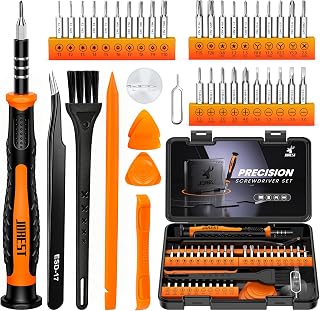
Not every repair is a teardown. Tightening the arm of a pair of glasses, opening a battery compartment or getting into a remote control needs the right small driver and nothing else, and that is the job this set is built for.
The head selection covers the fasteners that turn up on small consumer items, including triwing which appears on toys and game controllers more often than people expect. For a drawer set that gets used monthly rather than weekly, it is well judged.
Its limits are clear enough. There are no real opening tools, so a clipped laptop panel or an adhesive phone back is outside its scope. Treating it as a full repair kit is the mistake to avoid, and it is not what the set claims to be.
Bottom line: the right small set for light jobs, and the wrong one for a laptop teardown.
- Type: compact precision driver set
- Bit types: Torx, triwing, Phillips, slotted
- Magnetised: yes
- Opening tools: none of substance
- Storage: compact case
- Scope: light repairs and small devices
Households wanting a small set in a drawer for glasses, toys, remotes and battery compartments.
Not for anyone planning to open laptops or phones.
If you expect to graduate to laptop work, buy a fuller kit now rather than this plus a second purchase later.
Keep it separate from a main repair kit so small drivers do not disappear into a larger tray.

Pros
- Solves the actual obstacle on clipped and bonded devices
- Wide selection of pick and spudger shapes
- Cheap addition to an existing driver set
- Metal spudgers for stubborn connectors
Cons
- No drivers, so it is an addition rather than a kit
- Metal tools require care to avoid marking cases
This set exists for the moment the screws are out and the device still will not open. Plastic picks work along a seam to release clips, and spudgers separate parts and lift connectors without pulling on cables.
As an addition to a driver set it is the cheapest way to close the biggest capability gap in this category. Someone who owns a 142 piece bit set and cannot open a phone does not need more bits, they need these.
The metal spudgers deserve a caution. They are useful on stubborn connectors and they will mark an aluminium case or cut a ribbon cable if used carelessly at a seam. Use plastic at the seam and metal only where you can see what you are touching.
Bottom line: the right purchase when the case, not the screw, is what is stopping you.
- Type: opening tool set
- Includes: plastic picks, spudgers, pry tools
- Metal tools: yes, for connectors
- Drivers: none
- Use: phones, tablets, laptops
- Storage: compact case
Use plastic at any seam. Metal blades mark cases permanently and can cut ribbon cables running close to the edge.
Treat plastic picks as consumables. They are meant to chip and break rather than transfer force into the device.
Anyone who already owns a driver set and keeps hitting sealed or clipped cases as the obstacle.
Not a standalone kit, since it contains no drivers.
Pros
- Includes opening tools in a small package
- Covers the common security heads
- Fits easily in a drawer or bag
- Good starting kit for a first repair
Cons
- Fewer bits than larger kits
- Less comprehensive opening selection than the full kit
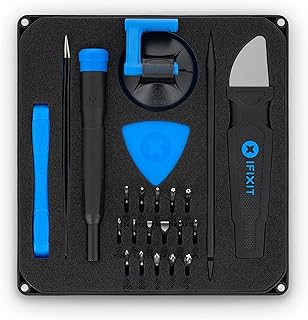
This is the reduced version of the full kit, keeping the principle that a repair kit needs opening tools while cutting the bit count and the case size.
For a household that opens a laptop once or twice a year to add memory or replace a battery, it is often the correct amount of tool. The security heads that stop cheap sets are present, and the picks and spudger mean a clipped panel is not a dead end.
The compromise is depth. Fewer bits means a higher chance of meeting a head you do not have, and the opening selection is basic rather than comprehensive. Anyone repairing devices regularly will outgrow it, which is fine if you know that going in.
Bottom line: the right size for occasional repairs, and the wrong one if this becomes a habit.
- Type: compact repair kit
- Bits: core precision selection
- Security heads: common types included
- Opening tools: basic picks and spudger
- Storage: compact case
- Scope: occasional repairs
Households doing a repair or an upgrade occasionally, and anyone wanting a starter kit that will not stop at the first clipped panel.
Not enough for frequent or professional repair work.
If you already suspect you will repair often, the larger kit costs less than this plus later additions.
Check your machine's fastener types against the included bits before ordering.

Pros
- High bit count covers a wide range of sizes
- Includes general accessories beyond drivers
- Good value per bit
- Suits desktop builds and household electronics
Cons
- Piece count is padded with sizes rarely used on electronics
- Opening tools are limited
A large set like this is at its best in a desktop build, where screws are standard, access is generous and having every size on hand saves trips to a drawer.
The accessories broaden it into general household use. An extension shaft and a flexible drive reach fasteners a straight driver cannot, which turns up as often behind a wall bracket as inside a computer.
Read the piece count with some scepticism. A large share of those pieces are sizes that never appear in electronics, and the opening tool selection is limited, so a bonded phone remains out of scope. That is not a flaw so much as a category boundary.
Bottom line: strong value for desktop and general work, weaker for sealed portable devices.
- Type: large precision driver set
- Pieces: 152
- Bit types: broad range including Torx and hex
- Accessories: extension and flexible shaft
- Opening tools: limited
- Storage: organised case
Desktop builders and households wanting one large set for computers and general small repairs.
Less suitable as the only kit for phones and tablets.
Use the flexible shaft for recessed fasteners in a case rather than forcing an angle with a straight driver.
Return bits to their slots as you work so gaps are visible before the case is closed.
How to Choose a Computer Repair Tool Kit
Drivers Alone Do Not Open a Laptop

Removing the screws is step one of maybe four. On most laptops the bottom panel is also held by a run of internal clips, and on phones and tablets the display or back glass is bonded with adhesive. Getting past those needs thin plastic picks, a spudger and often a suction cup, none of which is a driver.
This is the difference between a screwdriver set and a repair kit, and listings blur it constantly. A 142 piece set can be 120 bits and a handful of accessories, or it can include a proper opening assortment. Read what the non-bit pieces are before counting the bits.
Using the wrong thing here has a cost. A metal blade slipped into a laptop seam marks the case permanently and can cut a ribbon cable running close to the edge. Plastic picks flex and break instead, which is exactly what you want them to do.
Bit Count Versus Bit Type
A high bit count means very little on its own, because the count is padded with sizes nobody uses on electronics. What matters is whether the specific heads in front of you are present. Torx appears throughout laptops, Phillips in the smaller sizes covers most internal fasteners, and hex turns up on hinges and mounting brackets.
The awkward ones are the security heads. Pentalobe is used on Apple laptops and phones, tri-point Y000 secures batteries and internal shields, and both are common enough that a kit without them is a kit that will fail you at some point. Torx security bits, with the pin in the middle, come up on drive enclosures and some desktop cases.
Before buying, look up the fastener types your particular machine uses. It takes two minutes and it is the difference between a complete kit and an almost complete one.
The Driver Handle Does the Work

Electronics screws are small and often tight, and a bad handle turns that into stripped heads. Three features separate a good driver from a frustrating one. A knurled grip lets you apply real torque without the handle turning in your fingers. A spin cap on the end lets you rotate quickly with one finger once the screw is loose. A ratcheting mechanism helps in tight spaces where a full turn is impossible.
Shaft length matters more than people expect. Recessed screws in a laptop hinge or a desktop drive cage need a driver that reaches without the handle fouling on the case, and a flex extension covers the awkward angles a straight shaft cannot.
Downward pressure is the technique that prevents most stripping. Push into the screw first, then turn. Turning before seating the bit is how a tight Phillips head becomes a round hole.
Magnetism and Where the Screws Go
Magnetised bits are close to essential at this scale, because a screw dropped inside a laptop chassis is a genuine problem and a screw dropped on carpet is often gone for good. Most kits here magnetise the tips, and a magnetiser block lets you add or remove it as needed.
The larger issue is keeping track. Laptop bottom panels commonly use several different screw lengths, and putting a long screw into a short hole can press into the board underneath. A magnetic project mat with marked sections, or even a sheet of paper with the layout drawn on it, solves a problem that no tool in the kit addresses.
Concerns about magnets damaging modern hardware are mostly outdated. Solid state drives and circuit boards are unaffected by the weak magnetism in a driver tip. Mechanical hard drives are also far more robust than the folklore suggests.
Case Format: Roll, Tray or Hard Box

The storage decides whether the kit stays complete. A moulded tray shows an empty slot the moment something is missing, which is how you notice a bit left inside a machine before you close it up. A fabric roll packs smaller and travels better, at the cost of that visual check.
Hard boxes protect the contents best and are the bulkiest to store. For a kit that lives in a drawer and comes out occasionally, a tray is usually the right balance. For a kit that goes in a bag to fix other people’s machines, a roll wins.
Whichever you choose, put bits back as you go rather than at the end. The bits that go missing are the ones set down on a desk during a repair, not the ones lost in transit.
What Actually Breaks
Two components wear out and neither is the handle. Bit tips soften and round off, most noticeably on the small Phillips sizes that see the heaviest use, and a rounded tip then strips the next screw it touches. Cheap bit steel gets there faster, which is where the price difference between kits usually shows up.
Plastic opening picks are consumable by design. They chip and snap against clips, and that is preferable to the alternative of transferring that force into the case. Buying a kit that includes several is sensible, and replacing them is expected rather than a fault.
Check tips before a delicate job. A visibly rounded driver on a tight security screw is how a repair turns into a much longer repair.
Static, and How Much to Worry
Static discharge is a real risk to bare boards and memory, though a smaller one than internet advice often suggests. The sensible baseline costs nothing: work on a hard surface rather than carpet, avoid synthetic clothing, and touch an unpainted metal part of the chassis before handling components.
An anti-static wrist strap adds a layer of certainty and some kits include one. It matters most in dry indoor air in winter, which is exactly when people notice static shocks from door handles.
Matching the Kit to the Machine
A desktop rebuild is the least demanding job in this category. Standard Phillips screws, plenty of room, and almost any set will do. If that is all you plan to do, a large kit is money spent on bits you will not touch.
Laptops raise the bar with Torx, mixed screw lengths and clipped panels, so opening tools become necessary rather than optional. Phones and tablets raise it again with adhesive, security fasteners and the need for a suction cup and thin picks, which is where the complete repair kits justify themselves.
Buy for the hardest machine you expect to open, not the easiest. The gap between a driver set and a repair kit only becomes obvious when you are already halfway into a job.
Reassembly Is Where the Damage Happens
Most accounts of a repair going wrong describe the opening. In practice a surprising share of the damage happens on the way back together, when the hard part feels finished and attention drops.
Overtightening is the main culprit. The screws in a laptop or a phone thread into thin metal inserts or directly into plastic bosses, and a precision driver gives you more than enough leverage to strip either. The correct amount of force is much less than instinct suggests: turn until the screw seats and stops, then stop yourself. A stripped boss cannot be retightened, and the panel above it will never sit flush again.
Mixing up screw lengths does quieter damage. A long screw driven into a short hole presses into whatever sits beneath, and on some laptop models that is the board itself. This is why laying screws out in the pattern they came from matters more than any tool in the kit, and why a magnetic mat or even a drawn sketch on paper is worth the thirty seconds it takes.
Connectors deserve the same care in reverse. Ribbon cables seat with even pressure across the connector rather than a push at one end, and the small latches that hold them are easy to snap when tired. If a panel does not close with light pressure, something inside is not seated, and forcing the case shut turns a fixable misalignment into a cracked clip.
| Kit | Type | Opening Tools | Best For |
|---|---|---|---|
| iFixit Pro Tech Toolkit | Full repair kit | Yes, comprehensive | Laptops, phones and tablets |
| STREBITO 142 Piece Set | Driver set with extras | Some included | Broad coverage at lower cost |
| iFixit Mako Driver Kit | Precision driver set | Limited | Bit coverage for small electronics |
| JOREST Small Precision Set | Compact driver set | Minimal | Glasses, small devices, light repairs |
| Kaisi Pry Tool Repair Kit | Opening tool set | Yes, its main purpose | Adding opening tools to a driver set |
| iFixit Essential Electronics Toolkit | Compact repair kit | Yes, basic | Occasional repairs in a small case |
| JOREST 152 in 1 Set | Large driver set | Some included | Desktop builds and general use |
For related hardware decisions, our computer guides cover components and peripherals, and the full library sits at our article index.
Why You Should Trust Us
We sorted this category by capability rather than by piece count, because the number on the box is the least informative figure in the listing. A kit with 142 pieces and no opening tools cannot do a job that a smaller kit with picks and a spudger handles easily, and grouping the list that way makes that visible.
We then weighted real customer ratings with attention to complaints that repeat, since reports of bits rounding off after a few uses describe the steel rather than one bad unit. Where a brand lists the same kit twice under different titles, we counted it once.
Final Thoughts
For most people the iFixit Pro Tech Toolkit is the easiest recommendation. It covers the security bits that stop cheaper kits, and more importantly it includes the picks, spudger and suction cup that decide whether a modern laptop or phone opens at all. If you expect to work on more than desktops, that combination is what you are paying for.
The STREBITO 142 Piece Electronics Precision Screwdriver Set is the best value pick, with broad bit coverage and a tray that shows at a glance when something is missing. For bit coverage in a more compact package the iFixit Mako Driver Kit is the better buy, and the Kaisi Pry Tool Repair Kit is the sensible addition if you already own drivers and keep hitting the case as the obstacle.
Whichever you choose, buy for the hardest machine you expect to open. Push into the screw before turning, keep track of screw lengths as they come out, and treat plastic picks as consumables. Browse more of our category guides for the rest of the desk.
Frequently Asked Questions
What is the best computer repair tool kit in 2026?
The iFixit Pro Tech Toolkit is our overall pick for 2026 because it combines wide bit coverage with the opening tools most kits leave out. If your work is limited to desktop builds, a large driver set like the STREBITO 142 piece covers it for less.
Do I need special bits for laptops?
Often yes. Torx is common throughout laptops, and Apple machines use pentalobe on external screws and tri-point Y000 internally. Check the fastener types on your specific model before buying, since a kit without those heads will stop you at the first screw.
Will magnetic tools damage my computer?
No. The weak magnetism in a driver tip does not affect solid state drives, memory or circuit boards, and mechanical drives are far more resilient than the folklore suggests. The real benefit is not dropping a screw inside a chassis.
Why do my screwdriver bits keep stripping screws?
Usually one of two causes: a rounded bit tip, or turning before the bit is seated. Press firmly into the screw and then turn, and inspect small Phillips tips for wear, since those see the most use and soften first. Our computer guides cover the components behind those screws.
Is an anti-static wrist strap necessary?
Not strictly, though it removes doubt. Working on a hard surface rather than carpet and touching unpainted chassis metal before handling components covers most of the risk. A strap matters most in dry winter air when static shocks are already noticeable.






Write Your Review
No reviews yet. Be the first to share your experience!