

A 500GB drive is the size that fixes the most computers for the least money: enough for an operating system, the programs you actually open, and a game or two, without paying for space that sits empty. The catch is that the phrase covers three different objects, a 2.5-inch SATA drive that drops into any laptop or desktop, an M.2 NVMe stick that is several times faster but only fits a modern board, and a portable USB drive that never goes inside a case at all. Shopping for a 500gb ssd without knowing which slot you have is how people end up with a stick that does not fit. For October 2026 we pulled 9 of the highest rated 500GB and 512GB drives on Amazon from PNY, Patriot, Samsung and more, then sorted them by interface so you can jump straight to the ones that fit.
Our top pick is the Samsung 870 EVO 500GB SATA SSD for its consistent speed at the SATA ceiling, its long track record for reliability, and the Samsung Magician software that makes cloning an old drive painless. Below it you will find a Gen 4 NVMe stick from Kingston for modern desktops and laptops, a Gen 3 WD Green for basic M.2 upgrades, a run of dependable SATA drives from Crucial, TEAMGROUP, Patriot, PNY and fanxiang, and one portable USB-C drive for people who need the storage in a pocket. Every pick is rated at least 4.0 stars by real Amazon customers, and if the drive is going into a new build, our computer guides cover the rest of the parts list.

Pros
- Consistent performance under sustained writes thanks to a proper cache
- Fits any laptop or desktop with a 2.5-inch bay or SATA port
- Samsung Magician makes cloning and firmware updates easy
- Longer warranty than most budget SATA drives
Cons
- Capped at SATA speeds, so it will not match an NVMe stick
- Costs more than the budget SATA field
- No cables or bracket in the retail box
The Samsung 870 EVO is the SATA drive to buy when you want the upgrade done once and forgotten. It runs at the SATA III ceiling like every drive on the interface, but it holds that speed during long transfers because it carries a DRAM cache and higher-grade flash rather than leaning on a small SLC buffer that fills up.
Because it is a standard 2.5-inch, 7 mm drive, it fits nearly any laptop or desktop, including machines many years old, and Samsung Magician handles cloning the old drive, updating firmware and monitoring health. The warranty and endurance rating sit above the budget class.
The trade-offs are price, and the fact that it is still SATA: if your board has an NVMe slot, a stick like the Kingston NV3 will be several times faster on paper. There are no cables or brackets in the box either.
Bottom line: the safest, most consistent 500GB SATA drive, and the right pick for any computer that cannot take NVMe.
- Capacity: 500GB
- Interface: SATA III 6 Gb/s
- Form factor: 2.5-inch, 7 mm
- Quoted sequential read: up to 560 MB/s
- Cache: DRAM
- Software: Samsung Magician
Anyone upgrading a laptop or desktop that uses SATA, and anyone who copies large files often enough to care about sustained speed. Not the pick if your board has a free NVMe slot.
Install Samsung Magician first, clone the old drive with a USB-to-SATA adapter, then swap and boot. Check for a firmware update after installation and enable TRIM in the OS if it is not already on.
Pros
- Gen 4 speeds several times faster than SATA
- Standard M.2 2280 size fits most modern boards
- Works in Gen 3 slots at Gen 3 speed
- Small and cable-free
Cons
- Only fits boards with an NVMe-capable M.2 slot
- DRAM-less design slows on very large sustained writes
- No heatsink, so check airflow in a tight case
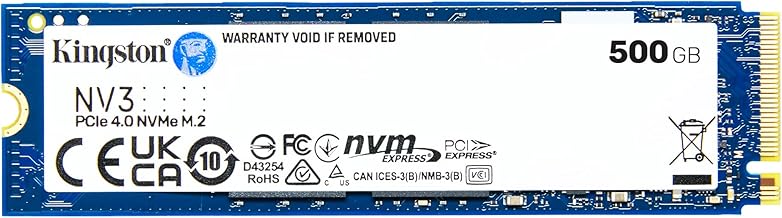
The Kingston NV3 is the Gen 4 NVMe pick, a bare M.2 2280 stick rated up to 5,000 MB/s that slots directly into a modern motherboard with no cables. As a boot and game drive in a current desktop or laptop it feels the way people expect an SSD to feel today.
It drops into a Gen 3 slot as well, running at that slot's speed, so it is a safe buy for a board you plan to upgrade later. It is a DRAM-less design, which is normal at this tier and irrelevant for daily use, though very large sustained copies can slow once the cache fills.
There is no heatsink in the box, and it will not fit anything without an M.2 NVMe slot, which rules out most older machines.
Bottom line: the drive to buy for a modern board when you want the speed of the current generation without paying for the top tier.
- Capacity: 500GB
- Interface: PCIe 4.0 x4 NVMe
- Form factor: M.2 2280
- Quoted sequential read: up to 5,000 MB/s
- Model: SNV3S/500G
Owners of modern desktops and laptops with an M.2 NVMe slot who want a fast boot drive. Not for machines that only have SATA.
Check the motherboard manual for which M.2 slot runs at Gen 4 and whether using it disables a SATA port. Seat the stick at an angle, secure the screw, and install the OS fresh or clone with an M.2 enclosure.

Pros
- Far faster than SATA for a modest price
- Standard M.2 2280 fits most boards with an NVMe slot
- Low power draw suits laptops
- From an established storage brand
Cons
- Gen 3 speeds, so slower than the Kingston NV3
- DRAM-less, slows on very large writes
- Entry-tier endurance rating
The WD Green SN350 is the practical Gen 3 NVMe upgrade: an M.2 2280 stick rated up to 2,400 MB/s that makes an older laptop or desktop with an M.2 slot feel new without paying for Gen 4 speed the board cannot use.
It draws little power, comes from a maker with long storage experience and published tools, and installs with a single screw. Like most drives at this tier it is DRAM-less and can slow on very large sustained writes, and its endurance rating is entry level.
Bottom line: the sensible choice for a Gen 3 slot, and a big step up from any SATA drive.
- Capacity: 500GB
- Interface: PCIe Gen 3 NVMe
- Form factor: M.2 2280
- Quoted sequential read: up to 2,400 MB/s
- Model: WDS500G2G0C class
Owners of laptops and desktops with a Gen 3 M.2 slot who want NVMe speed on a budget. Not needed if your board is Gen 4 and you want the headroom.
Confirm the M.2 slot supports NVMe rather than SATA-only M.2. Update firmware with the WD tool after installing, and clone from the old drive with an M.2 enclosure if you are not reinstalling.

Pros
- Established flash maker at a budget price
- Fits any 2.5-inch bay or SATA port
- Big jump from a hard drive
- Crucial software for cloning and health checks
Cons
- DRAM-less, slows on very large sustained writes
- Shorter warranty than the Samsung
- SATA speed cap
The Crucial BX500 is the value pick because it comes from an established flash maker at a price close to the no-name field. It is a standard 2.5-inch, 7 mm SATA drive rated up to 540 MB/s read, and it turns a hard-drive machine into a fast one for very little.
Like every budget SATA drive it is DRAM-less, so a very large single copy can slow once its cache fills, and its warranty is shorter than the Samsung 870 EVO. For booting, office work, browsing and games it behaves like any other SATA SSD.
Bottom line: the drive to buy when the goal is the biggest improvement per dollar on an older computer.
- Capacity: 500GB
- Interface: SATA III 6 Gb/s
- Form factor: 2.5-inch, 7 mm
- Quoted read/write: up to 540/500 MB/s
- Cache: DRAM-less with SLC buffer
Budget upgrades of older laptops and desktops, secondary drives in a build. Not for constant heavy copying.
Use a USB-to-SATA cable to clone the old drive with the Crucial tool, then swap. In a desktop, any SATA port works; in a laptop, check the bay is 7 mm or add a spacer.

Pros
- 512GB label with full capacity exposed
- SLC cache gives fast everyday bursts
- Fits any SATA bay
- Gaming-oriented brand with a solid owner rating
Cons
- DRAM-less design
- SATA speed cap
- Less well-known support network than Samsung or Crucial
The TEAMGROUP T-Force Vulcan Z is a 512GB SATA drive built for budget gaming builds and secondary storage. It uses 3D TLC flash with an SLC cache for quick everyday bursts and quotes up to 530 MB/s read, right at the SATA ceiling.
The 512GB label means the full flash is exposed rather than reserved, which is normal for this tier. It is DRAM-less, so very large sustained writes will slow, and TEAMGROUP's support network is smaller than the biggest names, though its owner rating here is strong.
Bottom line: a solid budget SATA drive for a second slot or a first upgrade.
- Capacity: 512GB
- Interface: SATA III
- Form factor: 2.5-inch
- Flash: 3D NAND TLC with SLC cache
- Quoted read/write: up to 530/470 MB/s class
Budget PC builders and anyone adding a game drive over SATA. Not for heavy content creation.
Mount it in a 2.5-inch bracket if the case only has 3.5-inch bays. Initialize it in Disk Management on first boot if it is a secondary drive.

Pros
- Simple, well-reviewed SATA upgrade
- Standard 2.5-inch, 7 mm fit
- Long-established brand
- Low power draw
Cons
- DRAM-less budget design
- SATA speed cap
- Basic software support
The Patriot P210 is the plain SATA upgrade for machines that just need to stop waiting on a hard drive. It is a standard 2.5-inch, 7 mm drive from a brand that has made memory for decades, and it behaves like the rest of the budget SATA class: fast at everyday tasks, capped by the interface, and slower on very large sustained writes because it lacks DRAM.
Software support is basic compared with Samsung or Crucial, so plan on a generic cloning tool or a clean install.
Bottom line: a dependable, unfussy SATA drive for older laptops and desktops.
- Capacity: 512GB
- Interface: SATA 3
- Form factor: 2.5-inch
- Model: P210S512G25
Owners of older laptops and desktops on a tight budget. Not for workloads that hammer the drive.
Clone with a free tool over a USB-to-SATA adapter or install the OS fresh. Confirm the laptop bay accepts a 7 mm drive.

Pros
- Widely available, well-reviewed budget drive
- Standard 2.5-inch, 7 mm
- PNY publishes support tools
- Low power and silent
Cons
- DRAM-less budget class
- SATA speed cap
- Not for sustained heavy writes
The PNY CS900 is another well-reviewed budget SATA drive, and its case is simplicity: standard 2.5-inch, 7 mm form factor, SATA III interface, and a brand that publishes support tools and has been in the market a long time.
Performance sits in the budget SATA class, meaning quick everyday response and a slowdown on very large sustained writes because it lacks DRAM. For a laptop swap or a secondary desktop drive that is exactly what it needs to be.
Bottom line: a safe, plain SATA drive for a simple upgrade.
- Capacity: 500GB
- Interface: SATA III
- Form factor: 2.5-inch, 7 mm
Simple laptop and desktop SATA upgrades. Not for heavy content work.
Clone the old drive with the PNY-recommended tool or a generic one, then swap. Enable TRIM and check the OS sees the full capacity.

Pros
- Lowest cost path from a hard drive to an SSD
- Standard 2.5-inch, 7 mm
- Large owner review base for a newer brand
- Adequate everyday speed
Cons
- Newer brand with a smaller support network
- Slightly lower quoted speed than the big names
- DRAM-less, slows on big writes
The fanxiang S101 is the lowest-cost SATA drive in this roundup, and for a machine that is still booting from a hard drive it delivers most of the benefit of the pricier options. It is a standard 2.5-inch, 7 mm SATA III drive quoting up to 500 MB/s read.
It comes from a newer brand, so the support network and software are thinner than Samsung or Crucial, and like all budget SATA drives it is DRAM-less. The owner review base is large for a newer name, which is reassuring.
Bottom line: the drive for the tightest budget, best as a secondary drive or a revival for a machine you would not otherwise upgrade.
- Capacity: 500GB
- Interface: SATA III 6 Gb/s
- Form factor: 2.5-inch
- Quoted read: up to 500 MB/s
Minimal-budget upgrades and secondary storage. Not for a work machine you depend on daily.
Use a generic cloning tool or a fresh install. Keep a backup of important files, as you should with any drive.

Pros
- Up to 1,050 MB/s over USB 3.2 Gen 2
- Ships with both USB-C to C and C to A cables
- No slot needed, works with laptops, desktops, tablets and consoles
- Pocket size
Cons
- Full speed needs a Gen 2 port
- Not suitable as a boot drive
- Newer brand
The SSK Portable SSD is the one drive in this roundup that never goes inside a case. It connects over USB 3.2 Gen 2 with a USB-C to C and a USB-C to A cable in the box, quotes up to 1,050 MB/s, and works with laptops, desktops, tablets and game consoles.
You only see the full speed on a Gen 2 port; on an older USB 3.0 port it runs at roughly half that, still far faster than a portable hard drive. It is not a boot drive and should not be treated as one, and SSK is a newer brand than the internal drive makers here.
Bottom line: the drive for console game storage and for carrying projects between machines.
- Capacity: 500GB
- Interface: USB 3.2 Gen 2, USB-C
- Quoted read: up to 1,050 MB/s
- Cables: USB-C to C and USB-C to A
- Features: SMART and TRIM support
Console owners adding storage, and anyone moving large files between computers. Not for use as an internal boot drive.
Plug into a Gen 2 port for full speed. Format it for the device that will use it most, and eject safely before unplugging to protect data.
How to Choose the Right 500gb Ssd
Check the Slot Before Anything Else: SATA 2.5-Inch, M.2 NVMe, or USB

The single most important question is physical, not technical. A 2.5-inch SATA drive is a flat rectangle about the size of a deck of cards that connects with the same SATA data and power cables a hard drive uses. It fits nearly every desktop and every laptop with a drive bay, including machines a decade old, and it is the format of the Samsung 870 EVO, the Crucial BX500, the TEAMGROUP Vulcan Z, the Patriot P210, the PNY CS900 and the fanxiang S101 here.
An M.2 NVMe drive is a bare stick that slots directly into a socket on the motherboard, with no cables. It is dramatically faster, but only if your board has an M.2 slot, and some older M.2 slots only accept SATA-protocol sticks rather than NVMe. The Kingston NV3 and the WD Green SN350 are M.2 2280 NVMe drives, the 2280 meaning 22 mm wide and 80 mm long, which is the standard size. A portable SSD like the SSK plugs into a USB port and needs no slot at all. Open the case, or look up the exact model of your laptop, before you order.
SATA Speeds Are Capped, and Every SATA SSD Hits the Same Ceiling
SATA III tops out around 550 MB/s of sequential throughput, and every drive on that interface bumps into the same wall. That is why the Samsung, Crucial, TEAMGROUP, Patriot, PNY and fanxiang drives all quote read speeds in the 500 to 560 MB/s range: the interface, not the drive, sets the number. For a computer coming off a spinning hard drive the jump is still enormous, and it is where the money is best spent on an older machine.
The differences between SATA drives live elsewhere: how well they hold speed during long writes once a cache fills, how consistent they are under mixed workloads, and how long they last. Premium SATA drives such as the 870 EVO use a DRAM cache and higher-grade flash to keep performance steady; budget drives lean on an SLC cache that gives fast bursts, then slows on very large transfers. For everyday use the budget drives are fine; for constant heavy copying, the premium one holds up better.
NVMe Gen 3 Versus Gen 4: When the Extra Speed Shows Up

NVMe drives talk to the processor over PCIe lanes instead of the SATA controller, which is why the WD Green SN350 quotes up to 2,400 MB/s on Gen 3 and the Kingston NV3 up to 5,000 MB/s on Gen 4. Both are many times faster than SATA on paper.
In practice you feel the difference in large file work, game and project loading, and anything that streams data continuously. Booting and opening a browser feel much the same across all three tiers. A Gen 4 drive works in a Gen 3 slot at Gen 3 speed, so buying the NV3 for an older board is not a mistake, just a speed you will not use until you upgrade. If your board is Gen 3 and the budget is tight, the SN350 is the sensible match.
| Drive | Interface | Form factor | Quoted read speed | Best suited to |
|---|---|---|---|---|
| Samsung 870 EVO 500GB | SATA III | 2.5 in | Up to 560 MB/s | Any laptop or desktop upgrade, heavy use |
| Kingston NV3 500GB | PCIe 4.0 NVMe | M.2 2280 | Up to 5,000 MB/s | Modern desktops and laptops, boot drive |
| WD Green SN350 500GB | PCIe 3.0 NVMe | M.2 2280 | Up to 2,400 MB/s | Basic M.2 upgrades on Gen 3 boards |
| Crucial BX500 500GB | SATA III | 2.5 in | Up to 540 MB/s | Budget upgrade from a hard drive |
| TEAMGROUP T-Force Vulcan Z 512GB | SATA III | 2.5 in | Up to 530 MB/s | Budget builds, secondary storage |
| Patriot P210 512GB | SATA III | 2.5 in | SATA III class | Older laptops and desktops |
| PNY CS900 500GB | SATA III | 2.5 in | SATA III class | Simple laptop swap |
| fanxiang S101 500GB | SATA III | 2.5 in | Up to 500 MB/s | Lowest cost SATA upgrade |
| SSK Portable SSD 500GB | USB 3.2 Gen 2 | External | Up to 1,050 MB/s | Console storage, moving files between machines |
DRAM Cache, SLC Cache and What Happens on Big Copies
A DRAM cache is a small amount of fast memory on the drive that holds the map of where data lives, keeping random reads and writes snappy over time. Drives without it, which describes most budget SATA and Gen 3 NVMe sticks, use a slice of the flash itself as a fast SLC buffer instead. That buffer handles normal daily writes without complaint.
The place it shows is a sustained transfer larger than the buffer, such as copying a whole photo library or installing a huge game. Once the buffer is full, a DRAM-less drive can slow noticeably until it catches up. If your workflow is normal office and gaming use, ignore this. If you regularly move tens of gigabytes at a time, the Samsung 870 EVO on SATA or a higher-tier NVMe is worth the premium.
Endurance Ratings and Warranty: The Numbers That Predict Lifespan
Manufacturers publish endurance as TBW, terabytes written, over the warranty period, and the figure scales with capacity. On 500GB class drives it commonly sits in the low hundreds of terabytes, which is far more than a typical user writes in a decade. The Samsung 870 EVO is known for a higher endurance rating and a five-year warranty on the SATA side; budget drives typically carry three-year coverage and lower TBW.
For a boot drive in a home computer, any of these drives will outlast the machine. Endurance starts to matter for scratch disks, video editing caches and drives that are rewritten constantly. Read the listing for the warranty length and TBW figure and match it to how you work rather than paying for endurance you will never use.
500GB or 512GB: Why the Number Differs and Whether It Matters
Some drives are sold as 500GB and others as 512GB, and the two are essentially the same class. The difference is how much flash the maker sets aside as spare area for wear leveling and error handling. A 512GB label often means the full flash capacity is exposed; a 500GB label means the maker reserved a little more, which can help long-term consistency.
In use, both formats show roughly 465 to 476 usable gigabytes once the operating system reports them in binary units, so do not choose between the Patriot P210 or TEAMGROUP Vulcan Z at 512GB and the Crucial BX500 at 500GB on capacity alone. Choose on interface, price and the cache behavior above.
Laptop Upgrades: Thickness, Bays and Cloning

For a laptop, the practical checks are whether it has a 2.5-inch bay or an M.2 slot, and how thick the bay is. Modern 2.5-inch SSDs are 7 mm, and some older bays that shipped with 9.5 mm hard drives benefit from a spacer, which several budget kits omit. All the SATA drives here are 7 mm.
Cloning is the other half of a laptop upgrade. Samsung Magician and the free tools other makers point to can copy the old drive onto the new one, but a 2.5-inch drive needs a USB-to-SATA adapter or an enclosure to be connected alongside the original, and an M.2 stick needs an M.2 enclosure. Budget for that adapter, or plan a clean install and restore from backup.
Desktop Builds and Consoles: Which Drives Fit Where
A desktop with a modern motherboard usually has at least one M.2 slot for a boot drive plus several SATA ports for extra drives, so a common plan is a Gen 4 NVMe like the Kingston NV3 for the operating system and games, and a SATA drive for bulk storage. Check the motherboard manual for how many M.2 slots there are and whether using one disables a SATA port, which some boards do.
For consoles, be careful with 500GB drives. Current-generation consoles that accept internal expansion generally require higher-tier Gen 4 NVMe drives with a heatsink, and 500GB may fall below the minimum they accept. A portable USB SSD is the safe way to add game storage to a console, and it is where the SSK drive fits. If a new PC is on the horizon, our guide to the best gaming PCs under 1500 shows what drives ship in current builds.
Portable SSDs: Speed, Cables and What USB Version You Have
The SSK Portable SSD is the one external drive in this roundup, and it quotes up to 1,050 MB/s over USB 3.2 Gen 2. That number only appears if the port on your computer is also Gen 2 or better; on an older USB 3.0 port it will run at roughly half that, still far faster than a portable hard drive.
Look for a drive that ships with both USB-C to C and USB-C to A cables, as the SSK does, so it connects to laptops, desktops, tablets and consoles without an adapter. Portable drives are the right answer for moving projects between machines and for console game storage; they are the wrong answer for a boot drive, since booting from USB is slower and less reliable than an internal drive.
Software, Firmware and the Brand Behind the Drive
The unglamorous parts of a drive purchase are the tools and the support. Samsung Magician handles cloning, firmware updates and health monitoring; Kingston, WD, Crucial and PNY each publish similar utilities. Budget brands often rely on generic tools, which work but offer less. Firmware updates matter because they fix compatibility and performance issues in the field, so a brand that ships them is worth a small premium.
Brand also predicts warranty handling. Established makers with long histories in flash tend to process claims smoothly; newer names offer more capacity for the money and typically fine everyday performance, and their listings here are rated highly by owners, but the support experience varies. Decide how much you value that safety net. If the drive is for a work laptop you cannot afford to lose, our guide to the best gaming laptops shows the storage tiers current machines ship with.
Why You Should Trust Us
We built this shortlist from the highest rated 500GB and 512GB solid state drives on Amazon, then read the specification sheets, the interface and form factor details and the owner feedback for each one, focusing on what determines whether a drive fits and how it behaves under load: SATA versus NVMe, cache design, endurance and warranty terms. We do not claim to have benchmarked every drive; the speed figures are the manufacturers’ published maximums, and the comparisons come from those specifications and the pattern of real owner reports.
Ratings shown on the cards are pulled from Amazon and update over time. We do not print prices because they change daily, and we do not accept payment for placement. Where a drive is sold in several capacities, we linked the 500GB or 512GB version.
Final Thoughts
The best overall pick is the Samsung 870 EVO 500GB SATA SSD. It fits almost anything, holds its speed at the SATA ceiling under sustained writes thanks to a proper cache, carries a longer warranty than the budget field, and comes with software that makes cloning an old drive straightforward.
The best value is the Crucial BX500 500GB, a dependable SATA drive from an established flash maker at a budget price, and the fanxiang S101 sits just below it for the lowest-cost swap. If your board has an M.2 slot, the Kingston NV3 is the Gen 4 stick to buy and the WD Green SN350 the sensible Gen 3 choice, and the SSK Portable SSD is the drive for a console or a pocket. Whichever slot you have, check it first, then buy the fastest drive that fits it. For a whole new machine rather than an upgrade, our guide to the best gaming PCs is the next read.
Frequently Asked Questions About 500GB SSDs
Is a 500GB SSD enough in 2026?
For an operating system, everyday programs and a handful of games or a large photo library, yes. A 500gb ssd typically shows about 465 to 476 usable gigabytes. Heavy gamers and video editors usually pair it with a second, larger drive for bulk storage.
What is the difference between a SATA and an NVMe 500GB SSD?
A SATA drive uses the same cables as a hard drive and tops out around 550 MB/s; it fits nearly any computer. An NVMe drive is a bare M.2 stick that plugs into a motherboard slot and can reach several thousand MB/s, but only fits boards with an NVMe-capable M.2 slot.
Should I buy 500GB or 512GB?
They are the same class. The label difference reflects how much flash the maker reserves as spare area. Both report roughly the same usable space, so choose on interface, cache behavior and warranty rather than the number.
Can I put a 500GB SSD in a PS5 or Xbox?
Internal console expansion generally requires higher-tier Gen 4 NVMe drives, often with a heatsink and a minimum capacity that 500GB may not meet. A portable USB SSD is the safe way to add game storage to a console.
How do I move Windows to my new 500gb ssd?
Connect the new drive alongside the old one, using a USB-to-SATA adapter or an M.2 enclosure for a laptop, then use the maker’s cloning tool such as Samsung Magician to copy the old drive across, swap the drives and boot. If you would rather start clean, install fresh and restore files from a backup; our electronics guides cover the external drives that make backups easy.



Write Your Review
No reviews yet. Be the first to share your experience!