

A flat keyboard asks your forearms to rotate inward and your wrists to bend outward for as long as you type, and the ache that follows is the whole reason the ergonomic split keyboard category exists. Splitting the key block into two angled halves lets the hands sit at shoulder width with straighter wrists, and the better designs add a raised center, a cushioned rest and a way to tilt the keys away from you. For October 2026 we gathered 8 of the highest rated options on Amazon from Kinesis, Logitech, X9 Performance and more, then sorted them by how far each one goes: from a gentle one-piece curve to two fully separate halves you can place anywhere on the desk.
Our top pick is the Logitech Ergo K860 for its curved split keyframe, pillowed wrist rest and adjustable palm lift that make the move from a flat board painless. Below it you will find a fully separable Kinesis for people who want real shoulder-width spacing, a Microsoft-designed Incase with a detached numpad, and several wired and wireless splits that cost far less. Every pick is rated at least 4.0 stars by real Amazon customers, and if you are rebuilding the whole desk, our computer guides cover the monitors and arms that go with it.

Pros
- Curved split keyframe with a built-in tent that needs no setup
- Pillowed wrist rest and palm lift with zero, minus four and minus seven degree settings
- Pairs with up to three devices over Bluetooth or the receiver
- Runs on replaceable AAA batteries with a long stated runtime
Cons
- Attached numpad pushes the mouse further to the right
- Deeper than a flat board, so shallow keyboard trays may not fit it
- Fabric wrist rest can stain over years of use
The Logitech Ergo K860 is the ergonomic split most people should buy first. The key block is a single curved piece angled outward at the center, so your hands sit slightly wider and your palms turn slightly inward without any assembly or configuration. The layout is otherwise standard full size, which keeps the adjustment period short.
What separates it from a keyboard with a cushion is the palm lift under the front edge, which props the rest at zero, minus four or minus seven degrees so the board slopes away from you and the wrist stays neutral. The pillowed rest uses layered foam under fabric, and it is comfortable enough that most owners stop noticing it, which is the goal.
It pairs over Bluetooth or the bundled receiver with up to three devices, and runs on AAA batteries with a long stated life. The drawbacks are the attached numpad, which pushes the mouse outward, and the depth of the whole unit with its rest, which will not fit a shallow pull-out tray.
Bottom line: the safest ergonomic split for a home or office desk, and the one to recommend to anyone coming from a flat keyboard.
- Split style: fixed curved split with built-in tent
- Wrist rest: integrated pillowed rest, layered foam and fabric
- Palm lift: 0, minus 4, minus 7 degrees
- Connection: Bluetooth or USB receiver, up to 3 devices
- Power: 2 AAA batteries
- Layout: full size with attached numpad, Windows and Mac legends
First-time split users who want the ergonomic benefit without a learning curve, people who switch between a laptop and a desktop, and anyone whose desk is deep enough for a keyboard with an integrated rest. It is less ideal for heavy mouse users who would prefer the numpad out of the way.
Start with the palm lift at minus four degrees and give it a week before judging. Pair the receiver to your main machine and Bluetooth to the laptop so the switch key does the daily hop. If the fabric rest picks up marks, a barely damp cloth is the safe way to clean it.

Pros
- Halves separate up to 9 inches for true shoulder-width typing
- Bundled VIP3 lifters give three tenting angles plus palm supports
- Low-force membrane keys reduce finger effort
- Compact halves without a numpad keep the mouse close
Cons
- Wired USB-A only
- Steeper learning curve than a fixed split
- PC layout; the Mac version is a separate model
The Kinesis Freestyle2 is the fully separable board in this roundup, and it is the one to buy when a fixed split has not gone far enough. The two halves are joined by a cable that allows up to 9 inches of separation, so each half sits directly in front of its shoulder, or a trackpad sits between them.
This listing bundles the VIP3 lifters, which raise the inner edge of each half in three steps and add palm supports, so you get tenting and cushioning in the box rather than as separate accessories. Keys are low-force membrane switches chosen to reduce finger effort, and there is no numpad, which keeps the mouse close.
The costs are a wired USB-A connection, a layout that takes a week or two to master, and a footprint that grows with the separation you choose. It is also the PC version; Kinesis sells a Mac layout separately.
Bottom line: the most complete ergonomic answer here, for people who already know a fixed split is not enough.
- Split style: fully separable two-piece, up to 9 inch separation
- Tenting: VIP3 lifters, three angles, palm supports included
- Keys: low-force membrane
- Connection: wired USB-A
- Layout: PC, no numpad
- Model: KB820PB-US
Typists with broad shoulders or existing wrist strain who want each half in front of its own shoulder, and anyone who wants tenting beyond what a fixed split offers. Not for someone who needs a numpad or wants wireless.
Begin with the halves only a few inches apart and the lifters on the lowest step, then widen and raise over two weeks. Keep the mouse between the halves if you use a trackpad, or just outside the right half otherwise, so the reach stays short.

Pros
- Domed, split keyset with a natural arc for the hands
- Numpad is a separate block you can place anywhere
- Cushioned palm rest molded to the keyframe
- Wireless over a USB receiver
Cons
- Receiver only, no Bluetooth
- Runs on AAA batteries you will eventually replace
- Domed shape sits taller than a slim board
The Incase Sculpt is the keyboard many people know as the Microsoft Sculpt Ergonomic, now produced and sold by Incase. The keyset is split and domed so the hands rest in a natural arc, and the cushioned palm rest is molded to that shape rather than bolted onto the front.
Its signature feature is the numeric keypad, which is a separate wireless block. Leave it beside the keyboard for spreadsheet days and put it in a drawer the rest of the time, so the mouse can sit close. A riser under the front edge gives the reverse tilt that keeps wrists neutral.
Connection is a 2.4 GHz USB receiver only, and power comes from AAA batteries, so there is no Bluetooth pairing to a tablet and there is a battery to change once in a long while. The domed shape also sits taller than a slim board, which matters on a fixed-height desk.
Bottom line: the pick for people who want the classic Microsoft ergonomic layout with the numpad out of the way.
- Split style: fixed domed split keyset
- Numpad: separate wireless block
- Wrist rest: cushioned palm rest, integrated
- Connection: 2.4 GHz USB receiver
- Power: AAA batteries
- Design: by Microsoft, sold by Incase
Heavy mouse users who want the numpad off to the side, and fans of the original Microsoft Sculpt shape. Less suited to anyone who needs Bluetooth for a tablet or wants a low-profile board.
Use the front riser from day one; the dome feels odd without the reverse tilt. Park the numpad on the left if you are right-handed and only reach for it occasionally, so the mouse stays close on the right.

Pros
- Full-size fixed split with an attached palm rest
- Wireless over a plug-and-play 2.4 GHz receiver
- Standard layout keeps the learning curve short
- Costs a fraction of the premium splits
Cons
- Receiver only, no Bluetooth
- Attached numpad pushes the mouse outward
- Membrane keys are quiet but not especially crisp
The Arteck Split Ergonomic Keyboard is the value pick because it delivers the core of the category, a fixed split with an attached palm rest and a full-size layout, without a premium price. The halves are angled outward in one shell, the rest is padded and wipe-clean, and the layout is standard enough that most people are back to speed in days.
It connects over a 2.4 GHz USB receiver, which is simple and reliable but means no Bluetooth pairing to a tablet or phone. The numpad is attached, so the mouse sits further right than on a compact board.
Key feel is quiet membrane, fine for long documents and email but not crisp. For the price it is hard to fault, and it is the board to try if you want to know whether a split helps before spending more.
Bottom line: the sensible first split for a home office or a second desk.
- Split style: fixed split, single shell
- Wrist rest: attached padded palm rest
- Connection: 2.4 GHz USB receiver
- Layout: full size with numpad
- Keys: membrane
Anyone trying a split for the first time on a budget, and anyone equipping a second desk. Not for tablet users who need Bluetooth.
Plug the receiver into a port on the back of the desktop rather than a hub, and keep the board within a couple of meters of it. If you later want backlighting, the wired Arteck sibling in this roundup adds it.

Pros
- Both Bluetooth and 2.4 GHz receiver in one board
- Built-in rechargeable battery charged over USB
- Attached wrist rest and full-size layout
- Multi-device switching
Cons
- Attached numpad
- Membrane keys
- Rest is pleather rather than fabric
The TECKNET Wireless Ergonomic Keyboard adds two things the cheaper receiver-only splits lack: Bluetooth alongside the 2.4 GHz receiver, and a built-in rechargeable battery so you top it up over USB instead of buying AAAs. That makes it a natural fit for anyone who hops between a work laptop and a home desktop.
The shape is a fixed split with a modest tent and an attached wrist rest, and the layout is full size with a numpad. Multi-device switching is handled from the keyboard, and it lists both Windows and Mac support.
Key feel is standard membrane, and the rest is pleather, which wipes clean but is less plush than the K860. It sits between the budget and premium tiers on features and price.
Bottom line: the split to buy if you want dual-mode wireless and rechargeable power without paying for the premium boards.
- Split style: fixed split with tent
- Connection: Bluetooth and 2.4 GHz USB receiver
- Power: built-in rechargeable battery, USB charging
- Wrist rest: attached
- Layout: full size with numpad
People who switch devices during the day and do not want to manage batteries. Less ideal for heavy mouse users who would rather lose the numpad.
Pair the receiver to the machine you use most and Bluetooth to the others; the receiver connection wakes faster. Charge it fully before first use and expect weeks between top-ups in normal use.

Pros
- Bluetooth and 2.4 GHz with three-device switching
- Adjustable tilt legs let you change the angle
- Cushioned wrist rest attached
- Rechargeable over USB
Cons
- Attached numpad
- Tilt legs raise the back rather than giving true negative tilt
- Newer listing with a smaller review base
The Nulea Ergonomic Split Keyboard covers the same ground as the TECKNET, dual-mode wireless, rechargeable power and an attached cushioned rest, and adds three-device switching and adjustable tilt legs. It is a fixed split with a modest center rise and a full-size layout.
The tilt legs are worth understanding: they raise the back edge, which some people prefer for reach, but that is the opposite of the negative tilt an ergonomic purist wants. If you care about neutral wrists, leave them folded and rely on the rest.
It is one of the newer listings here, so the review base is smaller than the Logitech or Arteck boards, but the feature set is complete for the price.
Bottom line: a well-equipped mid-price split for multi-device desks, as long as you use the tilt legs sparingly.
- Split style: fixed split
- Connection: Bluetooth and 2.4 GHz, 3 devices
- Power: rechargeable, USB charging
- Wrist rest: cushioned, attached
- Tilt: adjustable legs
- Layout: full size with numpad
Multi-device users who want three pairings and a rechargeable board. Not for people chasing negative tilt, which the legs do not provide.
Assign device one to the receiver on your main computer. Keep the tilt legs folded for the first week so you can judge the split on its own before adding any angle.
Pros
- Backlit keys, rare on ergonomic splits
- Wired, so no battery to manage
- Attached palm rest and full-size layout
- Budget price
Cons
- Wired only
- Attached numpad
- Membrane key feel
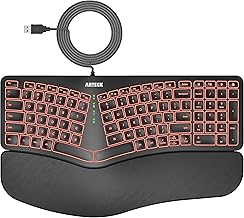
The wired Arteck Split Ergonomic Keyboard is the sibling of the wireless value pick, and its reason to exist is the backlighting. Ergonomic splits rarely light their keys because it drains a wireless battery; a wired board has no such limit, so this one suits a home office that runs into the evening.
Otherwise it shares the fixed split shell, the attached palm rest and the full-size layout with the wireless version. It plugs in over USB and needs nothing else.
Key feel is membrane and the numpad is attached. If you never type in the dark, the wireless version is the more flexible buy; if you do, this is the one.
Bottom line: the backlit budget split for evening typists at a fixed desk.
- Split style: fixed split, single shell
- Backlight: yes
- Connection: wired USB
- Wrist rest: attached palm rest
- Layout: full size with numpad
People who type in low light and do not need wireless. Not for anyone who moves the keyboard between machines.
Turn the backlight down a step or two during the day to keep it from washing out the legends. Route the cable through the desk grommet so the split sits square to your body.

Pros
- Cushioned wrist rest and fixed split in one shell
- Wired USB, plug and play
- Full-size layout with media keys
- Large review base for a budget board
Cons
- Wired only
- Attached numpad
- Rest is not adjustable
The X9 Performance Wired Ergonomic Keyboard is the plain, well-reviewed budget split: a fixed split shell, a cushioned wrist rest across the front and a full-size layout with media keys, connected over USB. It asks nothing of you beyond plugging it in.
The listing has one of the larger review bases in the category, which is reassuring for a budget board. There is no tenting adjustment and no negative tilt, so what you get is the split angle and the cushion; for many people that is enough to take the edge off a long day.
The numpad is attached and the connection is wired only. If those suit your desk, it is a solid, unfussy choice.
Bottom line: a dependable wired split for anyone who wants the basics and a big pool of owner feedback behind them.
- Split style: fixed split, single shell
- Wrist rest: cushioned, attached
- Connection: wired USB
- Layout: full size with numpad and media keys
- Keys: membrane
Office and home desks with a fixed computer, and anyone who wants the simplest possible split. Not for laptop users who move around.
Because there is no negative tilt, keep the rear feet folded flat; propping the back up bends the wrists the wrong way. Pair it with a low-profile mouse pad so the hand does not step up and down all day.
How to Choose the Right Ergonomic Split Keyboard
Fixed Split or Fully Separable: Decide How Far Apart Your Hands Should Sit

The phrase covers two very different objects. A fixed split keeps both halves in one shell, angled a few degrees outward and usually curved upward in the middle, so your hands sit slightly wider than on a flat board. The Logitech Ergo K860, the Incase Sculpt, the Arteck and Nulea boards and the X9 all work this way. You cannot change the spacing, but you also cannot get it wrong, and the learning curve is measured in days rather than weeks.
A fully separable board like the Kinesis Freestyle2 ships as two independent halves joined by a cable, in this case with up to 9 inches of separation. That lets you place each half directly in front of its shoulder, or park a trackpad or mouse between them. It is the more complete ergonomic answer, and it is also the one that demands the most desk space and the most patience while your fingers relearn where the center keys live. If you have never used a split, start with a fixed one; if you already own a fixed split and still feel your shoulders rounding inward, the separable design is the next step.
Tenting and Negative Tilt: The Two Angles a Wrist Rest Cannot Fix
Tenting raises the middle of the keyboard so your palms face slightly toward each other instead of flat down, which reduces the inward forearm rotation that flat boards force. Fixed splits build a modest tent into the shell. Separable boards can go much further with lifters: the Kinesis Freestyle2 listing here bundles the VIP3 lifters, which raise the inner edge of each half in three steps and add palm supports at the same time.
Negative tilt is the other angle worth understanding. Most keyboards prop the back edge up on feet, which bends the wrist backward. An ergonomic board does the opposite, sloping away from you so the wrist stays neutral. The Logitech Ergo K860 handles this with a palm lift that props the front edge at zero, minus four or minus seven degrees, and it is one of the reasons the K860 feels less tiring than boards that only add a cushion. Look for a listing that mentions palm lift, reverse tilt or negative tilt rather than just adjustable feet.
The Wrist Rest Is Part of the Keyboard, Not an Accessory
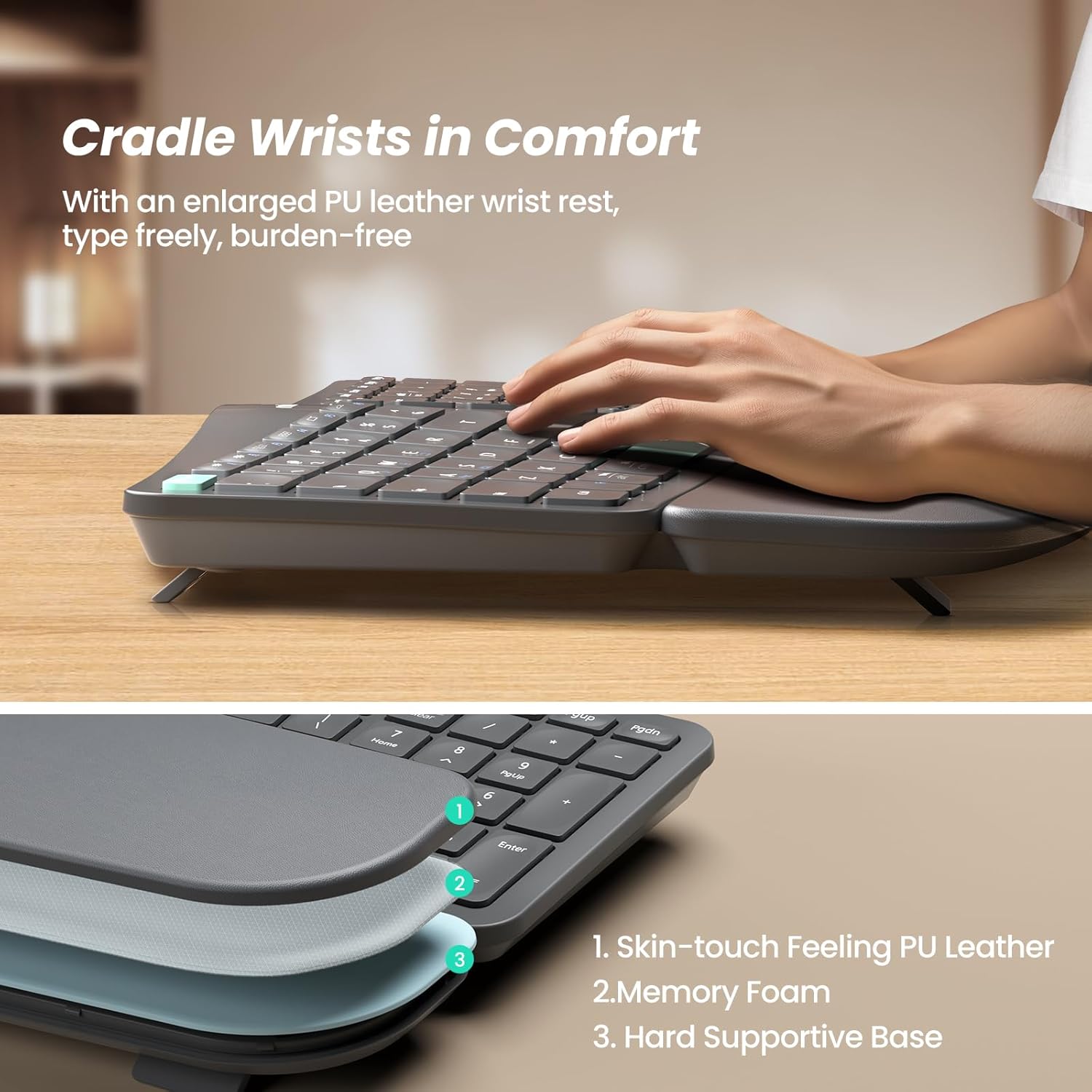
On a conventional board a wrist rest is optional. On a split, it is where your hands actually live between keystrokes, so its shape and cushioning matter as much as the key layout. The K860 uses a pillowed rest with layered foam and fabric, the Incase Sculpt a cushioned palm rest molded to the domed keyframe, and the budget wireless splits from Arteck, Nulea and TECKNET a padded pleather rest attached to the front edge.
The detail to check is whether the rest is integrated or detachable, and how it wears. Integrated rests keep the alignment right every time you sit down. Fabric-covered foam is comfortable but stains and compresses over years of use; pleather wipes clean but can peel at the seams. Neither is wrong, but if the keyboard will live on a shared desk or next to a coffee cup, the wipe-clean surface is the practical choice.
Numpad: Attached, Detached, or Gone
A full-size split with an attached numpad, which describes the K860, the X9 and the Arteck and TECKNET boards, pushes the mouse further to the right, so your mouse arm reaches outward for the whole day. That partly undoes the benefit of the split for anyone who mouses more than they type numbers.
The Incase Sculpt answers this the way Microsoft designed it: the numpad is a separate block you can place wherever it suits, or leave in a drawer. The Kinesis Freestyle2 simply omits it, which keeps both halves compact and the mouse close. If you enter figures all day, the attached pad wins; if you mostly write and browse, a detached or absent numpad brings the mouse in and is worth more than most people expect.
| Keyboard | Split style | Connection | Numpad | Notable feature |
|---|---|---|---|---|
| Logitech Ergo K860 | Fixed curved split | Bluetooth + USB receiver, AAA | Attached | Pillowed rest, adjustable palm lift |
| Kinesis Freestyle2 for PC | Fully separable, up to 9 in | Wired USB-A | None | VIP3 lifters with palm supports |
| Incase Sculpt Ergonomic | Fixed domed split | USB receiver, AAA | Separate block | Designed by Microsoft |
| Arteck Split Wireless | Fixed split, palm rest | 2.4 GHz USB | Attached | Low cost wireless full size |
| TECKNET Wireless Ergo | Fixed split, wrist rest | Bluetooth + 2.4 GHz, rechargeable | Attached | Multi-device switching |
| Nulea Split Wireless | Fixed split, cushioned rest | Bluetooth + 2.4 GHz, rechargeable | Attached | Adjustable tilt legs, 3 devices |
| Arteck Split Wired Backlit | Fixed split, palm rest | Wired USB | Attached | Backlit keys |
| X9 Performance Wired Ergo | Fixed split, cushioned rest | Wired USB | Attached | Media keys, plug and play |
Wired, Wireless, or Both: How the Board Reaches the Computer
Wired boards like the Kinesis Freestyle2, the X9 and the wired Arteck plug in over USB-A and never need charging, which is the right call for a fixed desk and for anyone who resents another battery to manage. Wireless splits come in two flavors. The K860 and the Incase Sculpt use replaceable AAA batteries with long stated runtimes; the Nulea, TECKNET and wireless Arteck boards use built-in rechargeable cells topped up over USB.
The connection type matters most on a shared desk. Boards that pair over both Bluetooth and a 2.4 GHz USB receiver, such as the K860, the Nulea and the TECKNET, can hop between a work laptop, a personal machine and a tablet with a key press. Receiver-only boards are simpler and often cheaper, but you lose the tablet and phone. Check that the listing names both modes if you want them; plenty of boards say wireless and mean receiver only.
Key Feel: Low-Force Membrane, Scissor, or Something Else
Almost every popular split uses membrane or scissor-switch keys rather than mechanical switches, and that is deliberate. Lower actuation force and a shorter travel reduce finger effort, which is the point of an ergonomic board. The Kinesis Freestyle2 uses low-force membrane switches for exactly that reason. The K860 uses a scissor mechanism with a curved key surface, and the budget boards use quiet membrane domes.
If you love the feel of a mechanical keyboard, understand that mechanical ergonomic splits are a different price tier and a much smaller pool of listings, and none of the top rated options in this roundup is mechanical. What you can compare instead is key size and shape: concave key tops that guide the fingertip, a slightly larger spacebar split into two so each thumb has its own, and a full-height key travel that does not bottom out harshly.
The Learning Curve, and Which Keys Move
Every split relocates the boundary between the hands, and it lands in a place that surprises touch typists: the B, Y, 6 and 7 keys. On most fixed splits the B and the 6 sit on the left half and the Y and 7 on the right, so anyone who reaches across for those with the wrong hand will mistype for a week. Fully separable boards make the boundary absolute, because there is physically no key on the other side to reach.
The rest of the layout should stay standard. Look for a full-size backspace, a proper right shift, and arrow keys in an inverted T rather than a compressed cluster, since relearning arrows on top of the split doubles the adjustment period. Boards that shrink the function row or move Delete to save width feel clever in a product photo and annoying in a spreadsheet.
Multi-Device Switching and Operating System Support

Splits that pair with up to three devices, which the K860, the Nulea and the TECKNET boards advertise, save you from owning two ergonomic keyboards for a laptop and a desktop. Switching is usually a dedicated key or a function combination, and the good ones remember all three pairings so the swap takes a second.
Operating system support is worth a look at the key legends. Boards that print both Windows and Mac legends on the modifier keys, and switch layouts with a key combination, avoid the daily annoyance of a Command key that is labeled Alt. Most of the boards here list Windows and Mac support; the Kinesis Freestyle2 in this roundup is the PC version, and Kinesis sells a separate Mac layout, so match the model to your machine.
Backlighting, Media Keys and the Extras That Matter at a Desk
Backlighting is rare on ergonomic splits because it costs battery life on wireless boards, so the wired Arteck with backlit keys stands out for anyone who types in a dim room. If you want light and wireless in one, expect to compromise on runtime or price.
Media keys, a calculator shortcut and a screen-lock key are small conveniences that show up on the full-size budget boards from X9, Arteck and TECKNET. They cost nothing to have and save a reach to the mouse. What you should not pay extra for is a wrist rest that lights up, or a swappable colored keycap set, on a keyboard whose whole purpose is that you stop noticing it.
Desk Space, Keyboard Trays and Where the Board Will Physically Sit
A fixed split with an attached rest is deeper front to back than a flat board, and a separable one can be wider than a full-size keyboard when spread. Measure the tray or the desk before you buy. Many pull-out keyboard trays are too shallow for a K860 with its rest, and a Kinesis at full separation wants roughly the width of a laptop plus a mouse pad.
Height matters as much as width. The raised center of a fixed split can put the home row noticeably higher than a slim board, which pushes your elbows up unless the desk or chair adjusts to match. If your desk is fixed, a lower-profile split with a smaller tent is the safer buy; if you have an adjustable desk, the taller boards with more tent are worth their extra height. Our guide to the best standing desks covers the other half of that equation.
Why You Should Trust Us
We built this shortlist from the highest rated ergonomic split keyboards on Amazon, then read the listings, the specification sheets and the customer feedback for each one, focusing on the details that separate an ergonomic keyboard from a keyboard with a cushion glued to it: split style, tenting and tilt, wrist rest construction, numpad placement and connection type. We do not claim to have typed on every board; the comparisons here come from published specifications and the pattern of real owner reports.
Ratings shown on the cards are pulled from Amazon and update over time. We do not print prices in the guide because they change daily, and we do not accept payment for placement. Where a listing sells the same keyboard in several colors or bundles, we chose one representative version.
Final Thoughts
The best overall pick is the Logitech Ergo K860. It gets the three ergonomic fundamentals right in one shell, a curved split keyframe, a pillowed wrist rest and a palm lift that gives real negative tilt, and it pairs with three devices over Bluetooth or the receiver, so it fits almost any desk without a learning curve.
The best value is the Arteck Split Ergonomic Keyboard with palm rest and 2.4 GHz wireless: a full-size fixed split with an attached rest at a fraction of the price, and the wired backlit sibling covers dim rooms. For people who want the full separable experience, the Kinesis Freestyle2 with VIP3 lifters is the board to grow into, and the Incase Sculpt is the choice for anyone who wants Microsoft’s domed layout with the numpad off to the side. Whichever you pick, pair it with a mouse that sits close and a chair that lets your elbows hang; our guides to the best office chairs and best monitor arms handle the rest of the posture problem.
Frequently Asked Questions About Ergonomic Split Keyboards
Is an ergonomic split keyboard worth it in 2026?
For anyone who types several hours a day and feels forearm or wrist fatigue on a flat board, yes. The ergonomic split keyboard designs let the hands sit at shoulder width with straighter wrists, and the versions with tenting and negative tilt address the two angles a wrist rest alone cannot fix.
How long does it take to get used to a split keyboard?
A fixed split with a standard layout usually takes a few days, mostly relearning which hand types the B, Y, 6 and 7 keys. A fully separable board like the Kinesis Freestyle2 can take a week or two, because the boundary between the halves is absolute and any cross-hand habit gets corrected immediately.
Should I choose a wired or wireless ergonomic split keyboard?
Wired boards never need charging and suit a fixed desk. Wireless boards that pair over both Bluetooth and a USB receiver make sense if you switch between a laptop, a desktop and a tablet. Check whether a wireless board uses replaceable AAA batteries or a built-in rechargeable cell, since that decides your maintenance routine.
Do split keyboards come with a numpad?
Some do, some detach it, and some leave it out. An attached numpad pushes the mouse further right; a detached block, like the Incase Sculpt design, or no numpad, like the Kinesis Freestyle2, brings the mouse closer to your body, which is worth more than most people expect if you mouse more than you enter numbers.
Are mechanical ergonomic split keyboards better?
They are a different, smaller and pricier pool of products, and none of the top rated splits in this roundup is mechanical. Most ergonomic boards deliberately use low-force membrane or scissor keys to reduce finger effort. If you want to explore conventional boards first, our guide to the best wired keyboard and mouse combos is the place to compare.



Write Your Review
No reviews yet. Be the first to share your experience!