

If your desk is a mess of cables and your monitor sits at an awkward height, a good monitor arm fixes both problems at once. We rounded up the 9 best monitor arms for September 2026, covering everything from budget single-arm clamps to heavy duty dual mounts built for creative and gaming setups. Every pick below is a real, currently sold product with a strong track record of verified customer ratings, not a guess based on a spec sheet. Our top pick is the VIVO Dual Monitor Desk Mount for its heavy duty steel construction and generous 22 pound per arm capacity, which lets it support large screens without sagging over time.
Whether you run a single ultrawide display, a two screen home office setup, or a gaming rig with a monitor and a second panel for chat and streams, there is a match for your desk in this list. A well built arm also frees up real desk space, since the monitor floats above the surface instead of sitting on a bulky stand. If you are upgrading your whole workstation at once, our full computers category has more desk and display gear worth a look.
We also made a point of covering more than one price tier and more than one use case. Remote workers who mostly need a stable, no-fuss single arm will find a couple of straightforward options here, while gamers and creators juggling two or more displays get dedicated dual and multi-monitor picks. A few products even add small extras, like a built-in USB port, that make sense once you actually live with an arm on your desk every day rather than just reading the spec sheet once and forgetting about it.

Pros
- Supports two monitors up to 30 inches and 22 pounds each without sagging
- Heavy duty steel frame feels noticeably sturdier than lighter weight competitors
- Ships with both a C-clamp and a grommet base, so it fits almost any desk
- Each arm tilts, swivels, and rotates independently for side by side or stacked layouts
- Frees up a large amount of desk space compared to two separate monitor stands
Cons
- The printed assembly guide is thin, so first time setup takes some patience
- Arms reach fairly far back, so a shallow desk can feel cramped
- Cables need to be bundled by hand since there is no fully enclosed channel
The VIVO Dual Monitor Desk Mount is built for anyone running two monitors who wants a setup that feels rock solid rather than wobbly. It is aimed at office workers, creators, and anyone tired of two separate desktop stands eating up surface space, and it comfortably handles most 24 to 30 inch monitors without needing an upgrade later.
The biggest strength here is the steel build. Where many budget arms flex slightly under a large monitor, this one holds its position after adjustment and keeps both screens level even when one is heavier than the other. The combination of C-clamp and grommet hardware in the box also means it adapts to almost any desk without an extra trip to buy adapters.
On the downside, the included instructions are sparse, so first time installers should expect to go slowly and double check each bolt. The arms also extend fairly far back before folding, which can feel tight on a shallow desk.
Bottom line: for most people replacing two separate monitor stands, this is the arm to start with. It is sturdy enough for larger screens, flexible enough to mount almost anywhere, and priced well below premium ergonomic brands.
- Screen size range: up to 30 inches per monitor
- Weight capacity: up to 22 pounds per arm
- VESA pattern: 75x75mm and 100x100mm
- Mounting: C-clamp or grommet, both included
- Adjustment: full tilt, swivel, and rotation per arm
- Material: heavy duty steel construction
This arm suits anyone running a dual monitor office or creative setup who wants stability over flashy extras. It is a strong fit for larger 27 to 30 inch displays that lighter weight arms struggle to support long term.
Measure your desk's back edge thickness before choosing the C-clamp, and check for an existing cable grommet hole if you would rather bolt the base flush to the desktop. Both pieces of hardware are included, so pick whichever suits your desk without buying anything extra.

Pros
- Full motion VESA arms adjust smoothly with almost no ongoing tightening needed
- Fits a wide range of screens from 13 to 32 inches
- Comes with both C-clamp and grommet hardware in the box
- Price sits well below premium arms while covering the same basic adjustments
- Large base of owners means troubleshooting tips and replacement parts are easy to find
Cons
- Plastic joint covers feel less premium than the metal arm underneath
- Maximum load per arm is lower than heavy duty options, so very large monitors are not a fit
The HUANUO FlowLift Dual Monitor Stand is aimed at anyone who wants the core benefits of a full motion dual arm, height, tilt, swivel, and rotation, without paying for a premium ergonomic brand name. It fits screens from 13 to 32 inches, which covers the large majority of office and gaming monitors on the market.
Its main strength is how smooth the adjustment feels for the price. The full motion joints move easily but hold position once set, and the dual C-clamp and grommet hardware in the box means installation rarely requires a separate purchase. It has also built up an enormous base of real customer reviews, which is a reasonable signal that it holds up across a wide range of desks and monitor combinations.
The tradeoff for the lower price shows up in the joint covers, which are plastic rather than metal, and in the maximum weight rating, which sits below the heavy duty options in this guide. Very large or very heavy monitors are better served by a sturdier arm.
Bottom line: for typical 22 to 27 inch monitors on a budget, this is one of the strongest value picks in the category.
- Screen size range: 13 to 32 inches
- Weight capacity: up to 19.8 pounds per arm
- VESA pattern: 75x75mm and 100x100mm
- Mounting: C-clamp or grommet, both included
- Adjustment: full motion tilt, swivel, and rotation
The full range of motion makes it easy to angle a main display toward a chair and a second screen toward a capture card or chat window, which is a common setup for gaming and streaming desks.
Leave a little slack in your cables before tightening the arm into its final position, since the full range of tilt and rotation can pull a too-short cable taut. Bundling cables loosely along the arm keeps them from snagging when you adjust height.

Pros
- Same reliable full motion design as the dual version, sized for one screen
- Lower cost than most single arm competitors with similar adjustability
- C-clamp and grommet base both included
- Good entry point for anyone upgrading from a fixed monitor stand
Cons
- Only one screen, so multitasking setups will need a second arm
- Weight capacity tops out around 19.8 pounds, which rules out some larger ultrawide monitors
The HUANUO FlowLift Single Monitor Mount brings the same full motion mechanism as the brand's dual arm to a single screen setup, aimed at anyone replacing a fixed factory stand with something adjustable for the first time. It fits 13 to 32 inch monitors, covering most common office displays.
Its main appeal is value: the adjustment feels smooth for the price, and both C-clamp and grommet hardware are included so there is no extra hardware to buy. It is a straightforward upgrade for anyone who has never used an arm before and wants to try one without a big commitment.
Because it is a single arm, it obviously will not help with a two monitor setup, and its weight rating means very large or heavy displays are better matched to a sturdier arm.
Bottom line: a sensible, low-risk first monitor arm for typical single-screen desks.
- Screen size range: 13 to 32 inches
- Weight capacity: up to 19.8 pounds
- VESA pattern: 75x75mm and 100x100mm
- Mounting: C-clamp or grommet, both included
- Adjustment: full motion tilt, swivel, and rotation
A good fit for anyone with a single monitor upgrading away from a fixed factory stand for the first time, especially on a tighter budget.
Check your monitor's VESA pattern and actual weight before ordering, and confirm your desk has either an open back edge for the clamp or a grommet hole for the bolt-through base.

Pros
- Height adjustable arm with full motion tilt, swivel, and rotation
- C-clamp and grommet mounting both included for flexible desk setups
- Sturdy gas spring holds position well after adjustment
- Straightforward included tools for assembly
Cons
- Weight capacity is lower than dual arm options built for larger displays
- Cable clips are basic and do not fully hide cabling
The MOUNTUP Single Monitor Desk Mount targets anyone who wants a straightforward, no-fuss single arm without extra features to configure. It handles monitors up to 32 inches and covers most common office and home displays.
The gas spring mechanism is the standout here, holding height adjustments firmly without the joint slowly slipping, which is a common complaint with cheaper friction-only arms. Full tilt, swivel, and rotation cover the typical range anyone needs for glare control and shared-screen viewing.
Cable management is basic, with simple clips rather than a fully enclosed channel, so cables stay tidy but partly visible. The weight rating also means it is best matched to typical monitors rather than heavier curved or ultrawide displays.
Bottom line: a dependable, simple single arm for anyone who wants adjustable height without extra complexity.
- Screen size range: up to 32 inches
- Weight capacity: up to 17.6 pounds
- VESA pattern: 75x75mm and 100x100mm
- Mounting: C-clamp or grommet, both included
- Adjustment: gas spring height, tilt, swivel, and rotation
Check your desk's back edge thickness for the clamp option, or confirm a grommet hole exists if you prefer the bolt-through base. Both are included in the box.
Keep the mounted monitor's weight within the rated 17.6 pound limit, and periodically check that the clamp screw remains snug, especially after moving the arm through its full range of motion.

Pros
- Handles flat, curved, and ultrawide monitors up to 34 inches
- Constant force technology keeps large or heavy screens exactly where you leave them
- Backed by a long standing reputation for ergonomic office hardware
- Smooth one hand height adjustment even with heavier monitors attached
Cons
- Costs noticeably more than clamp style arms from newer brands
- Overkill for a single lightweight monitor under 20 inches
The Ergotron LX Monitor Arm is aimed at anyone who wants the sturdiest possible single arm and does not mind paying more for it, particularly people running larger curved or ultrawide monitors that punish cheaper hinges over time. It is rated for 7 to 25 pounds, a noticeably wider range than most budget arms.
Its standout feature is the constant force gas spring, which adjusts smoothly with one hand and holds position precisely regardless of how heavy the attached monitor is. Build quality carries a long standing reputation in ergonomic office hardware, and the arm feels appreciably more refined than clamp-style competitors.
The obvious downside is price. It costs meaningfully more than the clamp style arms elsewhere in this guide, and that premium is hard to justify for a single small, lightweight monitor that a cheaper arm would handle just fine.
Bottom line: worth the premium specifically for larger, heavier, or ultrawide monitors where cheaper arms tend to sag over time.
- Screen size range: flat, curved, and ultrawide up to 34 inches
- Weight capacity: 7 to 25 pounds
- VESA pattern: 75x75mm and 100x100mm
- Mounting: desk clamp
- Adjustment: constant force gas spring, tilt, swivel, and rotation
The higher price reflects a wider weight range, a more refined constant force mechanism, and a long track record in ergonomic office hardware rather than any single flashy feature.
Best suited to anyone running a larger curved or ultrawide monitor, or professionals who want the most refined single-arm adjustment available and are willing to pay for it.

Pros
- Height adjustable dual arms with independent tilt and swivel per screen
- C-clamp and grommet base cover most desk edges
- Reasonable price for a two arm setup
- Easy to switch between side by side and stacked screen layouts
Cons
- Arms can drift slightly with very top heavy monitors until fully tightened
- Two screens near the max size can feel tight on a smaller desk
The MOUNTUP Dual Monitor Stand is built for anyone moving from one monitor to two without wanting to pay a large premium for it. It supports two screens between roughly 22 and 32 inches, with each arm adjusting independently.
The height adjustment and independent tilt and swivel per arm make it easy to switch between side by side and stacked layouts depending on the task at hand, and both C-clamp and grommet hardware are included for flexible mounting. Pricing sits in a reasonable middle ground for a full two arm setup.
Very top heavy monitors can cause slight drift until the joints are fully tightened, and two screens near the upper size limit can feel a bit tight together on a smaller desk. Measuring both monitors and the desk beforehand avoids surprises.
Bottom line: a solid, reasonably priced way to add a second monitor arm without stepping up to a heavy duty or premium option.
- Screen size range: 22 to 32 inches per monitor
- Weight capacity: up to 17.6 pounds per arm
- VESA pattern: 75x75mm and 100x100mm
- Mounting: C-clamp or grommet, both included
- Adjustment: height, independent tilt and swivel per arm
Measure both monitors and your desk depth before ordering, since two screens near the maximum rated size can feel tight together on a smaller surface.
Start with both arms fully tightened and adjust one screen at a time, checking that the joint holds position before moving to the second monitor.

Pros
- Tool free VESA mounting speeds up first time setup
- Handles two screens up to 19.8 pounds each
- Compact footprint compared to some bulkier dual arm designs
- Smooth height and angle adjustment right out of the box
Cons
- Tool free clamp is convenient but not quite as rock solid as bolted designs
- Cable routing channel is narrow for thicker monitor cables
The ErGear Dual Monitor Arm is built around a tool-free VESA mounting system, aimed at anyone who wants to get a dual arm installed quickly without hunting for an allen key. It supports two screens up to 19.8 pounds each, covering most common monitor sizes.
The tool-free installation is the clear selling point, letting most people mount both screens in a few minutes. The arm also has a more compact footprint than some bulkier dual designs, which helps on smaller desks, and height and angle adjustment feel smooth from the first use.
The tradeoff for tool-free convenience is that the clamp feels slightly less rock solid than a fully bolted design, and the cable channel is on the narrow side for thicker cables. Neither is a dealbreaker, but both are worth knowing going in.
Bottom line: a fast, convenient dual arm option for anyone who wants an easy setup process over the last bit of maximum rigidity.
- Screen size range: 13 to 32 inches
- Weight capacity: up to 19.8 pounds per arm
- VESA pattern: 100x100mm
- Mounting: tool-free VESA clamp
- Adjustment: height, tilt, swivel, and rotation
The clamp and VESA plate snap together without tools, so most people can mount both monitor arms in well under ten minutes.
Good for anyone who wants a dual monitor arm without a lengthy installation process, especially on desks with limited depth.

Pros
- Straightforward height adjustable design with tilt, swivel, and rotation
- Holds up to 22 pounds per arm, above average for the price range
- Both C-clamp and grommet hardware included
- Simple, no frills assembly
Cons
- Fewer premium touches like an enclosed cable channel compared to pricier arms
- Arms sit a bit closer together than some competitors, worth measuring your monitors first
The WALI Dual Monitor Stand is a no-frills option for anyone who wants solid dual arm fundamentals without extra features layered on top. It fits 13 to 32 inch screens and is rated for up to 22 pounds per arm, above average for its price range.
Its main strength is straightforward reliability: tilt, swivel, and rotation all work as expected, both C-clamp and grommet hardware are included, and assembly does not require guesswork. The above average weight rating also gives it a bit more headroom for slightly heavier monitors than some competitors at a similar price.
It skips some of the premium touches found on pricier arms, like a fully enclosed cable channel, and the two arms sit a little closer together than some competitors, which is worth checking against your specific monitors before ordering.
Bottom line: a dependable, no-frills dual arm for anyone who wants the basics done well.
- Screen size range: 13 to 32 inches
- Weight capacity: up to 22 pounds per arm
- VESA pattern: 75x75mm and 100x100mm
- Mounting: C-clamp or grommet, both included
- Adjustment: height, tilt, swivel, and rotation
Measure the width of both monitors together before ordering, since the arms sit a bit closer together than some dual mount competitors.
Stay within the 22 pound per arm rating and re-check clamp tightness periodically, especially on desks that get bumped or moved often.

Pros
- Built in USB ports add convenient charging or data access at desk height
- Higher weight capacity than most dual arms, up to 26.4 pounds per arm
- Fits a wide range of monitor sizes from 13 to 40 inches
- More premium finish compared to the brand's entry level dual arm
Cons
- Costs more than the standard HUANUO dual arm without USB
- USB ports are basic data or charging only, not a full docking hub
The HUANUO Dual Monitor Stand with Built In USB Ports is aimed at creators and multitaskers who plug in a phone, drive, or accessory throughout the day and want that access built directly into the monitor arm. It fits an unusually wide range of screen sizes, from 13 up to 40 inches, and is rated for up to 26.4 pounds per arm.
The built-in USB ports are the headline feature, keeping a charging cable or flash drive within easy reach at monitor height instead of digging around behind a desktop tower. The higher weight rating and wider size range than the brand's standard dual arm also make it a better match for larger displays.
The USB ports are basic charging or data connections rather than a full docking hub, so anyone expecting video pass-through or a multi-port hub should look elsewhere. It also costs more than the brand's standard dual arm without the added ports.
Bottom line: a smart upgrade for creators and multitaskers who will actually use the built-in USB access, and a strong choice for larger monitors thanks to the higher weight rating.
- Screen size range: 13 to 40 inches
- Weight capacity: up to 26.4 pounds per arm
- VESA pattern: 75x75mm and 100x100mm
- Mounting: C-clamp or grommet, both included
- Extras: built-in USB ports on the arm
The arm-mounted USB ports handle basic charging and data transfer, keeping a cable or flash drive within reach without crawling behind the desk to the computer's rear ports.
Best suited to creators and multitaskers who regularly plug in phones, drives, or accessories at their desk, and to anyone needing extra weight capacity for larger monitors.
How to Choose the Right Monitor Arms for Your Desk
Not every monitor arm is built the same way, and the right pick depends on your desk, your monitor, and how often you rearrange your setup. Before comparing individual products, it helps to understand the handful of specs that actually matter and the ones that are mostly marketing noise.
VESA Compatibility and Screen Size
Almost every modern monitor has a VESA mounting pattern on the back, usually 75 by 75 millimeters or 100 by 100 millimeters. Nearly all the arms in this guide support both patterns, but it is still worth flipping your monitor over and checking before you order anything, since a handful of ultra thin or curved displays use nonstandard plates or require an adapter.
Screen size matters less than you might think, since most arms are rated by a size range rather than a hard limit. A 13 to 32 inch rating, which is common across this list, covers the vast majority of office and gaming monitors. Ultrawide and larger 34 inch plus displays need a closer look at both the size rating and the weight rating, which brings us to the next criterion.
Weight Capacity and Arm Type
Weight capacity is the single most important spec on any monitor arm, and it is also the one people skip past most often. Heavier monitors, especially curved and ultrawide models, need an arm rated well above their actual weight so the joint does not slowly droop over months of use. Most of the arms here handle somewhere between 4.4 and 22 pounds per arm, with a couple of standout options built for even heavier displays.
The mechanism inside the arm also affects how it feels day to day. Gas spring arms use an internal cylinder to counterbalance the monitor, so you can adjust height with one hand and the screen stays exactly where you leave it. Friction hinge arms rely on tightened joints instead, which keeps the price down but can loosen slightly over time and need an occasional twist of an allen key.
Clamp vs Grommet Mounting
Most monitor arms ship with two mounting options: a C-clamp that grips the back edge of your desk, and a grommet base that bolts through a hole in the desktop. Clamp mounting is faster to install and completely reversible, which makes it the better choice for rented spaces or desks you do not want to drill into. Grommet mounting is slightly more permanent but tends to feel a touch more rigid once installed, since the base plate is bolted flush to the surface.
Before buying, measure your desk’s edge thickness for clamp mounting, and check whether your desk already has a grommet hole if you plan to go that route. Nearly every arm in this guide includes both pieces of hardware in the box, so you are not locked into one method.
| Mounting Style | How It Works | Best For | What to Check |
|---|---|---|---|
| C-Clamp Mount | Clamps to the back edge of the desk, no drilling needed | Rented spaces or desks you do not want to modify | Maximum clamp opening versus your desk’s edge thickness |
| Grommet Mount | Bolts through a drilled or existing desk hole | Desks with a grommet hole, or owners willing to drill one | Base plate hole size and desk material thickness |
| Gas Spring Arm | Uses an internal spring to counterbalance the monitor | Heavier or larger monitors needing one-hand adjustment | Rated weight range versus your monitor’s actual weight |
| Friction Hinge Arm | Relies on tightened joints instead of a spring | Lighter monitors and tighter budgets | Expect occasional re-tightening as joints settle |
Single vs Dual Arm Configurations

If you only run one display, a single arm keeps the cost down and the footprint small. Dual and multi-monitor arms share a single base but let each screen move independently, which is worth it the moment you add a second display for reference material, chat, or streaming overlays. Keep in mind that dual arms need more desk depth once both screens are extended, so measure your space before assuming a dual setup will fit comfortably.
For anyone who plugs in a laptop alongside a desktop, a couple of options in this guide also include built-in USB ports on the arm itself, which is a small but genuinely convenient upgrade for keeping a charging cable or flash drive within reach.
Cable Management and Desk Space
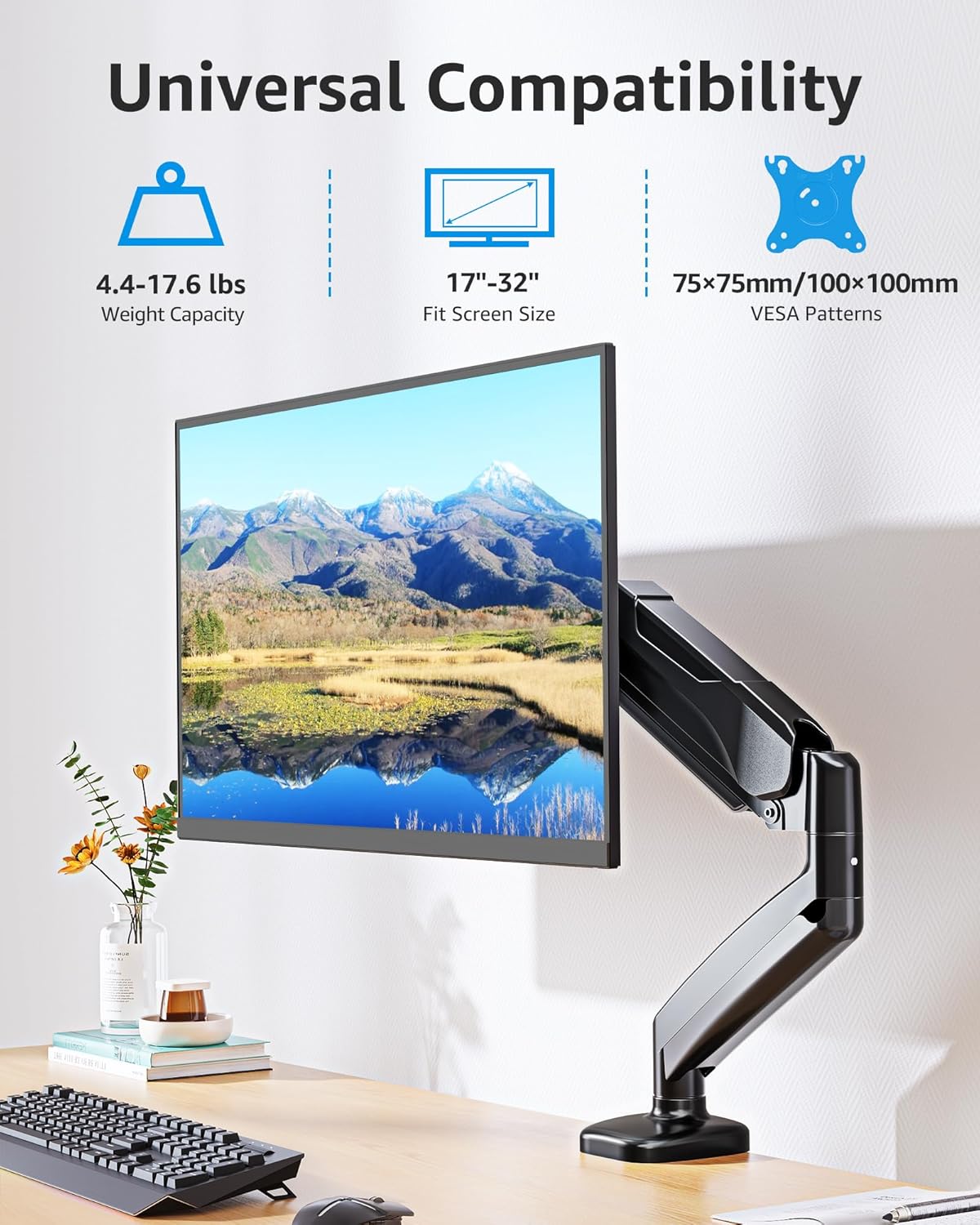
Every arm in this guide routes cables along the arm itself rather than letting them dangle, but the quality of that channel varies. Some use fully enclosed plastic covers that snap shut over the cable run, while others use open clips that hold cables in place but leave them partly visible. If a clean desk setup matters to you, look for the enclosed channel style and plan cable length with a little slack for the full range of arm motion.
The bigger payoff of any monitor arm is the desk space it gives back. Once a monitor is off its factory stand and floating on an arm, the footprint underneath becomes free real estate for a keyboard, notebook, or a second monitor stand entirely. It is a small change that makes a surprisingly large difference on a crowded desk, and it is one reason monitor arms remain one of the most requested upgrades in our office products coverage.
Build Quality and Included Hardware

Steel gauge and joint design vary more between arms than most people expect, and it shows up over months of daily adjustment rather than on day one out of the box. Arms with thicker steel and metal joint housings tend to keep their tension longer, while arms leaning on thinner metal or extra plastic in the pivot points can start to feel a little looser after heavy use. This is not usually a dealbreaker for a light single monitor, but it becomes more noticeable the closer you get to an arm’s maximum rated weight.
It is also worth checking what actually ships in the box. Every arm in this guide includes mounting hardware for both clamp and grommet installation along with the basic tools needed for assembly, but the quality of that included hardware differs. A slightly heavier bag of bolts and a metal, rather than plastic, clamp plate are small signs of a manufacturer that spent a bit more on the parts you cannot see once everything is installed.
Why You Should Trust Us
We built this list by pulling real, currently sold monitor arm listings and filtering out anything with a shaky ratings history or too small a sample of reviews to trust. Every product here cleared a minimum star rating and a minimum number of verified customer reviews before it made the cut, and we sorted the finalists by review volume as a rough proxy for how many people have actually lived with the product day to day.
From there, our editorial team cross-checked manufacturer specifications, including VESA compatibility, weight ratings, and mounting hardware, against the marketplace listing to make sure the details in this guide match what actually ships in the box. We update picks periodically as ratings shift and new hardware comes to market, so a product that qualifies today reflects current, real world customer sentiment rather than a one-time snapshot.
Final Thoughts on the Best Monitor Arms
For most desks, the VIVO Dual Monitor Desk Mount is our best overall pick. Its heavy duty steel build and 22 pound per arm rating give it enough headroom for larger monitors, and the included clamp and grommet hardware means it fits almost any desk without extra shopping. It is the arm we would point most people toward first, especially anyone running two mid-size to large displays.
If budget is the deciding factor, the HUANUO FlowLift Dual Monitor Stand is our best value pick. It brings the same full motion adjustment and dual clamp or grommet hardware to a lower price point, and its enormous base of customer reviews suggests it holds up well across a wide range of desks and monitor sizes. For anyone who wants the sturdiest possible single-monitor arm and does not mind paying more for it, the Ergotron LX Monitor Arm is worth the premium, particularly for larger curved or ultrawide screens that punish cheaper hinges over time. Creators and multitaskers who want a charging port within arm’s reach should look at the HUANUO Dual Monitor Stand with Built In USB Ports instead.
Whichever arm you choose, take a minute to measure your desk and your monitor’s actual weight before ordering. It is the single step that prevents the most common return, and it is the difference between an arm that feels rock solid for years and one that slowly droops after a few months. If you are also shopping for a new display to go with your new arm, our list of the best gaming monitors is a good next stop.
Frequently Asked Questions About Monitor Arms
What size monitor can a monitor arm hold in 2026?
Most current monitor arms, including every pick in this guide, are rated for screens between roughly 13 and 32 inches, with a few options stretching up to 34 or even 40 inches. The screen size rating matters less than the weight rating, though, since a large but lightweight monitor can sit comfortably on an arm that a smaller but heavier curved display would overpower.
Do I need to drill holes in my desk to install monitor arms?
No. Every arm in this guide ships with a C-clamp option that grips the back edge of your desk without any drilling. A grommet base is usually included as a second option for desks that already have a cable hole or for anyone who prefers a more permanent, flush-mounted setup.
Can I use monitor arms with a standing desk?
Yes, and it is one of the best pairings for a monitor arm. Because the monitor floats on the arm instead of resting on a stand, your screen rises and falls with the desk without needing to be repositioned every time you switch between sitting and standing. Just double check that the clamp or grommet mount is compatible with your particular desk’s edge profile.
How do I know if my monitor is compatible with a VESA mount?
Check the back of your monitor for four small threaded holes arranged in a square pattern, usually 75 by 75 millimeters or 100 by 100 millimeters. Nearly every monitor sold in the last decade includes this pattern, though a handful of ultra-slim or curved displays need a separate adapter plate, which is worth confirming before you order an arm.
Are monitor arms worth it over a fixed monitor stand?
For most people, yes. A monitor arm gives you height, tilt, and distance adjustment that a fixed stand simply cannot match, and it frees up desk space underneath the screen. The one exception is a very tight budget or a desk that genuinely cannot accommodate a clamp or grommet mount, in which case a basic stand still gets the job done. Browse our full articles section for more desk setup guides if you are weighing other upgrades at the same time.

Write Your Review
No reviews yet. Be the first to share your experience!