

Handling outgoing mail, parcel dispatch, and office storage can quickly degenerate into a frustrating chore when you are forced to write out every envelope by hand or wrestle with full-sheet sticker paper jammed inside standard desktop printers. Whether you run a thriving online storefront from your spare room or manage an active household filing system, having a dedicated machine to generate crisp, smudge-free tags transforms your daily workflow. We evaluated the current landscape and compared 7 address label maker options from Brother QL-820NWB, Brother QL-800, Phomemo and more for October 2026 to pinpoint the most dependable models for home offices and commercial workstations.
Our top pick is the Brother QL-800 High-Speed Professional Printer for its blazing output speed and versatile dual-color thermal printing.
Selecting the appropriate unit requires balancing speed, paper capacity, connection options, and recurring supply convenience. While handheld portable gadgets let you label bins and pantry shelves straight from a smartphone, larger desktop stations handle high-volume envelopes and shipping boxes with automated cutting mechanisms. Exploring our broader office products deals and reviews can help you equip your entire workspace, but securing the right labeler is the single fastest way to eliminate mailing headaches. By choosing a model engineered around direct thermal technology, you also avoid messy toner cartridges and dried-out ink wells forever.

Pros
- Zero ink or toner required for crisp thermal output
- Automatic label size detection inside the mobile app
- Lightweight, portable build with rechargeable battery
- Quick Bluetooth pairing with iPhone and Android phones
Cons
- Not compatible with iPads or other tablet devices
- Requires manual PC driver installation for USB desktop printing
- Cannot print full-sized 4x6 shipping labels
The NIIMBOT B1 is a portable thermal label printer engineered for creating neat address labels, pantry tags, and small retail stickers without hassle. Geared toward home organizers and small sellers, it connects wirelessly to smartphones to produce sharp monochrome prints without liquid ink or messy toner ribbons.
Its biggest strength is the intuitive companion app, which automatically recognizes the installed label roll size so you can bypass manual template setup. The app provides access to dozens of fonts, decorative borders, and icons, while the built-in rechargeable battery and automatic shutoff keep the machine practical for mobile use around the house or office.
However, users looking to format labels on a larger screen should be aware that the device does not support tablets such as iPads. Desktop printing is possible, but it requires a physical USB cable and a manual driver download rather than a simple wireless connection.
Bottom line: For smartphone-first users who need a clean, inkless solution for envelope addresses and everyday organizing, the NIIMBOT B1 offers outstanding portability and convenience.
- Brand: NIIMBOT
- Model: B1
- Color: Blue
- Print Technology: Direct Thermal (Inkless)
- Maximum Print Width: 2 inches
- Connectivity: Bluetooth (mobile), USB (PC)
- Mobile Compatibility: iOS and Android (tablets excluded)
- Housing Material: ABS plastic
- Power: Rechargeable built-in battery with 15-minute auto shutoff
Mobile pairing is simple: download the NIIMBOT app from the App Store or Google Play, choose the B1 model, and connect through Bluetooth within the app interface. The software automatically detects the loaded roll size, allowing you to start designing right away.
Desktop users can connect to a PC using a standard USB cable, though you must download the official printer driver from the NIIMBOT website before sending print jobs.
Please note that tablet devices, including iPads and Android tablets, are not supported. Be sure to fully charge the battery via USB before your initial power-on.
The NIIMBOT B1 is built for small business owners, crafters, and busy households that need fast, customized labels up to 2 inches wide. It is particularly well suited for return address stickers, product pricing, jar labeling, and file folder organization.
High-volume e-commerce merchants who need full-sized 4x6-inch postage labels should consider a dedicated desktop shipping printer instead. For smaller envelope tags and everyday organizing directly from a smartphone, this compact unit is a great fit.

Pros
- Versatile print width from 3/4 inch to 2 inches
- No ink or toner cartridges required
- App requires no account registration to use
- Automatic label size detection
- Extensive free font and icon library
Cons
- Requires a Bluetooth device and app for label editing
- Monochrome thermal printing only with no color support
- Maximum 2-inch width cannot print 4x6-inch shipping labels
The SUPVAN T50M Pro is a compact Bluetooth label printer built for organizing homes, classrooms, and small businesses. Accommodating tape widths between 3/4 inch and 2 inches, it bridges the gap between narrow handheld labelers and bulky desktop shipping printers.
Its standout feature is the companion editing software, which connects quickly over Bluetooth and operates without forcing account creation. Direct thermal printing keeps running costs low by avoiding ink or toner, while built-in auto label recognition ensures custom address text, barcodes, and logos print cleanly without manual alignment hassle.
Those needing to generate standard 4x6-inch shipping labels will find the 2-inch maximum print width too narrow. Additionally, because the unit relies strictly on monochrome thermal technology, users seeking multicolored retail labels or colored graphics will need to look elsewhere.
Bottom line: The SUPVAN T50M Pro delivers crisp, reliable thermal output for address labeling, bin organization, and small business tags in an easy-to-use package.
- Print Technology: Direct thermal (inkless)
- Supported Label Width: 3/4 inch to 2 inches
- Connectivity: Bluetooth
- Color: Black
- Device Compatibility: iOS, Android, and PC
- App Assets: 30+ fonts, 50+ frames, 660+ icons
- Compatible Media: Address, file, cable, jewelry, round, and square labels
- Features: Automatic label size recognition
The SUPVAN T50M Pro connects wirelessly via Bluetooth to iOS and Android smartphones, tablets, and computers. Setup takes only a few minutes through the dedicated editing app available on standard mobile app stores.
Unlike many app-connected label printers, the software does not require registration, passwords, or personal account creation before you start printing. You simply install the roll, power on the device, and connect.
The unit features automatic label size detection. When a new tape roll is inserted, the app identifies the dimensions automatically, eliminating tedious manual margin adjustments and misprinted labels.
Does this label maker require ink or ribbons?
No. The SUPVAN T50M Pro relies entirely on direct thermal technology, which uses heat to activate the specialized paper, completely removing the need for ink, toner, or ribbon cartridges.
Can this device print standard package shipping labels?
It can print return address tags, recipient labels, and package barcodes up to 2 inches wide. It is not wide enough to print full 4x6-inch shipping labels used by major couriers.
What types of labels can it handle?
The printer accepts continuous and die-cut rolls ranging from 3/4 inch to 2 inches in width, including standard address labels, round stickers, square tags, file folder labels, and jewelry tags.

Pros
- Wide label width range up to 3.14 inches
- Long-lasting 2200mAh rechargeable battery
- No ink or toner cartridges required
- Feature-rich app with Excel data import
Cons
- Does not support standard 4x6 shipping labels
- Bluetooth printing is limited to mobile devices
The Phomemo M220 is a versatile direct thermal printer designed for producing custom address labels, product barcodes, and storage tags. Handling widths between 0.78 and 3.14 inches, it fills the gap between miniature tape labelers and bulky full-size shipping machines.
Its primary strength lies in its balance of portability and software capabilities. The integrated 2200mAh battery provides cord-free operation for multiple label rolls, while the Print Master app gives access to hundreds of fonts, borders, and fast batch printing via Excel spreadsheets.
Keep in mind that this machine cannot handle standard 4 by 6 inch shipping labels, making it unsuitable for large parcel postage. In addition, desktop computers must use a wired USB connection because Bluetooth functionality is reserved exclusively for the mobile app.
Bottom line: The Phomemo M220 is a dependable, ink-free labeling tool that delivers crisp address labels and organizational stickers for crafters, offices, and small storefronts.
- Printing Technology: Direct thermal (no ink or ribbon)
- Print Width Range: 0.78 inches to 3.14 inches
- Battery Capacity: 2200mAh rechargeable lithium-ion
- Wireless Connectivity: Bluetooth (iOS and Android via app)
- Wired Connectivity: USB data cable (Windows and Mac)
- Unit Dimensions: 6.2 x 5.7 x 3.4 inches
- Weight: 400 grams (approx. 0.88 lbs)
- Included Starter Roll: 100 labels (40mm x 30mm)
For smartphones and tablets, download the Print Master app from the Apple App Store or Google Play Store. Turn on Bluetooth and open the application to connect directly to the printer, as the unit will not pair through standard system Bluetooth menus.
For desktop and laptop computers running Windows or macOS, wireless pairing is not supported. Users must connect using the provided USB cable and install the official M220 printer driver alongside the Labelife software from the manufacturer website.
- 1 Phomemo M220 thermal label printer (Black)
- 1 starter roll of thermal label paper (100 labels, 40mm x 30mm)
- 1 USB data and charging cable
- 1 user instruction manual

Pros
- Fast print speed of 93 labels per minute
- Unique black and red two-color thermal printing
- Integrated automatic tape cutter
- Direct thermal technology requires no ink or toner
- Two-year limited warranty with exchange service
Cons
- Requires a wired USB connection with no wireless or Bluetooth options
- Red color printing requires specific Brother Genuine continuous label rolls
- Relies on proprietary Brother DK roll cartridges
The Brother QL-800 is a desktop direct thermal label printer designed for busy home offices, small businesses, and mailrooms that produce high volumes of address labels, file folder tags, and visitor badges. Its compact form factor sits easily beside a computer workstation.
Its standout capability is raw throughput, outputting up to 93 standard address labels per minute at a sharp 300 dpi resolution. It also supports specialized black and red printing on compatible DK continuous rolls, while an integrated auto-cutter cleanly trims labels or creates banners up to three feet long.
Because connectivity is limited to a standard USB cable, users looking for Wi-Fi, Ethernet, or mobile smartphone printing will need to step up to a wireless model. It also relies specifically on Brother DK roll formats rather than generic, flat-pack thermal sheets.
Bottom line: For desktop computer users seeking rapid, ink-free address printing with the flexibility of automatic cutting and two-color accents, the Brother QL-800 is an exceptionally dependable workhorse.
- Print Speed: Up to 93 standard address labels per minute
- Print Resolution: 300 dpi
- Printing Technology: Direct thermal
- Color Capabilities: Black and red (with select DK rolls)
- Cutter: Built-in automatic cutter
- Media Support: Brother Genuine DK pre-sized labels and continuous tapes up to 3 feet
- Connectivity: USB interface (cable included)
- System Compatibility: Windows and Mac OS
- Warranty: Two-year limited warranty with exchange service
Setting up the Brother QL-800 is straightforward thanks to its built-in Plug and Label feature, which allows Windows users to connect and design basic labels without installing external software. For more comprehensive layout options, users can download the full design software suite.
The printer is compatible with both Windows and Mac operating systems and connects directly through the included high-speed USB cable. Office workers can print address labels seamlessly from programs like Microsoft Word, Excel, and Outlook.
Roll changes require minimal effort with drop-in Brother Genuine DK cartridges, ensuring automatic roll detection and alignment with every reload.
Small business owners and administrative assistants managing daily mailing batches will appreciate the rapid 93 label per minute printing speed and ink-free thermal mechanics.
Warehouse and office organizers can utilize the dual-color red and black output to create urgent warning labels, priority shipping markers, or color-coded filing tags.
Those who work exclusively from a dedicated desk or workstation will find the direct USB connection stable and simple, though anyone needing to print from tablets or smartphones should consider a wireless alternative.
Pros
- Ink-free direct thermal printing
- Fast and reliable Bluetooth mobile connection
- Compact, portable design with built-in battery
- Extensive selection of fonts and app templates
Cons
- Limited to 50mm maximum print width, not for 4x6 shipping labels
- Certain premium app templates require an optional subscription
- Lacks native desktop computer printing support
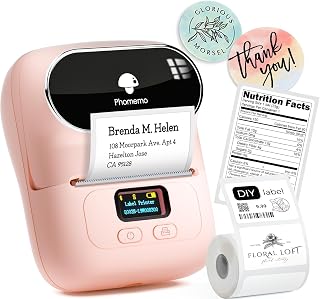
The Phomemo M110 is a handheld thermal label printer designed for crafters, organizers, and small business owners. Its pocket-sized form factor and direct Bluetooth connectivity allow users to generate return address labels, price tags, and inventory labels quickly from a smartphone.
Thermal printing technology removes the need to buy replacement ink or toner, while the Print Master mobile app provides OCR text capture and hundreds of customizable layouts. A built-in rechargeable battery delivers up to four hours of continuous runtime, easily supporting batch printing speeds of 1.2 inches per second.
Because the maximum print width is capped at 50mm, this printer cannot accommodate large 4x6 parcel shipping labels. Shoppers who need full-size shipping labels or prioritize a desktop computer workflow should explore wider desktop thermal printers instead.
Bottom line: The Phomemo M110 is a dependable, ink-free labeling tool that excels at producing crisp address labels, tags, and small stickers on the go.
- Printing Technology: Direct Thermal (ink-free)
- Supported Print Width: 20mm to 50mm
- Print Speed: Up to 1.2 inches per second
- Connectivity: Bluetooth
- Compatibility: iOS and Android devices
- Battery Life: Up to 4 hours continuous use
- Color: Baby Pink
- Included Roll: 100 starter labels (40x30mm)
The Phomemo M110 operates wirelessly with smartphones and tablets via the Print Master app, available for iOS and Android. Pairing takes place directly inside the app, removing the hassle of complicated system Bluetooth menus.
Once connected, the app provides tools such as OCR image-to-text scanning, barcode creation, and over 130 font choices. Because it is engineered specifically for mobile device use, it does not support desktop operating systems.
Etsy shop owners, cottage food bakers, and market vendors will benefit from this printer for creating ingredient lists, price tags, and small return address labels in batches.
It is also a great match for crafters, teachers, and home organizers who want to label storage bins, classroom materials, and event favors quickly without messy ribbons or expensive cartridges.

Pros
- Ink-free direct thermal printing
- Supports custom label widths up to 2 inches
- Smart label rewinding prevents paper waste
- Lightweight and compact 0.6-pound design
Cons
- Select templates inside the app require a paid subscription
- PC connection requires a USB cable instead of Bluetooth
- 203 DPI resolution is not designed for detailed photo printing
The Ponek M100 is a direct thermal label printer designed for quick desktop and on-the-go labeling tasks. Supporting media widths between 0.78 inches and 2 inches, it bridges the gap between narrow handheld labelers and bulky shipping machines, making it a great pick for address labels, mailing tags, barcodes, and pantry organization.
Its key strength lies in its portability and ink-free direct thermal technology. Weighing only 0.6 pounds, the unit can be taken anywhere, and its built-in battery delivers up to 4,200 labels per charge. The printer also includes a smart first-label rewinding mechanism, which pulls the tape back before printing to stop wasted paper on individual runs.
While the mobile app offers thousands of free icons and fonts, shoppers should note that select specialty templates are locked behind an optional VIP tier. Additionally, users wanting to connect to a desktop computer must install drivers and connect through a USB cable rather than Bluetooth.
Bottom line: The Ponek M100 provides a flexible and efficient labeling solution for small business owners and home organizers who want reliable, pocket-sized address and barcode printing.
- Print Technology: Direct Thermal
- Print Resolution: 203 DPI
- Print Speed: 20 mm/s
- Print Width Range: 0.78 inches to 2.0 inches
- Connectivity: Bluetooth (Mobile), USB (PC)
- Operating Systems: iOS, Android, Windows PC
- Battery Output: Up to 4,200 labels per charge
- Weight: 0.6 pounds
- Color: Black
Mobile users can pair their devices wirelessly by downloading the Print Master app from the Apple App Store or Google Play Store. Once installed, activate Bluetooth on your smartphone and connect through the app interface to begin customizing labels immediately.
For desktop computers, the M100 connects via a standard USB cable. Users need to download the device drivers and the Labelife software from the official brand website to format and print address tags or barcodes from a PC.
The manufacturer recommends fully charging the printer before its first use to calibrate the battery and ensure smooth Bluetooth communication.
Small business owners who regularly ship envelopes or manage inventory will appreciate the ability to print standard 2-inch address tags, QR codes, and product barcodes on demand without running an ink-guzzling full-size printer.
Home and office organizers will find it well suited for sorting storage bins, spice jars, and file folders. The companion app includes hundreds of decorative borders and fonts to personalize organization projects.
Teachers and students can also take advantage of its 0.6-pound form factor to label classroom bins, notebooks, and school equipment on the go.

Pros
- Extremely fast print speeds up to 110 labels per minute
- Broad connectivity including Wi-Fi, Ethernet, and Bluetooth
- Standalone operation via monochrome LCD screen
- Two-color black and red printing support
- Cuts custom label sizes up to 3 feet in length
Cons
- Red and black two-color output requires specific DK-2251 rolls
- Monochrome screen interface takes time to navigate for complex tasks
- Larger desktop footprint than basic handheld label makers
The Brother QL-820NWB is a versatile thermal printer engineered for busy offices, shipping hubs, and businesses that generate high volumes of address and routing labels. Its broad connectivity roster allows seamless sharing across entire networks or direct pairing with individual workstations and mobile devices.
Its standout capability is sheer speed, pushing out up to 110 standard address labels per minute at a sharp 300 dpi resolution. The built-in monochrome LCD screen allows users to select and print pre-stored templates directly from the device without keeping a computer connected, while support for specialized continuous tape adds rare two-color black and red printing.
While the machine is exceptionally flexible, the two-color printing requires specific Brother DK-2251 media, which limits color versatility on standard label rolls. Users who only need occasional mailing labels or prefer a pocket-sized portable machine may find this desktop unit more complex than necessary.
Bottom line: For high-volume shipping, address labeling, and multi-user office environments, the Brother QL-820NWB offers top-tier speed, versatile networking, and convenient standalone printing.
- Print Speed: Up to 110 standard address labels per minute
- Print Resolution: 300 dpi
- Wireless Interface: Wi-Fi 802.11b/g/n
- Bluetooth Connectivity: Integrated Bluetooth wireless technology
- Wired Networking: Ethernet interface
- Host Interface: USB host port for peripherals like scanners
- Display: Monochrome LCD screen
- Color Capability: Monochrome and two-color black/red with DK-2251 tape
- Maximum Label Length: Up to 3 feet
Connecting the QL-820NWB to your workplace infrastructure is straightforward thanks to its broad connectivity options. You can hook it directly to a local network via Ethernet or 802.11b/g/n Wi-Fi, allowing multiple team members to send print jobs simultaneously from different computers.
For mobile workflows and specialized setups, the printer includes Bluetooth wireless technology and a USB host interface. The USB host port lets you connect peripherals like barcode scanners directly to the printer, enabling rapid label generation without needing a desktop workstation in the loop.
Can this printer create custom label sizes?
Yes, the printer supports continuous rolls that allow you to print labels up to 3 feet in length, which the internal cutter trims to size automatically.
Does it require ink or toner?
No, it uses direct thermal technology, which applies heat directly to treated paper rolls, eliminating the need for replacement ink cartridges or toner.
Can I use it without a computer?
Yes, the built-in monochrome LCD display enables standalone printing using pre-stored label templates and network configurations.
How to Choose the Best Address Label Makers: Buying Guide
Print Speed and Throughput Capacity

When you are preparing hundreds of greeting cards, billing statements, or customer orders, print speed quickly becomes the defining metric of your workspace efficiency. Traditional multi-purpose printers require feed trays and slow passes, whereas a dedicated thermal label printer focuses solely on rapid ribbonless feeding. The EPA’s assessment of alternatives to BPA in thermal paper explains that in thermal printing applications, the developer in the paper reacts with white or colorless dyes in the presence of heat, converting them to a dark color. Heavy-duty desktop units represent the gold standard for high-volume commercial needs. For example, the Brother QL-800 High-Speed Professional Printer delivers an impressive 93 labels per minute at a crystal-clear 300 dpi resolution, and the enterprise-oriented Brother QL-820NWB Professional reaches up to 110 standard address labels per minute with black text. These machines process extensive postal runs before a standard printer finishes warming up its fuser rollers.
In contrast, compact battery-powered devices prioritize portability over sheer volume. Handheld machines such as the Phomemo Label Printer M110 operate at a sustained 1.2 inches per second print speed, while the Ponek Label Maker Machine with Tape achieves a 20mm/s output rate. These speeds are perfectly suited for printing ten to fifty custom envelope tags, personalized return address labels, or product barcodes in batches. However, trying to run thousands of commercial parcel tags through a pocket-sized roller will quickly reveal throughput limits, as smaller thermal print heads require brief cooldown intervals during non-stop jobs.
Matching throughput capacity to your operational volume ensures you do not overspend on heavy machinery you will rarely utilize or starve an active shipping station of necessary speed. If you regularly handle bulk seasonal mailings or dispatch dozens of customer packages daily, high-speed continuous feeding is non-negotiable. For general home organization, student binder labeling, and occasional holiday envelopes, a steady mobile unit delivering several inches per second offers the ideal balance between desktop footprint and practical speed.
Label Width Support and Media Flexibility

Address labels are not one-size-fits-all items, making roll width support a crucial consideration before purchasing. A standard return address label requires modest surface area, but complete mailing labels with delivery addresses, return information, and carrier barcodes demand substantial width. The USPS guide to delivery addresses reminds mailers using address labels to make sure they don’t cut off any important information. The Phomemo Label Maker,M220 Label Printer stands out in the portable class by supporting thermal label widths ranging from 0.78 inches up to 3.14 inches. That extra width accommodates multi-line addresses, company logos, and QR codes comfortably, although the manufacturer explicitly notes it will not handle large 4 by 6 shipping sheets.
For more compact requirements, machines like the SUPVAN T50M Pro Bluetooth Label Maker Machine with and the Ponek Label Maker Machine with Tape support widths from 0.78 inches (or 3/4 inch) to 2 inches wide. This range covers square, round, address, cable, jewelry, and file folder formats. Similarly, the Phomemo Label Printer M110 focuses on 20mm to 50mm widths, which is optimal for price tags, ingredient declarations, and standard letter stickers. Ensuring your printer can handle at least a 2-inch wide roll gives you the latitude needed for standard postal formats.
Beyond width alone, you should evaluate whether a machine restricts you to proprietary pre-sized rolls or accepts continuous media. The Brother QL-800 High-Speed Professional Printer and the Brother QL-820NWB Professional accept both pre-sized DK labels and continuous-length tapes extending up to 3 feet long. Continuous rolls let you dictate exact tag lengths, enabling custom signage and extra-long international package labels without purchasing specialized individual cartridges.
Connectivity and Multi-Device Compatibility
Connectivity options determine how smoothly an address printer integrates into your everyday computing setup. Advanced enterprise environments benefit immensely from comprehensive network integration. The Brother QL-820NWB Professional leads this segment by offering Bluetooth wireless technology, wired Ethernet, Wireless 802.11b/g/n interfaces, and a USB host interface for attaching peripherals like barcode scanners. This multi-protocol connectivity enables multiple team members across different office workstations to share a single centralized printing terminal seamlessly.
Conversely, standalone entrepreneurs and household organizers often prioritize wireless mobile pairing. The NIIMBOT B1 Label Maker, 2Inch Bluetooth Label pairs via Bluetooth with iOS and Android smartphones in seconds through its dedicated app, while desktop PC use is supported through a wired USB cable and downloadable drivers. However, buyers should note that the manufacturer specifies it is not compatible with tablet devices. Always confirm operating system compatibility before selecting a mobile-first unit, particularly if your workflow relies heavily on an iPad or Android tablet.
Meanwhile, the Phomemo Label Maker,M220 Label Printer offers flexible dual-path operation, connecting via Bluetooth to phones and tablets through the Print Master app, while tethering to laptops and desktop PCs via USB data cable using the Labelife software. If you spend significant time managing recipient databases on a desktop computer, pairing a wired thermal printer alongside organized desktop organizers keeps your physical workstation uncluttered while you churn out batches from your favorite spreadsheet program.
Software Ecosystem, Design Assets, and Data Import
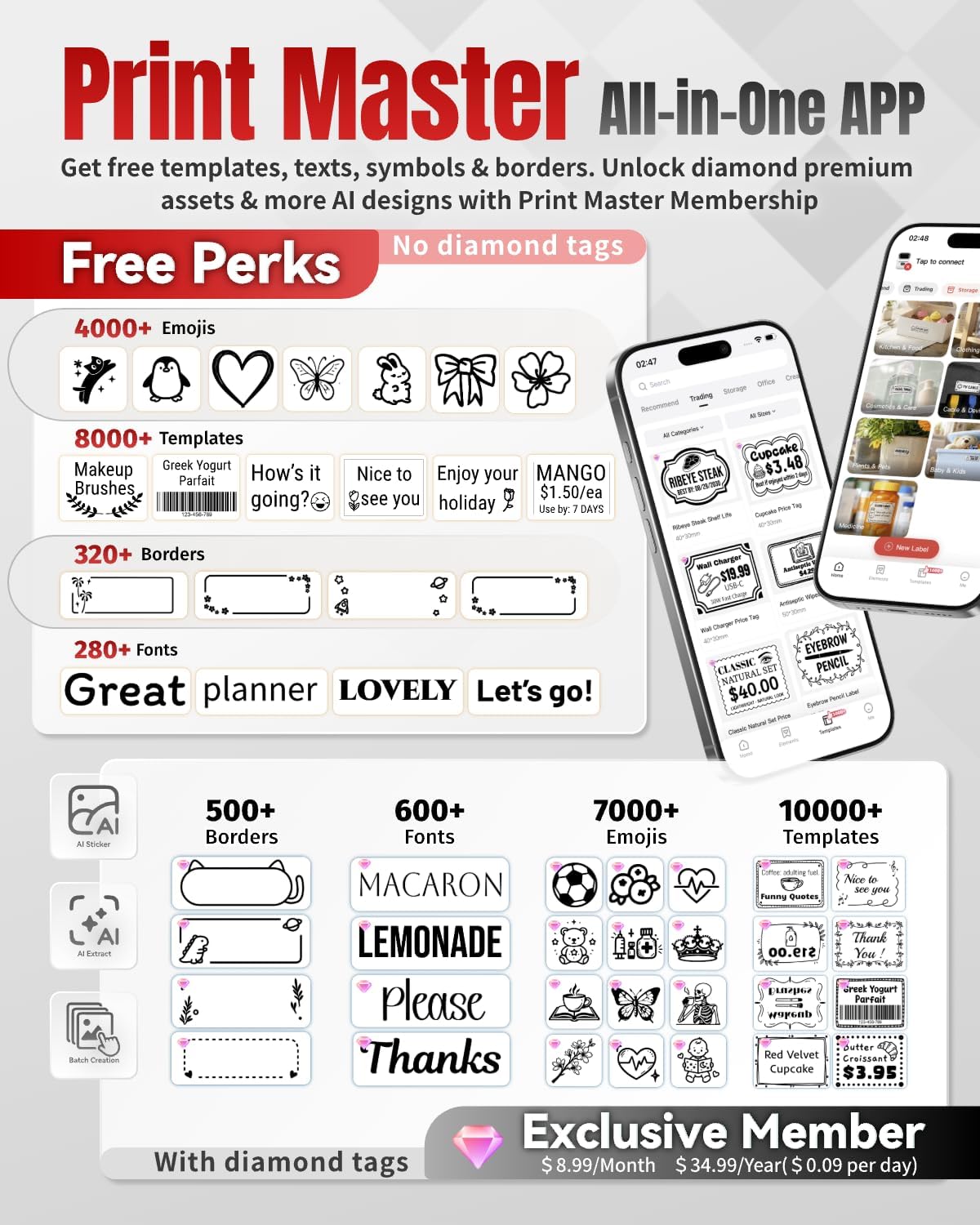
The overall usability of any address printer hinges directly on the software that generates the text and formatting. The companion application must do more than just send raw text to the printer; it needs to simplify layout alignment, barcode creation, and contact management. The Print Master app utilized by the Phomemo Label Maker,M220 Label Printer delivers an expansive design suite featuring over 7,900 icons, 458 borders, 1,900 templates, and 550 fonts. Crucially for address printing, it supports Excel file imports, optical character recognition (OCR), image scanning, and voice input, letting you ingest address rosters effortlessly without typing names individually.
If you prefer a simpler user journey without mandatory cloud profiles, the SUPVAN T50M Pro Bluetooth Label Maker Machine with includes an application that requires no user registration and is completely free to use. It delivers auto label size recognition, 30+ fonts, 50+ frames, and 660+ icons alongside enhanced image processing. Auto-detection saves valuable setup time by reading the installed roll dimensions automatically, preventing off-center text prints and misaligned margins that ruin expensive rolls.
For corporate desktop users who prefer standard office software over mobile design suites, the Brother QL-800 High-Speed Professional Printer features Plug and Label technology. This enables instant printing directly from Microsoft Word, Excel, and Outlook on Windows and Mac systems without demanding complex secondary software installations. In mobile contexts, smart artificial intelligence features like those found in the Phomemo Label Printer M110 automatically recognize raw text and format it into clean, balanced address labels with minimal manual adjustment. For reference, USPS Publication 28 asks that all lines of the address be formatted with a uniform left margin and says uppercase letters are preferred on all lines of the address block.
Power Architecture and Portability Considerations
Deciding between a battery-operated portable labeler and a tethered AC desktop machine depends entirely on how and where you organize your tasks. Mobile units allow you to bring the printer directly to the project, whether you are sorting envelopes at the dining room table or labeling storage containers in a warehouse aisle. The Phomemo Label Maker,M220 Label Printer features an integrated 2200mAh rechargeable battery capable of printing at least 36 rolls of labels continuously on a single charge, freeing you completely from power outlets.
Rechargeable units also incorporate automated power-saving measures to prevent unexpected battery drain. The NIIMBOT B1 Label Maker, 2Inch Bluetooth Label features an intelligent auto-shutoff mechanism that cuts power after 15 minutes of inactivity, preserving charge for when you need it next. Similarly, the Ponek Label Maker Machine with Tape is equipped with an internal NTC temperature sensor for safer charging cycles, allowing its battery to churn out up to 4,200 labels on a single charge.
Stationary desktop units like the Brother QL-800 High-Speed Professional Printer depend on direct wall power, trading mobile freedom for unlimited, heavy-duty cycles. A wall-powered unit eliminates the anxiety of battery depletion midway through a critical bulk mailing deadline. If your labeling tasks happen exclusively at an office workstation, an AC-powered desktop machine delivers unmatched operational stability and consistently rapid feed rates throughout demanding workdays.
Cutting Mechanisms, Build Quality, and Waste Management
Label finishing significantly affects the presentation and efficiency of your mailing workflow. Tearing stickers by hand against a serrated plastic edge can lead to ripped tags, uneven borders, and adhesive gumming up the feed channel. Professional workhorses like the Brother QL-800 High-Speed Professional Printer solve this by integrating a heavy-duty automatic cutter that trims each individual tag or banner cleanly as soon as the print head completes its pass. This feature is particularly valuable when producing long runs of uniform address labels.
Another major issue with compact thermal labelers is paper waste during initialization. Many older machines push out a full blank sticker upon boot-up to calibrate roll alignment. The Ponek Label Maker Machine with Tape addresses this headache with smart first-label rewinding, optimizing roll usage and preventing unnecessary sticker loss. Weighing only 0.6 pounds, it combines thoughtful media management with durable, travel-ready portability.
Housing construction and interface hardware also determine longevity. The NIIMBOT B1 Label Maker, 2Inch Bluetooth Label uses high-quality ABS materials designed to endure daily knocks in retail and classroom environments. On the high-end desktop side, the Brother QL-820NWB Professional incorporates a monochrome LCD screen right on the front chassis, allowing standalone operation and template selection without requiring an active computer terminal.
The following comparison table highlights key specifications and hardware details across top models to help you select the ideal match for your mailing setup:
| Product | Supported Media | Software / Application | Connectivity Interfaces |
|---|---|---|---|
| NIIMBOT B1 Label Maker, 2Inch Bluetooth Label | 2Inch, 1.18″ white label rolls | NIIMBOT APP | Bluetooth, USB cable |
| SUPVAN T50M Pro Bluetooth Label Maker Machine with | 3/4″ - 2″ wide labels | App | Bluetooth |
| Phomemo Label Maker,M220 Label Printer | 0.78” to 3.14” | Print Master, Labelife | Bluetooth, USB data cable |
| Brother QL-800 High-Speed Professional Printer | DK pre-sized labels and continuous-length tapes up to 3 ft long | Microsoft Word, Excel, and Outlook | USB cable |
| Ponek Label Maker Machine with Tape | 0.78″ to 2″ | Print Master, Labelife | Bluetooth, USB |
Why You Should Trust Us
At Daily Deal Here, our productivity and office product recommendations are built upon rigorous editorial analysis and verified customer feedback. We monitor the evolving landscape of home office technology and commercial dispatch gear to help buyers make sensible, lasting equipment investments. To produce this guide, our editorial team examined verified retail listings, cross-referenced manufacturer technical specifications, and analyzed thousands of owner ratings and recurring user experiences across major retail platforms.
We look closely at the practical operational factors that marketing materials frequently gloss over, such as thermal head longevity, long-term mobile app stability, driver support across Windows and Mac environments, and the ease of sourcing replacement tape rolls. Our product evaluations remain strictly independent, ensuring our curated selections reflect genuine utility, dependable performance, and seamless operation for small business operators, educators, and busy household managers alike.
Final Thoughts
Upgrading to a dedicated thermal label printer removes one of the most frustrating bottlenecks in household organization and small business dispatch. Instead of struggling with misaligned paper templates or smeared ink on standard envelopes, direct thermal hardware creates clean, crisp, professional address tags on demand. For high-volume office environments, commercial dispatch stations, and users who regularly mail correspondence in bulk, our top overall recommendation is the Brother QL-800 High-Speed Professional Printer. Its rapid 93 labels per minute engine, crystal-clear 300 dpi output, integrated automatic cutter, and dual-color black and red printing capabilities make it a reliable workhorse for business correspondence.
For budget-conscious organizers and small craft shops seeking portable wireless convenience, the SUPVAN T50M Pro Bluetooth Label Maker Machine with represents our best value pick. It provides a versatile 3/4 inch to 2 inch printing range, auto label size recognition, and an editing app that requires zero user registration. This ensures you can unbox the unit and begin labeling jars, file folders, and outgoing envelopes immediately without jumping through subscription hoops. When managing full office document workflows alongside envelopes, pairing your label station with one of the best all-in-one printers delivers complete document coverage across standard paper and adhesive formats.
Finally, if your daily operations demand flexible portable printing with wider format support, the Phomemo Label Maker,M220 Label Printer is our premier specific-need choice for wide tags on the go. Accommodating labels up to 3.14 inches wide and powered by a substantial 2200mAh battery capable of printing 36 rolls continuously, it bridges the gap between pocket-sized labelers and heavy desktop units. By matching your daily output volume, device preferences, and label width requirements to the right machine, you can streamline your mailing tasks and maintain an immaculate, organized workspace.
Frequently Asked Questions About Address Label Makers
Do I need to buy ink or toner for an address label maker?
No, direct thermal printers do not require liquid ink cartridges, ribbons, or toner powder. Instead, an address label maker utilizes a specialized thermal print head that applies heat directly to chemically treated, heat-sensitive paper or sticker rolls. This process forms crisp, dark text and barcodes instantly without the risk of smudges or running ink. Because the only recurring consumable is the thermal label paper itself, these machines offer remarkably low operating costs over time compared to traditional inkjet and laser printing systems for home offices and businesses.
What is the ideal label size to use with an address label maker?
The ideal dimensions depend on your mailing application and envelope size. Standard return address stickers commonly measure around 0.5 to 1 inch tall by 2 inches wide, which easily fit the upper corner of letters and postcards. For complete recipient addresses and shipping packages, labels measuring between 2 and 3 inches wide provide adequate space for multi-line text, recipient names, postal barcodes, and company branding logos. Devices supporting variable widths give you the greatest flexibility to match small envelopes, parcel packages, and filing folders without wasting tape.
Can an address label maker print directly from Excel or Word rosters?
Yes, many high-speed units and advanced mobile applications support direct roster imports. Desktop models like the Brother QL series feature built-in software add-ins that allow one-click label printing straight from Microsoft Word, Outlook, and Excel spreadsheets. Similarly, companion apps for mobile labelers often include bulk Excel file import features, enabling you to upload a spreadsheet of customer addresses and batch-print dozens of customized tags in minutes. Reviewing our comprehensive all buying guides and reviews hub helps you discover productivity workflows that connect software with office hardware.
What is the best address label maker for small business shipping in 2026?
For active small businesses handling daily envelope dispatch and parcel packages in 2026, high-speed desktop thermal units offer the greatest reliability and efficiency. Printers delivering over 90 labels per minute with integrated auto-cutters save enormous amounts of preparation time when packaging bulk orders. If you need mobile flexibility for pop-up shops or warehouse inventory, choose a portable model offering wide tape compatibility up to 3 inches and high-capacity rechargeable batteries. Selecting a unit with reliable PC and smartphone compatibility ensures seamless daily operation across all your order fulfillment channels.
Can I print barcodes and QR codes with an address label maker?
Yes, modern thermal label printers are specifically engineered to produce sharp, high-contrast barcodes and QR codes suitable for optical scanning. Most manufacturer companion apps include dedicated barcode generator tools supporting standard symbologies such as UPC, Code 128, and two-dimensional QR patterns. To ensure your packages and product tags scan reliably at postal facilities and retail checkout counters, always print at resolutions of 203 dpi or higher, and verify that your thermal label stock is clean, smooth, and free from surface oils or scratches.
Write Your Review
No reviews yet. Be the first to share your experience!