

A STEM robotics kit has to survive first contact with a real child, which is a harder test than any spec sheet. It needs to be buildable in one sitting, interesting once it is built, and sturdy enough to survive being carried around the house. The 7 kits below come from Klutz, Makeblock, ELEGOO and more, and they span three genuinely different approaches: programmable robots that teach code, solar and mechanical kits that teach physics through building, and hydraulic models that make an abstract idea visible in the hand. Our top pick is the Makeblock mBot for the way it moves a child from drag-and-drop blocks to real Arduino code without ever needing a new robot.
The word STEM gets attached to almost every toy on the shelf, so the useful question is not whether a kit is educational but what specific skill it builds. Snapping together a solar rover teaches gear ratios and energy conversion. Wiring a sensor and writing a loop teaches logic and debugging. Assembling a hydraulic hand teaches fluid pressure. Those are three different lessons for three different children, and buying the wrong one is the usual reason an expensive kit ends up under a bed. If you are shopping for the same age group more broadly, our list of the best board games for middle schoolers covers the screen-free side of the same shelf.

Pros
- Block coding and Arduino code on the same hardware
- Aluminium chassis survives repeated rebuilds
- Line following and ultrasonic sensors included
- Large range of add-on modules available
- Software ecosystem has been maintained for years
Cons
- First session usually needs an adult alongside
- Runs on batteries that need charging or replacing
- Costs more than a mechanical kit of similar size
The mBot is the kit to buy when you want robotics rather than a construction toy. It arrives as a screwed-together aluminium chassis with a motor on each side, a line following sensor underneath, and an ultrasonic sensor on the front, and the build itself takes a comfortable evening with a screwdriver.
What sets it apart is the software path. A child starts in a block-based environment built on Scratch, which is already familiar from most school computing lessons, and drags instructions into place to make the robot follow a line or avoid a wall. When blocks stop being enough, the same robot accepts standard Arduino code, so the hardware does not have to be replaced at the exact moment interest deepens.
The costs are honest ones. It is more expensive than a solar kit, it needs charged batteries, and the first session goes better with an adult sitting alongside to install software and interpret the first error. After that, independence comes quickly.
Bottom line: the best long-term purchase here, and the only kit that keeps offering new work months after the build is finished.
- Type: programmable two-wheel robot
- Chassis: aluminium, screw assembly
- Sensors: line following, ultrasonic distance
- Programming: block-based Scratch environment and Arduino code
- Control: on-board buttons, infrared remote, app control
- Recommended ages: 8 and up
Children around eight to twelve who already enjoy Scratch at school, families willing to sit in on the first session, and clubs or classrooms that need a rebuildable platform.
Look at a solar or gear kit instead if you want a project that needs no software, no charging, and no adult involvement.
Build the chassis first and confirm the robot drives under remote control before writing any code. That separates mechanical problems from software problems, which is the single most useful debugging habit to teach.
Start with line following on a taped track, then move to obstacle avoidance. Both give immediate visual feedback, which keeps early programming from feeling abstract.

Pros
- Twelve different builds from one parts set
- No batteries and no app needed
- Independent project for most eight year olds
- Each individual build is a short session
- Teaches gears, drive trains, and energy conversion
Cons
- Needs real sunlight, indoor lighting is not enough
- Small snap-fit parts can be lost easily
- No programming element at all
The Sillbird kit is the best value here because a single box turns into twelve short projects instead of one long one. Around one hundred and ninety parts snap together into a rover, a walking robot, a boat, and nine other configurations, each driven by the same small solar panel and motor.
The educational content is real even though nothing is programmed. Converting sunlight into rotation and then gearing that rotation into walking, rolling, or paddling is a complete lesson in energy and mechanical advantage, and a child discovers it by building rather than by being told.
The limitation is sunlight. Household lighting will barely move the motor, so this is an outdoor or sunny-window kit, and a run of grey days can stall the fun. The small parts also demand a container, since a solar kit missing one gear stops working entirely.
Bottom line: the strongest gift choice when you want an independent project with a dozen finishes and no software attached.
- Type: multi-model solar construction kit
- Models: 12 configurations from one parts set
- Pieces: approximately 190
- Power: solar panel, no batteries required
- Assembly: snap-fit with illustrated instructions
- Recommended ages: 8 to 13
The twelve builds split roughly into land models, water models, and walking models, so a child can pick a category rather than working through the manual in order.
Water builds are the ones most often rebuilt, because a paddle boat driven by sunlight in a paddling pool produces the most obvious result.
Keep the parts in a lidded box between builds. One missing gear disables the whole drive train and replacements are not always easy to source.
Do not leave the solar panel face down on hot paving or in a car window for long periods, and dry water models thoroughly before storing them.

Pros
- Standard Arduino code with no proprietary app to depend on
- Camera enables first-person video driving
- Line tracking, obstacle avoidance, and follow modes
- Huge open community for troubleshooting
- Teaches real wiring alongside programming
Cons
- Steepest learning curve of any kit here
- Build must be exactly right or nothing runs
- Rechargeable cells need adult supervision
This is the most technical kit in the roundup and the most rewarding for the right child. It is a four wheel robot car built around an Arduino compatible board, with a camera module for first-person video driving, sensors for line tracking and obstacle avoidance, and an app plus infrared control for manual driving.
The learning here is genuine electronics. Modules are wired to specific pins, code is written in the standard Arduino environment rather than a proprietary app, and when something does not work the fault could be mechanical, electrical, or in the program. Learning to isolate which one is the actual skill on offer.
The cost of that depth is difficulty. The build assumes comfort with a wiring diagram, the first upload requires driver installation, and rechargeable cells need supervision. For a twelve year old with interest or an adult and child working together, none of that is a barrier.
Bottom line: the pick for older children who want to learn real electronics rather than operate a finished robot.
- Controller: UNO R3 board, Arduino compatible
- Camera: FPV video module
- Modes: line tracking, obstacle avoidance, auto follow
- Control: mobile app and infrared remote
- Power: rechargeable cells
- Recommended ages: 12 and up
Older children and teenagers with an interest in electronics, families where an adult is happy to work through a wiring diagram, and anyone moving on from block-based coding.
Not the right first robot for a younger builder working alone, since a single wiring mistake produces a car that does nothing.
Assemble and test the drive motors before adding sensors. Confirming that the car moves under remote control first turns later debugging from guesswork into a short checklist.
Upload the supplied example sketches one at a time and change one value in each before writing anything from scratch. That builds confidence faster than starting on a blank file.
Pros
- Excellent illustrated instruction book
- Compatible with standard bricks already in the house
- Teaches gear ratios and torque directly
- No batteries, app, or software involved
- Several machines from one parts set
Cons
- Purely mechanical with no programming element
- Younger builders may need help with gear alignment
- Cardboard packaging is not long-term storage
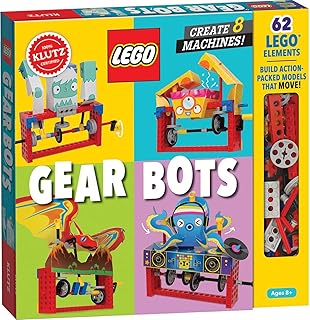
Klutz has built a long reputation on one idea: a proper illustrated book paired with exactly the parts needed to do what the book describes. Gear Bots applies that formula to mechanical engineering, walking a child through several gear-driven machines using brick-compatible parts.
The lesson is gear ratio, and it is taught the only way it really lands, which is by building a train of gears and watching a slow, strong output become a fast, weak one when the arrangement changes. Because the parts are compatible with standard bricks, the machines can be attached to a collection the household already owns, which extends the kit well past its own page count.
What it is not is a robot in the programmable sense. Nothing runs code, nothing has a sensor, and nothing continues after the build except play. For an eight to twelve year old who likes making things move, that is often exactly right.
Bottom line: the best mechanical introduction for younger builders, and the best value in pure instruction quality.
- Type: gear-driven mechanical building kit
- Format: illustrated activity book plus parts
- Compatibility: standard construction bricks
- Power: manual, no batteries
- Recommended ages: 8 to 12
- Builds: several machines from one set
Children who already own bricks and want a reason to use them differently, readers who enjoy following a book, and households looking for a screen-free project.
Choose a programmable kit instead if the goal is specifically coding rather than mechanics.
Move the parts into a lidded box early. The packaging is designed for shelf display rather than for a year of use, and loose gears disappear quickly.
Keep the book with the parts. Without the instructions the set becomes a handful of unfamiliar pieces rather than a project.

Pros
- Finished model is genuinely fun to operate
- Teaches linkages and mechanical grip clearly
- No batteries or software required
- Award recognised design and instructions
- Wide age band from eight to fourteen
Cons
- Single model with no rebuild variations
- Build requires patience with small linkages
- Wearable fit varies with hand size
The Smartivity hand is a single-model kit and makes no apology for it. A child assembles a set of linkages, levers, and finger segments into a mechanical hand that opens and closes with a pull, and then spends a considerable amount of time picking things up with it.
The teaching is about linkage: how pulling in one place produces coordinated movement somewhere else, and why finger joints need to move together to grip anything. That is a real biomechanics lesson, delivered through the fingertips rather than a diagram, and it lands with children who are not otherwise drawn to engineering.
The tradeoff is replay through play rather than through rebuilding. Once built, it stays built. The linkage assembly also takes patience, so a younger builder benefits from an adult nearby for the fiddly stage in the middle.
Bottom line: the pick when you want a finished machine that is enjoyable to operate rather than a robot to program.
- Type: single-model mechanical build
- Mechanism: linkage-driven articulated hand
- Power: manual operation
- Recommended ages: 8 to 14
- Includes: illustrated step-by-step instructions
- Recognition: parents' choice award winner
Children who like making things they can then use, and gift buyers who want a result that is immediately playable rather than a project that needs follow-up.
Consider a multi-model solar kit instead if repeated rebuilding is what keeps the child engaged.
Work through the linkage stage in one sitting rather than stopping halfway, since partially assembled linkages are easy to misalign when picked up again.
Once built, set challenges: lift a cup, stack blocks, pick up something soft without crushing it. The challenges are where the mechanics lesson actually sinks in.

Pros
- Demonstrates hydraulic pressure in a visible way
- Large scale makes the mechanism easy to follow
- Adjustable to different hand sizes
- Established educational publisher with strong manuals
- No batteries or software required
Cons
- Single build with no alternative configurations
- Filling the hydraulic system takes care and patience
- Takes up considerable storage space
Thames and Kosmos builds kits around a single scientific principle explained properly, and the Mega Cyborg Hand is a good example. The build produces an oversized wearable hand whose fingers are driven by fluid-filled syringes, so squeezing one side pushes fluid through a tube and closes a finger at the other.
Hydraulics are genuinely hard to picture from a textbook, and this makes them obvious. Because the components are large and transparent, a child can see fluid move and connect the cause to the effect immediately, which is the entire argument for hands-on science kits.
Assembly demands patience at the filling stage, where air bubbles in the lines make the fingers feel spongy and have to be worked out. That step is worth an adult's help. Storage is the other consideration, since the finished hand is deliberately large.
Bottom line: the most memorable single-principle science kit here, and an excellent science fair project.
- Type: hydraulic mechanical build
- Mechanism: fluid-filled syringe actuators
- Fit: adjustable for different hand sizes
- Power: manual hydraulic operation
- Includes: illustrated experiment manual
- Recommended ages: 8 and up
Fill the syringes slowly and hold the tubing upright so air rises out rather than travelling into the line. Trapped air is the reason a finished hand feels soft instead of crisp.
Once assembled, try gripping objects of different weights and shapes, and note which finger arrangement works best. That comparison is the experiment the kit is really designed around.
Use only the fluid recommended in the manual and check the tube connections before each session, since a disconnected line makes a mess quickly.
Store the hand assembled rather than dismantling it, and keep it away from heat sources that could soften the tubing.

Pros
- Thirteen different models from one parts set
- Solar powered with no batteries needed
- Non-toxic ABS parts throughout
- Land and water configurations included
- Independent build for most eight year olds
Cons
- Needs direct sunlight to run properly
- No coding or electronics content
- Instructions are picture-led with little explanation
The Bottleboom kit covers the same territory as the Sillbird set with a slightly larger model list. Thirteen configurations come out of one bag of parts, driven by a small solar panel, and the builds split between machines that roll, walk, and float.
The appeal is the short project cycle. Each model takes well under an hour, produces a working machine, and can be dismantled for the next one, which suits children who lose interest in long builds. Parts are moulded in ABS, so repeated assembly does not chew up the connectors as quickly as softer plastics do.
Expectations should be set on two points. Sunlight is required, and household lighting genuinely will not do the job. And there is no electronics or coding content at all, so if the goal is programming this is the wrong category of kit.
Bottom line: a strong alternative to the Sillbird set, and the better pick if the model variety itself is the selling point.
- Type: multi-model solar construction kit
- Models: 13 configurations from one parts set
- Materials: non-toxic ABS parts
- Power: solar panel, no batteries required
- Builds: land and water models
- Recommended ages: 8 to 12
The model list runs from simple rolling rovers up to walking machines and floating craft, so difficulty can be matched to the mood of the afternoon.
Water builds need a dry-off before storage, and the walking models are the ones most worth attempting outdoors where the light is strongest.
Independent builders around eight to twelve, siblings sharing one kit, and gift buyers who need a project that works without an adult or a device.
Choose a programmable robot instead if the child has already outgrown pure construction kits.
How to Choose a STEM Robotics Kit
Most disappointing robotics kits fail for predictable reasons: the build is too hard for the age on the box, the finished robot does one thing and then nothing, or the software the whole experience depends on is abandoned. The ten criteria below are ordered roughly by how often they decide whether a kit gets used twice or fifty times.
Age Range and Reading Level
The age printed on a robotics box is a manufacturer estimate of fine motor skill, patience, and reading comfort combined, and it is usually optimistic by a year or two when a child is building alone. A confident eight year old can manage the Klutz Gear Bots or a solar kit without much help, because those use large parts and picture-led instructions. The same child will stall on the ELEGOO car kit, where the manual assumes comfort with wiring diagrams and a computer.
Reading level matters more than manual dexterity for the coding kits. Block-based programming environments are visual, but the tutorials, the error messages, and the troubleshooting notes are all text. A child who reads fluently at nine will get further with Makeblock mBot than a mechanically gifted seven year old will, simply because debugging means reading carefully and trying again.
When in doubt, buy for the age below the ambition. A kit that gets built successfully and then modified is worth far more than one that stalls halfway and turns into a source of frustration. Several kits here, including the Smartivity hand and the Thames and Kosmos Cyborg Hand, hit a wide band because the build scales in difficulty as it goes.
Coding Kits Versus Pure Mechanical Builds

This is the fork in the road that determines everything else. A coding kit ends with a robot that runs instructions you wrote, which means the build is the beginning rather than the end. The mBot and the ELEGOO car both work this way, and their real value shows up in week three when a child changes the behavior instead of rebuilding the chassis.
A mechanical kit ends with a machine that does one thing very well and teaches through assembly. The Klutz Gear Bots teach gear ratio and torque by making you build the gear train. The Smartivity and Thames and Kosmos hands teach linkage and hydraulic pressure by making you assemble and then operate the mechanism. Nothing is programmed, and nothing needs a computer, a tablet, or an account.
Neither approach is more educational. What differs is the follow-through. Mechanical kits deliver their whole lesson during the build, which is perfect for a rainy afternoon or a gift where you cannot count on adult time later. Coding kits deliver most of their value after the build, which is only realized if someone keeps coming back.
Power Source and Battery Requirements
Solar kits like the Sillbird twelve-in-one and the Bottleboom thirteen-in-one need no batteries at all, which is genuinely liberating and also the source of their one recurring frustration: they need real sunlight. A bright window on an overcast day is often not enough, and a disappointed child on a grey afternoon is a common story. Some solar kits include a battery module for exactly this reason, and it is worth checking for.
Battery-powered robots trade convenience for continuity. The mBot runs from cells or a rechargeable pack, and the ELEGOO car uses rechargeable lithium cells that need a charger and a little supervision. Neither cares about the weather, both work at night, and both add a running cost or a charging routine that an adult usually ends up owning.
Build Time and Piece Count

Piece count is a rough proxy for build time, but the type of piece matters more. Two hundred small plastic parts that snap together, as in the Sillbird solar kit, is an afternoon of steady work with an occasional stuck connector. Fifty parts that include a circuit board, a motor driver, and a wiring harness, as in the ELEGOO car, can take longer because each step must be exactly right or nothing works at the end.
Think about the session length a child will actually tolerate. A build that fits in ninety minutes gets finished and celebrated. A build that needs four hours usually gets abandoned partway and finished by a parent, which is a different experience entirely. If the box quotes a long build, look for whether the instructions break it into stages that end at a natural stopping point.
The multi-model kits handle this well by design. Each of the twelve or thirteen configurations in the solar kits is a short build on its own, so a child gets a finished robot quickly and can choose to do another one the next day.
Rebuild Value and Multi-Model Kits

The single biggest difference between a kit used once and a kit used all year is whether it can become something else. Multi-model solar kits are explicit about this: the Sillbird converts between twelve builds and the Bottleboom between thirteen, so the same parts become a rover, a boat, a walking robot, and several other machines. Every conversion is a fresh short project with a new result.
Single-model kits earn their keep differently. The Smartivity hand and the Thames and Kosmos Cyborg Hand are built once and then played with, which is a legitimate outcome because the finished object is genuinely fun to operate. The Klutz Gear Bots sit between the two, offering several buildable machines from one set of gears and plates.
Programmable robots are rebuildable in software rather than hardware. The mBot chassis stays as it is while the behavior changes completely, and that is a form of replay value that never runs out of configurations to try.
App, Software, and Curriculum Support
For any kit that depends on software, the quality and longevity of that software is at least as important as the hardware in the box. Makeblock has maintained its ecosystem for years, with a block-based environment built on Scratch for beginners and a path into Arduino code for children who outgrow blocks. That continuity is worth a great deal, because a robot whose app stops being updated becomes an expensive plastic shell.
ELEGOO takes a different route by being Arduino compatible from the start. There is no proprietary app to depend on, the code is standard, and the enormous open Arduino community means help exists for every problem a beginner will hit. The tradeoff is that the on-ramp is steeper, since there is no drag-and-drop layer to hide the syntax.
Check what comes with the kit beyond the parts. Printed project cards, a proper illustrated manual, and downloadable lesson plans make an enormous difference to whether a kit gets used after the first week, particularly if the adult in the house is not confident with the subject.
Durability and Part Quality
Robotics kits get dropped, carried to school, and taken apart repeatedly, so plastic quality is a practical concern rather than a snobbish one. Look for parts moulded in ABS rather than a brittle general-purpose plastic, connectors that grip without needing force, and gears with clean teeth. The most common failure in cheap kits is a stripped gear or a snapped connector tab, and either one ends the project immediately.
Metal chassis parts, as used on the mBot, change the calculation. An aluminium frame survives a fall off a table and can be unscrewed and rebuilt many times without the mounting holes wearing out. It also adds weight, which matters for a robot that needs to drive over carpet.
Ask whether spare parts exist. Established brands sell replacement motors, gears, and sensors, and a two dollar part can rescue a kit that would otherwise be thrown away. That availability is one of the quiet advantages of buying from a company that has been in the category for a decade.
How Much Adult Help Is Required
Be honest about this before buying, because it is the difference between a gift that works and one that generates guilt. Solar and mechanical kits are largely independent projects. A child opens the box, follows the pictures, and asks for help perhaps twice. That makes them ideal for grandparents, holiday gifts, and any household where adult time is scarce.
Coding kits need a partner at the start. Installing software, pairing a robot, and understanding a first error message are all easier with someone alongside, even if that someone is also learning. Once the first program runs, independence arrives quickly, but the first session is a shared one.
The good news is that the shared session is often the point. Parents consistently report that the building is the memorable part rather than the finished robot, and kits designed around that shared hour tend to be the ones that get talked about afterwards.
Sensors, Expansion, and Room to Grow
A robot with sensors can react to the world, and reacting to the world is where robotics stops being a construction toy. Line following, obstacle avoidance, light seeking, and distance measuring are the standard four, and each one supports a completely different set of programming lessons. The mBot ships with line and ultrasonic sensors, and the ELEGOO car adds a camera for first-person video driving.
Expandability decides how long the kit stays interesting. Ports that accept additional modules, a chassis with mounting holes, and compatibility with common construction systems all extend the life of the purchase. Makeblock in particular sells a wide range of add-on modules that plug into the same controller.
For mechanical kits the equivalent question is whether parts are compatible with anything else you own. The Klutz set works with standard bricks, which turns a finished gear machine into a component of something larger and considerably extends what a child can do with it. Children who like that kind of open building often enjoy our roundup of the best magnetic Rubik’s cubes for the same reason.
Classroom, Group, and Sibling Use
Kits bought for a classroom or a club face requirements a home kit never does: they must be rebuildable dozens of times, storable with no lost pieces, and usable by children of different ages in the same session. Screwed metal construction survives that far better than snap-fit plastic, and clearly numbered part bags make reset between groups possible.
For siblings sharing one kit, multi-model designs work best because two children can each claim a build. Single-model kits create a queue and an argument. It is also worth checking whether the software allows more than one robot on the same network, since classrooms with several units can otherwise hit pairing conflicts.
Storage sounds trivial until the second session. A kit with a moulded tray or labelled bags survives a year of use; a kit that arrives in one loose bag loses its small parts within a month, and a solar kit missing one gear no longer works at all.
| Kit | Type | Power | Typical age fit |
|---|---|---|---|
| Makeblock mBot | Programmable robot | Battery | 8 to 12 and up |
| Sillbird 12-in-1 Solar | Multi-model mechanical | Solar | 8 to 13 |
| ELEGOO UNO R3 Smart Robot Car V4 | Programmable robot with camera | Rechargeable | 12 and up |
| Klutz Lego Gear Bots | Mechanical gear builds | Manual | 8 to 12 |
| Smartivity Robotic Hand | Single-model mechanical | Manual | 8 to 14 |
| Thames and Kosmos Mega Cyborg Hand | Hydraulic mechanical | Manual | 8 and up |
| Bottleboom 13-in-1 Solar | Multi-model mechanical | Solar | 8 to 12 |
Why You Should Trust Us
We assemble these shortlists the way a thorough parent would if they had a full day for it. Every kit here cleared a floor on both average customer rating and total number of ratings, so nothing arrives on the strength of a handful of early reviews. We then read the negative reviews closely, because in this category the complaints are unusually informative: stripped gears, missing parts, instructions that skip a step, and software that no longer installs are all recurring themes that a star average hides.
The editing matters as much as the screening. We deliberately kept three different kinds of kit in this roundup rather than filling it with near-identical solar rovers, and we removed listings that were electronics sets rather than robotics kits even though they rank for the same searches. Age guidance blends the manufacturer’s own rating with what reviewers report about builds attempted at each age. Specifications come from the manufacturers, and anything we could not confirm was left out.
Final Thoughts
The best overall choice is the Makeblock mBot. It is the only kit here that begins as a build, continues as a coding project, and then keeps going as an expandable platform, moving a child from Scratch-style blocks to actual Arduino code on the same hardware. The metal chassis survives real use, sensors are included rather than sold separately, and the software has been maintained long enough to trust.
For best value, the Sillbird twelve-in-one solar kit is the clear pick. It needs no batteries, no app, and no adult, and it converts into twelve genuinely different machines, so a single purchase produces a dozen short projects. The Bottleboom thirteen-in-one covers the same ground with a slightly different model set, and either one is an excellent gift when you cannot rely on follow-up support at home.
For older or more technical children, the ELEGOO UNO R3 Smart Robot Car V4 is the best pick for real electronics learning, with camera-based first-person driving and standard Arduino code underneath. The Klutz Gear Bots is the best mechanical introduction for younger builders, while the Smartivity Robotic Hand and the Thames and Kosmos Mega Cyborg Hand are the ones to choose when you want a finished machine that is fun to operate rather than a robot to program. Browse more of our toys and games guides, or see what else is new in our latest articles.
Frequently Asked Questions
What age is right for a first STEM robotics kit
Eight is the practical floor for most kits in this category, and that assumes picture-led instructions and reasonably large parts. Coding kits work better from around ten, because debugging depends on reading carefully rather than on manual skill. If you are buying for a child at the edge of a stated range, choose the simpler kit. A finished robot builds confidence, while an abandoned one does the opposite.
Do solar robotics kits work indoors
Only weakly, and this is the most common disappointment with solar kits. Household lighting produces a small fraction of the energy of direct sun, so a solar rover that races outside will barely twitch on a kitchen table. Plan on outdoor use or a sunny window, and look for a kit that includes a battery module as a backup if your climate is often overcast.
Does a STEM robotics kit need a computer or tablet
It depends entirely on the type. Solar, gear, and hydraulic kits need nothing but hands and daylight. Programmable robots need a device to write and send code, either a computer for Arduino-based kits such as the ELEGOO car or a tablet or computer for block-based environments like the one Makeblock uses. Check the supported operating systems before ordering if the household device is older.
Are these kits still worth buying in 2026
Yes, and the reason is that the underlying lessons do not go out of date. Gear ratios, hydraulic pressure, and program loops work the same as they did a decade ago. What does age is proprietary software, so the safest purchases are either purely mechanical kits with nothing to install or programmable kits built on open standards like Arduino that will keep working regardless of what any single company decides.
Which kit is best for a classroom or club
Pick screwed metal construction over snap-fit plastic, since a classroom kit is rebuilt dozens of times, and pick a system with spare parts available. Multi-model kits work well for group sessions because each child can build something different from the same set. Storage matters more than anything else in the long run, so favour kits with labelled bags or a moulded tray. More gift and group ideas are in our strategy game guide.










Write Your Review
No reviews yet. Be the first to share your experience!