

The check engine light is the only warning on the dashboard that tells you almost nothing on its own. It can mean a gas cap that was not turned until it clicked, or it can mean a failing catalytic converter, and the lamp looks identical either way. A vehicle code reader is the twenty dollar to two hundred dollar tool that turns that one amber symbol into a specific fault code, which is the difference between guessing and knowing before anyone quotes you a repair. We sorted 9 of them from Autel, FOXWELL, FIXD and more by the split that actually decides which one belongs in your glovebox in September 2026: a handheld unit with its own screen, or a Bluetooth dongle that borrows your phone.
Our top pick is the ANCEL AD310 Classic Enhanced Universal OBD II Scanner for reading and clearing codes the moment you plug it in, with no phone, no app, and no account standing between you and the answer. Below we sort the field by that handheld and wireless split, then by how deep each one goes once the code is on screen. For the tools that come after the diagnosis, our automotive section covers the rest of the garage.

Pros
- Works the second it is plugged in, with no pairing or account setup
- Powered by the vehicle port, so there is no battery to go flat in the glovebox
- Readiness monitor check for emissions testing sits in the main menu
- Simple enough to hand to another driver with one sentence of instruction
Cons
- Two line display shows short code text rather than full definitions
- No wireless option, so the cable length dictates where you sit while reading
The AD310 is the unit most people should start with, because it removes every step between the warning light and the answer. There is no app to install, no account, and no pairing step that fails in a parking garage. You plug it into the port under the dash, the screen wakes on vehicle power, and the code appears.
The display is a two line panel, which sets the honest limits of the tool. It shows the code and a short description rather than a paragraph of explanation, so a code you have never seen still needs a lookup afterward. In exchange you get a reading that does not depend on signal, battery level, or which phone happens to be in the car.
The functions that matter beyond reading codes are present rather than exhaustive. Freeze frame shows the conditions recorded when the fault was stored, and the readiness monitor screen answers the one question that saves a wasted inspection appointment. Anything past the powertrain, such as airbag or antilock brake faults, sits outside what this unit reaches.
Bottom line: the AD310 is the scanner to buy when you want a reliable answer with the fewest possible steps, and when other people in the household may need to use it too.
- Type: handheld with built in screen
- Coverage: engine and emissions codes on OBD2 vehicles
- Display: two line panel with keypad navigation
- Power: drawn from the vehicle port
- Live data: not included
- Freeze frame: included
- Readiness monitors: dedicated menu
- Connection: wired
Buy this if you want to know what the check engine light means without installing anything, and if the car is driven by more than one person. It is also the sensible glovebox tool for an older car where you mainly need to decide whether a warning is urgent or can wait for the weekend. Choose something else if you want to watch sensor values change in real time, or if you need access to airbag and brake system faults.
Find the port under the driver side dash, turn the ignition to the on position without starting the engine, and plug in. Let the unit finish its startup, then read stored codes first and freeze frame second, because the freeze frame tells you the conditions that triggered the fault. Write the code down before clearing anything. If an inspection is coming up, check readiness monitors last and leave codes intact until the repair is actually done.
Pros
- Onboard code library explains the fault without a phone lookup
- Backlit screen stays readable in a dark garage or at night
- Reads readiness monitors for emissions preparation
- Straightforward menu with few layers to navigate
Cons
- No live data stream, so intermittent faults are harder to chase
- Build is light, and the cable is the part that shows wear first
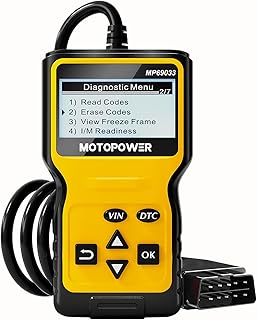
The MP69033 answers the main complaint about entry level scanners, which is that a bare code number sends you looking for a signal to search on. It carries a definition library on the unit, so the screen shows both the code and a sentence about what set it.
The backlight matters more than it sounds. The port sits in the footwell where daylight rarely reaches, and a lit screen is the difference between reading a code in place and pulling the tool out to a window. For a unit at this level that is a meaningful piece of design.
What it does not do is stream live data. If your fault is intermittent, or if you want to watch fuel trim while the engine runs, this is the wrong tool and one of the live data units below is worth the difference. For reading, understanding, and clearing a stored fault, it covers the whole job.
Bottom line: the value pick, and the one to choose if you want the code explained on the same screen where you read it.
- Type: handheld with built in screen
- Coverage: engine and emissions codes on OBD2 vehicles
- Display: backlit panel
- Code library: stored on the unit
- Live data: not included
- Freeze frame: included
- Readiness monitors: included
- Power: drawn from the vehicle port
This suits an owner who wants the cheapest sensible entry into the category but does not want to look codes up on a phone afterward. It fits a second car, a teenage driver, or a household that wants a reader in each vehicle rather than one shared unit. Look higher up the list if you want live sensor data or access to systems beyond the powertrain.
Compare this against the plainest handhelds on one question: do you want the definition on screen. If yes, this is the least expensive way to get it. If you already keep a code lookup bookmarked and mainly want a reliable read and clear, the simpler units are equally capable. Do not buy this expecting manufacturer specific coverage, since the code library covers the standard set of powertrain faults.

Pros
- Live data and freeze frame on a self contained screen
- Colour display with a readiness indicator that reads at a glance
- Code definitions stored on the unit
- Records and plays back data streams for intermittent faults
Cons
- Menus take more steps than a plain read and clear unit
- Graphing on a small screen is cramped compared with a phone display
The NT301 is the answer for owners who want live data without handing the job to a phone. It reads the same sensor stream a dongle would, but shows it on a colour screen that belongs to the tool, which means nothing depends on pairing or an app version.
Live data changes what you can diagnose. A stored code tells you a circuit reported a fault; watching fuel trim, coolant temperature, and oxygen sensor voltage while the engine runs tells you whether the sensor is failing or is reporting a real problem elsewhere. The playback function is the part owners underuse, since it lets you record a drive and review the moment the fault appeared.
The cost of that capability is navigation. There are more menus than on a read and clear unit, and the display is small enough that graphs are best read one parameter at a time. Neither is a flaw so much as the shape of a handheld that does more.
Bottom line: the pick when you want real diagnostic depth and prefer a tool that works with no phone in the equation.
- Type: handheld with colour screen
- Coverage: engine and emissions codes on OBD2 vehicles
- Live data: streamed with graphing and playback
- Freeze frame: included
- Readiness monitors: indicator plus detail screen
- Code library: stored on the unit
- Updates: over a computer connection
- Power: drawn from the vehicle port
Choose this if you do your own repairs and want to confirm a diagnosis rather than accept a code at face value, and if you would rather not depend on a phone in the driveway. It is also the better choice for anyone chasing a fault that comes and goes, because the recording function captures what a live read would miss.
Read stored codes first, then open freeze frame to see the conditions at the moment the fault set. For an intermittent problem, start a recording before the drive that usually triggers it and review the playback afterward rather than trying to watch the screen while driving. Update the firmware over a computer when you first get it, since definitions and vehicle coverage improve with updates.

Pros
- Readiness status shown by indicator lights, readable in seconds
- Reads and clears codes with one button flow
- Onboard definitions with a clear screen layout
- Small enough to leave permanently in a glovebox
Cons
- Live data is limited compared with larger handhelds
- Cable is short, so you sit close to the footwell while reading
The AL319 is designed around the question most owners actually ask twice a year: will this car pass inspection. Instead of burying readiness status in a submenu, it puts it on indicator lights, so the answer arrives before you have finished reading the screen.
The rest of the tool is a competent basic reader. Stored and pending codes come up quickly, definitions are on board, and freeze frame is included. The one button flow means there is very little to learn, which is the right decision for a unit that may sit unused for months between uses.
Its limits are the ones you would expect at this size. Live data exists but is thin next to a dedicated live data handheld, and coverage stops at the powertrain. For an owner who wants a fast pass or fail answer plus the ability to read a light, that is a fair trade.
Bottom line: buy this if inspection readiness is the reason you are shopping, and you want that answer without navigating anything.
- Type: compact handheld
- Coverage: engine and emissions codes on OBD2 vehicles
- Readiness: coloured indicator lights plus detail screen
- Codes: stored and pending, with definitions
- Freeze frame: included
- Live data: limited
- Power: drawn from the vehicle port
- Cable: fixed to the unit
This is for the owner in a state with an inspection or emissions program who wants to check status in the driveway before booking. It also suits anyone who wants the simplest possible tool to keep in a car that is otherwise maintained by a shop. Skip it if you want to watch live sensor values or need access beyond engine and emissions systems.
The decision here is between a fast readiness check and diagnostic depth. If your car is under warranty or serviced by a shop, depth is wasted and this size is right. If you repair your own vehicles, put the money toward a live data handheld instead. Check that your model year is covered before buying, since the standard applies to vehicles from the 1996 model year onward.

Pros
- Explains codes in ordinary language rather than shorthand
- Stays plugged in, so a fault can be checked from the driveway
- Tracks maintenance reminders across more than one vehicle
- Phone screen shows far more text than any handheld display
Cons
- The most useful guidance features sit behind a paid tier of the app
- Depends entirely on a charged phone with the app installed
FIXD approaches the category from the owner side rather than the mechanic side. The adapter stays in the port, and the app translates a code into a sentence about what is wrong and how urgent it is, which is the question a driver actually has when the light appears.
That translation is the product. A handheld shows a code and expects you to know what to do with it; this shows a description, a severity indication, and a sense of whether the car should be driven. For an owner who has no interest in sensor values, that is more useful than a data stream.
The trade is the subscription structure and the phone dependency. Reading and clearing works without paying, while deeper guidance and history features belong to the paid tier, and none of it works if the phone is dead. Read the current terms before buying so the tier split is not a surprise.
Bottom line: the pick for an owner who wants to be told what a code means, not shown what the sensors are doing.
- Type: Bluetooth adapter with phone app
- Coverage: engine and emissions codes on OBD2 vehicles
- Display: your phone
- Code definitions: plain language in the app
- Live data: available in the app
- Maintenance tracking: included in the app
- Power: drawn from the vehicle port
- Some app features require a paid tier
This fits a driver who wants a clear explanation and a sense of urgency, and who keeps their phone with them anyway. It works well for a household tracking maintenance across two or three cars. It is the wrong choice for a shared vehicle where whoever needs the reading might not have the app, and for anyone who wants to avoid subscriptions entirely.
An adapter left in the port draws a small amount of power, so unplug it if the car will sit unused for weeks, especially with an older battery. Keep it clear of the pedals and check that it does not sit where a foot can catch it. Do not read the app while driving; if you want data from a drive, have a passenger watch the screen or review it afterward.

Pros
- Reads systems beyond the powertrain on many makes
- Fast data rate makes live graphing on a phone genuinely smooth
- Works with a wide range of third party apps
- Sleep mode reduces the drain of leaving it plugged in
Cons
- The capability only appears once you pick a suitable app
- Costs considerably more than a basic dongle or handheld
The MX Plus is the wireless option for someone who already knows what they want from the port. Its data rate is high enough that live graphs on a phone update smoothly, and on supported makes it reaches modules that the mandated standard never covered, such as antilock brake and body systems.
The important thing to understand before buying is that the adapter is half of the tool. Its ceiling depends on the app you pair it with, and the manufacturer specific access that justifies the price is only available through apps that implement it. Buy it with a plan for which app you will use.
Sleep mode is the practical detail that separates it from cheaper adapters. Left plugged in, it drops to a low power state instead of drawing steadily on the battery, which matters on a car that sits for days at a time.
Bottom line: the deepest wireless option here, and the right buy only if you are willing to choose an app to match it.
- Type: Bluetooth adapter with third party app support
- Coverage: OBD2 protocols plus manufacturer specific modules on supported makes
- Display: your phone or tablet
- Live data: supported with logging
- Power management: sleep mode when the vehicle is off
- App: chosen by the user
- Firmware: user updatable
- Connection: wireless
This is for an enthusiast or a serious home mechanic who wants manufacturer level access without a shop grade handheld, and who is comfortable researching which app supports their make. It is not the right first scanner: an owner who simply wants to know why the light is on will get the same answer from a plain handheld for far less.
Choose the app before you plug the adapter in, because the app decides which systems you can reach. Pair it once with the phone that will normally be in the car, then set up the specific dashboards you want rather than scrolling long parameter lists each time. For a long diagnostic drive, log the session and review it afterward instead of watching the screen live.

Pros
- Battery and alternator test built in, which catches a common false lead
- Live data and freeze frame on the unit itself
- Oil and service light reset for owners who change their own oil
- Screen layout is legible with clear labelling
Cons
- Bulkier than a basic reader and less convenient to store
- More functions means more menu depth to learn
The 5210 is built around a fact that catches a lot of owners out: a tired battery or a weak charging system can set codes that look like sensor faults. By putting a battery and alternator test on the same tool that reads the codes, it lets you eliminate the cheapest possible cause before you buy a part.
Beyond that it is a capable mid level handheld. Live data and freeze frame are present, readiness monitors are covered, and the oil reset earns its place for anyone who changes their own oil on a car that will not clear its own reminder.
The trade is size and menu depth. It is bigger than a glovebox reader and there is more to learn, so it suits someone who will use it regularly rather than twice a year. Used that way, the extra functions pay for themselves.
Bottom line: the pick if you maintain your own car and want the electrical check and the code read from one tool.
- Type: handheld with built in screen
- Coverage: engine and emissions codes on OBD2 vehicles
- Battery test: battery and charging system
- Live data: included
- Freeze frame: included
- Service functions: oil and service reminder reset
- Readiness monitors: included
- Power: drawn from the vehicle port
Buy this if you do your own maintenance and want one tool that covers the diagnostic and electrical checks you actually perform. It fits an older car particularly well, where a marginal battery is a live possibility every winter. If you only need to know why a light is on, a simpler handheld does that job with less to learn.
Run the battery test with the engine off first and then with it running, since the two readings answer different questions about the battery and the alternator. Keep hands and the cable clear of moving belts and the cooling fan whenever the engine is running. Reset a service reminder only after the service is actually done, so the next interval starts from the right point.

Pros
- Battery check included without moving to a much larger tool
- Larger screen than entry level handhelds
- Keeps the no app, no account approach
- Readiness monitors and freeze frame both covered
Cons
- Battery test is a quick check rather than a full load analysis
- Still limited to powertrain systems, with no airbag or brake access
The AD530 is what the plain handheld becomes when you give it one more job. The reading flow is unchanged, which is the point, and the addition is a battery check that answers a question owners often face at the same moment as a warning light.
The bigger screen is the quieter improvement. More text per line means definitions read as sentences rather than fragments, and menu items are easier to pick out in a dim footwell. Neither changes what the tool can reach, but both change how quickly you get to it.
The battery function is a check rather than a laboratory test, so treat a marginal result as a reason to have the battery tested properly rather than a verdict. Within those limits it is enough to tell you whether the electrical system deserves attention before you chase a sensor.
Bottom line: the step up to take when you like the simplicity of a basic reader but want a battery check and a screen you can actually read.
- Type: handheld with built in screen
- Coverage: engine and emissions codes on OBD2 vehicles
- Battery check: voltage reading on the unit
- Display: larger panel than entry level handhelds
- Freeze frame: included
- Readiness monitors: included
- Code library: stored on the unit
- Power: drawn from the vehicle port
This suits an owner who wants the simplicity of a basic reader but keeps running into questions about the battery, which is most people with a car more than a few years old. It is a sensible single purchase for a household that wants one tool covering both. Look elsewhere if you need live data graphing or systems beyond the powertrain.
Compare this directly against the entry level handheld from the same maker. If your car is newer and the battery is under warranty, the extra function is optional and the cheaper unit is enough. If winter starts are already slow, the battery check is the reason to choose this one. Do not expect it to replace a proper load test at a parts counter.

Pros
- Indicator light gives readiness status without navigating menus
- Small body suits permanent glovebox storage
- Reads stored and pending codes with definitions
- No app, account or pairing at any stage
Cons
- No live data, so it cannot help with intermittent faults
- Small screen limits how much definition text fits at once
The NT201 is the compact end of the same design language as its larger sibling, stripped to the checks an owner performs most often. The readiness indicator is the headline: it answers the inspection question with a light rather than a menu, which is the fastest version of that check.
Pending codes are the feature worth knowing about. A pending code is a fault the computer has seen once but not yet confirmed, and reading it gives you warning before the lamp comes on at all. For a car you are preparing to sell or to test, that is genuinely useful information.
What you give up is depth. There is no live data stream, so a fault that comes and goes will not be diagnosed here, and coverage stays inside engine and emissions systems. As a small tool that lives in the car and answers two questions quickly, it is well judged.
Bottom line: buy this as the compact inspection and quick check tool, not as your only diagnostic instrument.
- Type: compact handheld
- Coverage: engine and emissions codes on OBD2 vehicles
- Readiness: indicator light plus detail screen
- Codes: stored and pending with definitions
- Freeze frame: included
- Live data: not included
- Power: drawn from the vehicle port
- Size: pocket sized body with fixed cable
This is for someone who wants a permanent glovebox tool for inspection checks and quick reads, particularly in a state with an annual emissions programme. It also suits a used car buyer who wants to check for pending codes before a purchase. Anyone chasing an intermittent fault should choose a live data unit instead.
For an inspection check, read readiness status before you clear anything, since clearing resets every monitor to incomplete. When checking a car you are thinking of buying, read pending codes as well as stored ones, because a seller who cleared the light recently will leave monitors incomplete and pending faults visible. Keep the unit in its case so the cable does not kink at the plug.
How to Choose a Vehicle Code Reader
Two form factors, then four questions about depth. Read the first section even if you skip everything else, because buying the wrong form factor is the mistake that leaves a scanner unused in a drawer.
Handheld Screen or Bluetooth Dongle

A handheld reader is a self-contained unit: a plug on a cable, a small screen, and a keypad. You plug it into the port under the dash, wait for it to power up from the car, and read the code off the screen. Nothing pairs, nothing updates, and nothing expires. That matters more than it sounds, because the moment you actually need this tool is often on the shoulder of a road with one bar of signal and a passenger asking whether it is safe to keep driving.
A Bluetooth dongle is a thumb-sized adapter that stays in the port and sends data to an app on your phone. The screen is bigger, the code definitions are easier to read, and the good ones graph live sensor data in a way no two-line handheld display can match. The trade is that the dongle is only as good as the app behind it, and some of those apps put their most useful features behind a subscription.
The practical rule is who else drives the car. A handheld unit can be handed to a spouse or a teenage driver with one sentence of instruction. A dongle assumes whoever needs the answer has the app installed and the account logged in. Households with several drivers and one shared car tend to be happier with a handheld; a single owner who likes data is better served by a dongle.
What the OBD2 Port Actually Covers
Every car sold in the United States from the 1996 model year onward has a standardized sixteen pin OBD2 port, usually within reach of the driver knee. That standard is what lets a thirty dollar reader work across dozens of makes. It is also narrower than most buyers expect: the mandated part of the standard covers the powertrain, meaning engine and emissions related faults, and nothing else.
Airbag faults, antilock brake faults, transmission faults on many makes, and every body control module in the car sit outside that mandated set. Manufacturers expose them through their own protocols, so a basic reader will show a clean bill of health while an airbag lamp is still glowing on the dash. Readers that reach those systems say so explicitly with terms like ABS, SRS, or enhanced coverage, and they cost more because that access has to be licensed and maintained per make.
Check the listing for your specific make before assuming coverage. European and Asian brands sometimes use manufacturer protocols that a budget unit reads only partially, and hybrid and electric drivetrains introduce whole systems the basic standard never contemplated. The safest assumption with an inexpensive tool is that it reads engine and emissions faults on a mainstream car built after 1996, and that anything beyond that is a bonus you should verify.
Live Data and Freeze Frame

A stored code tells you what the computer decided was wrong. Live data tells you what the sensors are reporting right now, in real time, while the engine runs. That is the difference between reading that an oxygen sensor circuit is lean and watching the fuel trim numbers climb as you rev the engine, which is how you separate a failing sensor from a vacuum leak feeding it bad air.
Freeze frame is the quieter feature and it is arguably more useful for an owner. When the computer sets a code it also snapshots the conditions at that instant: engine speed, coolant temperature, vehicle speed, and load. An intermittent misfire that only appears cold reads very differently from one that appears at highway speed, and the freeze frame is what tells you which one you have without reproducing the fault on demand.
The tools here split cleanly on this. The FOXWELL NT301 OBD2 Scanner and the Innova 5210 OBD2 Scanner and Engine Code Reader both stream live data on a handheld screen. The FIXD Bluetooth OBD2 Scanner and the OBDLink MX Plus put that same stream on a phone, where the graphing is far easier to read. The simplest units read and clear codes only, which is genuinely enough for a large share of owners.
Emissions Readiness Before the Test
If your state runs an emissions or inspection program, one function on this list saves more money than all the others combined: the readiness monitor check, sometimes labeled I/M readiness. The car runs internal self tests on its emissions systems, and each one reports as complete or incomplete. Arrive with too many incomplete monitors and the test is refused before it starts, which still costs you the appointment.
Those monitors reset whenever codes are cleared or the battery is disconnected, and they only complete again after the car has been driven through a specific pattern of cold starts, steady cruising, and idling. Depending on the make that can take days. A reader that shows monitor status in a single screen turns a wasted trip into a five second check in the driveway.
Several units here put that status behind a dedicated button or a colored light, which is the fastest possible version of this check. The Autel AL319 Professional OBD2 Scanner and the FOXWELL NT201 OBD2 Scanner both use an indicator that tells you pass or not ready at a glance, without navigating a menu, and that is exactly the design you want for a check performed in a parking lot.
Code Definitions, Guidance, and Subscriptions

A raw code such as P0420 is a starting point, not an answer. What separates tools in daily use is how much context arrives with it. Some handhelds carry an onboard library and print a plain sentence next to the code. Others show the code alone and expect you to look it up, which is fine at home and frustrating on the roadside.
App based tools go furthest here, often ranking likely causes and estimating repair difficulty. That guidance is generated from aggregate data rather than from an inspection of your car, so treat it as a shortlist to check rather than a diagnosis. It is genuinely useful for deciding whether a fault is a driveway job or a shop job, which is the decision most owners actually face.
Read the subscription terms before buying an app based unit. The pattern to look for is which features work on the free tier: reading and clearing codes usually does, while repair guidance, maintenance tracking, and multi vehicle history often do not. A handheld unit has no such tier, which is part of why the plain ones stay popular. Our article archive covers adjacent tools in the same way.
Extras Worth Paying For
Battery and charging system testing is the extra that earns its place most often, because a weak battery throws error codes that look like sensor faults and sends people chasing the wrong repair. Units such as the ANCEL AD530 OBD2 Scanner and the Innova 5210 fold that test in, so you can rule out the cheapest possible cause first.
Oil and service light resets are the second most useful addition for anyone who changes their own oil, since on many modern cars the maintenance reminder does not clear itself. ABS and airbag access is the third, and it is the one that moves a tool from owner grade toward shop grade, with pricing to match.
Ignore feature counts printed on the box. A listing advertising a long menu of functions may support each of them on only a narrow set of makes. The question worth asking is whether the specific function you want is confirmed for your specific make and model year, which is usually answered in the compatibility section rather than the headline.
| Type | Best at | Weak at |
|---|---|---|
| Basic handheld reader | Instant read and clear, works with no phone or account | Small screen, code definitions are brief or absent |
| Handheld with live data | Freeze frame and sensor streams without a subscription | Menus are slower, graphs are cramped on a small display |
| Bluetooth dongle and app | Readable definitions, graphed live data, repair guidance | Depends on a phone, best features may need a subscription |
Why You Should Trust Us
We build these lists from published specification and from the pattern of what long-term owners report rather than from marketing copy. For every scanner here we checked the stated protocol support, whether live data and freeze frame are included or reserved for a higher model, whether readiness monitors get a dedicated display, and whether any advertised function depends on a paid tier of an app.
We set aside near-identical listings that differ only in bundle contents or cable length, so every entry here is a genuinely different tool rather than the same unit twice. Where a maker sells a base model and an upgraded version of the same scanner, we kept the one whose extra function is meaningful on its own and said what that function is, instead of repeating the family name across two cards.
Final Thoughts
Best overall is the ANCEL AD310 Classic Enhanced Universal OBD II Scanner. It does the one thing everybody buys this category for, reading and clearing engine codes, with no pairing, no app, and no account, and it is the unit you can hand to another driver with a single sentence of explanation.
Best value is the MOTOPOWER MP69033 Car OBD2 Scanner Code Reader. It covers the same core job as the top pick and adds an onboard code lookup, which is the feature that keeps a roadside reading from turning into a search on a weak signal.
For specific needs, the FOXWELL NT301 OBD2 Scanner is the pick if you want live data without a phone, the OBDLink MX Plus is the one to buy if you want the deepest wireless access and are comfortable choosing your own app, the FIXD Bluetooth OBD2 Scanner suits an owner who wants plain language guidance more than raw numbers, and the Innova 5210 makes sense if battery testing and oil resets are part of your routine. The Autel AL319 and the FOXWELL NT201 are the two to look at when a pending inspection is the whole reason for the purchase. More picks are indexed across our category index and in the tools section.
Vehicle Code Reader FAQs
Will a code reader tell me which part to replace?
It tells you which circuit or system reported a problem, which is not the same thing. A code pointing at a catalytic converter can be caused by the converter itself, by an oxygen sensor lying about what it sees, or by an exhaust leak upstream drawing in air. The code narrows the search from the whole car to one subsystem, and that is its job. Tools that suggest likely causes are ranking probabilities from aggregate data, so treat the suggestion as the first thing to inspect rather than the parts order.
Does clearing the code fix anything?
No. Clearing erases the stored fault and turns off the lamp, but the condition that set it is untouched. If the fault is still present the light returns, sometimes within a single drive cycle and sometimes after several. Clearing is genuinely useful in two cases: confirming a repair worked, and checking whether a one-time event such as a loose gas cap has resolved. Clearing simply to hide the light also erases the freeze frame data a mechanic would have used.
Can I clear codes right before an emissions test?
You can, and it is usually the fastest way to fail. Clearing resets the readiness monitors to incomplete, and most programs refuse a vehicle with too many incomplete monitors regardless of whether the light is on. Those monitors only complete again after a specific pattern of driving that can take several days. Check readiness status first, and if monitors are incomplete, drive normally for a few days and check again before booking the test. Our automotive archive has more on maintenance timing.
Do these work on any car?
Any car sold in the United States from the 1996 model year on has the standard port, and the basic engine and emissions functions work across makes. Beyond that, coverage varies. Antilock brake and airbag systems are read through manufacturer specific protocols, so a tool that reaches them on one make may not on another. Some European and Asian models expose only part of the enhanced data to third party tools. Check the compatibility list for your make and model year rather than trusting the headline claim.
Is a handheld unit or a phone dongle better for a beginner?
A handheld unit asks less of you at the moment you need it: plug in, read, decide. A dongle gives a beginner more help understanding what the code means, since a phone screen can show a paragraph where a handheld shows a line. The deciding question is usually whether the car has one driver or several, and whether you want a tool that keeps working when the phone is dead or the signal is gone.

Write Your Review
No reviews yet. Be the first to share your experience!