

No subscription is the headline that sells these cameras and it means at least three different things depending on the manufacturer. Sometimes footage goes to a card inside the doorbell, sometimes to a base station indoors, and sometimes the phrase covers a free tier while the features people actually want stay behind a paywall. There is also a consequence nobody advertises: recordings kept only at home can be taken along with the hardware. We compared 8 doorbells from aosu, REOLINK, WYZE and more on where footage lives, how they are powered, and what still costs money afterwards.
Our top pick is the eufy Security Video Doorbell E340, because dual cameras and genuine local storage cover the two things a doorbell is actually for. For related home security, our electronics guides cover cameras and sensors.

Pros
- Second downward camera shows the doorstep, not just faces
- Local storage with no recurring fee
- Person detection runs on the device
- Works on battery or existing wiring
Cons
- Costs more than single camera doorbells
- Local footage can be taken with the unit unless a base is used
A single wide lens has to choose between framing a visitor's face and showing what was left on the step, and most doorbells choose the face. Two cameras remove the compromise, which is why this leads the list.
Storage is genuinely local, so there is no plan to renew and no clip window expiring. Person detection also runs on the device rather than in a cloud service, which is what keeps it working without a subscription.
Two things to weigh. It costs more than a basic single camera unit, and like any doorbell storing footage in itself, removing the doorbell removes the recording unless you pair it with storage kept indoors.
Bottom line: the most complete answer here, and the one that actually shows the parcel.
- Cameras: dual, front and downward
- Resolution: 2K
- Storage: local, no subscription required
- Power: battery or existing wiring
- Detection: person detection on device
- Chime: compatible with wireless chime
Set activity zones to exclude a pavement or road, which removes most false alerts on a street facing door.
If wiring exists, connect it even on battery models so the unit trickle charges and never needs removing.
Use an endurance rated memory card, since continuous recording wears ordinary cards out.
Consider keeping a free cloud tier alongside local storage as insurance if the doorbell itself is taken.
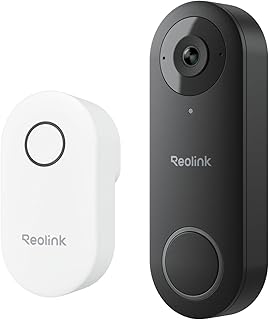
Pros
- Wired power removes battery charging entirely
- Local card storage with no recurring fee
- Taller aspect ratio suits front door use
- Brand focused on no subscription operation
Cons
- Requires existing doorbell wiring
- Footage stored in the unit can be taken with it
Where doorbell wiring already exists, a wired unit removes the one recurring chore of a battery model and the window of downtime while it charges.
The brand behind this builds its business on cameras that record locally rather than on recurring revenue, which matters when judging whether free features stay free.
The requirements are the standard wired ones: adequate transformer voltage, and often a small adapter at a mechanical chime. Footage lives in the unit, so the theft consideration applies as with any doorbell recording to itself.
Bottom line: the wired choice when you have the wiring and want nothing recurring.
- Resolution: 2K
- Power: wired only
- Storage: local card
- Subscription: not required
- Field of view: tall aspect for full body
- Chime: adapter may be needed for mechanical chimes
Homes with working doorbell wiring that want no charging and no recurring cost.
Not an option where wiring is absent or the transformer is underpowered.
Check transformer voltage before installing, since camera doorbells draw more than a simple bell.
Fit the chime adapter if one is supplied; skipping it causes buzzing or reboot loops.

Pros
- Wireless chime included in the box
- Local card storage with no fee
- Wide field of view
- Established networking brand behind the app
Cons
- Battery needs recharging periodically
- Local only storage carries the usual theft caveat
Including the chime matters more than it sounds, because a doorbell that only notifies a phone is a poor doorbell for anyone in the house without the app open.
Recording goes to a card locally with no plan involved, and the app comes from a company with a large existing networking ecosystem rather than a single product brand.
Battery power means periodic recharging, at intervals that depend heavily on how much traffic passes the door. And as with any doorbell storing footage internally, that footage leaves with the unit if it is removed.
Bottom line: a well rounded battery option with the chime already in the box.
- Resolution: 2K
- Power: battery
- Storage: local card
- Chime: wireless chime included
- Field of view: 160 degrees
- Subscription: not required for local recording
Homes without doorbell wiring that want a complete kit including an indoor chime.
Less suited to very busy doors where battery life will be short.
Place the plug in chime where it is audible from the main living area rather than nearest the door.
Set detection zones to exclude passing traffic, which also extends battery life by reducing wake ups.

Pros
- Very affordable for a wired doorbell
- Tall aspect ratio shows visitor and doorstep
- Wired power means no charging
- Simple setup for existing wiring
Cons
- Requires existing wiring, as the name states
- Some features sit behind an optional plan
For a house with working doorbell wiring, this is the least expensive route into a camera doorbell, and the tall field of view is well suited to a front door where the parcel matters as much as the face.
Wired power removes charging entirely, which is the main practical advantage over battery units.
Read the storage arrangement carefully. There is a free tier and there are features that sit behind an optional plan, so this is the middle version of subscription free rather than the strongest. For many households the free tier is sufficient, and it is worth confirming that before buying rather than after.
Bottom line: the budget wired option, with a free tier rather than pure local recording.
- Power: wired, requires existing wiring
- Field of view: tall aspect ratio
- Storage: free tier plus optional plan
- Charging: none required
- Price: budget end of the category
- Chime: works with existing chime
Confirm which features are included free and which need a plan before ordering, since that is the whole question in this category.
Check your transformer voltage, as camera doorbells draw more than a mechanical bell.
Budget conscious buyers with existing doorbell wiring who are content with a free tier.
Not the pick for anyone who wants purely local storage.

Pros
- Base station keeps recordings inside the house
- 5MP resolution captures more detail
- No recurring fee for local recording
- Base can extend wireless range
Cons
- Base station needs an indoor mains socket
- More hardware to place than a standalone doorbell
This addresses the flaw in local storage directly. Footage travels to a base station indoors, so the camera at the door holds nothing worth stealing and the recordings sit somewhere an intruder would have to enter to reach.
Higher resolution helps with the detail that actually matters, faces and plates, particularly when footage is being reviewed after the fact rather than watched live.
The costs are practical rather than financial. The base needs an indoor socket and somewhere sensible to live, and it is another device to set up. In return the base often improves wireless reliability at the door, which is where these systems commonly struggle.
Bottom line: the answer if the theft weakness of local storage is what concerns you.
- Resolution: 5MP
- Storage: indoor base station
- Power: battery doorbell, mains base
- Subscription: not required
- Range: base can improve connection
- Setup: two devices to place
Anyone concerned that a stolen doorbell takes the evidence with it, and homes with weak signal at the front door.
Less suitable where there is nowhere sensible to put a base station.
Place the base toward the front of the house rather than in a back room, which helps the doorbell connection as well as storage.
Check base capacity and how it handles a full drive, since overwriting oldest first is what you want.
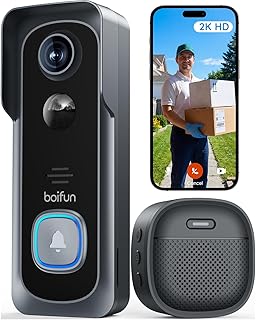
Pros
- Local recording with no plan needed
- Battery install without wiring
- Chime included for indoor alerts
- Simple setup
Cons
- Basic feature set compared with premium models
- Footage stored at the door rather than indoors
Some buyers want a doorbell that shows who is at the door and records it, without ecosystems, tiers or decisions. This is that product.
Battery power means it goes anywhere in minutes, the chime handles indoor alerts, and recording is local with nothing to renew.
The feature set is basic next to premium models: expect simpler detection and fewer options for zones and sensitivity. And footage lives in the unit, which carries the usual caveat about the doorbell being removed.
Bottom line: uncomplicated local recording for people who want exactly that.
- Power: battery
- Storage: local card
- Subscription: not required
- Chime: included
- Installation: no wiring needed
- Features: basic detection
Buyers wanting a simple, fee free doorbell without configuring much.
Less suitable where advanced detection zones matter, such as a busy street front.
Use an endurance rated card and check how the unit behaves when the card fills.
Recharge on a routine rather than waiting for a low battery alert.

Pros
- 2K resolution at a budget price
- Chime included in the box
- Local recording with no fee
- Quick battery installation
Cons
- Less refined detection than premium models
- Battery life depends heavily on door traffic
At the budget end, the question is whether the basics are covered properly, and here they are: 2K footage, an indoor chime and local recording with nothing to pay monthly.
Installation is the usual battery routine, which takes minutes and needs no wiring or electrician.
Detection is where budget models generally give ground, with fewer zone controls and more false alerts on a busy frontage. Battery life also swings widely with traffic past the door, so a street facing installation will need charging noticeably more often than a quiet one.
Bottom line: covers the essentials at a low price, with detection as the compromise.
- Resolution: 2K
- Power: battery
- Storage: local card
- Chime: included
- Subscription: not required
- Detection: basic
Quiet doors where budget matters more than advanced detection.
Less suitable for a busy street frontage generating constant motion.
Assess how much traffic passes your door before choosing a battery model, since that drives charging frequency.
Check whether detection zones can be configured if the door faces a pavement.
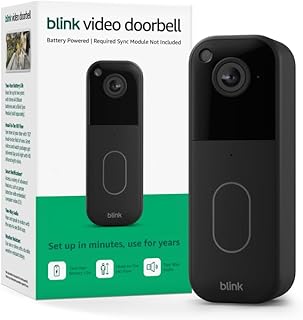
Pros
- Long battery life compared with rivals
- Head to toe field of view
- Large user base and mature app
- Local storage possible with a sync module
Cons
- Local storage needs an additional module
- Cloud features involve a plan
Battery life is where this stands out, running considerably longer between charges than many rivals, which matters because recharging is the recurring chore of a battery doorbell.
The head to toe field of view is the right shape for a front door, showing the step as well as the visitor.
The storage arrangement needs reading carefully against the subscription free question. Local storage is possible, and it requires an additional module rather than working out of the box, while the cloud features involve a plan. Buy it understanding which of those you intend to use.
Bottom line: excellent battery life, with local storage as an add on rather than a default.
- Power: battery, long life
- Field of view: head to toe
- Storage: local via sync module, or cloud plan
- Ecosystem: large and mature
- Installation: battery, no wiring needed
- Extra hardware: module required for local
Budget for the sync module if local storage is the goal, since it is not included with the doorbell.
Confirm which features you need are available without a plan before ordering.
Households prioritising battery life and willing to add a module for local recording.
Less suitable for someone wanting local storage with no extra hardware.
How to Choose a Video Doorbell With No Subscription
Three Different Meanings of No Subscription
The strongest version is genuine local recording, where footage is written to a memory card or a home base station and the manufacturer plays no part in storing it. Nothing expires, nothing needs renewing.
The middle version is a free cloud tier, typically holding a short rolling window of clips. It costs nothing and it is limited by design, since the point is to demonstrate what the paid tier does.
The weakest version is a doorbell that streams live for free while every recorded clip requires a plan. It is technically free to use and it will not have footage of whatever happened while you were out. Read which of the three a product offers rather than the phrase on the box.
Local Storage Has a Theft Problem
This is the trade nobody puts on the packaging. If the only copy of the footage is on a card inside the doorbell, then removing the doorbell removes the evidence.
A base station indoors solves it neatly. The doorbell transmits to a hub inside the house, so the camera at the door holds nothing worth taking and the recordings sit somewhere an intruder would have to enter to reach.
Where footage is stored in the doorbell itself, it is worth knowing that this is the arrangement you have. Some owners keep a free cloud tier alongside local recording specifically as insurance against the unit being taken, which is a reasonable belt and braces approach.
Where the Recording Actually Lives
Card in the doorbell is the simplest arrangement and the cheapest. Check what capacity is supported, whether a card is included, and how the unit behaves when the card fills, since overwriting oldest first is what you want rather than simply stopping.
A base station adds cost and a mains socket indoors, and gives more storage, better protection and often longer retention. Some systems let one base serve several cameras, which changes the maths if you plan to add more later.
A third option worth checking is whether the doorbell can write to your own network storage. Where supported, that puts footage on hardware you already own and back up, which is the most durable arrangement of all.
Battery or Wired

Battery doorbells install anywhere in minutes and need recharging, typically every few months depending on how much traffic passes the door. A busy street front drains a battery considerably faster than a quiet cul de sac.
Wired units draw from existing doorbell wiring and never need charging, which removes the recurring task and the window of downtime while the unit is off the wall. They require that wiring to exist and to supply adequate voltage, which older installations sometimes do not.
The practical middle ground is a battery unit connected to wiring where it exists, trickle charging continuously. If you have wiring, prefer a model that can use it even if it also has a battery.
Existing Wiring and the Indoor Chime
Retrofitting is where installations go wrong. Existing doorbell transformers vary in voltage, and a camera doorbell draws more than a simple bell did, so an old transformer may not supply enough.
Mechanical chimes also need consideration. Many camera doorbells require a small adapter fitted at the chime to work correctly with it, and skipping that step produces buzzing, a chime that will not ring, or a doorbell that keeps rebooting.
Where wiring is absent or awkward, a battery model with a plug in wireless chime avoids the entire question. That combination is why battery doorbells dominate this category despite the recharging.
Field of View, and Seeing the Parcel

Aspect ratio matters more than the angle number. A wide but short field of view shows a visitor’s face and not the package on the step, which is exactly the footage people want.
Manufacturers describe the taller format as head to toe coverage, and it is genuinely more useful for a front door. Some models solve it with a second downward facing camera dedicated to the doorstep, which removes the compromise entirely.
Mounting height interacts with this. A doorbell fitted at standard height with a short field of view will frame chests rather than faces on tall visitors, and an angled wedge mount is a cheap correction for a badly placed box.
Detection, and the False Alert Problem

A doorbell that alerts on every passing car becomes a doorbell whose notifications get muted, at which point it has stopped doing its job. Detection quality is the difference between a useful device and an ignored one.
Person detection filters out vehicles, animals and moving shadows, and on subscription free devices it usually runs on the doorbell itself rather than in the cloud. That local processing is a genuine selling point rather than a marketing line, since it keeps working without a plan.
Activity zones help just as much. Excluding a pavement or a road from the detection area removes most false alerts on a street facing door, and a device without zone control will struggle in that position no matter how good its detection is.
Night Vision and Facing the Wrong Way
Most doorbells use infrared at night, producing a black and white image. Some add a spotlight for colour footage, which is more useful for identification and also announces that the camera is there.
Daytime backlight is the harder problem and the one people meet more often. A door facing the afternoon sun leaves visitors silhouetted against a bright background, and the resulting footage shows a dark shape rather than a face.
Look for high dynamic range handling if your door faces west or south, and consider whether the mounting position can be angled slightly away from the worst of the glare. This is a limitation of physics that no amount of resolution fixes.
Wi-Fi at the Front Door
The front door is often the weakest point of a home network, sitting behind an external wall at the far end of the house from the router. A doorbell with a marginal connection drops clips, delivers late notifications and reboots.
Check signal strength at the door with a phone before buying, and be aware that many doorbells connect only on the slower band, which travels further through walls than the faster one. That is a deliberate design choice rather than a limitation.
Where signal is poor, a base station or a mesh node near the front of the house fixes it properly. Adding a doorbell to a marginal network and hoping is the most common cause of a device that seems unreliable.
What Still Costs Money Later
Subscription free does not mean cost free forever. Memory cards need buying and eventually fail, since continuous recording writes to them constantly and cards have a finite write life. Endurance rated cards are made for this and are worth the small premium.
Batteries degrade over years and are not always user replaceable, which quietly sets a lifespan on a battery powered unit. Base stations and wireless chimes are additional hardware if not included in the box.
Finally, check whether the free features you are buying for are guaranteed or merely current. Manufacturers have moved features behind paywalls after launch before, and a company whose business model depends on hardware sales rather than recurring revenue is a safer bet for keeping them free.
Privacy, Neighbours and Where the Camera Points
A doorbell camera records more than your own doorstep, and that is worth a few minutes of thought before mounting it.
Rules vary by country and locality, and the recurring theme across them is proportionality: recording your own entrance is ordinarily fine, while pointing a camera into a neighbour’s windows, garden or across a shared hallway is where complaints and legal problems begin. Audio recording is often treated more strictly than video, and some devices let you disable the microphone entirely, which is worth knowing if the door opens onto a shared space.
Activity zones help here as well as with false alerts. Excluding a neighbour’s property from the monitored area reduces what gets recorded in the first place, and on flats or terraced houses that is the difference between a device nobody minds and a source of friction.
Local storage has a quiet advantage in this respect too. Footage that never leaves your house is not held on a company’s servers, subject to their retention policy or accessible through their systems. For people who chose subscription free partly on principle rather than cost, that is often the real reason.
| Doorbell | Storage | Power | Best For |
|---|---|---|---|
| eufy Video Doorbell E340 | Local, dual camera | Battery or wired | Seeing both visitor and doorstep |
| REOLINK Video Doorbell 2K | Local card | Wired | Wired installs with no ongoing cost |
| Tapo 2K Video Doorbell | Local card | Battery with chime | Simple local recording |
| WYZE Wired Doorbell v2 | Local and free tier | Wired | Existing doorbell wiring |
| aosu 5MP Doorbell | Base station | Battery | Storage kept indoors |
| BOIFUN Video Doorbell | Local card | Battery with chime | Straightforward no fee setup |
| XTU 2K Doorbell | Local card | Battery with chime | Budget local recording |
| Blink Video Doorbell | Local with module or cloud | Battery | Long battery life |
For related devices, our electronics guides cover home technology, and the full library sits at our article index.
Why You Should Trust Us
We sorted this list by where footage is stored rather than by resolution, because that is what the search term is actually asking about and it is the detail most listings blur. A doorbell offering a free cloud tier and one recording to a card in your hallway are answering the question very differently.
We also excluded models whose recording features require a plan, however good the hardware. Real customer ratings informed the shortlist, with attention to repeated reports about false alerts, Wi-Fi dropouts and chime compatibility, and near identical listings of the same doorbell were counted once.
Final Thoughts
For most homes the eufy Security Video Doorbell E340 is the easiest recommendation. Local recording means no recurring cost, and the second downward camera solves the doorstep problem that a single wide lens handles badly.
Where existing wiring is available, the REOLINK and WYZE wired models remove battery charging entirely and keep footage local. The aosu base station approach is the one to choose if you are specifically worried about the doorbell being taken, since recordings sit indoors rather than at the door. Tapo, BOIFUN and XTU cover straightforward local recording at lower cost, and Blink is worth considering for battery life if you accept its storage arrangement.
Whichever you choose, check Wi-Fi strength at the door first, use an endurance rated memory card, and understand which of the three meanings of subscription free applies. Browse more of our category guides for the rest of the house.
Frequently Asked Questions
What is the best video doorbell with no subscription in 2026?
The eufy Security Video Doorbell E340 is our overall pick for 2026, combining genuine local storage with a second camera aimed at the doorstep. For a wired installation, the REOLINK 2K doorbell keeps footage local with no ongoing cost.
What is the catch with local storage?
If the only copy is on a card inside the doorbell, taking the doorbell takes the evidence. A base station indoors avoids that, and some owners keep a free cloud tier alongside local recording as insurance against the unit being removed.
Do I need existing doorbell wiring?
Not for battery models, which install anywhere and need recharging every few months. Wired units never need charging but require adequate transformer voltage, and many need a small adapter at a mechanical chime to work correctly with it.
Why does my doorbell alert on every passing car?
Because motion detection without filtering catches everything. Person detection and activity zones fix it, letting you exclude a pavement or road from the monitored area. On subscription free devices, person detection usually runs on the doorbell itself. Our electronics guides cover related devices.
Is a subscription free doorbell really free forever?
Free of recurring fees, not free of cost. Memory cards need replacing since continuous recording wears them out, batteries degrade over years and are not always replaceable, and base stations or chimes may be extra. Check whether free features are guaranteed rather than simply current.





Write Your Review
No reviews yet. Be the first to share your experience!