

Search for a fpv drone and you get two completely different aircraft on the same results page. One streams video to a phone clipped to the controller, which the listing calls FPV. The other puts you inside a headset flying in the first person, which is what pilots mean by the term. Both are sold with the same three letters, and buying the wrong one is the most common disappointment in this category. We sorted 7 of them from Holy Stone, Dwi Dowellin, Potensic and more by the things that actually separate them in September 2026: what the video feed goes to, how much the aircraft weighs, and how honest the flight time figure is.
Our top pick is the Potensic ATOM SE for combining GPS positioning, a stabilized 4K camera and a weight under the registration threshold, which is the combination most first buyers actually need. Below we sort the field from phone screen models up to a genuine headset system so you can match one to how you intend to fly. For adjacent kit, our electronics section covers cameras and accessories.

Pros
- GPS position holding keeps it still when you release the sticks
- Return to home covers signal loss and low battery
- Sits under the 249 gram registration line
- Bundled batteries give several flights per outing
Cons
- Electronic stabilization rather than a full mechanical gimbal
- Video is watched on a phone, not through goggles
The ATOM SE is the aircraft that answers what most first buyers actually want: aerial photographs, a drone that stays where it is put, and no registration paperwork.
GPS is the feature that matters most for a beginner. Without it the aircraft drifts on any breeze and a moment of hesitation becomes a chase across a field. With it, letting go of the sticks means the drone simply stops and waits.
The camera is stabilized in software rather than on a mechanical gimbal, so footage is smooth rather than cinematic. For photographs and casual video that is the right level, and it is part of why the aircraft stays under the weight line.
Bottom line: the sensible first drone for someone who wants photographs and a forgiving aircraft, and the one to buy if you only buy one.
- Type: GPS camera drone
- Weight: under 249 grams
- Camera: 4K with electronic stabilization
- Positioning: GPS with return to home
- Video: to a phone on the controller
- Airframe: foldable
- Batteries: multiple in the bundle
- Registration: below the United States threshold
Buy this as a first drone for someone who wants aerial photographs and a forgiving aircraft, and who would rather skip registration paperwork. It suits holidays, property photographs and learning outdoors. It is not the choice if you want immersive first person flying, which needs the goggle based system in this list.
Wait for a solid satellite lock before taking off, since return to home only knows where home is if it had a fix at launch. Fly the first few flights in an open field with no trees downwind. Check the current registration and airspace rules for your country before the first flight, and treat the quoted flight time as several shorter flights across the bundled batteries.

Pros
- Lowest cost route into flying with a camera
- Live preview on a phone clipped to the controller
- Beginner modes including one key takeoff and landing
- Cheap enough that a crash is not a disaster
Cons
- No GPS, so it drifts with any breeze and does not hold position
- Wi-Fi video is laggy and short range
The HS110D is the aircraft to learn the sticks on. It is inexpensive, it has a camera good enough to see what you are doing, and losing one in a hedge is an annoyance rather than a loss.
What it does not have is GPS, and that shapes everything. Release the sticks in a breeze and it keeps moving, so this is a drone for a still day, a garden or a large hall rather than for open country.
The live preview is genuine and useful for framing a photograph, but it lags. Fly by watching the aircraft and glance at the screen, which is the correct technique for every Wi-Fi drone here.
Bottom line: the value pick and the right first purchase if you want to find out whether flying appeals before spending more.
- Type: Wi-Fi camera drone
- Camera: 1080p
- Video: live preview to a phone
- Positioning: altitude hold, no GPS
- Modes: one key takeoff and landing, headless
- Guards: propeller guards included
- Use: learning, still conditions
- Registration: check weight against local rules
This suits a complete beginner, a gift, or anyone who wants to learn without risking much. It works best in a garden, a park on a calm day or a large indoor space. Anyone flying over open country, or wanting footage worth keeping, should move up to one of the GPS aircraft here.
Fit the propeller guards for the first flights, especially indoors and around people. Fly on calm days until the controls are second nature, since without GPS a gust moves the aircraft and it will not correct itself. Keep it in sight at all times, and check the local rules on where flying is permitted before you take off.

Pros
- GPS with return to home at a modest outlay
- Under 249 grams, so no registration for recreational use
- Foldable and light enough to carry easily
- Beginner friendly flight modes alongside GPS
Cons
- Camera stabilization is electronic rather than a gimbal
- Wi-Fi transmission limits real world video range
The HS175D is the middle rung of this list and a sensible step up from the beginner models. GPS, return to home and a 4K camera, in an aircraft that folds into a bag and avoids registration.
Brushless motors are the quieter technical upgrade here. They run cooler, last longer and are noticeably quieter than the brushed motors in cheaper drones, which matters more than it sounds on a quiet afternoon.
Video still travels over Wi-Fi, so the picture degrades sooner than on a drone with a dedicated transmission system. In practice the rule to keep the aircraft in sight bites first anyway.
Bottom line: the pick when you want GPS and 4K without paying premium compact money.
- Type: GPS camera drone
- Weight: under 249 grams
- Camera: 4K
- Positioning: GPS with return to home
- Motors: brushless
- Modes: follow me, waypoints, beginner modes
- Airframe: foldable
- Video: to a phone over Wi-Fi
Choose this if you want GPS safety features and 4K stills without stretching to the premium compacts, and if the drone will travel in a bag. It suits family holidays and hobby photography. Anyone who cares most about video smoothness should look at a gimbal equipped aircraft instead.
Let it acquire satellites fully before launch and calibrate the compass when the app asks, since skipping that is behind most erratic GPS behaviour. Use beginner mode for the first flights to limit speed and range. Fly with the sun behind you for the best stills, and land with battery to spare rather than relying on the low battery return.

Pros
- Mechanical gimbal produces genuinely smooth video
- Dedicated transmission system holds the picture far further than Wi-Fi
- Under 249 grams despite the capability
- Handles wind better than lighter budget aircraft
Cons
- Costs considerably more than the budget models here
- Still a phone screen aircraft rather than a goggle system
The Mini 4K is where footage stops looking like drone footage and starts looking like film. The difference is the mechanical gimbal, which physically holds the camera steady rather than cropping and shifting the image in software.
The transmission system is the second real upgrade. Instead of plain Wi-Fi it uses a dedicated link that holds a clean picture at distances where the budget aircraft here have long since broken up.
It costs a lot more than the rest of this list, and it is still not first person flying. What it is, is the point where the video is worth keeping and the aircraft is steady enough to fly on an ordinary breezy day.
Bottom line: the pick when video quality is the reason you are buying, and the budget stretches.
- Type: premium compact camera drone
- Weight: under 249 grams
- Camera: 4K on a three axis mechanical gimbal
- Transmission: dedicated long range system
- Positioning: GPS with return to home
- Airframe: foldable
- Wind resistance: published rating
- Video: to a phone on the controller
Buy this if the footage matters: travel video, property work, anything other people will watch. It also suits flying in less than perfect weather, where lighter aircraft struggle. It is more drone than a first time flyer needs if the goal is simply to try the hobby, and it does not deliver first person flight.
Compare it against the GPS budget drones on one question: will anyone watch the video. For stills and casual clips the cheaper aircraft are enough. For anything edited or shared, the gimbal is the difference and no software feature substitutes for it. Check what the bundle includes, since extra batteries and a carry case change the real cost.

Pros
- GPS with return to home and automated flight modes
- 4K camera in a folding 249 gram airframe
- Brushless motors for quieter, longer running flight
- Bundle typically includes several batteries
Cons
- Electronic stabilization, so video is smooth rather than cinematic
- Wi-Fi video range is modest in built up areas
The HS360S sits alongside its stablemate as a features first choice: GPS, return to home, automated modes and a folding airframe under the weight line.
The automated modes are the part hobby flyers use most. Circling a subject, following a moving person or flying a preset path produces shots that are hard to fly manually, and they are the quickest way to footage that looks deliberate.
As with the rest of the Wi-Fi based aircraft here, the video link is the limitation rather than the aircraft. Expect the picture to soften well before the control link gives up.
Bottom line: a well equipped mid range GPS drone, worth choosing on bundle contents against its stablemate.
- Type: GPS camera drone
- Weight: 249 gram class
- Camera: 4K
- Positioning: GPS with return to home
- Motors: brushless
- Modes: circle, follow, waypoints
- Airframe: foldable
- Batteries: multiple in the bundle
This suits a hobby flyer who wants automated shot modes and GPS safety without premium pricing, and who will fly regularly enough to use the extra batteries. Anyone buying purely for video quality should look at the gimbal equipped compact, and a complete beginner can start cheaper.
Practise the automated modes in a large open space first, since a follow or circle path does not avoid trees. Calibrate the compass at each new location when prompted. Rotate the batteries rather than always using the same one, and store them part charged rather than full if the drone is going away for the season.
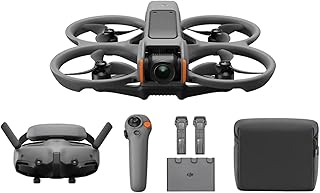
Pros
- Actual first person flying through goggles, not a phone preview
- Low latency transmission built for flying by video
- Motion controller makes the learning curve manageable
- Three batteries in the combo for a proper session
Cons
- Costs far more than the budget aircraft in this comparison
- Rules generally require a second person as a visual spotter
This is what FPV means when pilots use the term. The video goes to goggles with low enough delay to fly by, and the sensation is nothing like watching a preview on a phone clipped to a controller.
The motion controller is what makes it approachable. Traditional FPV flying uses a stick controller and a steep learning curve; here you point where you want to go, which turns a hobby that took months into something usable on the first afternoon.
It belongs in this comparison as the reference point rather than as a budget option. It costs several times what the other aircraft do, and flying under goggles generally requires someone beside you keeping the aircraft in sight.
Bottom line: buy this if immersive flight is the actual goal, and accept that nothing cheaper here delivers it.
- Type: FPV system with goggles
- Video: low latency transmission to goggles
- Control: motion controller included
- Camera: 4K with stabilization
- Batteries: three in the combo
- Guards: built in propeller protection
- Spotter: generally required by rules when flying under goggles
- Use: immersive first person flight
This is for someone who wants the feeling of flying rather than aerial photographs, and who has a flying partner to act as spotter. It suits open spaces and people who already know they enjoy the hobby. Anyone shopping for stills of a holiday, or buying a first drone to try the idea, should spend far less elsewhere in this list.
Fly with a spotter keeping the aircraft in sight, which is a requirement in most countries when the pilot is under goggles and sensible everywhere else. Learn the controls in a large open area with no people. Check airspace rules before each new location, and never fly over crowds regardless of how confident the aircraft feels.

Pros
- Small and light enough for indoor flying
- Crash resistant construction survives learning
- One key takeoff and landing simplifies the controls
- LED lights make it easy to see indoors
Cons
- Blows around outdoors in the lightest breeze
- Camera is a novelty rather than a useful feature
The Dwi Dowellin is the smallest and simplest aircraft here, and it is honest about what it is: a toy for learning the sticks indoors.
Crash resistance is the feature that matters at this level. A child learning will hit walls and furniture repeatedly, and a frame that bounces rather than breaks is what keeps the drone flying past the first afternoon.
Outdoors it is at the mercy of any breeze, and the camera, where fitted, is a novelty. Neither is a criticism of a drone bought to fly around a living room.
Bottom line: the right first aircraft for a child, and the wrong one for anybody wanting photographs.
- Type: mini indoor drone
- Controls: one key takeoff and landing
- Frame: crash resistant
- Lights: LED for indoor visibility
- Stability: altitude hold
- Batteries: usually several included
- Use: indoor learning, children
- Outdoor use: unsuitable in wind
Buy this for a child learning to fly indoors, or as a low cost introduction before deciding whether the hobby sticks. It suits a living room, a hall or a garden on a still day. It is not an outdoor aircraft, and anyone wanting aerial photographs should choose one of the GPS drones here.
Supervise flying with children, keep it away from faces and pets, and use the propeller guards indoors. Charge the small batteries with the supplied equipment rather than any charger to hand, and let them cool before recharging. Store the aircraft where the propellers cannot be bent, since a bent propeller makes it fly badly and is the usual cause of vibration.
How to Choose a Fpv Drone
One definition sorts this category before any specification does. Read the first section even if you skip the rest, because it decides which half of the results page you should be shopping in.
What FPV Actually Means Here

First person view means flying from the aircraft’s point of view rather than watching it from the ground. In the hobby that means goggles: the video goes to a headset, you see what the camera sees, and you fly by that image. It is a different skill from line of sight flying and it is what the term was coined for.
Most listings in this price range use FPV to mean something much milder. The drone sends a video feed over Wi-Fi to a phone clipped to the controller, and you glance at the screen while keeping the aircraft in sight. That is a live preview rather than immersive flight, and the delay between the aircraft moving and the screen updating makes flying by the screen alone unwise.
Both are legitimate products, but they suit different people. If you want aerial photographs of a house or a holiday, the phone screen version is what you want and goggles would be a waste. If you want the sensation of flying, only a headset system delivers it, and there is exactly one of those in this group.
Weight and the 250 Gram Line

Aircraft weight is not a specification detail here, it is a regulatory threshold. In the United States and in many other countries, drones at or above 250 grams have to be registered with the aviation authority, and the registration number displayed on the aircraft. Below that line, recreational flying skips the paperwork.
That is why so many listings advertise a figure just under 249 grams. It is a deliberate design target rather than a coincidence, and several drones here sit right against it. Note that the exemption covers registration only: other rules about where you may fly, keeping the aircraft in sight and staying clear of airports apply regardless of weight.
Check the weight as flown rather than as boxed. Adding propeller guards, a larger battery or a camera filter can push an aircraft over the line, and the figure in the listing is usually for the base configuration. Rules also change, so confirm the current requirement in your country before the first flight rather than trusting a product page.
Propeller guards deserve a mention alongside weight. They are the cheapest insurance a beginner can buy, they turn a collision with a wall into a bounce rather than a broken arm, and they add grams. On an aircraft sitting at 248 grams, fitting guards can cross the registration line, so decide which matters more for the way you will actually fly.
Camera, Gimbal, and What Stabilization Means
Camera resolution is the number listings lead with and the least useful one. A 4K sensor on an unstabilized mount produces shaky 4K, which is worse to watch than steady high definition. What separates usable footage from unusable is how the camera is held.
A mechanical gimbal is a motorized mount that physically counteracts the aircraft’s movement, and it is the only thing that produces genuinely smooth video. Electronic stabilization crops into the sensor and shifts the frame in software, which helps but costs resolution and cannot fix larger movements. Some cheaper drones offer neither and simply angle the camera by hand before takeoff.
Look for the words gimbal and axis together, since a three axis gimbal is doing far more than a single axis tilt mount. Where a listing mentions stabilization without naming a gimbal, assume it is electronic. For casual photographs of a garden or a beach, electronic is fine; for video anyone else will watch, the gimbal is where the money should go.
GPS, Return to Home, and Where You Fly

GPS changes how a drone behaves when you let go of the sticks. Without it the aircraft drifts with the wind and keeps drifting; with it the aircraft holds position and stays where you left it. For a beginner that difference is the single largest factor in whether the first flight ends with the drone in your hand or in a tree.
Return to home builds on it. The drone records the takeoff point and can fly back to it on command, on signal loss, or on low battery. It is not magic: it climbs to a set altitude and flies straight, so a tree or a building in that path is still a problem, and it needs a decent satellite lock before takeoff to know where home actually is.
The drones here without GPS are the small indoor and beginner models, and they are honest about being for learning in a garden or a hall rather than for flying over open country. Match the feature to the space: an indoor drone in a field is lost the moment there is a breeze. Our article archive covers more outdoor gear.
Flight Time and the Number on the Box
Quoted flight times are measured hovering in still air with a full battery on a mild day, which is not how anyone flies. Wind, cold and aggressive movement all reduce it, and the last portion of the battery is reserved for landing, so the usable figure in practice is meaningfully shorter than the number printed.
The listings that quote a long total, such as sixty minutes, are almost always adding several batteries together. Two or three batteries in a bundle is genuinely useful, but read it as three flights rather than one long one, because you still have to land and swap.
Batteries are also the consumable that decides how long the drone stays useful. Check that spares are sold separately for the model you choose, since an aircraft whose battery is discontinued is an aircraft with a fixed lifespan however well it flies.
Range, Transmission, and Where the Picture Breaks Up
Two ranges matter and listings blur them. Control range is how far the aircraft still answers the sticks; video range is how far the picture stays watchable. Video almost always fails first, and on Wi-Fi based drones it fails much sooner than the control link.
Quoted figures assume open ground with clear line of sight and no interference. In a town, with buildings and dozens of competing networks, real range is a fraction of the number. Drones using a dedicated transmission system rather than plain Wi-Fi hold their picture considerably further, which is a large part of what separates the more expensive models here.
In practice, range is rarely the limit anyway. Rules in most countries require keeping the aircraft within sight, and a drone is a small object that disappears against a bright sky long before the transmission gives up.
Wind is the specification nobody prints. A light aircraft is easier to carry and harder to fly in a breeze, and the same 249 gram design that avoids registration is the one that struggles first when the wind picks up. Manufacturers sometimes state a maximum wind resistance level; where they do, it is worth more attention than the range figure, because wind is what you meet on an ordinary afternoon.
| Type | Best at | Weak at |
|---|---|---|
| Wi-Fi camera drone | Aerial photographs, learning to fly, low outlay | Laggy preview, short real range, no immersive flight |
| GPS camera drone under 249 g | Holds position, returns home, no registration needed | Costs more, still not first person flying |
| Goggle based FPV system | Genuine first person flight, the sensation people want | Highest cost, steeper learning curve, needs a spotter |
| Indoor beginner drone | Learning the sticks safely, flying in a room | Blows away outdoors, camera is a novelty |
Why You Should Trust Us
We build these lists from published specification and from the pattern of what long-term owners report rather than from marketing copy. For each drone here we checked whether the video goes to a phone or to goggles, the stated weight against the registration threshold, whether the camera sits on a mechanical gimbal or relies on software, whether GPS and return to home are present, and whether a quoted flight time refers to one battery or to a bundle.
We kept one genuine goggle based system in the comparison even though it sits above the budget bracket, because it is the only way to show what the term FPV actually describes and what the cheaper drones are not doing. Nothing here is regulatory advice: registration thresholds and flight rules differ by country and change, so check the current requirements where you live before flying.
Final Thoughts
Best overall is the Potensic ATOM SE. It has GPS and return to home, a stabilized 4K camera, and a weight under the registration line, which is the set of features that keeps a first drone flying rather than sitting in a cupboard after a bad afternoon.
Best value is the Holy Stone HS110D. It is the least expensive way to learn the sticks with a live view on a phone, and losing it in a hedge costs a fraction of what it would with anything else here.
For specific needs, the Holy Stone HS175D adds GPS and a 4K camera while staying under 249 grams, the DJI Mini 4K is the pick when video quality matters most in a compact aircraft, the Holy Stone HS360S is a solid middle option with return to home, the DJI Avata 2 is the only true goggle based system here and the one to buy if immersive flight is the actual goal, and the Dwi Dowellin mini drone is the right first aircraft for a child learning indoors. More picks are indexed across our category index and the toys and games section.
Fpv Drone FAQs
Do I need to register my drone?
In the United States, recreational aircraft weighing 250 grams or more must be registered with the Federal Aviation Administration and marked with the registration number. Below that weight, recreational flyers do not register the aircraft, though other requirements still apply, including passing the free online safety test and following airspace rules. Several drones here are designed to sit just under the threshold for exactly this reason. Rules differ by country and do change, so check the current position where you fly.
Is a Wi-Fi FPV drone the same as a real FPV drone?
No, and this is the biggest source of disappointment in the category. A Wi-Fi FPV drone sends a preview to a phone with a noticeable delay, and you fly it by watching the aircraft itself. A true FPV setup sends low latency video to goggles and you fly entirely by that view. If you want the sensation of being in the cockpit, only the goggle based system delivers it, and the phone screen models will feel like a camera on a stick by comparison.
Why is my flight time shorter than advertised?
Because the quoted figure is measured hovering in still air in mild weather, and because part of the battery is reserved so the aircraft can land safely. Wind makes the motors work harder, cold reduces battery capacity, and flying quickly rather than hovering drains it faster still. Expect meaningfully less than the printed number in normal conditions, and treat a bundle advertising a long total as several separate flights rather than one.
Can a beginner start with a GPS drone?
Yes, and it is often the easier route. GPS position holding means the aircraft stays put when you release the sticks instead of drifting, which removes the panic that ends most first flights badly. The usual advice to learn on a cheap drone first applies mainly to indoor models and to windy days. If the budget stretches to a GPS aircraft with return to home, it is more forgiving than a cheaper one, not less. Our electronics archive covers related gear.
Where am I allowed to fly?
That depends on where you live, and it is the part worth reading properly before the first flight rather than after a complaint. Common rules include keeping the aircraft within visual line of sight, staying below a set altitude, avoiding controlled airspace near airports, and not flying over crowds. Many countries publish an app or a map showing where flight is restricted. Local rules on parks and private land are separate from aviation rules and often stricter.

Write Your Review
No reviews yet. Be the first to share your experience!