

YouTube TV is an app, not a box, and that is the whole trap in shopping for a universal remote for youtube tv: the remote does not control the service, it controls whatever the service runs on. On a smart TV with the app built in, a good infrared universal remote replaces the lost original completely. On a Roku, Fire TV or Apple TV streamer, most universal remotes can only reach the box indirectly, through the TV, because those boxes listen for Bluetooth or Wi-Fi rather than infrared. For October 2026 we gathered 6 of the highest rated options on Amazon from GE, One For All, UltraPro and more, then sorted them by what each one can actually talk to.
Our top pick is the GE Universal Remote Control for its four-device programming that covers the TV, a soundbar and a cable or streaming box in one clicker, backed by a large code library and a brand that has been making replacement remotes for decades. Beside it sit the One For All Streamer Remote, the only pick here built specifically to drive infrared streaming boxes, backlit and rechargeable GE models for dark living rooms, an UltraPro OneTouch that programs itself in one press for major TV brands, and an EZclicker big-button remote for anyone who just wants the TV to turn on. Every pick is rated at least 4.0 stars by real Amazon customers, and if the TV itself is the question, our best TVs guide is the place to start.

Pros
- Programs up to four devices in one remote
- Large brand code library for TVs, soundbars and boxes
- Full button layout including number pad
- Long-established replacement remote brand
Cons
- Infrared only, so it cannot directly control Bluetooth streaming sticks
- Code entry takes a few minutes per device
- Not backlit
The GE Universal Remote Control is the classic answer to a coffee table full of clickers. It programs up to four devices, a TV, a soundbar, a cable or satellite box and an infrared streaming device, from a large code library that covers the major brands and many minor ones, and it has the full button layout, number pad included, that a cable box needs.
For YouTube TV on a smart TV it does everything: power, input, volume, navigation. Its limit is the same as every infrared remote: a Roku or Fire TV stick that listens for Bluetooth is not directly controllable, so those keep their own remote for the parts the GE cannot reach.
Programming is by code or automatic search and takes a few minutes per device, and the keys are not backlit. In exchange you get the most complete, most compatible remote in the group.
Bottom line: the universal remote to buy when the goal is one clicker for everything that speaks infrared.
- Devices: up to 4
- Signal: infrared
- Compatibility: major TV brands, soundbars, cable and satellite boxes, infrared streaming devices
- Setup: code entry or auto search
- Power: 2 AAA batteries
Rooms with a TV plus a soundbar and a cable or infrared streaming box, and anyone who wants the biggest code library. Not the pick for controlling a Bluetooth streaming stick directly.
Program the TV first, then the soundbar, and set the master volume so the volume keys always go to whichever device makes the sound. Write the working codes on the battery cover.

Pros
- Designed around streaming boxes rather than cable
- Controls up to three devices
- Streaming-friendly button layout
- Simple, compact remote
Cons
- Only works with infrared-controlled streamers, not Bluetooth-only sticks
- Smaller code library than a full universal remote
- Not backlit
The One For All Streamer Remote is the only pick here whose whole purpose is the streaming box. It controls up to three devices, an infrared-controlled streamer, the TV and a soundbar, with a layout built for navigating apps rather than dialing channels.
The important word is infrared. It suits streamer boxes that accept infrared commands and it cannot drive a Bluetooth-only stick, so check your device before buying. For a room where the streamer is infrared friendly, it is a cleaner fit than a cable-oriented universal.
Bottom line: the streaming-first universal remote, for infrared-controllable boxes.
- Devices: up to 3
- Signal: infrared
- Targets: infrared-controlled streamer boxes, TVs, soundbars
- Layout: streaming oriented
- Power: AAA batteries
Households whose streaming box accepts infrared and who want an app-friendly layout. Not for Bluetooth-only sticks.
Confirm your streamer is on the compatibility list, program it first, then add the TV and soundbar. Keep the streamer's original remote for voice or Bluetooth-only functions.

Pros
- Backlit keys for viewing with the lights down
- GE code library and setup
- Standard full layout
- Runs on AAA batteries
Cons
- Backlight shortens battery life
- Infrared only
- Fewer device slots than the 4-device model
The GE Backlit Buttons Universal Remote is the evening-viewing version of the GE lineup: the same code-based setup and broad TV compatibility, with keys that light up so you can find mute at midnight without turning on a lamp.
Backlighting draws power, so expect to change AAAs a little sooner than on the plain model, and it remains an infrared remote with the usual limits around Bluetooth streaming sticks. For a TV that runs YouTube TV natively in a dim living room, it is the practical choice.
Bottom line: the GE to buy if the lights are usually off.
- Signal: infrared
- Backlight: yes
- Compatibility: major smart TV brands
- Setup: code entry or auto search
- Power: AAA batteries
Dark living rooms and anyone who loses the mute key at night. Not for people who need four-device control.
Use lithium or quality alkaline AAAs to offset the backlight drain, and program the TV code before adding anything else.

Pros
- Built-in rechargeable battery, no AAAs
- Backlit keys
- GE universal TV compatibility
- Convenient for a heavily used couch remote
Cons
- Dead battery means waiting for a charge
- Infrared only
- Newer listing with a smaller review base
The GE Rechargeable TV Remote combines the backlit keys of the Backlit model with a built-in battery you top up over a cable, which removes the AAA cost that backlighting normally adds. For a remote that is picked up every evening, that is a sensible trade.
The catch is that a flat rechargeable remote is out of action until it charges, where a AAA remote is fixed from the drawer. It is also one of the newer listings, with fewer reviews than the older GE models, and it is infrared like the rest.
Bottom line: the low-maintenance backlit remote for a household that charges things on the coffee table anyway.
- Signal: infrared
- Backlight: yes
- Power: built-in rechargeable battery, cable charging
- Compatibility: major smart TV brands
- Setup: GE code entry
Heavy nightly users who are tired of buying AAAs. Not for anyone who wants an instant battery swap.
Charge it fully before programming, keep the cable by the couch, and top up when the backlight starts to dim rather than waiting for it to die.

Pros
- One-touch setup: hold the brand key and it configures itself
- Backlit keys
- Covers Samsung, LG, Vizio, Sony, Roku TVs and more
- No code booklet to keep
Cons
- Fewer obscure brands than a code-library remote
- Infrared only
- Focused on the TV rather than multiple devices
The UltraPro Backlit OneTouch Universal Remote is the value pick because it removes the one step people dread: press and hold the key labeled for your TV brand and it sets itself up, no code booklet, no auto search. It covers the major brands, Samsung, LG, Vizio, Sony and Roku TVs among them, and the keys are backlit.
The simplicity has limits: it is aimed at the TV rather than a stack of devices, and an unusual TV brand may not be in its one-touch list. For the single smart TV that runs YouTube TV in most homes, it is exactly enough.
Bottom line: the replacement remote for anyone who will not read a code sheet.
- Signal: infrared
- Setup: OneTouch, hold brand key
- Backlight: yes
- Compatibility: Samsung, LG, Vizio, Sony, Roku TVs and more
- Power: AAA batteries
Single-TV rooms and anyone who wants setup in one press. Not for a rack of devices or an obscure TV brand.
Point it at the TV, hold the brand key until the set responds, and release. If your brand is not listed, a code-library remote like the GE is the better fit.

Pros
- Large clearly labeled buttons
- Simplified layout that cannot be pressed wrong
- Works with major TV brands
- Ideal for seniors and young children
Cons
- No number pad or advanced menu control
- Infrared only
- Not a full replacement for a cable box remote
The EZclicker Big Button Universal TV Remote solves a different problem from the rest of the list: not how many devices, but how few buttons. Power, volume, channel and input sit on large clearly labeled keys, and there is little else to press by mistake, which is exactly what an older relative or a young child needs to get the TV on and into the app.
It does not carry a number pad or deep menu control and it will not run a cable box, and like the others it is infrared. Owning one alongside a full remote is common and sensible.
Bottom line: the kind choice for a household member who wants the TV to just work.
- Signal: infrared
- Layout: large simplified buttons
- Compatibility: major TV brands
- Best for: seniors, children, simple setups
- Power: AAA batteries
Seniors, children and anyone overwhelmed by a full remote. Not for controlling a cable box or multiple devices.
Program it for the TV, set the input to the one YouTube TV lives on, and hide the full remote so the input never gets changed by accident.
How to Choose the Right Universal Remote For Youtube Tv
Where YouTube TV Runs Decides What the Remote Must Control
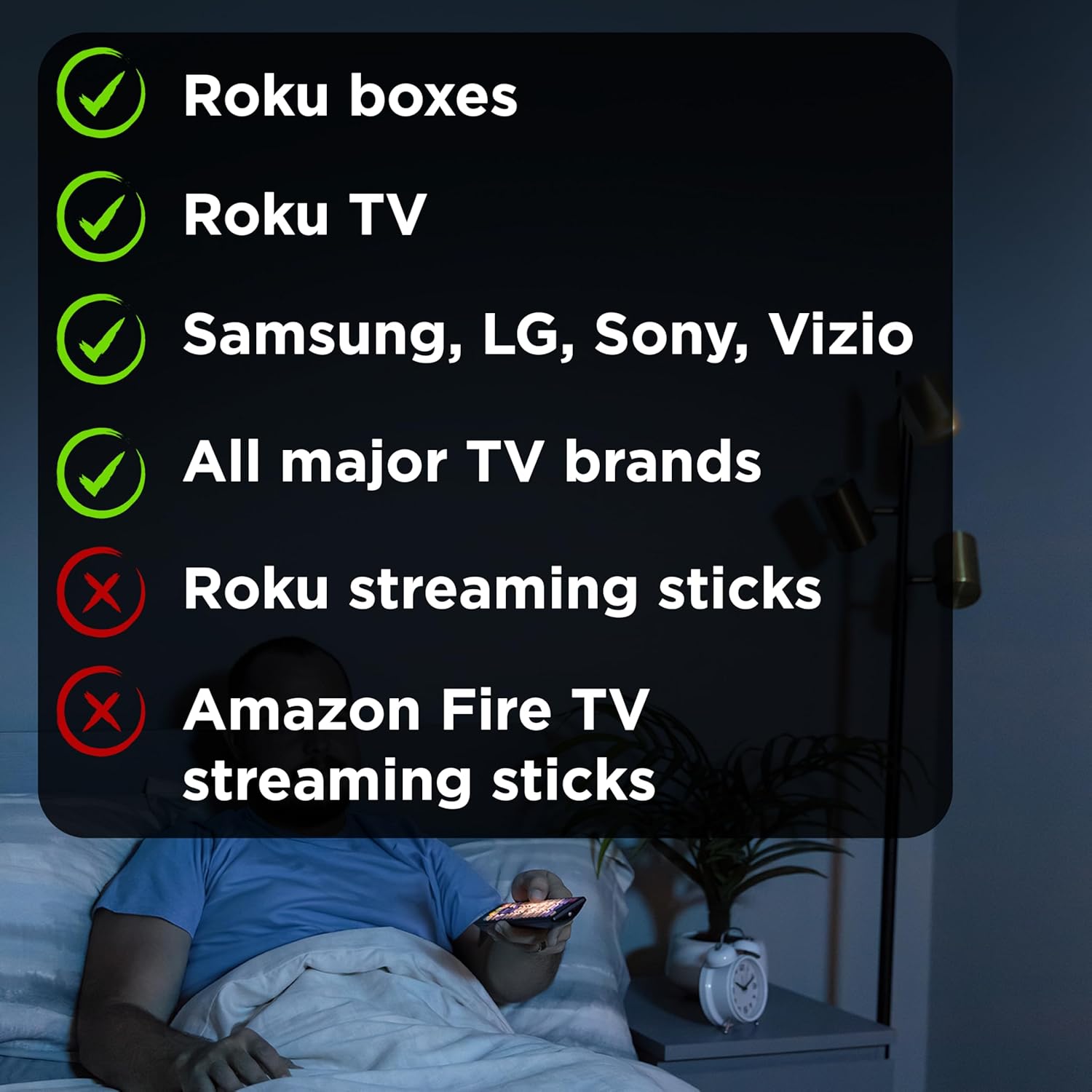
Start by naming the device the app is installed on, because that is the only thing the remote will ever talk to. If YouTube TV runs on the smart TV itself, a Samsung, LG, Vizio, TCL, Hisense or Sony set with the app built in, then the remote only needs to control the TV, and every pick here does that over infrared. Volume, input, power and the directional pad get you into the app and around it.
If the app runs on a streaming box, the picture changes. Roku players, Fire TV sticks, Apple TV and Chromecast with Google TV listen for Bluetooth or Wi-Fi commands from their own remotes, not infrared. A universal infrared remote cannot wake them directly. It can still control the TV, and on many setups the TV passes navigation to the box over HDMI-CEC, but that is a workaround, not a replacement. The One For All Streamer Remote is the exception here, and even it targets infrared-controlled streamer boxes rather than Bluetooth ones.
Infrared, Bluetooth and Why Most Universal Remotes Are One and Not the Other
Infrared is a line-of-sight signal that has controlled televisions for forty years, and it is why a universal remote can be programmed with a code and just work with a TV made by any of a dozen brands. It is cheap, reliable and needs no pairing. It also cannot go through a cabinet door and cannot reach a device that has no infrared receiver.
Bluetooth remotes pair to one device and work from anywhere in the room, which is why streaming boxes use them. A universal remote that also speaks Bluetooth to a Roku or Fire TV is a rare and pricier product, and none of the top rated affordable clickers in this list claims it. Read the compatibility list on any remote you consider: if it names TV brands and cable boxes but not your streamer, assume it will not control the streamer directly.
Device Count: How Many Things Sit Under the TV
A living room usually has a TV and at least one of a soundbar, a cable or satellite box, a Blu-ray player or a streaming device. The GE Universal Remote Control here is programmed for four devices, which is the count most households need to retire the drawer of originals; the One For All Streamer Remote handles up to three; the simpler UltraPro and EZclicker models focus on the TV.
More device buttons are useful only if the remote can actually control those devices. A four-device remote controlling a TV plus a Bluetooth streamer is still, in practice, a one-device remote. Count what you own that speaks infrared, then match the device count to that.
| Remote | Controls | Signal | Backlit | Power |
|---|---|---|---|---|
| GE Universal Remote Control | Up to 4 devices: TVs, soundbars, cable and streaming boxes | Infrared | No | 2 AAA |
| One For All Streamer Remote | Up to 3 devices, built for infrared streamer boxes, TVs and soundbars | Infrared | No | AAA |
| GE Backlit Buttons Universal | Multi-device, major TV brands | Infrared | Yes | AAA |
| GE Rechargeable Backlit | Universal TV remote | Infrared | Yes | Built-in rechargeable |
| UltraPro Backlit OneTouch | Major TV brands, one-touch setup | Infrared | Yes | AAA |
| EZclicker Big Button Universal | Major TV brands, simplified layout | Infrared | No | AAA |
Programming: Code Entry, Auto Search and One-Touch Setup
Traditional universal remotes are programmed by entering a brand code from a booklet, then holding a button until the TV responds; if the code fails you try the next one, or run an automatic search that cycles codes until the set powers off. It works, it takes ten minutes, and you will do it once. The GE remotes use this method with a large code library.
The UltraPro OneTouch takes a shortcut for the most common brands: press and hold the button labeled for your TV brand and it configures itself, no code needed. That is the right pick for someone who will not read a booklet, at the cost of covering fewer obscure brands. Whichever method a remote uses, keep the code sheet, because a battery change can occasionally require re-entering the code.
Backlighting and Watching in the Dark
Most viewing happens with the lights down, and a remote you cannot read is a remote you fumble. Backlit models, including the GE Backlit Buttons Universal Remote, the GE Rechargeable Backlit remote and the UltraPro Backlit OneTouch, light the keys when you pick them up or press a button.
Backlighting draws power, which is why the plain models run longer on the same batteries and why the GE Rechargeable version exists: it charges over a cable instead of eating AAAs. If your remote lives on the couch and gets used every evening, backlighting is worth the small cost; if it is a spare for the guest room, skip it.
Batteries, Rechargeable Remotes and Standby Life
Nearly every universal remote runs on two AAA cells and lasts months. Backlit models drain faster, and a remote that is picked up constantly drains fastest. The GE Rechargeable TV Remote answers this with a built-in battery you top up over USB, which suits a household that already charges phones on the coffee table.
Rechargeable convenience has one trap: a dead rechargeable remote is useless until it charges, while a dead AAA remote is fixed in thirty seconds from the drawer. Keep whichever failure mode you prefer in mind, and if you choose rechargeable, leave the cable somewhere obvious.
Button Layout, Size and Who Will Be Holding It

A remote with sixty small buttons and a remote with a dozen big ones solve different problems. The GE and UltraPro models carry a full layout with number pad, transport keys and menu controls, which matters if the remote also runs a cable box. The EZclicker Big Button Universal TV Remote strips it down to large, clearly labeled keys for power, volume, channel and input, which is exactly what an older relative or a young child needs.
Think about the person, not the spec. A remote that does everything but is too fiddly for the person who watches most television is the wrong remote for that house, and it is worth owning a big-button model alongside a full one.
Volume, Power and the Soundbar Problem
The most common daily frustration is volume going to the wrong device. If sound comes from a soundbar, the remote either has to be programmed to send volume to the soundbar while everything else goes to the TV, a feature the multi-device GE and One For All remotes support through their device programming, or the TV has to pass volume through HDMI-ARC and CEC.
Before you buy, decide which device owns volume in your room and check that the remote can be told the same thing. A universal remote that only knows the TV will leave you reaching for the soundbar remote every night. Our guide to the best home theater receivers covers the setups where this gets complicated.
Streaming Shortcut Buttons and What They Really Do
Some remotes carry dedicated keys labeled for streaming apps. On a smart TV those keys can send the app-launch command if the TV supports it over infrared, which is a real convenience for opening YouTube TV in one press. On a streaming box that only listens to Bluetooth, the same key does nothing, no matter how it is labeled.
Treat app buttons as a bonus that depends on your TV, not as a reason to choose a remote. The dependable path into YouTube TV on any setup is still power, input, home and the directional pad, and every pick here provides those.
Range, Line of Sight and Cabinet Doors

Infrared remotes need a clear line to the sensor on the TV or box. A closed cabinet door, a soundbar sitting in front of the sensor, or a TV mounted high with the sensor blocked by a shelf will make even a perfect remote seem broken. Check where the sensor sits before blaming the clicker.
If your equipment lives behind doors, an infrared repeater kit is the fix, or you keep the streaming box, which speaks Bluetooth, and use the universal remote only for the TV. For the wall-mount half of that problem, our guide to the best swivel TV mounts covers keeping the sensor pointed at the room.
Why You Should Trust Us
We built this shortlist from the highest rated universal remotes on Amazon, then read each listing, the compatibility notes and the pattern of owner feedback, with one question in front: what can this remote actually control in a room where YouTube TV runs on a smart TV or a streaming box? We do not claim to have programmed every remote against every television; the comparisons come from published compatibility information and real owner reports.
Ratings shown on the cards are pulled from Amazon and update over time. We do not print prices in the guide because they change constantly, and we do not accept payment for placement. Replacement remotes made for a single TV brand were left out, because they are not universal.
Final Thoughts
The best overall pick is the GE Universal Remote Control. Four-device programming, a broad code library and decades of replacement-remote experience make it the clicker most likely to retire the pile of originals, and on a smart TV with YouTube TV built in it covers everything you touch.
The best value is the UltraPro Backlit OneTouch Universal Remote: one-touch setup for the major TV brands, backlit keys, and no code booklet, which is all most single-TV rooms need. If your streamer is an infrared box, the One For All Streamer Remote is the one built for it; if the remote lives on the couch every night, the GE Rechargeable Backlit model saves batteries; and for a relative who wants power, volume and channel and nothing else, the EZclicker Big Button remote is the kind choice. Whatever you buy, remember that a Roku or Fire TV stick will keep its own remote for the parts an infrared clicker cannot reach. If you cut the cord entirely, our guide to the best antennas for local TV stations pairs well with a streaming setup.
Frequently Asked Questions About Universal Remotes for YouTube TV
Can a universal remote control YouTube TV in 2026?
It controls the device YouTube TV runs on. On a smart TV with the app built in, a universal remote for youtube tv like the GE Universal Remote controls power, volume, input and navigation, which is everything you need. On a Roku, Fire TV or Apple TV box it can control the TV but usually not the box directly, because those boxes listen for Bluetooth rather than infrared.
Will a universal remote work with a Roku or Fire TV stick?
Most affordable universal remotes are infrared only and cannot wake or drive a Bluetooth streaming stick directly. Some setups pass navigation from the TV to the box over HDMI-CEC, and the One For All Streamer Remote is built for infrared-controlled streamer boxes, but keep the stick’s own remote for anything the universal cannot reach.
How do I program a universal remote for youtube tv?
Traditional models use a brand code from the booklet or an automatic code search until the TV responds. The UltraPro OneTouch configures itself when you hold the button for your TV brand. Keep the code sheet, since a battery change can occasionally require re-entry.
Do I need a backlit universal remote?
If you watch mostly with the lights down and use the remote every evening, backlit keys are worth the small extra battery drain. The GE Rechargeable Backlit model avoids the battery cost entirely by charging over a cable.
What is the simplest universal remote for seniors?
A big-button model such as the EZclicker Big Button Universal TV Remote, which keeps power, volume, channel and input on large clearly labeled keys and leaves out the rest. For more living room hardware guides, see our electronics section.

Write Your Review
No reviews yet. Be the first to share your experience!