

A 55 inch television is the size where wall mounting stops being a luxury and starts being the obvious answer. The panel is big enough to dominate a stand, light enough that one solid bracket can carry it, and common enough that almost every manufacturer builds hardware for it. The problem is that the hardware all looks alike in a listing photo. This guide sorts the field into the three shapes that actually matter, then explains how to match one to your wall. Our top pick is the Mounting Dream MD2380 Full Motion TV Wall Mount for its 99 pound published capacity, its 400 by 400 millimeter maximum VESA pattern and dual arms that swing a 55 inch panel away from the wall without a second person holding it.
We built this shortlist of 10 picks around real customer ratings on models from Mounting Dream, Amazon Basics, ECHOGEAR and more, filtered to options that publish a size range and a load rating covering a 55 inch screen. A typical 55 inch LED or OLED weighs roughly 30 to 60 pounds without its stand, so capacity is rarely the bottleneck. Stud placement, arm length and VESA spacing are. If you are still choosing the screen itself, our roundup of the best TVs is a good place to start before you drill anything. Prices and availability move constantly, so check the live listing for each pick as of October 2026.

Pros
- Published 99 pound capacity leaves large headroom over a typical 55 inch panel
- Dual arm design swivels, tilts and extends for corner or off axis seating
- 400 by 400 millimeter VESA maximum covers the mainstream 55 inch pattern
- Designed around standard 16 inch stud spacing
- One of the most reviewed articulating mounts on the market
Cons
- Dual arms sit noticeably proud of the wall even when folded
- Single stud installation puts all of the arm leverage into one piece of lumber
- Cable routing across a moving arm takes planning to look tidy
The MD2380 is the mount most people should look at first for a 55 inch television. It is a conventional dual arm articulating bracket sized for 32 to 70 inch panels, which puts a 55 inch screen comfortably in the middle of its range rather than at either edge. That matters more than it sounds: a mount stretched to its size limit is usually working near its mechanical limit too.
The published numbers are the strong part. A 99 pound rating against a 55 inch panel that typically weighs 30 to 60 pounds gives you a wide margin, and the 400 by 400 millimeter VESA maximum matches the pattern used by most 55 inch sets. The dual arm geometry is what you are really paying for, since it lets the screen come off the wall, swivel toward a kitchen or a side chair, and then fold back close when nobody is using it.
The compromises are the ones every articulating mount shares. Folded depth is greater than a tilting bracket, so the screen never sits truly flush. The single stud installation concentrates the entire prying moment from an extended arm into one stud, so the lag bolts have to be centered and fully seated, not just somewhere in the wood. Cables need slack routed along the arm or they bind at full extension.
Bottom line: if you want one bracket that handles almost any 55 inch room layout and you have a solid wood stud to work with, this is the safest all round choice on the list.
- Mount type: full motion, dual arm articulating
- Screen size range: 32 to 70 inches
- Published load capacity: 99 pounds
- Maximum VESA: 400 by 400 millimeters
- Stud compatibility: 16 inch on center
- Movement: swivel, tilt and extension
- Model: MD2380
Best for open plan rooms, corner placements and anyone who plugs and unplugs devices behind the screen often. Also a good fit for renters who plan to reuse the bracket on a different TV later, since the size range and VESA maximum cover a broad slice of the market.
Less ideal if you want the panel to look like art hanging flat against the wall. A tilting or fixed bracket is the better answer for that look.
Locate both edges of the stud and mark the center before drilling. Pilot holes sized to the lag bolt shank prevent splitting and let the threads bite fully. Re check the bolts after a few weeks of use, since wood can compress slightly under sustained load.
Never extend the arms to their limit while an adult is leaning on the screen, and keep the panel folded flat when children are unsupervised in the room.
Pros
- Published 132 pound capacity is far above what a 55 inch panel needs
- 600 by 400 millimeter VESA maximum covers wide hole patterns other mounts miss
- Works with 16, 18 and 24 inch stud spacing
- Low profile design keeps the screen close to the wall
- Tilt removes overhead glare when the TV sits high
Cons
- No swivel, so seating off to one side gets an angled picture
- Reaching rear ports usually means lifting the panel off the bracket
- The wide plate needs two studs for its best load path
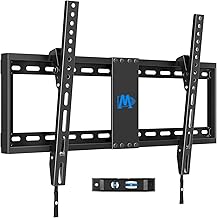
This is the bracket to buy when the television is going higher than seated eye level and you do not need it to swing. It is a low profile tilting mount with a published 132 pound rating, which is roughly double to quadruple the weight of a typical 55 inch panel, and a 600 by 400 millimeter VESA maximum that swallows every common 55 inch hole pattern including the wide ones that stop 400 by 400 brackets.
The stud flexibility is the quietly useful feature. Support for 16, 18 and 24 inch spacing means it lands on modern construction, older framing and the odd wall where the layout does not cooperate. Because the load path is nearly straight down rather than out on an arm, the anchoring is forgiving compared with a full motion mount, and a two stud installation spreads the force further still.
What you give up is any lateral movement. If half your seating is off to the side, the picture is off axis and stays that way. Port access is the other trade, since a low profile plate leaves little room to get a hand behind the panel. Plan a right angle power cable and route HDMI before the screen goes up.
Bottom line: for a 55 inch TV over a fireplace or a dresser, this delivers the only movement that actually matters at the lowest complexity and the highest published capacity per dollar in this group.
- Mount type: tilting, low profile
- Screen size range: 37 to 90 inches
- Published load capacity: 132 pounds
- Maximum VESA: 600 by 400 millimeters
- Stud compatibility: 16, 18 and 24 inch spacing
- Movement: downward tilt only
- Hardware included
Buy this if the screen is going above seated eye level and your seating is roughly in front of it. Skip it if you need the panel to swivel toward a kitchen island or a second seating group, because tilt alone will not fix an off axis view.
The 600 by 400 VESA maximum is worth noting even if your current set is 400 by 400, since it means the bracket will carry a larger replacement TV later.
Mark both stud centers, then hold the wall plate level and transfer the hole positions before drilling. Attach the vertical brackets to the TV first while the panel is face down on a padded surface, then lift onto the wall plate.
Set the tilt after the screen is hung and check it from the seating position rather than from a ladder. A few degrees usually makes the difference between glare and a clean picture.

Pros
- Built for large panels, so a 55 inch screen sits at the light end of its range
- Smooth swivel, tilt and extension in a single motion
- Included drill template makes stud layout much easier
- Universal design works across the major TV brands
- Complete hardware kit in the box
Cons
- Overbuilt and bulkier than a 55 inch panel strictly requires
- Long extension demands centered lag bolts in solid wood
- Folded depth is greater than a tilting bracket
The MaxMotion is aimed at big screens, and that is exactly why it is worth considering for a 55 inch television. When a mount is engineered for panels up to 90 inches, a 55 inch screen sits comfortably at the light end of the load range, which is where any piece of hardware behaves best. The arm geometry is generous and the motion is noticeably smoother than budget articulating brackets.
ECHOGEAR ships a paper drill template with this mount, which sounds like a small thing until you are standing on a ladder trying to transfer four hole positions onto a wall by eye. The template plus a hardware kit that actually includes what you need turns the install from a two person argument into a manageable solo job.
The trade is size. This is a physically substantial bracket, and on a 55 inch panel the arms are hidden but the folded depth is not. Its long reach also means real leverage at full extension, so this is a mount that wants centered lag bolts in solid framing rather than an optimistic anchor near the edge of a stud.
Bottom line: pick this when you want a lot of reach for a big open room and you would rather have capacity you do not need than a bracket working at its limit.
- Mount type: full motion articulating
- Screen size range: 42 to 90 inches
- Movement: swivel, tilt and extension
- Fitment: universal, works with major TV brands
- Included: mounting hardware and drill template
- Series: MaxMotion
A strong fit for open plan living spaces where the viewing angle changes, and for households that expect to upgrade to a larger screen without replacing the bracket.
Overkill in a small bedroom or a tight alcove where a tilting mount would do the same job in less depth.
Use the supplied template to keep the wall plate square, and verify each lag bolt lands in the middle of the stud rather than the edge. On a long arm mount, an off center bolt is the most common source of a slow sag.
Fold the arms back when the screen is not in use to reduce sustained leverage on the anchors, and keep extension movements slow to avoid shock loading.

Pros
- UL listing is meaningful third party safety verification
- Published 77 pound capacity clears a typical 55 inch panel
- 400 by 400 millimeter VESA maximum fits the mainstream pattern
- Centered design keeps the screen positioned over a single stud
- Swivel, tilt and articulation in a compact package
Cons
- 77 pounds is the lowest published capacity in this group
- Single stud mounting concentrates all arm leverage into one stud
- A 55 inch screen sits near the top of the stated size range
The XMM006-1 solves a specific and very common problem: you have exactly one usable stud where the television needs to go. Its centered design lets the panel sit visually centered on the wall while the load path stays over that single stud, and the articulating arm handles the angle adjustment from there.
The UL listing is the detail that separates it from a lot of similar looking brackets. Independent safety certification on load bearing hardware is not universal in this category, and it is a reasonable thing to prioritize when you are hanging glass above a sofa.
Two caveats. The published 77 pound rating is the lowest in this roundup, which still clears the 30 to 60 pounds a typical 55 inch panel weighs but leaves less margin than the 99 and 132 pound options. And a 55 inch screen sits near the upper end of its 26 to 65 inch range, so an unusually heavy 55 inch set is worth weighing before you commit. Single stud mounting also means the full prying force of the extended arm loads two bolts in one stud, so centered placement is not optional here.
Bottom line: the right pick when your wall gives you one stud and you want certified hardware rather than the cheapest arm available.
- Mount type: full motion articulating
- Screen size range: 26 to 65 inches
- Published load capacity: 77 pounds
- Maximum VESA: 400 by 400 millimeters
- Certification: UL listed
- Stud requirement: single stud, centered design
- Model: XMM006-1
Choose this when stud availability drives the decision. If you have two studs at a usable spacing, a two stud bracket will always spread the load better, but that is rarely a choice you get to make.
Confirm your set is at or under the 400 by 400 millimeter VESA maximum, since this bracket cannot reach a 600 millimeter horizontal pattern.
On a single stud installation the bolts must be dead center in the lumber. Find both edges of the stud, split the difference, and drill pilot holes to the depth the instructions specify.
Avoid hanging anything extra from the arms, including streaming boxes and cable bundles, since added weight at the end of a lever costs far more than the same weight at the wall plate.

Pros
- Highest published capacity in this roundup at 150 pounds
- About a 1.18 inch profile keeps the panel close to flush
- Works with 16 and 24 inch stud spacing as well as concrete
- Drill template and full hardware kit included
- Simplest load path of any mount type
Cons
- No tilt or swivel at all, the drilled height is permanent
- Very little room to reach rear ports once the panel is on
- Not suitable if the screen must sit above seated eye level
This is the mount for people who want the television to look like it was built into the wall. At roughly a 1.18 inch profile the panel sits close to flush, and with a published 150 pound rating it carries more than double what any 55 inch screen weighs. Simplicity is the feature: with no arm and no pivot, the load runs almost straight down the wall face, which is the easiest thing a fastener can be asked to do.
Support for both 16 and 24 inch stud spacing plus concrete makes it unusually adaptable for a fixed bracket. Concrete and solid masonry are excellent substrates when you use the correct sleeve or wedge anchors, and a fixed mount is the type that benefits most from that kind of wall since there is no leverage working against the anchor.
The obvious limitation is permanence. Whatever height you drill is the height forever, and there is no tilt to fight glare from a window behind the seating. Port access is tight too, so route power and HDMI before the screen goes on and use right angle connectors where you can.
Bottom line: the cleanest look and the strongest published rating here, as long as your screen is going at seated eye level with cables already sorted.
- Mount type: fixed, low profile
- Screen size range: 32 to 90 inches
- Published load capacity: 150 pounds
- Wall profile: about 1.18 inches
- Wall compatibility: 16 and 24 inch studs or concrete
- Included: drill template and hardware
- Movement: none
Mock the screen position up with painter's tape first, since a fixed mount gives you no second chance on height. Sit on the sofa and look at the tape before you drill.
Connect every cable you might ever need, including a spare HDMI, before lifting the panel onto the bracket. Right angle plugs are close to mandatory at this profile.
On concrete, use a hammer drill with a masonry bit and anchors rated for the load, and drill into the solid face of the block rather than a mortar joint. Do not substitute wood lag bolts in plastic plugs.
On wood framing, pilot holes sized to the bolt shank let the threads bite without splitting the stud.

Pros
- Can be leveled after installation, which fixes a crooked drill job in minutes
- UL listed for third party verified safety
- Tilt eliminates glare when the screen sits high
- Low profile keeps the panel close to the wall
- Drill template and hardware included
Cons
- No swivel for off axis seating
- Rear port access is limited by the low profile design
- Rated size range reaches far past 55 inches, so the plate is larger than needed
The post installation leveling adjustment is the headline here, and anyone who has hung a bracket slightly out of true will understand why. Instead of pulling the panel back down and re drilling, you nudge the level at the bracket and the picture sits straight. On a wall where the studs are not perfectly plumb, that feature alone justifies the mount.
The rest is a well executed low profile tilting bracket. It is UL listed, it ships with a drill template, and the tilt range is enough to bring a high mounted screen back down toward the seating. Because the load runs close to the wall, the anchoring demands are modest compared with an articulating mount.
Limitations are the ones inherent to the type. There is no swivel, so seating off to one side gets an angled view permanently. The low profile design also leaves little clearance behind the panel, so plan cables in advance. The bracket is sized for screens up to 90 inches, which means the wall plate is wider than a 55 inch panel strictly needs, though that also gives you room to land on studs wherever they fall.
Bottom line: the tilting mount to buy if you value a straight picture and certified hardware over swivel range.
- Mount type: tilting, low profile
- Screen size support: up to 90 inches
- Certification: UL listed
- Adjustment: leveling after installation
- Movement: downward tilt
- Included: drill template and hardware
A good match for a fireplace wall or any position above seated eye level where you want the panel close to the wall. Compare it against the Mounting Dream tilting mount if your set uses a wide 600 millimeter VESA pattern.
Not the pick for corners or dual seating groups, where an articulating arm is the only real solution.
Use the template to transfer hole positions, then hang the panel and set the tilt from the sofa rather than from the ladder. Small angle changes have a large effect on reflections.
If the picture looks slightly off after installation, use the leveling adjustment before assuming the wall plate is wrong.

Pros
- Published 80 pound capacity is well above a typical 55 inch panel
- Swivel and tilt at an entry level price
- Single stud installation simplifies wall layout
- Very large customer review base
- Compact folded footprint for an articulating mount
Cons
- A 55 inch screen sits exactly at the top of the stated range
- Shorter extension than the larger articulating picks
- Single stud design leaves no margin for an off center lag bolt
This is the value entry in the articulating group, and for a 55 inch television it is a legitimate option with one important caveat: 55 inches is the top of its stated range, not the middle. That is fine for a mainstream panel in the 30 to 45 pound band, and the published 80 pound rating gives real headroom, but it does mean there is no room to move up to a larger screen later.
What you get is genuine swivel and tilt at a price close to what better tilting mounts cost. For a bedroom, a small living room or a home office where you occasionally want to angle the screen toward a desk, that is often all the movement anyone needs. The single stud installation keeps the wall work simple, and the folded footprint is compact for an arm mount.
The compromises are extension range and margin for error. The arm does not reach as far as the larger picks here, which limits how far you can pull the panel into a room. And because everything loads into one stud, the two lag bolts need to be centered and fully driven. This is the mount where an optimistic anchor is most likely to show up as a sag later.
Bottom line: a sensible budget articulating choice for a 55 inch set, provided you accept that you are buying at the top of its size range.
- Mount type: full motion articulating
- Screen size range: 26 to 55 inches
- Published load capacity: 80 pounds
- Fitment: VESA compatible
- Stud requirement: single stud
- Movement: swivel and tilt
- Finish: black
Best for bedrooms, offices and secondary rooms where the screen is unlikely to be replaced with something larger, and where cost matters more than maximum reach.
Not the pick if you plan to upgrade to a 65 inch panel, since the range stops at 55 inches.
Weigh your television before installing if it is an older or unusually heavy 55 inch model. The published rating is generous but the size range is not.
Center the lag bolts in the stud and re check them after the first few weeks, since a single stud mount has the least redundancy of any design here.

Pros
- Published 99 pound capacity with a 55 inch panel in the middle of its size range
- Dual arms give swivel, tilt and extension
- 400 by 400 millimeter VESA maximum suits most 55 inch sets
- Built around standard 16 inch stud spacing
- Straightforward value alternative to the better known brands
Cons
- Smaller review base than the established mount brands
- Folded depth is greater than a tilting bracket
- Long extension needs carefully centered lag bolts
The EconoMe dual arm mount covers the same ground as the more famous articulating brackets and does it at a lower profile in the market. A 32 to 65 inch range puts a 55 inch television right in the middle, the published 99 pound rating gives a wide margin over a typical panel, and the 400 by 400 millimeter VESA maximum matches the mainstream pattern.
Dual arm geometry is the practical advantage over single arm designs. Two arms distribute the load more evenly and generally give a steadier picture at full extension, which is where cheap single arm brackets tend to wobble. Standard 16 inch stud fitment keeps the installation conventional.
The main reason to hesitate is simply track record. It has a smaller review base than the long established names on this list, so there is less accumulated evidence about how it holds up over years rather than months. Mechanically it is a familiar design, and the published specifications are competitive, but that is a fair thing to weigh.
Bottom line: a well specified dual arm mount for a 55 inch screen when you want articulation without paying a brand premium.
- Mount type: full motion, dual articulating arms
- Screen size range: 32 to 65 inches
- Published load capacity: 99 pounds
- Maximum VESA: 400 by 400 millimeters
- Stud compatibility: up to 16 inch spacing
- Movement: swivel, tilt and extension
- Panel types: LED, LCD and 4K flat screens
Compare this directly against the Mounting Dream MD2380, which shares the same headline specifications with a much longer review history. If the two are close on the day you shop, the deeper track record is worth something.
Confirm your VESA pattern is 400 by 400 millimeters or smaller before ordering.
Dual arm mounts are heavier than they look. Assemble the wall plate first and have a second person help lift the panel onto the bracket.
Keep the arms folded when the screen is not being repositioned, and verify bolt tightness after the first month of use.

Pros
- Corner capable, which most brackets in this class are not
- Published 77 pound capacity clears a typical 55 inch panel
- Perfect center single stud design simplifies placement
- 400 by 400 millimeter VESA maximum fits most 55 inch sets
- Swivel and tilt for awkward viewing angles
Cons
- 77 pounds is the joint lowest published capacity here
- Corner installations put the arm at long extension most of the time
- Single stud mounting demands precise bolt placement
Corner placement defeats most wall mounts, and that is the problem this ELIVED bracket is built to solve. The arm geometry lets the panel sit in a corner and then swivel out to face the room, which is the layout that people with small living rooms and bedrooms keep asking about and rarely find a clean answer to.
Specifications are reasonable for the job. A published 77 pound capacity clears a typical 55 inch panel with margin, the 400 by 400 millimeter VESA maximum matches the mainstream pattern, and the centered single stud design means you only need to find one piece of usable framing.
The caution is about how corner mounts actually get used. A screen tucked into a corner spends most of its life with the arm partly or fully extended, which is the loading condition that puts the most prying force on the anchors. Combine that with a single stud installation and the 77 pound rating, and this becomes a mount where centered lag bolts in solid wood are non negotiable rather than merely recommended.
Bottom line: the specialist pick for corner placement, on the condition that you anchor it properly for sustained extension.
- Mount type: full motion articulating, corner capable
- Screen size range: 26 to 60 inches
- Published load capacity: 77 pounds
- Maximum VESA: 400 by 400 millimeters
- Stud requirement: single stud, perfect center design
- Movement: swivel and tilt
Made for corners, alcoves and small rooms where a flat wall position is not available. Also useful in bedrooms where the bed and a chair need different angles.
Skip it for a straightforward flat wall installation, where a two stud bracket will always be the stronger arrangement.
Corner installations often place the stud at an awkward angle to the room. Verify the bolts land in the center of the lumber, not near a corner framing edge where the wood is already carrying other loads.
Check the bolts periodically, since sustained extension keeps the anchors under load rather than letting them rest.

Pros
- Installs without a stud, which no conventional bracket can claim
- Published to hold up to 100 pounds
- Slim profile keeps the screen close to the wall
- No drilling required, the system uses nails
- Spreads load across many fasteners instead of a few anchors
Cons
- Fixed position only, no tilt and no swivel
- Leaves many small holes to patch if you ever move it
- Not an option for plaster, masonry or metal framing
Every other mount on this list assumes you can reach a stud. This one exists for the situation where you cannot, and it is the only honest way to hang a 55 inch television on bare drywall. Instead of a few large anchors pulling against half inch gypsum board, the system drives a large number of small nails at opposing angles, so the load is distributed across a wide area of board and resolved into shear rather than pull out.
The published rating of up to 100 pounds sits well above what a 55 inch panel weighs, and the slim profile keeps the screen close to the wall. Installation genuinely does not need a drill, which also means no dust and no hunting for framing that may not exist where you need it.
The design constraint is absolute and worth stating plainly: this is a fixed position mount and it has to be. An extending or swiveling arm creates a rotational prying force, and prying is exactly the loading direction drywall cannot survive. If you want articulation on a wall with no stud, the correct solution is a plywood backer or a stud anchored rail, not a stronger drywall anchor. The other trade is reversibility, since removal leaves a field of small holes to fill.
Bottom line: a genuinely engineered answer to the no stud problem, as long as you accept a permanent, fixed position screen.
- Mount type: fixed, no stud drywall system
- Published load capacity: up to 100 pounds
- Installation: nails, no drilling required
- Wall type: drywall only
- Profile: slim, close to the wall
- Movement: none
Buy this only when a stud is genuinely unavailable at the position you need. If there is a stud within a few inches, a conventional bracket on that stud is stronger and easier to remove later.
Confirm your wall is standard drywall. Plaster, lath, masonry and metal stud construction are outside what this system is designed for.
Follow the nail pattern in the instructions exactly. The capacity comes from the number and the opposing angles of the fasteners, so skipping any of them reduces the holding force disproportionately.
Do not hang anything else from the bracket and do not lean on the screen. Fixed position is a design requirement here, not a cost saving.
How to Choose a Wall Mount for a 55 Inch TV
Every decision below is downstream of one question: what is behind the drywall at the exact spot where you want the screen? Answer that first and the rest of the shopping list falls into place quickly. Answer it last and you end up returning hardware.
Fixed, Tilting and Full Motion: Choose the Movement You Will Actually Use

A fixed or low profile mount holds the panel flat and close, often around an inch and a quarter off the wall. It is the cheapest, the strongest for its price, and the least forgiving: whatever height you drill is the height you live with, and reaching the ports behind the screen usually means lifting the TV back off the bracket. Fixed mounts suit a screen at seated eye level with an accessible outlet already behind it.
A tilting mount adds five to fifteen degrees of downward pivot. That sounds trivial until you hang a 55 inch screen above a fireplace or a dresser, where a flat panel throws window glare straight back at the couch and forces everyone to look up at the underside of the picture. Tilt is the single most useful degree of freedom for a mount that is going above seated eye level, and it costs very little in depth or price over a fixed model.
A full motion or articulating mount puts the panel on arms that extend, swivel and tilt. It is the right answer for corners, for open plan rooms where the kitchen and the sofa want different angles, and for anyone who needs regular access to the back panel. It is also the heaviest, the most expensive, and the most demanding on your wall, which brings us to the physics.
Arm Length, Leverage and Why Full Motion Demands a Better Anchor

A fixed mount transfers the weight of the screen almost straight down the face of the wall. The lag bolts are mostly resisting shear, which is the loading direction they handle best. Extend that same screen 20 inches out on an articulating arm and the load stops being a simple downward pull. It becomes a moment, a rotational force that tries to pry the top bolts out of the stud while pressing the bottom of the plate into the wall.
The size of that prying force scales with distance. Double the extension and you roughly double the pull on the upper fasteners for the same panel weight. This is why a 60 pound TV on a fully extended arm can stress an anchor far more than a 100 pound TV sitting flat against the wall, and why manufacturers of full motion mounts are so insistent about landing lag bolts in the center of solid wood. It is also why a mount that feels rock solid when folded flat can develop a slow sag or a visible wall gap months after installation if the bolts only caught the edge of a stud.
Practical rule: the longer the arm, the less tolerance you have for a sloppy anchor. Fixed and tilting mounts forgive a lot. Full motion mounts forgive very little, and single stud designs concentrate the entire moment into one piece of lumber, so the two bolts going into it need to be dead center and fully seated.
Check the VESA Pattern Before Anything Else
VESA is the square or rectangular hole pattern on the back of the television, measured in millimeters between hole centers. For 55 inch panels, 400 by 400 is by far the most common. Plenty of budget and older sets use 300 by 300, and some models, especially thin bezel sets from the larger brands, use 400 by 200 or 600 by 400. Measure your own screen rather than assuming, because a mount rated to a 400 by 400 maximum physically cannot reach a 600 millimeter horizontal spacing no matter how strong it is.
Most of the picks here publish a 400 by 400 maximum, which covers the mainstream 55 inch market. The Mounting Dream tilting model publishes 600 by 400, which is the safety net if your set turns out to use the wider spacing or if you plan to reuse the bracket on a larger screen later. Watch out for the reverse problem too: if your VESA pattern is smaller than the mount’s plate, you need the shorter machine screws and spacers from the hardware kit, and cheap kits sometimes ship only the long ones.
Weight Capacity and What a 55 Inch TV Actually Weighs
Most 55 inch televisions land between roughly 30 and 60 pounds with the stand removed. Compare that against the published capacity of each bracket, not against a guess. Among the picks in this list the published figures run from 77 pounds on the USX MOUNT and ELIVED models up to 150 pounds on the ECHOGEAR Universal XL fixed mount, so every one of them clears a typical 55 inch panel with room left over. If you ever find a mount whose published rating sits at or below 60 pounds, treat it as a mount for smaller screens regardless of the size range printed in the title.
Headroom is worth paying for anyway. A published rating is measured under controlled conditions with the arms in a defined position, and it says nothing about the family cat, a toddler pulling on the frame, or the day you lean on the screen while fishing a cable out from behind it. Buying a bracket with double the capacity you need costs very little at this size and removes a whole category of worry.
Wood Studs, Concrete and the Truth About Bare Drywall

Wood studs are the default and the easiest case. Find them, mark both edges, aim for the center, and drive the lag bolts through pilot holes. Studs in North American homes usually sit 16 inches apart on center, sometimes 24 inches in newer construction. Several picks here, including the Mounting Dream tilting mount, publish compatibility with 16, 18 and 24 inch spacing, which matters if your wall does not follow the standard. A cheap sensor makes this far less painful, and our guide to the best stud finders for plaster walls covers the harder wall types where magnets beat electronics.
Concrete, brick and solid masonry are actually excellent substrates, they just need the right consumables: a hammer drill, a masonry bit and proper sleeve or wedge anchors rated for the load. Do not reuse the wood lag bolts in a plastic plug and call it done. Hollow brick and mortar joints are the weak spots here, so drill into the solid face of the block rather than the joint between courses.
Bare drywall with nothing behind it will not hold a 55 inch television on ordinary anchors. Half inch gypsum board has very little pull out strength, and the moment created by any arm makes that worse. Toggle bolts and plastic plugs are made for picture frames and shelf brackets, not for 40 pounds of glass hanging off a lever. The one legitimate exception is a purpose engineered no stud system such as the ECHOGEAR No Stud mount, which spreads its load across dozens of small nails driven at opposing angles rather than relying on a few large anchors. Those systems are fixed position by design, precisely because they cannot handle the prying force an extending arm produces. If you cannot hit a stud and you want articulation, the correct fix is to add a plywood backer or a stud mounted rail first, not a bigger anchor.
Height, Clearance and Cable Routing
The comfortable center of a 55 inch screen is usually around 42 inches off the floor for a standard sofa, which puts the middle of the picture near seated eye level. Above a fireplace you will typically be 15 to 25 inches higher than that, which is exactly the situation tilt was invented for. Measure twice, because the bracket position and the screen center are not the same point: on most tilting mounts the wall plate sits above the vertical middle of the panel.
Depth matters too. A low profile fixed mount can sit close enough to the wall that a right angle power cable is the only thing that will fit behind it, and some soundbars and receivers need clearance you have not accounted for. Full motion mounts give you all the working room you want when extended, but check the folded depth, since dual arm designs often sit three to four inches proud of the wall even when closed.
| Mount type | Typical depth from wall | Best situation | Anchor demand |
|---|---|---|---|
| Fixed / low profile | About 1 to 1.5 inches | Screen at seated eye level, ports already reachable | Lowest, load is mostly straight down |
| Tilting | About 1.5 to 3 inches | Above a fireplace or dresser, glare control | Low to moderate |
| Full motion | About 2 to 4 inches folded, up to 20 inches extended | Corners, open plan rooms, frequent port access | Highest, arm leverage pries at top bolts |
| No stud drywall system | About 1 to 1.5 inches | Walls with no usable stud, fixed position only | Special hardware, many small nails |
One more practical note: buy or borrow a torpedo level and check the bracket before the screen goes on. Some models, including the ECHOGEAR low profile tilting mount, allow small adjustments after installation, which turns a crooked picture into a two minute fix instead of a re drilling job. You can browse more hardware and screen picks in our electronics section.
Why You Should Trust Us
We build these lists from the data that a shopper cannot easily aggregate on their own. Every candidate here was pulled from live Amazon listings, then filtered on two hard thresholds: a customer rating of at least 4.0 stars and a review count of at least 50, so that nothing on the page is riding on a handful of opinions. From that pool we read the published specifications, the size ranges, the VESA maximums, the load ratings and the stud spacing claims, and we cut anything that did not genuinely suit a 55 inch panel. Brackets built only for screens up to 43 inches and heavy commercial hardware aimed at 75 to 98 inch displays were removed even when their ratings were excellent.
We do not claim to have hung all of these in a lab, and we do not repeat numbers that a manufacturer has not published. Where a specification is not stated on the listing, we leave it out rather than estimate it. What we do add is the engineering context behind those numbers, because the reason a mount fails is almost never the mount: it is a lag bolt that caught the edge of a stud instead of the center of it. Our recommendations are grouped by mount type rather than ranked by price alone, since the wrong type at any price is the wrong buy.
Final Thoughts
For most people putting a 55 inch screen on a normal wood framed wall, the Mounting Dream MD2380 Full Motion TV Wall Mount is the pick that covers the widest set of situations. It publishes a 99 pound capacity and a 400 by 400 millimeter VESA maximum, it lands on standard 16 inch studs, and its dual arms give you the swivel and the port access that make an articulating mount worth the extra drilling. If you only need to kill glare from a high position, the Mounting Dream universal tilting mount is the best value in the group: a 132 pound published rating, a 600 by 400 VESA maximum and support for 16, 18 and 24 inch stud spacing is unusually broad coverage for a low profile tilting bracket.
Choose by situation from there. The ECHOGEAR MaxMotion is the pick for a big reach in an open room, the USX MOUNT XMM006-1 is the one to look at when you only have a single usable stud and want a UL listed design, and the ELIVED corner capable mount solves the awkward diagonal placement that defeats most brackets. For the flattest possible look with the highest published capacity in this group, the ECHOGEAR Universal XL fixed mount carries 150 pounds at about a 1.18 inch profile and works on 16 or 24 inch studs as well as concrete. And if your wall genuinely has no stud where the TV has to go, the ECHOGEAR No Stud drywall mount is the only honest answer on this page, with the understanding that it is a fixed position solution.
Whichever bracket you pick, spend the extra ten minutes on the wall rather than the hardware. Locate both edges of the stud, mark the center, drill proper pilot holes, and check the level before the panel goes on. If the television itself is the next item on your list, our guides to the best OLED TVs and the wider buying guide archive will help you pair the screen to the bracket you just chose.
Frequently Asked Questions
What VESA size does a 55 inch TV use?
Most 55 inch televisions use a 400 by 400 millimeter VESA pattern. A meaningful minority use 300 by 300, and some thin bezel or premium models use 400 by 200 or 600 by 400. Measure the horizontal and vertical distance between the hole centers on the back of your set in millimeters before buying any wall mount for 55 inch tv, and make sure that figure is at or below the maximum the bracket publishes.
Can I mount a 55 inch TV on drywall without hitting a stud?
Not with ordinary anchors. Standard half inch drywall does not have the pull out strength to hold a 55 inch panel safely, and any arm extension multiplies the force trying to tear the fasteners out of the board. The only reasonable options are a purpose built no stud system that spreads the load across many small fasteners and stays in a fixed position, or adding a plywood backer board or steel rail that is itself anchored into the framing. Toggle bolts alone are not a substitute for a stud.
Is a full motion mount overkill for a 55 inch TV in 2026?
It depends entirely on the room. In a rectangular living room where everyone sits in front of the screen, a tilting mount does everything you need for less money and less depth. In a corner, an open plan kitchen and living space, or a bedroom where you watch from two positions, the swivel is the whole point. Remember that the extra capability comes with a stricter installation: the longer arm creates leverage that demands centered lag bolts in solid wood.
How high should a 55 inch TV be mounted?
For a standard sofa, aim for the center of the screen at roughly 42 inches off the floor, which sits near seated eye level. Above a fireplace the center often lands 15 to 25 inches higher, and at that height a tilting or full motion bracket is strongly preferable to a fixed one so you can angle the picture back down toward the seating. Mock the position up with painter’s tape on the wall before you drill.
Does a heavier weight rating mean a better mount?
Not on its own. Capacity headroom is good, but a 150 pound fixed bracket and a 99 pound articulating bracket are solving different problems, and the articulating one is under far more complex loading at full extension. Match the mount type to the room first, confirm the VESA pattern, then treat the published capacity as a floor to clear rather than a score to maximize. You can compare more options across our category directory.





Write Your Review
No reviews yet. Be the first to share your experience!