

Taking a call in the car should not mean shouting at a phone wedged in a cup holder. A good car bluetooth microphone puts a dedicated mic close to your mouth, routes the call through speakers you can actually hear, and lets you keep both hands on the wheel. For September 2026 we pulled together 9 of the highest-rated hands-free options on Amazon, from FingerLakes, Nulaxy, VeoPulse and more, covering visor speakerphones, AUX receivers, FM transmitters, and a replacement mic for factory head units.
Our top pick is the Nulaxy KM18 Bluetooth Car Adapter for its flexible gooseneck that positions the microphone near your face while the call plays through your car radio. Every product below was ranked using real customer ratings and review volume rather than marketing claims, and each one is judged on how it handles the two things that matter in a moving vehicle: call clarity and how little attention it demands. If you want the wider picture on in-car gear, our automotive section collects the rest of the deals we track.

Pros
- Gooseneck lets you aim the microphone toward the driver
- Works in any car with an FM radio, no AUX jack needed
- Display shows caller, station, and battery voltage
- Doubles as a USB charger from the 12V socket
- Plays music from Bluetooth, AUX, or TF card
Cons
- FM broadcasting can pick up static in crowded radio markets
- Occupies the cigarette lighter socket
- Display brightness can be distracting at night
The Nulaxy KM18 is a combined FM transmitter, Bluetooth receiver, and car charger that plugs into the 12V socket. It is aimed at drivers whose vehicle has no factory Bluetooth and no AUX jack, which covers a large share of cars still on the road.
Its best idea is the gooseneck. Instead of leaving the microphone buried near the floor at socket level, the flexible arm lets you raise the head and angle it toward the driver's seat, which is the single cheapest improvement you can make to how you sound on a call. The 1.44 inch display doubles as a status readout for the connected call, the chosen FM frequency, and the vehicle's battery voltage.
The compromises are the ones inherent to FM. In dense urban areas, finding a genuinely empty frequency takes patience, and the audio path is never as clean as a wired connection. The unit also claims the cigarette lighter socket, though it hands back a 5V 2.1A USB port in exchange.
Bottom line: with the highest review volume in this roundup by a wide margin and a microphone you can actually reposition, the KM18 is the most broadly useful pick for a car that offers you nothing to work with.
- Bluetooth version: 5.4
- Audio path: FM transmitter, plus AUX and TF card playback
- Display: 1.44 inch color LCD on a flexible gooseneck
- Power input: 12V to 24V cigarette lighter socket
- USB output: 5V 2.1A charging port
- Supported files: MP3, WMA, WAV, FLAC via TF card
- Hands-free calling with noise reduction processing
Best suited to drivers of older vehicles where the stereo has an FM tuner and little else. If your dashboard has no 3.5mm input and the head unit predates Bluetooth calling, this is the least invasive fix available, and nothing needs to be wired or installed.
It also suits anyone who wants one device to handle calls, music, and phone charging rather than stacking three accessories in the same footprint.
Plug the unit in while parked, then tune your car radio to a frequency with no station on it, ideally at the low end of the dial. Set the transmitter to the same frequency and pair your phone over Bluetooth.
Bend the gooseneck so the mic head sits above the console and points at the driver, not the windshield, and set your call volume before you pull away. If static appears on a long drive, park before changing the frequency.

Pros
- Sends calls and music through your factory speakers
- Powered by USB, so there is no battery to recharge
- Connects automatically when the car starts
- Pairs two phones at once and remembers up to five
- Compact zinc alloy connectors and flexible cable
Cons
- Useless in a car with no 3.5mm AUX input
- Microphone sits at dashboard level, not head height
- Uses up both a USB port and the AUX jack
This UGREEN adapter is the simplest device in the roundup and, for the right car, the most effective. One end plugs into the 3.5mm AUX input, the other draws power from a USB port, and from then on your phone connects on its own every time you start the engine.
Because the audio travels down a wire into your existing stereo, call and music quality are limited only by your speakers. There is no frequency to tune and no interference to chase. The built-in microphone handles the calling side, and the adapter supports pairing two phones simultaneously, which suits a shared car or a two-phone driver.
Its weakness is placement. The mic lives wherever the adapter body ends up, usually low on the dash, so a visor unit will beat it for voice clarity in a noisy cabin. And of course the whole design depends on a 3.5mm jack that many recent cars no longer include.
Bottom line: if your dashboard has an AUX input, this is the cheapest and cleanest way to add hands-free calling, and the reason it is our best value pick.
- Bluetooth version: 6.0
- Audio path: 3.5mm AUX into car speakers
- Power: USB 2.0, no internal battery
- Codecs: AAC and SBC
- Range: approximately 10m line of sight
- Multipoint: two devices connected, up to five remembered
- Build: zinc alloy connectors with TPE cable
Check your dashboard for a 3.5mm jack before buying, usually labelled AUX and often hidden inside the center console or glovebox. Also confirm you have a spare USB port, since the adapter needs one for power.
Choose the cable length to match the distance between the two ports so the body does not dangle where it can be knocked. A short run keeps the microphone higher on the dash, which helps call clarity.
Route the cable so it never crosses the gear selector, the steering column, or an airbag panel. Tuck slack behind the console rather than letting it hang into the footwell.
Pair the adapter while parked. Once paired it reconnects on its own, so there is no reason to touch it again while driving.

Pros
- Two fast charging ports built into the adapter
- Works with any FM radio, no wiring required
- Supports Siri and Google Assistant by button press
- Compact body that does not block nearby controls
- Music and calls both route through the car speakers
Cons
- FM transmission is prone to interference in cities
- Microphone sits at socket level, away from your mouth
- Small display is hard to read at a glance
The UNBREAKcable transmitter takes the same approach as the Nulaxy but leans harder on charging. Alongside Bluetooth 5.3 pairing and FM broadcasting, it carries a 20W Power Delivery port and a Quick Charge 3.0 port, so a socket that used to hold a single slow charger now handles two devices at speed.
For calls, the phone connects over Bluetooth and audio moves to your radio on whichever frequency you set. Siri and Google Assistant are reachable from a button on the unit, which is the safest way to place a call once you are moving.
The limitation is the same as any socket-mounted device: the microphone ends up low and forward, so cabin noise reaches it before your voice does. In a quiet car this is fine, but at highway speed with the windows down expect callers to notice.
Bottom line: the best pick if you want hands-free calling and serious charging capacity out of the same socket, provided you accept the tradeoffs of FM.
- Bluetooth version: 5.3
- Audio path: FM transmitter to car radio
- Charging: USB-C Power Delivery 20W plus USB-A Quick Charge 3.0
- Power input: 12V cigarette lighter socket
- Voice assistants: Siri and Google Assistant supported
- Hands-free calling with built-in microphone
Made for drivers who spend long stretches in the car with more than one device to keep charged, such as rideshare drivers running a phone and a tablet, or families on road trips.
It is also a sensible choice for a car with no AUX jack where the driver would rather not clip anything to the visor.
Set the transmitter frequency and your radio to the same unused station while parked, then pair the phone. Note the frequency you chose, because it may need changing when you travel to a different region.
Use the voice assistant button rather than reaching for the phone once you are underway, and plug charging cables in before you start driving.

Pros
- Sits at head height for better voice pickup
- Bluetooth 5.3 with instant reconnection
- Roughly 16 hours of hands-free talk time per charge
- Siri and Google Assistant support
- Moves between vehicles in seconds
Cons
- Single speaker is quieter than dual-driver rivals
- Needs recharging every few weeks of commuting
- Visor clip can rattle on rough roads
The AGPTEK visor speakerphone puts everything you need on the sun visor: microphone, speaker, battery, and controls. Nothing plugs into the dashboard and nothing borrows the car stereo, which makes it the easiest option to move between a personal car, a work van, and a rental.
Placement is its real advantage. With the mic roughly at head height and less than an arm's length away, your voice reaches it before the road noise does. Bluetooth 5.3 handles the pairing side, and Siri or Google Assistant can be triggered from the unit so the phone stays in your pocket.
Battery life is quoted at around 16 hours of hands-free time with 9 to 10 hours of music playback after a two-hour charge, which covers weeks of ordinary commuting. The single speaker is the compromise: it is clear enough for calls and navigation prompts, but it will not fill a noisy cabin the way the VeoPulse does.
Bottom line: a straightforward, portable hands-free kit that fixes microphone placement, the most common cause of poor in-car call quality.
- Bluetooth version: 5.3
- Audio path: built-in speaker on the visor unit
- Talk time: approximately 16 hours hands-free
- Music playback: approximately 9 to 10 hours
- Charge time: approximately 2 hours
- Storage: TF card slot for local playback
- Voice assistants: Siri and Google Assistant supported
- Mounting: magnetic back clip for the sun visor
Ideal for drivers who change vehicles often or who do not want anything permanently attached to the dashboard. It suits company car drivers, rental users, and anyone whose main complaint is that callers cannot hear them clearly.
It is also the better choice if your radio is already in use for something else, since call audio never touches the stereo.
Clip the unit to the outer edge of the visor so it does not obstruct your view of the road or interfere with the visor airbag label on cars that have one. Remove it before flipping the visor down against strong sun.
Charge it at home rather than fumbling with a cable in the car, and set the volume while parked.

Pros
- Dual 2W speakers are louder than single-driver units
- Up to 20 hours of talk time from a 1000mAh battery
- Motion sensor wakes and reconnects at door open
- Connects to two phones at the same time
- One-button Siri or voice command access
Cons
- Bluetooth 5.0 is the oldest standard in this list
- No memory card slot for offline music
- Auto power sensor can wake it on bumpy parking
The Besign BK06 is the visor speakerphone to pick when volume matters. Two 2W drivers give it more headroom than the single-speaker units here, which is the difference between hearing a caller clearly and asking them to repeat themselves on the highway.
Its motion sensor is the other detail worth paying for. Open the door and the unit wakes and reconnects before you have fastened your seatbelt, so there is no power button ritual each morning. Multipoint pairing means a work phone and a personal phone can both stay connected, and a single button reaches Siri or Google's assistant.
The 1000mAh battery is rated for up to 20 hours of talk time and 600 hours of standby, which in practice means charging it every few weeks. The main mark against it is Bluetooth 5.0, the oldest radio in this roundup, though in daily use the difference against 5.3 is mostly reconnection speed rather than call quality.
Bottom line: the best all-round visor unit here, and the one to choose if road noise regularly drowns out your calls.
- Bluetooth version: 5.0
- Speakers: dual 2W drivers
- Battery: 1000mAh rechargeable
- Talk time: up to 20 hours
- Standby: up to 600 hours
- Multipoint: two devices connected simultaneously
- Range: up to approximately 33 feet
- Auto power on via built-in motion sensor
Multipoint pairing lets a work phone and a personal phone stay connected at the same time, and the unit rings for whichever one receives the call. That removes the daily habit of unpairing and repairing when you switch devices.
The same feature suits a shared family car, where two drivers can leave their phones paired and simply get in and go.
Mount it on the driver's visor edge where it is within easy reach but out of your sightline. Because it wakes on motion, expect it to power up occasionally when the car is jostled while parked, which shortens the interval between charges.
Answer calls with the single large button rather than the phone, and leave conversations that need concentration until you have stopped.

Pros
- 6W of speaker output for loud, clear calls
- Vibration sensor connects and disconnects automatically
- Two phones can be connected at once
- Melody alert instead of spoken caller numbers
- Voice command support for Siri and Google Assistant
Cons
- Priced above most visor speakerphones here
- No memory card or music storage
- The B model disables voice call acceptance by design
The VeoPulse B-PRO 2B is the loudest unit in this roundup. Its two 3W drivers add up to 6W, which is enough to stay intelligible in a van, a pickup, or any cabin where tire and engine noise usually win.
The automation is the other reason people buy it. A vibration sensor detects your approach, powers the kit on, and connects with a beep; walk away and it shuts down again. Over months of daily driving that removes hundreds of small interactions. Two phones can stay connected at once, and voice commands pass through to Siri or Google.
Worth knowing: the B variant differs from the standard B-PRO 2 in how it announces calls. It plays a melody rather than reading out the caller's number, and it does not accept a spoken yes to answer. Some drivers prefer that, others miss the announcement, so choose the variant deliberately.
Bottom line: the pick for noisy cabins and for drivers who want the kit to manage itself, at a price above the budget visor units.
- Speakers: two 3W drivers, 6W total
- Audio path: built-in speakers on the visor unit
- Connection: automatic multipoint, two phones
- Auto power on via vibration sensor, auto off when you leave
- Call alert: melody, no spoken caller number on the B variant
- Voice commands: Siri and Google Assistant
- Mounting: sun visor clip, no installation
Aimed at drivers of loud vehicles and at anyone who spends most of the working day in the car, where a few extra watts of output and hands-off pairing pay for themselves.
Less relevant if you drive a quiet modern sedan for short trips, where a cheaper visor unit will sound close enough.
Because it connects automatically, set your preferred call volume once and leave it alone. Position the clip so the speaker faces the driver rather than the roof lining.
The unit's automation is designed to keep your hands off the phone entirely; use the voice assistant to place calls and never dial while the car is in motion.

Pros
- You choose the mounting position, usually the A-pillar or visor
- Works with most head units that have a 3.5mm mic input
- No battery, no pairing, nothing to charge
- Long cable reaches from the dash to the headliner
- Inexpensive fix for a poorly placed factory mic
Cons
- Requires a head unit that already has Bluetooth calling
- Needs a 3.5mm microphone input, not all stereos have one
- Cable routing takes patience and some trim removal
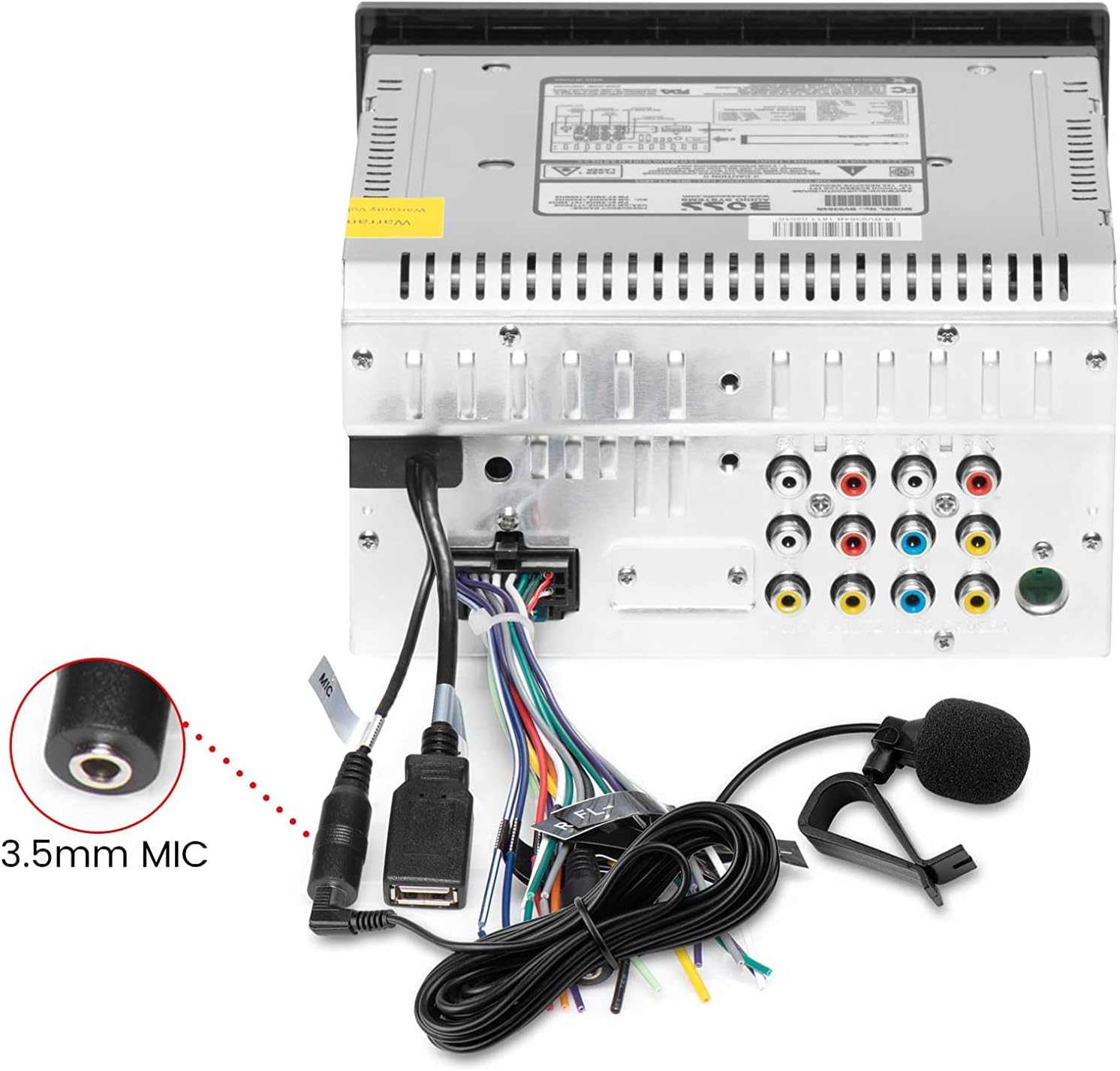
This FingerLakes assembly is the odd one out here, and for some drivers it is the only correct answer. It is not a Bluetooth device at all: it is a wired microphone with a 3.5mm plug, intended for a head unit that already handles Bluetooth calling but hides its microphone behind the faceplate.
Moving that microphone is transformative. Run the cable up the A-pillar or across the headliner near the visor and the capsule finally sits near your mouth instead of a foot below the air vents. Callers hear the difference immediately, and nothing about your stereo, your phone, or your pairing routine changes.
The catch is compatibility. Your head unit needs a dedicated 3.5mm microphone input on the back, which most aftermarket receivers have and many factory units do not. Installation also means pulling a trim panel or two to hide the cable properly.
Bottom line: the cheapest meaningful upgrade if your car already does Bluetooth calls badly, and a waste of money if it does not do them at all.
- Connector: 3.5mm microphone plug
- Type: wired external microphone assembly
- Power: supplied by the head unit
- Mounting: clip with adhesive pad
- Compatibility: Bluetooth-enabled car stereo, GPS, and DVD head units with a mic input
- Cable long enough for A-pillar or headliner routing
Check the back of your head unit for a 3.5mm socket labelled MIC before ordering. With the stereo pulled out, plug the microphone in, then route the cable behind the dash trim, up the A-pillar, and clip the capsule near the visor pointing at the driver.
Test a call before reassembling the trim so you can move the capsule if it picks up too much air from a vent. Keep the cable clear of airbag deployment paths in the pillar.
Many modern A-pillars house curtain airbags. Route the cable around the pillar trim rather than under it if you are not certain, and never trap it beneath a bolt or clip that belongs to a restraint system.
If you are not comfortable removing trim, an installer can do this in under an hour, or choose a visor speakerphone instead.

Pros
- Wakes automatically when you open the car door
- Holds two Bluetooth phones at the same time
- Long quoted talk time and very long standby
- Doubles as a desktop speakerphone for conference calls
- Voice assistant access from the unit
Cons
- Sound is functional rather than rich for music
- Sold under several near-identical model numbers
- Clip grip weakens on thick sun visors
The SUNITEC BC980SA covers the same ground as the Besign and AGPTEK units, with automatic wake-up as its headline trick. A vibration sensor notices the door opening, powers the kit on, and reconnects the phone, so it is live by the time you are belted in.
SUNITEC quotes up to 22 hours of talking and around 1000 hours of standby, with a charge time under two hours. Two phones can stay paired at once and switching between music and calls is handled by the unit. Because it is fully self-contained, it also works away from the car as a desk speakerphone for conference calls.
Sound is the honest compromise. It is clear for voices and navigation prompts but thin for music compared with the dual-driver Besign or the 6W VeoPulse. The model naming is also confusing, with BC980SA, BC980P, and bundle listings covering slightly different variants.
Bottom line: a capable, well-reviewed visor kit for drivers who mainly want calls handled automatically and do not expect it to replace their stereo.
- Audio path: built-in speaker on the visor unit
- Talk time: up to 22 hours
- Standby: approximately 1000 hours
- Charge time: under 2 hours
- Multipoint: two phones connected simultaneously
- Auto power on via vibration sensor at door open
- Voice assistants: Siri and other phone assistants supported
- Mounting: sun visor clip
A good fit for drivers who take frequent short calls and want zero setup each trip, and for anyone who would also use a portable speakerphone at a desk or in a hotel room.
Less suited to drivers who want the unit to double as a music speaker, where the dual-driver options here are the better buy.
Check the clip tension against your visor thickness; on padded visors the grip can loosen over time, and a unit that drops into your lap while driving is a distraction you do not need.
Set volume and position while parked, and use the assistant button rather than your phone to start calls.

Pros
- Two microphones capture voice from a wider arc
- CVC 8.0 filtering targets road and electrical noise
- Bluetooth 6.0 with a long stated working range
- Multifunction button handles calls and track changes
- Backlit button is easy to find at night
Cons
- Requires a 3.5mm AUX input in the dashboard
- Occupies a USB port for power
- No internal battery, so it only runs with the car on
The JOYROOM AUX adapter is the answer to the most common complaint about cheap Bluetooth receivers: callers cannot hear you over the road. Instead of one microphone it uses two, working together to capture voice across a wider arc, backed by CVC 8.0 processing and a dedicated filter chip aimed at engine drone and electrical whine from the USB supply.
Everything else is deliberately simple. It plugs into the 3.5mm jack, takes power from USB, and pairs automatically when you start the car. Bluetooth 6.0 gives it a generous stated working range, and two phones can stay paired. A single backlit multifunction button covers answering, hanging up, calling back, and skipping tracks, so you never need to look down.
The limits are structural. Like any AUX receiver it needs a 3.5mm input, and with no battery it only works when the car supplies power. The microphones also still sit at dash level, so a visor unit remains closer to your mouth even if the processing here is better.
Bottom line: the AUX adapter to choose when noise is the problem rather than convenience, and a modest step up from the plain UGREEN unit.
- Bluetooth version: 6.0
- Audio path: 3.5mm AUX into car speakers
- Microphones: dual array with 360 degree pickup
- Noise processing: CVC 8.0 with built-in filter IC
- Power: USB, no internal battery
- Range: stated up to approximately 100 feet
- Controls: single multifunction button with LED backlight
- Multipoint: two devices paired simultaneously
The dual microphone layout and CVC 8.0 filtering are aimed squarely at drivers whose complaint is call clarity rather than convenience. If you drive a diesel, a van, or an older car with loud tires, this is the AUX adapter to pick over a single-mic model.
Noise processing is not magic, though. An open window at speed will still overwhelm the array, so close up before an important call.
Plug the 3.5mm end into the AUX jack and the USB end into a powered port, then select AUX on your stereo. The phone pairs on the first connection and reconnects automatically after that.
Learn the button pattern while parked: one press to answer or hang up, and the track controls for volume and skipping, so you never have to look at it while driving.
How to Choose the Right Car Bluetooth Microphone
Shoppers searching for a car bluetooth microphone are usually solving one of three different problems, and the right answer changes completely depending on which one you have. Maybe your car has no Bluetooth at all. Maybe it has Bluetooth for music only, with no calling. Or maybe it pairs fine but callers say you sound like you are in a wind tunnel. The six criteria below sort the options by what they actually fix.
Microphone Placement and Pickup

Distance is the single biggest factor in how you sound to the person on the other end. A mic on a dash-mounted adapter sits low and far from your mouth, so it competes with tire roar, HVAC fans, and anything coming through the vents. A visor clip puts the capsule roughly at head height and less than an arm’s length away, which is why speakerphone units like the Besign BK06 and the VeoPulse B-PRO 2B tend to draw better call-quality feedback than dashboard gadgets.
Two designs give you placement control instead of asking you to accept a fixed position. The Nulaxy KM18 uses a rotatable gooseneck so you can angle both the display and the mic toward the driver’s seat. The FingerLakes assembly goes further: it is a wired 3.5mm microphone you route wherever you want, usually to the A-pillar or the headliner near the visor, feeding a factory or aftermarket head unit that already has Bluetooth calling built in.
Several products in this roundup advertise noise cancellation. The JOYROOM AUX adapter uses two microphones and CVC 8.0 processing, and Nulaxy and AGPTEK both describe noise reduction on their units. Treat those labels as design intent rather than a guaranteed result, because cabin noise varies enormously between a compact hatchback and a diesel pickup at highway speed.
Bluetooth Version and Two-Phone Pairing
Bluetooth version numbers get plastered across product pages, and the practical difference between 5.0 and 6.0 for a phone call is small. What the newer chipsets do reliably improve is reconnection speed and how stable the link stays when your phone is in a pocket or a bag on the passenger seat. In this list the range runs from Bluetooth 5.0 on the Besign BK06 up to Bluetooth 6.0 on the UGREEN and JOYROOM AUX receivers.
Multipoint matters more than the version number for a lot of drivers. If you carry a work phone and a personal phone, or if your partner shares the car, a unit that holds two connections at once saves a pairing dance every trip. The Besign BK06, the VeoPulse B-PRO 2B, the SUNITEC BC980SA, the UGREEN adapter, and the JOYROOM adapter all state support for two devices at the same time.
How the Audio Reaches Your Speakers
This is the fork in the road. An AUX receiver like the UGREEN or the JOYROOM plugs into a 3.5mm input and sends the call through your car’s own speakers, which gives the best sound of any approach here, but it only works if your dashboard has that jack. An FM transmitter such as the Nulaxy KM18 or the UNBREAKcable unit broadcasts to an empty radio frequency instead, so it works in a car with nothing but an FM radio, at the cost of occasional static when you drive through a crowded band in a city.
The third route skips your stereo entirely. Visor speakerphones from AGPTEK, Besign, VeoPulse, and SUNITEC carry their own drivers, ranging from 2W up to 6W on the VeoPulse. Call audio comes out of the visor unit rather than the door speakers, which keeps the radio free and makes the whole setup portable between vehicles, including rentals.
The FingerLakes mic is the exception to all three. It adds nothing to the audio path, because the head unit you already own does the calling; it just gives that head unit a better placed microphone than the one buried behind the faceplate.
Power Source and Battery Life

Battery units and always-powered units both have a case. Visor speakerphones run on internal batteries: Besign lists a 1000mAh cell rated for up to 20 hours of talk time and 600 hours of standby, and AGPTEK quotes roughly 16 hours of hands-free time with 9 to 10 hours of music playback after a two-hour charge. That is enough for weeks of ordinary commuting between charges, and the motion sensors on the Besign and SUNITEC units wake them when you open the door so they are ready before you sit down.
The always-powered camp never needs a charge cable. The UGREEN and JOYROOM AUX adapters draw power from a USB port, and the Nulaxy, UNBREAKcable, and other 12V units live in the cigarette lighter socket, where they double as chargers. The Nulaxy accepts 12V to 24V input and offers a USB charging port, and the UNBREAKcable adds 20W Power Delivery plus Quick Charge 3.0 outputs, so the socket you gave up comes back as two.
Voice Assistant Access and One-Touch Controls
The whole point of this category is not touching your phone, so the controls on the device itself have to be usable without looking. Single large buttons win here. The AGPTEK, Besign, VeoPulse, SUNITEC, and UNBREAKcable units all support Siri and Google Assistant through a button press, which means you can start a call, ask for directions, or send a message by voice while the phone stays in your pocket.
Automatic behavior counts too. The VeoPulse connects on its own when its vibration sensor detects you approaching and powers down when you walk away, and the SUNITEC and Besign units reconnect on door open. A device that needs a manual power cycle every morning is a device you will eventually leave in a drawer.
Safe and Legal Hands-Free Use
Hands-free rules differ by country, state, and even city, and some places restrict phone calls behind the wheel regardless of the equipment you use. Check your local regulations before you rely on any of these devices, and treat a hands-free kit as a way to comply with the law rather than a way around it. None of these products make it safe to read a screen, dial a number, or scroll a playlist while the car is moving.
Practical habits help more than hardware. Pair and position the device while parked, set the volume before you pull out, and let the assistant place calls by voice. If a conversation needs your full attention, the safest answer is still to pull over. For related in-cabin gear, our electronics category and the cell phones and accessories section cover mounts, chargers, and adapters that keep the same principle in mind.
| Model | How audio reaches you | Power | Standout feature |
|---|---|---|---|
| Nulaxy KM18 | FM transmitter to car radio | 12V to 24V socket | Gooseneck mic and 1.44 inch display |
| UGREEN AUX Adapter | 3.5mm AUX to car speakers | USB, no battery | Bluetooth 6.0, remembers five devices |
| UNBREAKcable FM Transmitter | FM transmitter to car radio | 12V socket | 20W PD and QC 3.0 charging ports |
| AGPTEK Visor Speakerphone | Built-in speaker | Rechargeable battery | TF card slot and Bluetooth 5.3 |
| Besign BK06 | Built-in dual 2W speakers | 1000mAh battery | Motion sensor auto power on |
| VeoPulse B-PRO 2B | Built-in 6W speakers | Rechargeable battery | Vibration sensor auto connect |
| FingerLakes 3.5mm Mic | Your existing head unit | Powered by head unit | Wired mic you place yourself |
| SUNITEC BC980SA | Built-in speaker | Rechargeable battery | Auto power on at door open |
| JOYROOM AUX Adapter | 3.5mm AUX to car speakers | USB, no battery | Dual mics with CVC 8.0 filtering |
Why You Should Trust Us
We build these lists from verified customer data rather than press releases. Every product here cleared a rating floor of 4.0 stars and a minimum review count, then we ranked what remained by review volume so that the products with the longest track records among real drivers rise to the top. Listings with thin feedback histories were left out even when the spec sheets looked appealing.
We also removed duplicate color and model variants of the same unit so that the shortlist represents genuinely different approaches instead of the same product counted twice. Specifications quoted above come from the manufacturers’ own published details, and where a claim could not be confirmed, we describe the feature rather than repeat a number. Our full library of buying guides lives in the articles archive.
Final Thoughts
The Nulaxy KM18 Bluetooth Car Adapter is our best overall choice because it solves the widest range of situations. It needs nothing from your dashboard except a 12V socket, the gooseneck lets you aim the microphone at the driver’s seat instead of the windshield, and the display tells you what is happening without a phone in your hand. In an older vehicle with no AUX jack and no factory Bluetooth, it is the shortest path to hands-free calling.
If your dashboard does have a 3.5mm input, the UGREEN Aux to Bluetooth 6.0 Adapter is the best value in the group. It is the cheapest way to get calls and music through your factory speakers, it draws power from USB so there is nothing to recharge, and it holds two paired phones at once. The JOYROOM AUX adapter is the alternative worth paying a little more for if road noise is your main complaint, thanks to its dual microphone array.
For drivers who want the microphone as close to their mouth as possible, the Besign BK06 is the best visor speakerphone here, with a motion sensor that wakes it at the door and roughly 20 hours of talk time per charge. The VeoPulse B-PRO 2B is the louder option for noisy cabins, and the FingerLakes 3.5mm microphone assembly is the fix when your head unit already handles Bluetooth calls but its built-in mic is buried in the dash. Whichever you pick, set it up while parked and let your voice assistant do the driving-time work. More in-car deals are collected across our category directory.
Frequently Asked Questions
Does a car bluetooth microphone work in a car with no Bluetooth at all?
Yes. That is exactly what FM transmitters and visor speakerphones are for. An FM unit like the Nulaxy KM18 or the UNBREAKcable transmitter pairs with your phone and broadcasts to an empty station on your radio, so any car with an FM tuner and a 12V socket can take hands-free calls. A visor speakerphone skips the stereo entirely and uses its own speaker, which also makes it easy to move to another vehicle.
Why do callers still say I sound muffled?
Usually the microphone is too far away or pointed at the wrong surface. Move the unit closer to head height, aim it toward the driver rather than the windshield, and close the vents that blow directly across it. Wind noise from an open window will defeat any microphone in this list, and a phone lying face down in a cup holder will always sound worse than a visor clip at eye level.
Is an AUX adapter better than an FM transmitter in 2026?
For sound quality, yes, an AUX connection is a direct wired path and carries no interference. The catch is that many cars built in the last few years dropped the 3.5mm jack, and plenty of older ones never had one. Check your dashboard first. If there is no jack, an FM transmitter is the practical option, and picking an unused frequency at the low end of the dial reduces the static you hear in dense city areas.
Can I use one of these devices for recording or video work?
No. Everything in this roundup is tuned for voice calls, with narrow bandwidth and aggressive noise processing that would ruin a recording. If you need a microphone for content rather than conversation, our guide to budget microphones for vlogging covers shotgun, lavalier, and USB options built for that job instead.
Will a car bluetooth microphone drain my car battery?
Units that live in the 12V socket only draw power when the socket is live, which in most cars means when the ignition is on. A few vehicles keep the socket powered all the time, so if yours does, unplug the adapter when the car sits for several days. Battery-powered visor units and USB-powered AUX adapters have no effect on the starting battery either way.




Write Your Review
No reviews yet. Be the first to share your experience!