

Ask for a audio interface for music production and you will be handed two completely different products. One is a card that goes inside a desktop computer, the other is a box that sits on the desk with an XLR socket on the front. Both are called sound cards in everyday speech, and only one of them is what a person recording vocals or guitar actually needs. We sorted 9 of them from Behringer, Creative, PreSonus and more by the things that decide which box belongs on your desk in September 2026: how many inputs it has, what the preamps do to a quiet microphone, and what software arrives with it.
Our top pick is the Focusrite Scarlett Solo 3rd Gen for pairing a preamp with enough clean gain for a difficult microphone with the simplest front panel here. Below we sort the field by input count so you can match one to what you actually record. For the rest of the room, our musical instruments section covers the gear that plugs into these.

Pros
- Preamp has enough clean gain for most microphones people actually own
- Front panel is simple, with nothing to misread while tracking
- Direct monitoring switch removes latency from the headphone feed
- Bundled software covers a first year of learning
Cons
- One microphone preamp only, so two microphones at once is out
- Bus powered design means no separate supply to lose, but also no headroom to spare
The Scarlett Solo is the interface most home recordings should start with, because its shape matches the way most people actually work: one voice or one guitar at a time, into a computer, with headphones on.
The preamp is the reason it stays recommended. It has enough clean gain that a typical microphone reaches a usable level without the knob at maximum, which is where hiss creeps into cheaper boxes. The instrument input takes a guitar directly with no extra box in between.
Direct monitoring is a switch rather than a menu, which matters when you are already wearing headphones and about to sing. Everything on this front panel does one thing, and none of it needs the manual after the first session.
Bottom line: the default recommendation for solo recording, and the one to buy unless you specifically need two microphones at once.
- Inputs: one XLR microphone, one instrument
- Phantom power: yes, 48 volts
- Connection: USB-C, bus powered
- Monitoring: direct monitor switch
- Outputs: balanced monitor outputs plus headphones
- MIDI: not fitted
- Software: bundled recording software and plugins
- Use: solo vocal or instrument recording
Buy this for solo recording: one vocal, one guitar, voiceover work, or a podcast recorded by one person. It suits a first interface particularly well because there is very little to learn. Look at a two input box instead if you record two people or voice and instrument simultaneously, and at the four input class if you track a band.
Install the maker's driver before plugging it in on Windows, since the generic system driver will work but will not give you low latency. Set gain with the loudest part of the performance rather than a test line, leaving headroom rather than chasing the top of the meter. Use direct monitoring while tracking and switch to software monitoring only when you want to hear effects.

Pros
- Lowest cost route into proper microphone recording
- Phantom power included despite the entry position
- Instrument input handles a guitar without an extra box
- Small enough to leave permanently on a crowded desk
Cons
- Gain runs out sooner than the better preamps here
- Build is light, and the knobs feel their price
The UM2 exists to answer one question: what is the least you can spend and still record a microphone properly. It has a real preamp, real phantom power, and direct monitoring, which is the whole functional list an entry level interface needs.
Where it shows its price is gain and feel. A demanding dynamic microphone will push it, and the knobs do not have the reassuring weight of the pricier boxes. Neither stops it working; both are what you are accepting in exchange.
For someone unsure whether they will keep recording, that trade is sensible. Many people who start here move up within a year, and the UM2 then becomes the interface that lives in the bag or on a second machine.
Bottom line: the value pick, and the right buy when you want to find out whether recording sticks before spending more.
- Inputs: one XLR microphone, one instrument
- Phantom power: yes
- Connection: USB, bus powered
- Monitoring: direct monitor switch
- Outputs: line outputs plus headphones
- MIDI: not fitted
- Software: bundled recording software
- Use: entry level solo recording
This suits a first interface on a tight budget, a spare unit for a second computer, or a portable box you are not worried about knocking around. If you already own a demanding dynamic microphone, or you know you will be recording seriously, start higher up this list where the gain headroom is greater.
Compare this against the top pick on one thing only: the microphone you own or plan to buy. With a condenser, the difference in daily use is small. With a low output dynamic microphone, the extra gain further up the list is what stops you needing an inline booster later, and that booster costs about what the gap between the two boxes does.

Pros
- Two combo inputs accept microphone, line or instrument on either channel
- Suits two people talking or voice plus instrument together
- Straightforward controls with per channel gain
- Bundled software package included
Cons
- Phantom power is a single switch for both channels
- Plastic body is light next to the metal cased options
The M-Track Duo is the step most people take when one input stops being enough. Both channels accept a microphone, a line source or an instrument, so the box does not dictate which combination you use on any given day.
That flexibility is the point. A two person podcast, a singer playing guitar at the same time, a keyboard and a microphone: all of it works without repatching or adapters, which is what makes a two channel box feel less restrictive than a solo unit.
The compromises are ordinary at this level. Phantom power switches both channels together, so a ribbon microphone alongside a condenser needs care, and the housing is plastic rather than metal.
Bottom line: the pick when two sources go in at once and you want either channel to take anything.
- Inputs: two combo XLR and jack
- Phantom power: yes, switched for both channels
- Connection: USB, bus powered
- Monitoring: direct monitoring
- Outputs: line outputs plus headphones
- MIDI: not fitted
- Software: bundled package
- Use: two source recording
Choose this for two person podcasts, singer guitarists tracking live, or anyone who records a mix of microphones, keyboards and guitars and does not want to think about which socket takes what. A solo vocalist recording one thing at a time does not need the second channel and can spend the difference elsewhere.
Set gain separately for each channel with both sources at performance level, since a loud instrument next to a quiet voice is the usual reason one channel clips. Remember phantom power applies to both inputs at once, so do not pair a ribbon microphone with a condenser here. Use direct monitoring for tracking and mute the software channel to avoid hearing yourself twice.

Pros
- Includes a full recording workstation rather than a limited edition
- Five pin MIDI in and out for older hardware
- Metering on the front panel shows levels at a glance
- USB-C connection with bus power
Cons
- Larger footprint than the simplest two input boxes
- Bundle takes some setting up before the first session
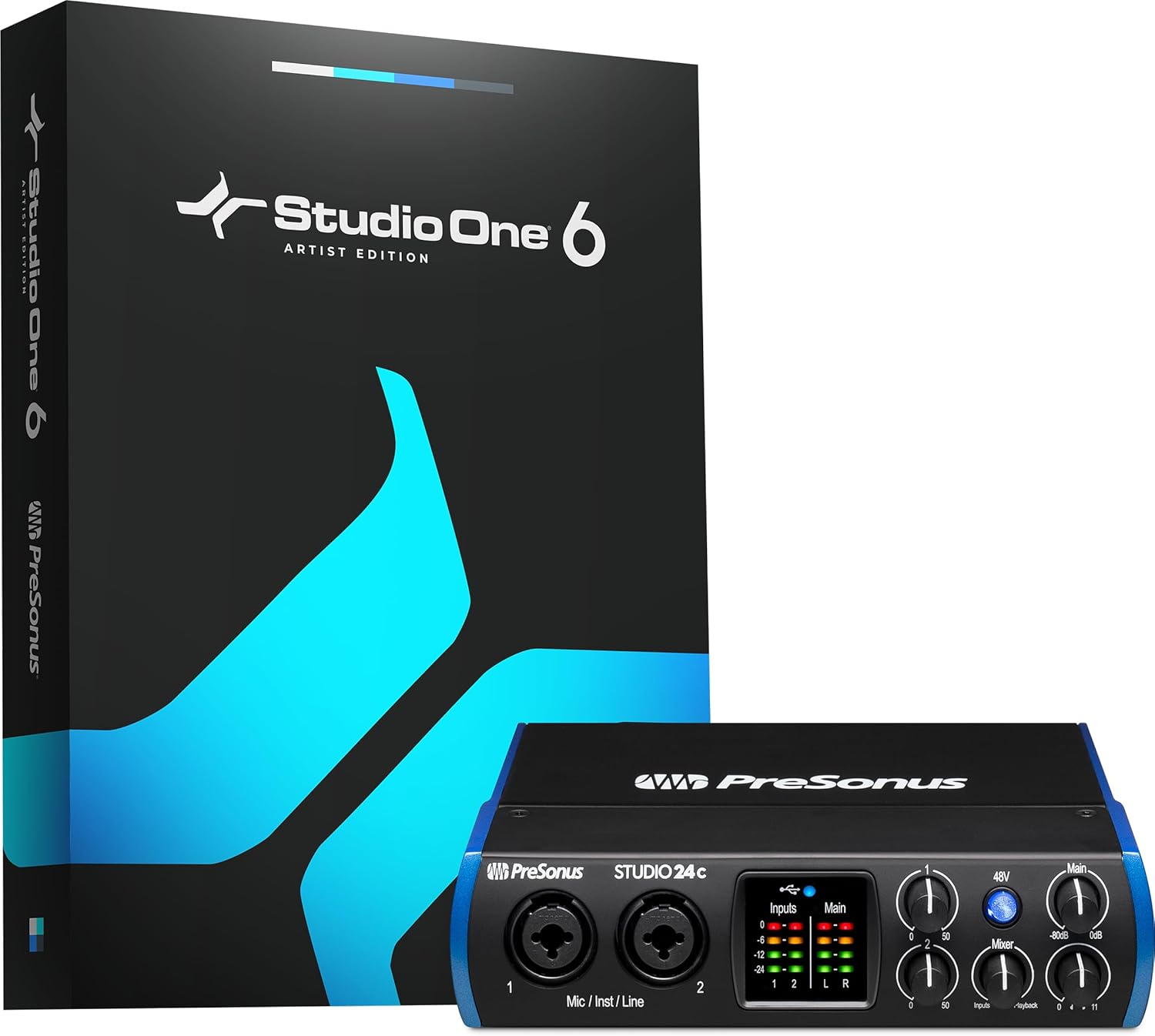
The Studio 24c aims at the person who wants one box to arrive and a complete setup to exist afterwards. The interface itself is a competent two input design; the bundle is what separates it, since it includes a full workstation rather than a capped edition.
MIDI sockets are the other differentiator and they matter more than they appear. Anyone with an older keyboard, a drum machine or a hardware sequencer needs those round five pin connectors, and most interfaces at this level leave them off.
Front panel metering is a small thing that pays off daily, letting you see levels without watching the computer screen while you play.
Bottom line: the pick for someone assembling a first full setup, especially with older MIDI gear in the room.
- Inputs: two combo XLR and jack
- Phantom power: yes
- MIDI: five pin in and out
- Connection: USB-C, bus powered
- Monitoring: direct monitoring with blend
- Metering: front panel level meters
- Software: full workstation bundle
- Use: complete first setup
Buy this if you are starting from nothing and want software and hardware settled in one purchase, or if you own MIDI hardware with five pin sockets. It suits a permanent desk setup rather than a bag. Someone who already owns a workstation they like is paying for a bundle they will not use.
Weigh this against the simpler two input boxes purely on the bundle and the MIDI sockets, since the recording capability is broadly comparable. If you have already chosen your software, the difference narrows to MIDI. If you have not, a full workstation included is worth real money and this is the shortest route to a working setup.

Pros
- Four microphone preamps for tracking several sources at once
- MIDI in and out included
- Higher sample rate support than the entry boxes
- Individual gain and pad controls per channel
Cons
- Considerably larger than a two input box on a desk
- More than a solo producer will ever use
The UMC404HD is where this list stops being about solo recording. Four preamps means a drum kit with several microphones, a band tracking together, or a podcast with three guests in the room, all captured on separate channels you can mix afterwards.
Recording to separate channels is the real argument for it. A single stereo recording of four people is one thing you cannot fix; four separate tracks lets you rebalance whoever spoke too quietly long after everyone has gone home.
It asks for space in return, and its four outputs and MIDI sockets suit a permanent setup rather than a laptop bag. For a solo vocalist it is simply more box than the job needs.
Bottom line: buy this when several microphones run at once, and skip it entirely if they do not.
- Inputs: four combo XLR and jack with preamps
- Phantom power: yes
- MIDI: five pin in and out
- Outputs: four, for flexible routing
- Connection: USB
- Monitoring: per channel control
- Sample rate: high resolution support
- Use: bands, drums, multi guest recording
This is for anyone recording more than two sources at the same time: a band rehearsal captured properly, a drum kit, or a panel podcast. It also suits a fixed studio desk where the extra outputs get used. Solo producers and two person podcasts will do everything they need with a smaller box.
Record each source to its own track rather than mixing on the way in, since that is the whole advantage of four preamps. Label channels in the software before the session starts, because sorting out which track was which afterwards wastes more time than the labelling. Check whether your session needs the separate power supply rather than assuming bus power will carry four preamps.

Pros
- Metal chassis stands up to being moved around
- Two combo inputs cover microphone, line and instrument
- Simple control set with a monitor blend knob
- Bundled recording software included
Cons
- No MIDI sockets on this model
- Feature set is deliberately plain next to rivals
The AudioBox 96 is the plain, durable option in the two input class. It does not chase a feature list; it puts two solid inputs in a metal box and gets out of the way.
The chassis is the part owners mention most. Interfaces get pushed around desks, packed into bags and knocked by cables, and a metal housing survives that in a way plastic does not.
The monitor blend knob is the other detail worth having, letting you dial between the direct input and the computer playback rather than choosing one or the other outright, which makes tracking to a backing track much easier.
Bottom line: the durable two input pick, and a sensible choice if the interface will not live in one place.
- Inputs: two combo XLR and jack
- Phantom power: yes
- Chassis: metal
- Monitoring: blend control between input and playback
- Connection: USB, bus powered
- MIDI: not fitted on this model
- Software: bundled recording software
- Use: two source recording, portable setups
Choose this if the interface travels between a desk and a rehearsal space, or if you simply prefer a metal box that will outlast the computer it plugs into. It fits two source recording well. Anyone needing MIDI sockets should look at the model in this list that has them, since this one does not.
Turn phantom power off before plugging or unplugging a microphone, which is good practice on any interface and protects both the microphone and your ears. Keep headphone levels sensible when switching monitoring modes, since a blend knob at the wrong position can be startlingly loud. Coil cables loosely rather than tightly around the unit when packing it.

Pros
- Very small footprint on a crowded desk
- Combo input takes a microphone or an instrument
- Phantom power available for condensers
- Bundled software included
Cons
- Single preamp, so no two microphone recording
- Plastic housing and light controls
The M-Track Solo is built for the smallest version of this setup: one microphone, headphones, a laptop and not much desk. It does that job and does not pretend to do more.
The combo input takes either a microphone or an instrument, and the additional line input handles a keyboard or a playback source, which covers more ground than the single preamp count suggests.
It is plastic and light, so it slides if cables tug at it, and there is no second preamp for a duet. Within its intended use it is a tidy, inexpensive box.
Bottom line: the compact single input option, for a small desk and a simple setup.
- Inputs: one combo XLR and jack, plus line input
- Phantom power: yes
- Connection: USB, bus powered
- Monitoring: direct monitoring
- Outputs: line outputs plus headphones
- MIDI: not fitted
- Software: bundled recording software
- Use: minimal solo setup
This suits a small desk, a laptop setup, or a second interface for travel. It fits voiceover work and single instrument recording. If you expect to record two microphones, or want a chassis that shrugs off being moved constantly, spend a little more within this list.
Compare it against the value pick and the top pick on gain and build rather than on features, since all three cover the same basic job. Choose this one if physical size is a real constraint, choose the value pick if cost is, and choose the top pick if microphone gain is your concern.

Pros
- Higher sample rate support than the entry models
- Two preamps with individual gain controls
- Metal chassis at a modest cost
- Phantom power for condenser microphones
Cons
- No MIDI sockets
- Front panel is busier than the simplest interfaces
The UMC202HD is the middle step in this maker's range and it makes sense for someone who has outgrown a single input but does not need four. Two preamps, higher resolution converters and a metal box, for meaningfully less than the premium two input options.
The converters are the technical selling point, though the honest note is that on a home recording the microphone and the room matter far more than the sample rate. What you notice day to day is having a second preamp and a housing that does not flex.
MIDI is absent, so hardware keyboards with five pin sockets need another route.
Bottom line: a sensible middle option when you want two preamps and a metal box without paying for a bundle you will not use.
- Inputs: two combo XLR and jack with preamps
- Phantom power: yes
- Converters: high resolution
- Chassis: metal
- Monitoring: direct monitor with mix control
- Connection: USB, bus powered
- MIDI: not fitted
- Use: two source recording
Buy this if you need two preamps and prefer a metal chassis, and if the software bundle is not part of your decision because you already have a workstation. It suits a second interface in a home studio as well. Anyone with MIDI hardware should choose a model here that carries the sockets.
Install the maker's driver rather than relying on the generic one, since that is where the low latency performance comes from on Windows. Use the mix control to balance direct input against playback while tracking, and set both channel gains with the performance at full level rather than during a quiet soundcheck.

Pros
- Genuine upgrade over onboard audio for playback
- Surround output for a multi speaker desktop setup
- Headphone amplifier drives higher impedance headphones
- Installs inside the case with nothing on the desk
Cons
- No XLR inputs or microphone preamps, so not a recording interface
- Requires a desktop computer with a free PCIe slot
This is the product people often mean when they type sound card, and it is included so the comparison answers the question honestly rather than pretending the term only means one thing.
As a playback upgrade on a desktop it does real work: cleaner output than onboard audio, surround channels for a speaker set, and a headphone amplifier with enough drive for headphones a motherboard struggles with.
What it is not is a recording interface. There is no XLR socket, no microphone preamp and no phantom power, so a studio microphone cannot connect without adapters that defeat the purpose. If a microphone is in your plan, buy one of the interfaces above instead.
Bottom line: a good internal card for desktop playback, and the wrong tool if you are recording with a microphone.
- Type: internal PCIe sound card
- Use: playback, surround output, headphone listening
- Inputs: line and small jack, no XLR
- Microphone preamp: none
- Phantom power: none
- Fitting: PCIe slot in a desktop
- Software: control panel included
- Not intended for microphone recording
Choose this for a desktop used for listening, gaming and surround output, or where the onboard audio is noisy. It also suits someone recording only line level sources such as a mixer output. Anyone recording a microphone or an instrument directly should buy an audio interface from this list instead.
Power the computer down fully and unplug it before opening the case, and ground yourself against the chassis before handling the card. Seat it firmly in the slot and screw the bracket down so cable tension cannot work it loose. Install the maker's control software after the first boot so the outputs are configured correctly.
How to Choose an Audio Interface
One question comes before all the others, and getting it wrong is how people end up returning a perfectly good product. Read the first section even if you skip everything else.
Sound Card or Audio Interface: Which You Actually Need

An internal sound card is a circuit board that slots into a desktop motherboard. It exists to improve playback and to serve games and surround systems, and its inputs are the small stereo jacks on the back of a computer. For listening it can be a genuine upgrade over onboard audio.
An audio interface is an external box with the sockets a musician needs: XLR for microphones, a quarter inch jack that accepts a guitar directly, a headphone output with its own volume control, and preamps designed to lift a quiet source without adding hiss. It also carries drivers built for low latency recording rather than for playback.
If you are recording anything with a microphone or an instrument, you want the interface. The internal card in this list is here for the case where it makes sense, which is a desktop machine used for playback and for lighter recording through line level inputs. Everything else here is an interface, and that is deliberate.
Count the Inputs, and What Kind They Are

Interfaces are described by two numbers, inputs by outputs. A two by two records two sources at once and sends two channels back out. Where people get caught is assuming two inputs always means two microphones, because on the smallest boxes one of those inputs is a line or instrument jack rather than a second microphone preamp.
Work backwards from what you record simultaneously. One vocal at a time needs a single microphone preamp. Vocal plus guitar at the same time needs one preamp and one instrument input. Two people talking into two microphones needs two preamps, which is a different product from a single input box with an extra jack.
Above that sits the four input class, represented here by the Behringer UMC404HD. Four preamps matters for a small drum setup, a band tracking live, or a podcast with several guests in the room. It is more than most solo producers ever use, and it costs and occupies desk space accordingly.
Buying more inputs than you need has a cost beyond money. Every extra preamp is another knob on the front panel and another channel to arm and mute in the software, and on a small desk the difference between a two input box and a four input one is real estate you will notice daily. Match the count to the session you actually run most weeks, not to the one you might run someday.
Preamps, Gain, and Quiet Microphones
The preamp is the part that takes a microphone signal, which is tiny, and raises it to a level the converter can work with. How much it can raise it is quoted as gain in decibels, and how cleanly it does so is what separates a usable recording from one with a layer of hiss under everything.
This matters most with dynamic microphones, which are common for voice and produce a much weaker signal than condensers. A microphone of that type on an interface short of gain leaves you turning the knob to maximum and still recording something quiet, and the fix people reach for is an inline booster, which is money you did not plan to spend.
The interfaces here differ in how much headroom they offer, and the ones with more of it are worth the difference if you already own a dynamic microphone or intend to. If you are recording a condenser, an electric guitar, or a keyboard, gain is a much smaller concern and almost anything here has enough.
Latency, Drivers, and Hearing Yourself
Latency is the delay between playing a note and hearing it back through the computer. Enough of it and singing becomes impossible, because you are hearing yourself a fraction of a second late. This is the problem that makes people give up on recording through onboard audio, and it is the main reason interfaces exist.
Two things solve it. The first is a proper low latency driver, which on Windows means a dedicated driver from the maker rather than the generic system one. The second is direct monitoring, a switch that sends the input straight to the headphone output without going through the computer at all, so what you hear is instant regardless of what the software is doing.
Every interface in this list has direct monitoring in some form, and it is the feature to look for rather than a headline latency figure. Check driver support for your operating system version before buying, since that is where an otherwise fine box occasionally falls down. Our computers archive covers the machine side of this.
Phantom Power, MIDI, and the Rest of the Back Panel
Condenser microphones need phantom power, a 48 volt supply sent up the microphone cable from the interface. Every interface here provides it, usually on a single switch that applies to all inputs at once. That detail matters if you ever record a condenser and a ribbon microphone together, since a ribbon should not receive phantom power.
MIDI sockets are the other thing to check. Older keyboards and drum machines connect over five pin MIDI rather than USB, and only some interfaces carry those sockets. If your keyboard already connects to a computer by USB you do not need them, and if you own vintage gear you very much do.
Look also at outputs. Two balanced outputs feed a pair of monitor speakers properly; a single stereo jack means adapters. Bus power is worth confirming too, since an interface that runs off the USB connection alone is the one you can take to a friend’s house without hunting for a power adapter.
Bundled Software and What It Replaces
Interfaces at this level almost all arrive with recording software, and for a first purchase that is a real part of the value. A bundled digital audio workstation, a set of plugins and a few instrument libraries cover the first year of learning without any further spending.
The bundles differ in kind rather than in quantity. Some makers include their own full workstation software, which is the most useful outcome if you have not settled on one. Others include a limited edition of a well known program plus plugins, which suits someone who already knows what they will use and wants the extras.
Check what the bundle actually unlocks before treating it as decisive. Limited editions have track counts and feature caps, and upgrading later costs what it costs. The software is a genuine bonus rather than a reason to choose a box whose inputs do not match what you record.
Registration is worth doing on the day it arrives. Bundled software is almost always delivered as codes tied to the serial number and claimed through the maker’s account system, and several bundles have a window after purchase in which you have to claim them. People who leave the box unopened for a few months sometimes find the offer has moved on.
| Type | Best at | Weak at |
|---|---|---|
| Single preamp interface | One vocal or one instrument, simplest front panel | Cannot record two microphones at once |
| Two preamp interface | Two microphones, or voice plus instrument together | Larger footprint, more knobs than a solo user needs |
| Four preamp interface | Bands, drum setups, multi guest podcasts | Overkill for solo work, takes real desk space |
| Internal sound card | Playback quality on a desktop, surround output | No microphone preamps, not built for recording |
One last practical point: nearly everything here runs on USB power alone, which is what makes an interface portable. The exception is worth checking on the four input class, where the extra preamps sometimes need a separate supply. If you plan to record on a laptop away from a desk, confirm bus power before you buy rather than discovering it in a rehearsal room.
Why You Should Trust Us
We build these lists from published specification and from the pattern of what long-term owners report rather than from marketing copy. For each unit here we checked the real input configuration rather than the marketing number, whether phantom power and direct monitoring are present, whether MIDI sockets are fitted, what drivers the maker supplies and for which platforms, and exactly what the bundled software is rather than how long the list of it looks.
We kept one internal sound card in the comparison deliberately, because it is what a large share of people are searching for when they use the term, and leaving it out would answer a different question than the one being asked. Everything else here is an audio interface, and we say plainly which is which rather than blurring the two.
Final Thoughts
Best overall is the Focusrite Scarlett Solo 3rd Gen. It offers one properly specified microphone preamp and one instrument input, which is exactly the shape of most home recording, and the front panel is simple enough that nothing gets in the way of pressing record.
Best value is the Behringer U-PHORIA UM2. It covers the same essential job, a microphone in and headphones out with phantom power available, at the lowest outlay in this group, and it is the sensible way to find out whether you enjoy recording before spending more.
For specific needs, the M-Audio M-Track Duo is the pick when two sources go in at once, the PreSonus Studio 24c suits someone who wants a full workstation in the box, the Behringer UMC404HD is the one to buy for a band or a multi guest podcast, the PreSonus AudioBox 96 is a straightforward two input choice, the M-Audio M-Track Solo is the compact single input option, the Behringer UMC202HD sits between the value pick and the four input box, and the Creative Sound Blaster Audigy FX is the internal card for a desktop that needs better playback rather than microphone inputs. More picks are indexed across our category index and the electronics section.
Audio Interface FAQs
Do I need one if my computer already has a headphone jack?
For listening, no. For recording, almost certainly yes. The socket on a computer accepts a consumer level signal and has no microphone preamp worth the name, so a studio microphone plugged into it through an adapter records quietly and noisily. The bigger problem is latency: onboard audio routes through the operating system in a way that delays what you hear, which makes singing or playing along to a recording very difficult.
What is the difference between a sound card and an audio interface?
A sound card is internal and built around playback, with small stereo jacks and no microphone preamps. An audio interface is external and built around recording, with XLR inputs, preamps, phantom power, direct monitoring and low latency drivers. People use both terms loosely, and the search term brings up both, but if there is a microphone in your plan the interface is the product you want.
Will any of these work with my dynamic microphone?
They will connect, but gain is the question. Dynamic microphones put out a much weaker signal than condensers, and popular broadcast models are particularly demanding. On an interface short of clean gain you end up at maximum with a quiet recording and audible hiss. If you already own a dynamic microphone, favour the units here with more gain headroom, or budget for an inline booster and treat it as part of the purchase. Our musical instruments archive covers microphones themselves.
Do I need MIDI sockets?
Only if you own gear that uses them. Modern keyboards and pad controllers connect over USB and carry their MIDI data that way, so an interface without five pin sockets loses you nothing. Older synthesisers, drum machines and some hardware sequencers use the round five pin connector, and for those the sockets are the difference between plugging in and buying a separate adapter.
Is more expensive always better here?
Not in the way people expect. Above the entry level, extra money mostly buys more inputs, better converters and a nicer front panel rather than a dramatic change in recorded sound on a single vocal. The things that make an obvious difference to a home recording are the microphone, the room and the performance. Buy the interface that matches how many things you record at once, and put the rest of the budget elsewhere.



Write Your Review
No reviews yet. Be the first to share your experience!