

Selecting the right housing for your custom computer build is one of the most critical decisions you will make as an enthusiast or system builder. Modern graphics cards and multi-core central processors draw massive amounts of electrical power, converting that energy directly into ambient heat that must escape your cabinet without impediment. When hot air becomes trapped inside an unoptimized enclosure, your critical silicon faces thermal throttling, fan noise climbs to distracting volumes, and the operational lifespan of expensive hardware can degrade prematurely. Investing in essential gaming computer components requires pairing those parts with an enclosure engineered for low thermal resistance, generous clearance, and effortless maintenance.
To help you select the ideal foundation for your next desktop build, we evaluated 11 gaming PC chassis options from CoolerMaster, MUSETEX, Fractal Design and more for October 2026. Our assessment focused on physical intake volume, radiator mounting versatility, cable management channels, expansion slot clearances, and long-term acoustic control. Our top pick is the CORSAIR 4000D RS ARGB Frame Modular Mid-Tower ATX for its innovative FRAME modular system and high-airflow Y-pattern intake.

Pros
- Flexible six-position modular I/O panel
- Generous clearance for long graphics cards
- Standard ATX power supply support
- High-airflow perforated steel frame
- Removable patterned magnetic dust filters
Cons
- Limited to Micro-ATX and Mini-ITX motherboards
- Plastic side window scratches more easily than tempered glass
- Single internal 3.5-inch drive bay limits mass storage expansion
The Cooler Master MasterBox Q300L delivers a compact mini-tower footprint designed specifically for Micro-ATX and Mini-ITX desktop builds. It suits PC gamers and everyday builders who want a space-efficient chassis that still houses standard gaming hardware without occupying massive desk space.
Modularity stands out as a core benefit, featuring an I/O bracket with two USB 3.0 ports that can be repositioned across six distinct points on the exterior. Ventilation is maximized by fully perforated alloy steel panels on the front, top, and bottom, paired with magnetic dust filters. Despite its compact 15.39-inch depth, the interior provides room for graphics cards up to 360mm and liquid cooling radiators up to 240mm.
Builders planning to install standard full-size ATX motherboards will need to look elsewhere, as the interior only accommodates Micro-ATX and Mini-ITX boards with four expansion slots. The transparent side panel is made of acrylic plastic rather than tempered glass, requiring extra care to avoid scuffs, and internal drive mounting is limited to a single 3.5-inch bay.
Bottom line: The MasterBox Q300L is a versatile, space-saving enclosure that combines adjustable port placement, open ventilation, and impressive graphics card clearance for compact gaming rigs.
- Dimensions: 15.39" D x 9.06" W x 15.00" H
- Motherboard Support: Micro-ATX, Mini-ITX
- Enclosure Materials: Alloy Steel, Plastic
- Expansion Slots: 4
- Internal Bays: 1 x 3.5-inch drive bay
- Clearance: 360mm GPU, 159mm CPU cooler, 160mm PSU
- Cooling Support: Up to 5 fans, 240mm liquid cooler
- Front Panel I/O: 2 x USB 3.0 ports, Audio In/Out
- Color: Dark Gray
Hardware compatibility inside the MasterBox Q300L is remarkably accommodating for a mini-tower. The main chamber supports Micro-ATX and Mini-ITX motherboards while leaving 159mm of vertical clearance for CPU air coolers and 360mm of horizontal space for full-length graphics cards.
Power supply accommodation supports a standard bottom-mounted ATX unit up to 160mm in length, eliminating the need to source specialized small-form-factor power supplies. Liquid cooling builders can install a 240mm radiator along the front or top, with total mounting room for up to five case fans to maintain positive internal airflow.
This mini-tower chassis is built for PC builders who prioritize a compact footprint on or under their desk without sacrificing room for modern, triple-fan graphics cards. Builders assembling a gaming rig around a Micro-ATX or Mini-ITX motherboard will appreciate the high thermal airflow delivered by the fully perforated panels.
It is also a great fit for users with unconventional desk layouts. Thanks to the movable I/O module that locks into six different spots on the frame, the case adapts easily to left-side, right-side, horizontal, or vertical setups.

Pros
- Real walnut wood front panel with sleek metal detailing
- High-airflow mesh construction with integrated dust filter
- Pre-installed dual 140 mm Aspect PWM intake fans
- Seven bridgeless expansion slots for clean GPU installation
Cons
- Front 360 mm radiator installation limits maximum GPU length to 300 mm
- Mesh side panel hides internal components and custom lighting
- Mid-tower interior can feel tight with oversized liquid cooling setups
The Fractal Design North reimagines desktop aesthetics by incorporating genuine walnut wood bars into a sleek mid-tower chassis. Crafted to complement living spaces and modern home offices, it is tailored for builders who value Scandinavian design as much as internal hardware capability.
Airflow performance is a major strength, pairing an open front intake with fine-patterned mesh side and top panels. Inside, Fractal Design includes two 140 mm Aspect PWM fans that direct fresh air across your components, while the chassis accommodates ATX, micro ATX, and mini-ITX motherboards alongside graphics cards up to 355 mm.
Builders planning complex custom liquid cooling setups should plan carefully. Installing a 360 mm front radiator reduces maximum graphics card clearance to 300 mm, which may create a tight squeeze for oversized modern video cards. Those looking to showcase elaborate internal RGB lighting may also prefer a glass panel alternative over this full-mesh variant.
Bottom line: The Fractal Design North successfully combines natural wood craftsmanship with dependable thermal performance, making it an outstanding choice for an elegant and powerful PC build.
- Case Type: Mid Tower
- Dimensions: 17.6"D x 8.46"W x 18.46"H
- Weight: 9.5 kg
- Materials: Metal enclosure with genuine walnut wood front bars
- Motherboard Support: ATX, mATX, ITX
- GPU Clearance: Up to 355 mm (up to 300 mm with 360 mm front radiator)
- Expansion Slots: 7 bridgeless slots
- Included Cooling: Two 140 mm Aspect PWM fans
- Drive Mounts: Two 3.5"/2.5" combo mounts and two dedicated 2.5" mounts
- Warranty: 2 year
The North offers a flexible layout that accommodates standard ATX, micro ATX, and mini-ITX motherboards. Seven bridgeless expansion slots ensure that modern multi-slot graphics cards seat cleanly without frame obstruction.
GPU clearance extends up to 355 mm in standard airflow configurations. If you mount a 360 mm radiator along the front intake, clearance decreases to 300 mm, so measuring your card beforehand is recommended.
For storage, the interior features two dedicated 2.5-inch drive brackets and two convertible 3.5-inch or 2.5-inch positions. External connectivity is easily accessible on the top panel, providing three total USB ports, including Type C support.
This case is built for PC gamers, digital artists, and creative professionals who want powerful computing hardware without the aggressive, neon-heavy appearance of typical gaming cases.
It is particularly suited for high-airflow air-cooled builds. The open wooden slats and full mesh side panel allow the two pre-installed 140 mm PWM intake fans to move significant air through the chassis with minimal resistance.
Anyone aiming to build a quiet, sophisticated system that fits seamlessly into a curated workspace or home entertainment area will find the North to be an exceptional match.

Pros
- Sliding InfiniRail fan mounting system
- Includes three daisy-chainable ARGB PWM fans
- Broad compatibility with reverse-connector motherboards
- Sturdy steel and aluminum chassis construction
- Dual 360mm radiator cooling capacity
Cons
- Heavy build weight at 22.7 pounds when unpopulated
- Larger footprint than standard compact mid-towers
- Modular accessories may require separate purchases
The Corsair 4000D RS ARGB Frame is an updated mid-tower chassis engineered for enthusiasts who want high-volume airflow and modular flexibility. With support for standard ATX components as well as modern reverse-connector motherboards, it accommodates modern high-end gaming hardware effortlessly.
Cooling performance is a primary highlight, anchored by three pre-installed 120mm RS ARGB fans and an optimized 3D Y-pattern steel front panel. Corsair also introduces the InfiniRail mounting system, which allows builders to slide fan mounts into custom positions and fit dual 360mm radiators with ease.
At 22.7 pounds before installing any internal hardware, this chassis is noticeably heavy and takes up substantial desk space. Builders looking for a compact micro-ATX setup or an ultra-portable LAN rig might find its generous proportions too cumbersome.
Bottom line: This case sets a high benchmark for modularity and thermal design, making it a standout foundation for clean, modern PC builds.
- Case Type: Mid Tower
- Dimensions: 19.17"D x 9.41"W x 19.13"H
- Weight: 22.7 pounds
- Materials: Alloy Steel, Aluminum
- Motherboard Support: ATX, mATX, ITX
- Internal Bays: 3
- Expansion Slots: 7
- Pre-Installed Fans: 3x 120mm RS ARGB PWM
- Warranty: 2 Year Manufacturer
This chassis is engineered for versatile compatibility, supporting standard ATX, Micro-ATX, and Mini-ITX motherboards. It is fully ready for modern hidden-connector designs such as ASUS BTF, MSI Project Zero, and Gigabyte Stealth, which route power and data cables directly through the rear of the motherboard tray.
Liquid cooling enthusiasts have substantial clearance for cooling hardware, including simultaneous support for dual 360mm radiators. The internal side bracket can either serve as a neat cable shroud or be transformed into an auxiliary side intake mount for additional fans.
Connectivity on the front panel includes three USB 3.0 ports for peripherals and high-speed data transfer. The pre-installed RS ARGB fans utilize daisy-chainable 4-pin PWM and standard +5V ARGB headers, eliminating the need for proprietary control hubs.
Choosing the right mid-tower chassis depends largely on your cooling priorities and overall component sizes. The 4000D RS ARGB emphasizes unhindered airflow with its steel 3D Y-pattern front bezel, making it well suited for hot-running modern graphics cards and multi-core processors.
If maintaining a clutter-free interior is your priority, the internal cable cover conceals wiring cleanly while directing air straight to the GPU. For those seeking maximum cooling, removing the cover provides extra mounting points for side intake fans without interfering with main chamber clearance.
The modular FRAME system provides a distinct advantage over fixed-chassis alternatives by allowing users to swap out structural sections and I/O components over time. This makes the case a flexible investment that can adapt to changing hardware standards across multiple upgrade cycles.

Pros
- Six pre-installed PWM ARGB case fans
- Hinged magnetic tempered glass door
- High-airflow diamond mesh front panel
- Dual high-speed USB 3.0 front ports
Cons
- Maximum graphics card clearance limited to 320 mm
- Requires a 3-pin 5V ARGB motherboard header for lighting sync
- CPU cooler height is restricted to 160 mm
The MUSETEX NN8 is an ATX mid-tower chassis tailored for gamers and PC builders who prioritize direct airflow and vivid lighting straight out of the box. Designed to accommodate standard ATX, Micro-ATX, and Mini-ITX hardware, this case simplifies assembly by including a full complement of six cooling fans.
A primary highlight is the front diamond-mesh panel, which ensures ample air intake for internal components while filtering incoming dust. The hinged tempered glass side door relies on a magnetic latch and metal pull ring, allowing builders to access graphics cards, storage drives, and interior accents without handling thumbscrews or tools.
Builders planning top-tier installations must account for strict internal clearances, as the 320 mm maximum GPU length and 160 mm CPU cooler height may not fit massive triple-fan graphics cards or oversized air-cooling towers. Additionally, motherboard ARGB software synchronization requires a dedicated 3-pin 5V header on your board.
Bottom line: The MUSETEX NN8 delivers an impressive balance of out-of-the-box thermal management, accessible hinged door mechanics, and vibrant lighting for everyday PC gaming builds.
- Case Form Factor: Mid-Tower
- Supported Motherboards: ATX, Micro-ATX, Mini-ITX
- Materials: Metal, Tempered Glass
- Dimensions: 15.35 inches D x 8.07 inches W x 18.98 inches H
- Included Fans: 6 x 120 mm PWM ARGB fans
- Maximum GPU Length: 320 mm (12.59 inches)
- Maximum CPU Cooler Height: 160 mm (6.3 inches)
- Radiator Support: Up to 280 mm on the top panel
The MUSETEX NN8 supports ATX, Micro-ATX, and Mini-ITX form factors within a standard mid-tower profile. Internal cable routing channels and a rear-mounted power supply position make clean cable organization simple behind the motherboard tray.
Internal clearance allows graphics cards measuring up to 320 mm in length and CPU air coolers up to 160 mm in height. Liquid cooling setups support radiators up to 280 mm along the top frame, designed to provide adequate clearance above system RAM.
Full ARGB lighting synchronization requires a standard 3-pin 5V addressable RGB header on your motherboard. If your motherboard lacks this connector, the fans will run their factory default illumination sequence instead of motherboard software control.
- MUSETEX NN8 Mid-Tower PC Case
- 6 x Pre-Installed 120 mm PWM ARGB Fans
- Motherboard and Drive Mounting Screw Pack
- Integrated Dust Filter
- User Installation Manual

Pros
- Seven pre-installed PWM ARGB fans
- Pillarless 270-degree dual tempered glass view
- Front panel USB Type-C connectivity
- Room for graphics cards up to 400 mm
- Tool-free snap-on quick-release panels
Cons
- Tight 140 mm power supply clearance with hard drive cage installed
- Requires a 5V 3-pin motherboard header for native ARGB sync
- Pre-installed fans produce modest 24.72 CFM airflow output
The MUSETEX K2 is a feature-packed ATX mid tower chassis designed for PC builders who want an open showcase for their hardware. Featuring a pillarless 270-degree dual tempered glass layout, it gives internal components center stage while skipping the bulky corner pillar found on traditional cases.
Airflow is well planned straight out of the box thanks to seven pre-installed PWM ARGB fans. The three side-mounted fans use reverse blades to pull in fresh air while keeping bracket frames hidden from view. Builders will also appreciate modern front panel connectivity with a dedicated USB Type-C port, along with tool-free snap-on panels that simplify hardware installation.
However, builders planning high-wattage power supplies may run into tight tolerances. The lower chamber limits power supply length to 140 mm when the hard drive cage is installed, meaning modular cables require careful routing unless the drive cage is removed. Additionally, the included fans prioritize quiet operation over heavy static pressure.
Bottom line: The MUSETEX K2 delivers impressive showcase aesthetics, generous GPU clearance, and generous pre-installed cooling for builders seeking an eye-catching mid-tower build.
- Motherboard Form Factors: ATX, Micro-ATX, Mini-ITX
- Item Dimensions: 16.73"D x 8.35"W x 18.5"H
- Item Weight: 15 pounds
- Enclosure Materials: Metal, Plastic, Tempered Glass
- Maximum GPU Length: Up to 400 mm (15.7 inches)
- Maximum CPU Cooler Height: Up to 165 mm (6.5 inches)
- Radiator Support: Up to 360 mm liquid cooling along top mount
- Pre-Installed Fans: 7 x 120 mm PWM ARGB hydraulic bearing fans
- Warranty: 10-year warranty
- Supports standard ATX, Micro-ATX, and Mini-ITX motherboard form factors.
- Accommodates large modern graphics cards up to 400 mm in length with ease.
- Accepts air tower CPU coolers up to 165 mm tall or top-mounted liquid radiators up to 360 mm.
- Requires a 5V 3-pin ARGB header on the motherboard for direct lighting software synchronization.
- Power supply clearance supports up to 140 mm with the drive cage, or 150 to 180 mm if the cage is detached.
- 1 x MUSETEX K2 Mid Tower PC Case
- 3 x 120 mm Reverse-Blade PWM ARGB Intake Fans (Side Mounted)
- 3 x 120 mm Forward PWM ARGB Exhaust Fans (Top Mounted)
- 1 x 120 mm Forward PWM ARGB Exhaust Fan (Rear Mounted)
- 1 x Screw and Mounting Accessory Pack
- 1 x User Manual

Pros
- High airflow design with ultra-fine mesh panels
- Radiator support up to 360mm in front and 240mm on top
- Built-in cable channels and straps for clean organization
- Includes two pre-installed 120mm Quiet Airflow fans
Cons
- Shroud-mounted bottom intake fans are not included
- Only includes two pre-installed fans out of the box
The NZXT H5 Flow is a compact mid-tower PC case engineered for gamers and PC builders prioritizing thermal efficiency. Built with an all-metal chassis and ultra-fine mesh paneling, it delivers strong ventilation to keep modern hardware cool during demanding gaming sessions.
Cooling flexibility is one of the chassis's main highlights. It supports up to a 360mm radiator in the front and a 240mm radiator at the top, alongside two included 120mm Quiet Airflow fans. The perforated PSU shroud provides direct airflow pathways specifically to keep graphics cards running at lower temperatures, while wide routing channels and built-in straps keep cables neatly organized.
While the chassis delivers strong airflow capability, it only ships with two pre-installed fans, leaving the lower shroud fan slots empty out of the box. Builders looking for specialized storage server cases with numerous drive bays may also find the four internal bays somewhat limiting.
Bottom line: The NZXT H5 Flow provides a clean aesthetic, thoughtful cable routing, and outstanding cooling airflow, making it a great compact mid-tower foundation for any modern gaming PC build.
- Dimensions: 8.86"D x 16.93"W x 18.31"H
- Item Weight: 8 kg
- Case Type: Mid Tower
- Enclosure Material: Metal
- Motherboard Compatibility: E-ATX, ATX, Micro-ATX, Mini-ITX
- Expansion Slots: 7
- Internal Drive Bays: 4
- Included Fans: Two 120mm Quiet Airflow fans
- Warranty: 2 year manufacturer
The H5 Flow offers broad hardware compatibility within a compact footprint. It fits standard motherboard sizes including Mini-ITX, Micro-ATX, ATX, and even larger E-ATX boards. A bottom-mount power supply location allows standard ATX power supplies to tuck cleanly beneath the perforated shroud.
For cooling installation, the chassis supports liquid cooling radiators up to 360mm in the front and 240mm at the top. Seven total expansion slots accommodate multi-slot modern graphics cards, while built-in wire channels, hooks, and straps allow quick, clutter-free cable routing during assembly.
This mid-tower case is tailored for gamers and PC building enthusiasts who want efficient thermal management without taking up excessive desk space. The specialized GPU cooling design makes it an excellent choice for anyone running power-heavy graphics cards that benefit from direct air intake from the bottom and front.
It is also a great option for first-time builders who want a frustration-free assembly experience thanks to its clean layout, pre-routed cable tracks, and out-of-the-box fan setup.

Pros
- Vibrant 14.9-inch 2.5K 60Hz integrated capacitive touchscreen
- Included luxury PCIe 4.0 riser cable with color-matched canopy
- Substantial cooling layout accommodating up to 10 fans
- Spacious dual-chamber design simplifies cable management
Cons
- Hefty 24.4-pound weight and wide footprint require significant desk space
- Requires vertical GPU mounting with no horizontal installation option
- Touchscreen customization relies on active background software
The HYTE Y70 Touch Infinite is a premium mid tower ATX enclosure crafted for builders who want their desktop to double as an interactive centerpiece. With its 3-piece panoramic tempered glass and dual-chamber architecture, it isolates cable clutter in the rear while placing flagship components on full display.
Its definitive highlight is the integrated 14.9-inch 2.5K 60Hz multi-touch display built into the corner pillar. Paired with HYTE Nexus software, the screen offers smooth 10-point touch response for custom widgets, system telemetry, and application shortcuts. Thermal engineering is equally robust, offering room for up to 10 fans, cold floor intake underneath the graphics card, and dual 360mm radiator support for custom liquid loops or closed-loop coolers.
Because the case demands vertical graphics card mounting via the included PCIe 4.0 riser cable, standard horizontal installation is not supported. Builders should also take note of its generous 23 by 22 by 16 inch dimensions and 24.4-pound weight, which require a sturdy, spacious desk.
Bottom line: For enthusiasts wanting an uncompromising showcase chassis with advanced hardware monitoring and expansive cooling potential, the HYTE Y70 Touch Infinite stands in a class of its own.
- Case Type: Mid Tower
- Dimensions: 23"D x 22"W x 16"H
- Weight: 24.4 pounds
- Materials: Metal, Tempered Glass
- Motherboard Support: ATX
- Display: 14.9-inch 2.5K (682 x 2560) 60Hz 10-point capacitive touchscreen
- Total Fan Capacity: Up to 10 fans
- Internal Drive Bays: 4
- GPU Clearance: 4-slot vertical mount with included PCIe 4.0 x16 riser cable
- Warranty: 3-year manufacturer warranty
The HYTE Y70 Touch Infinite supports standard ATX motherboards and uses a bottom-mount power supply configuration inside its secondary rear chamber. Builders will find ample cable channels, molded rubber grommets, and reusable straps to keep wiring tidy and away from airflow pathways.
GPU installation is strictly vertical, featuring 4-slot clearance to accommodate modern high-power graphics cards. The chassis includes a color-matched PCIe 4.0 x16 riser cable and canopy for straightforward installation.
Liquid cooling compatibility includes space for a side radiator up to 360mm long and 125mm thick, plus a top adjustable bracket supporting another 360mm radiator up to 68mm thick. The lower cold floor intake accommodates either three 120mm or two 140mm fans up to 32mm thick.
This chassis is tailored for PC enthusiasts, streamers, and custom liquid cooling builders who prioritize visual flair and real-time system tracking. The corner touch display gives users instant access to performance metrics and media controls without needing a second standalone monitor.
It is also an ideal fit for anyone building around large modern graphics cards who prefers vertical presentation behind clear panoramic glass.
Builders looking for an ultra-compact footprint, lightweight transportability, or traditional horizontal graphics card placement should consider standard mid tower alternatives instead.

Pros
- Convenient hinged magnetic tempered glass side door
- Front panel Type-C connectivity included
- Supports 360mm front radiators and up to eight 120mm fans
- Dual magnetic dust filters on top and bottom
- Detachable and reusable expansion slot brackets
Cons
- Includes only one pre-installed cooling fan
- Top panel does not support a 360mm radiator
- GPU clearance limit of 340mm may restrict oversized custom cards
The DARKROCK EC2 is an ATX mid-tower chassis crafted for PC builders who prioritize steady thermal management and easy internal access. It features a full mesh front panel to ensure consistent airflow alongside a clean tempered glass door to showcase your internal components.
Builder-friendly features include a magnetic hinged side panel that swings open without thumb screws, making hardware upgrades effortless. Thermal flexibility is another plus, as the chassis accommodates up to eight 120mm fans and fits a 360mm liquid cooling radiator along the front mount. Modern builders will also appreciate the inclusion of front Type-C connectivity.
While the chassis offers plenty of fan mounts, it ships with only a single 120mm black rear fan pre-installed, meaning you will need extra intake fans to maximize cooling. Additionally, while the 340mm GPU clearance fits standard graphics cards, unusually long custom cards might face tight clearance if a thick front radiator is installed.
Bottom line: The DARKROCK EC2 delivers dependable ventilation, modern I/O, and accessible maintenance features that make it an attractive foundation for mainstream gaming rigs.
- Case Type: Mid Tower
- Dimensions: 15.1"D x 8.6"W x 17.6"H
- Motherboard Support: ATX, Micro-ATX, Mini-ITX
- Materials: Metal, Plastic, Tempered Glass
- Maximum GPU Length: 340mm
- Maximum CPU Cooler Height: 165mm
- Maximum PSU Length: 200mm (Bottom mount)
- Expansion Slots: 7 detachable slots
- Cooling Support: Up to 8 x 120mm fans; 1 x 120mm pre-installed fan; 360mm front radiator
The DARKROCK EC2 accommodates standard ATX, Micro-ATX, and Mini-ITX motherboards, offering versatile component options for mainstream builders. With a maximum graphics card clearance of 340mm, it fits most contemporary GPUs, including modern 50 series models.
For cooling setups, CPU air coolers can measure up to 165mm in height, and the front bracket allows for radiators up to 360mm. Power supply installation is straightforward with a bottom-mount configuration supporting PSUs up to 200mm in length, providing adequate room for cable storage.
This chassis is well suited for DIY PC builders assembling a mid-tier or high-performance gaming computer who want efficient thermal flow without a complicated layout. The mesh front panel ensures adequate fresh air reaches the GPU and CPU during long gaming sessions.
It is also a great choice for builders who regularly tinker with their hardware, thanks to the tool-free hinged glass panel. Those who already have extra cooling fans or plan to install an all-in-one liquid cooler will make the most of this case's open internal design.
Pros
- Panoramic wraparound tempered glass panels
- Three pre-installed reverse rotor ARGB fans
- Native reverse connection motherboard support
- Integrated GPU anti-sag support bracket
- Room for up to ten 120mm fans and 360mm radiators
Cons
- Solid glass front lacks direct front-facing mesh intake
- Heavier footprint weighing over nine kilograms empty
- Front I/O connectivity limited to two USB 3.0 ports
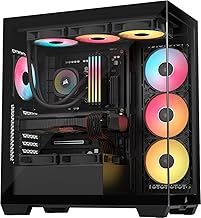
The Corsair 3500X RS ARGB is a panoramic mid-tower chassis designed for builders who want a clean, showcase-style computer without complex custom assembly. Featuring pillarless wraparound tempered glass, it provides an expansive view of internal hardware, making it an appealing option for modern gaming rigs and desk display setups.
Cooling performance remains dependable despite the solid glass front, thanks to three pre-installed RS120-R reverse rotor fans that draw air from the side without exposing visible fan frame brackets. The chassis supports up to ten 120mm fans or a 360mm liquid cooling radiator, and its native support for reverse connection motherboards allows for an exceptionally neat interior.
However, builders who prioritize direct front-intake mesh airflow over glass aesthetics may want to consider other configurations. The glass construction also contributes to an unbuilt weight of 9.02 kg, and the front panel provides only two USB 3.0 ports, which could feel sparse for peripherals.
Bottom line: The Corsair 3500X RS ARGB pairs head-turning panoramic glass visuals with modern hidden-connector board support, making it a standout chassis for clean showcase builds.
- Dimensions: 19.92"D x 18.11"W x 9.45"H
- Item Weight: 9.02 kg
- Chassis Type: Mid Tower
- Motherboard Support: Mini-ITX to Extended ATX (EATX)
- Reverse Motherboard Compatibility: ASUS BTF, MSI Project Zero, Gigabyte Project Stealth
- Pre-Installed Fans: 3x RS120-R Reverse Rotor ARGB Fans
- Total Fan Capacity: Up to 10x 120mm fans
- Radiator Support: Up to 360mm
- Front Ports: 2x USB 3.0
- Warranty: 2 Year Manufacturer
The Corsair 3500X RS ARGB offers broad compatibility across form factors, housing Mini-ITX, Micro-ATX, standard ATX, and Extended ATX motherboards. It features cutouts specifically arranged for reverse connection motherboards, allowing ASUS BTF, MSI Project Zero, and Gigabyte Project Stealth cables to plug directly into the rear of the motherboard tray.
Clearance is also generous for large performance parts. The internal chamber accommodates long graphics cards with an included anti-sag stabilization arm, while the top and side locations support liquid cooling radiators up to 360mm alongside standard bottom-mount power supplies.
When selecting the Corsair 3500X RS ARGB, the main design decision is between panoramic aesthetics and traditional mesh airflow. The side-intake arrangement is tailored to keep core temperatures stable while providing an uninterrupted view of the graphics card and liquid cooler.
Builders planning a hidden-cable system will benefit most from pairing this chassis with a compatible reverse connection motherboard. Even with standard components, the included double-shot grommets and removable panels keep routing manageable and tidy.

Pros
- Four pre-installed daisy-chained 120mm ARGB PWM fans
- Generous 420mm clearance for modern high-end graphics cards
- Supports back-connect motherboards for ultra-clean wire routing
- Convenient tool-less side panel design for quick access
Cons
- Relatively heavy chassis at 8,200 grams before installing components
- Mid-tower interior may feel tight for complex multi-radiator liquid loops
The Lian Li V100-ATX Mid-Tower PC Case is engineered for modern PC builders who demand thermal performance, generous component clearances, and vibrant aesthetics. Designed to accommodate modern gaming hardware, this chassis supports ATX, Micro-ATX, and Mini-ITX motherboards, including next-generation back-connect board layouts for concealed wiring.
Cooling performance is bolstered right out of the box with four pre-installed 120mm PWM ARGB fans that feature hydraulic bearings and daisy-chain connectivity. Coupled with an integrated 26-LED ARGB strip, tool-less side panels, and room for a 360mm top radiator, the chassis keeps assembly straightforward while showcasing internal hardware through tempered glass.
While the case excels in hardware support with clearance for 420mm graphics cards, its unpopulated weight of 8,200 grams means a fully built system will be heavy to move. Additionally, enthusiasts planning complex custom open-loop cooling with multiple thick radiators might find the mid-tower form factor somewhat restrictive.
Bottom line: The Lian Li V100RX delivers exceptional out-of-the-box cooling and broad hardware compatibility, making it a standout choice for high-performance gaming configurations.
- Case Type: Mid Tower
- Materials: Plastic, Stainless Steel, Tempered Glass
- Motherboard Compatibility: ATX, Micro-ATX, Mini-ITX (including back-connect)
- Maximum GPU Length: 420mm
- Maximum CPU Cooler Height: 178mm
- Top Radiator Support: Up to 360mm
- Included Cooling: 4x 120mm PWM ARGB Fans (up to 1800 RPM)
- Internal Drive Bays: 4
- Warranty: 1 Year
- Motherboard Layouts: Compatible with standard ATX, Micro-ATX, and Mini-ITX boards, as well as back-connect models that route cables behind the tray.
- Cooling Hardware: Supports CPU air coolers up to 178mm tall and liquid cooling radiators up to 360mm along the top panel.
- Graphics Card Fitment: Offers up to 420mm of horizontal GPU clearance, easily fitting long modern graphics cards with the included anti-sag bracket.
- Power Supply: Features a bottom-mount power supply bay protected by an integrated dust filter to maintain clean intake airflow.
- Front Panel Connectivity: Equipped with high-speed side I/O USB-C access alongside standard USB and audio ports.
This chassis is built for PC gamers and system builders who plan to install flagship graphics cards without worrying about length restrictions. The 420mm clearance ensures that even the largest modern GPUs fit comfortably alongside front-mounted hardware.
It is also a great match for builders who prioritize ultra-clean aesthetics, thanks to dedicated support for back-connect motherboards that hide primary power and data cables out of view.
Those who want reliable cooling out of the box will appreciate the four included daisy-chained ARGB fans, eliminating the need to purchase extra cooling hardware right away.

Pros
- Four pre-installed 120mm fans included
- High-airflow diamond mesh front panel
- Full tempered glass side window
- Accommodates full-size ATX motherboards
Cons
- RGB fan lighting is fixed and not addressable
- Graphics card clearance is limited to 300 mm
- CPU cooler height restricted to 155 mm
The MOROVOL 621 Mid Tower PC Case is tailored for builders seeking substantial airflow and gaming aesthetics in a compact ATX footprint. It provides a straightforward internal layout that supports ATX, Micro-ATX, and Mini-ITX motherboards.
Cooling performance is a primary strength, driven by a contoured diamond mesh front panel and four pre-installed 120mm RGB fans. The edge-to-edge tempered glass side panel provides an unobstructed view of internal components, while the front I/O section offers convenient access to high-speed USB 3.0 and standard audio ports.
Builders planning extreme hardware configurations should take note of interior clearance limits. With a maximum GPU length of 300 mm and a CPU cooler ceiling of 155 mm, oversized modern triple-fan graphics cards and tall air coolers will not fit. In addition, the pre-installed RGB lighting is static and cannot be synchronized via motherboard software.
Bottom line: The MOROVOL 621 delivers dependable out-of-the-box ventilation and an attractive presentation for mainstream desktop configurations that fit within standard component dimensions.
- Case Type: Mid Tower
- Motherboard Support: ATX, Micro-ATX, Mini-ITX
- Item Dimensions: 14.57"D x 7.28"W x 16.73"H
- Enclosure Materials: Metal, Plastic, Tempered Glass
- Pre-Installed Fans: 4 x 120 mm RGB Fans (3 front, 1 rear)
- Drive Bays: 4 total (supports 2 x 2.5" SSD and 2 x 3.5" HDD)
- Expansion Slots: 7
- Clearances: GPU up to 300 mm, CPU cooler up to 155 mm, PSU up to 160 mm
- Front I/O Ports: 1 x USB 3.0, 2 x USB 2.0, HD Audio, Microphone
This chassis is compatible with ATX, Micro-ATX, and Mini-ITX motherboards, allowing flexibility across different system generations. Drive mounting supports up to two 2.5-inch solid state drives and two 3.5-inch hard drives to handle broad storage setups.
When wiring the system, ensure the pre-installed fan power headers are fully connected before turning on the power supply. The rear-mounted power supply bay accommodates standard ATX units up to 160 mm in length.
Measuring 14.57 inches deep, 7.28 inches wide, and 16.73 inches high, the MOROVOL 621 maintains a compact desk footprint. System builders must verify component dimensions to ensure seamless assembly.
Graphics card clearance tops out at 300 mm, making it suitable for dual-fan and compact triple-fan cards. CPU air coolers must measure 155 mm or shorter to properly clear the tempered glass side panel.
How to Choose the Best Gaming PC Chassis: Buying Guide
Thermal Engineering and Intake Ventilation Patterns

The primary duty of any computer housing is establishing an uninterrupted thermal pathway from cool intake air to hot component exhaust. Intel’s guide to PC cooling explains that when a CPU runs too hot, a protection mechanism reduces performance, and it notes that positive air pressure, with fans pulling in more air than they push out, is better for reducing dust by localizing it to filtered areas. When shopping for an enclosure, you must decide between a high-porosity mesh front fascia or a seamless glass display. A mesh front panel provides the most direct, low-restriction route for ambient air, allowing your front fans to draw fresh air into the chamber without working against excessive static resistance.
Engineered mesh solutions showcase how structural contouring enhances intake velocity. The CORSAIR 4000D RS ARGB Frame Modular Mid-Tower ATX utilizes a steel front panel perforated in three dimensions with a specialized Y-pattern that maximizes intake volume while acting as a barrier against larger airborne debris. Similarly, the MOROVOL PC Case Pre-Install 4 RGB Fans and the MUSETEX ATX PC Case Pre-Install 6 PWM ARGB Fans both employ polygonal diamond mesh front contours designed to increase physical surface area for intake draft. For those seeking furniture-grade aesthetics, the Fractal Design North - Genuine Walnut Wood Front combines sustainably sourced solid wood slats with fine-patterned mesh ventilation, proving that decorative natural materials do not have to compromise thermal intake capacity.
Conversely, if you prefer panoramic showcase aesthetics with wraparound glass, you must evaluate how the chassis compensates for a sealed front wall. Enclosures like the MUSETEX ATX PC Case 7 PWM ARGB Fans Pre-Installed and the CORSAIR 3500X RS ARGB Panoramic Mid-Tower PC Case relocate primary intake fan brackets to the motherboard side tray or the bottom floor. Pulling air through side or bottom intakes works best with high-static-pressure fans and a balanced intake and exhaust setup. When you choose a glass-fronted case, verify that the side or bottom vents possess ample surface clearance so your graphics card receives fresh air rather than recirculated hot exhaust.
Motherboard Form Factor Support and Back-Connect Routing

Internal compatibility begins with motherboard form factor support, which dictates the footprint of your build and determines how components fit inside the chamber. Motherboards come in standardized footprints, mainly Mini-ITX, Micro-ATX, standard ATX, and Extended ATX (E-ATX). Before purchasing, you need to match your motherboard choice against the chassis tray mounting points. Selecting a compact enclosure like the Cooler Master Q300L V1 Micro-ATX PC Case restricts you strictly to Micro-ATX or Mini-ITX boards, creating a space-saving desk footprint while leaving sufficient room for a full-sized power supply unit.
Modern mid-tower cases, on the other hand, deliver broader multi-format flexibility. The NZXT H5 Flow - Compact ATX Mid-Tower PC Case supports motherboards ranging from Mini-ITX all the way up to E-ATX, accommodating high-end enthusiast boards with oversized VRM heatsinks. Beyond standard screw standoffs, chassis design has evolved to support zero-cable back-connect motherboards. Enclosures like the Lian Li V100-ATX Mid-Tower PC Case-Black-V100RX and the CORSAIR 3500X RS ARGB Panoramic Mid-Tower PC Case incorporate precision-cut motherboard trays engineered specifically for ASUS BTF, MSI Project Zero, and Gigabyte Project Stealth platforms. These cutouts allow all power and data headers to plug directly into the rear side of the board, completely hiding cable clutter from the main view.
Evaluating the depth behind the motherboard tray is equally essential if you want clean cable management without straining side panels. A quality chassis provides at least 20 to 30 millimeters of rear clearance, integrated tie-down points, and dedicated routing channels. In our broader look at the computers category, builders frequently encounter bowed side panels when housings lack sufficient depth behind the power supply shroud. Models like the CORSAIR 4000D RS ARGB Frame Modular Mid-Tower ATX address this challenge by providing removable internal cable covers, letting you route thick 24-pin motherboard cables cleanly or remove the shroud entirely to expose secondary fan mounting positions for custom configurations.
Component Clearances for Massive GPUs and Liquid Radiators

Modern graphics processors have expanded significantly in both length and thickness, turning physical clearance into a decisive buying criterion. High-performance gaming cards often exceed 300 millimeters in overall length and occupy three or more expansion slots. Expansion slot spacing is standardized, but the horizontal distance between the rear PCIe brackets and the front intake fans varies widely across cases. If your chassis lacks adequate horizontal clearance, an oversized graphics card can collide with front-mounted radiators or block intake air from reaching upper system components.
When selecting a housing, always check the maximum GPU clearance against the card you intend to install. The Lian Li V100-ATX Mid-Tower PC Case-Black-V100RX offers an exceptional 420 millimeters of GPU clearance, making it capable of housing the largest enthusiast graphics cards alongside thick liquid cooling hardware. The MUSETEX ATX PC Case 7 PWM ARGB Fans Pre-Installed supports cards up to 400 millimeters, while the DARKROCK EC2 ATX Mid Tower Gaming Computer PC handles cards up to 340 millimeters. In contrast, smaller or budget-oriented enclosures like the MOROVOL PC Case Pre-Install 4 RGB Fans cap graphics card clearance at 300 millimeters, which requires careful planning when choosing dual-fan versus triple-fan graphics card models.
Clearance for cooling hardware extends to air tower height and liquid cooling radiator placement. If you rely on large tower air coolers, you need sufficient vertical space between the CPU socket and the side panel. The Lian Li V100-ATX Mid-Tower PC Case-Black-V100RX accommodates air coolers up to 178 millimeters tall, whereas compact models like the Cooler Master Q300L V1 Micro-ATX PC Case cap CPU cooler height at 159 millimeters. For liquid cooling enthusiasts, top radiator clearance is crucial to prevent the radiator and its attached cooling fans from colliding with high-profile motherboard memory heatsinks. Cases such as the HYTE Y70 Touch Infinite Modern Aesthetic Gaming PC deliver immense liquid cooling versatility, providing clearance for radiators up to 360 millimeters on both the side and top panels, supporting thicknesses up to 125 millimeters on the side bracket.
Pre-Installed Fan Configurations and Acoustic Balancing
The number, size, and motor technology of pre-installed fans have an immediate effect on thermal control, setup convenience, and noise levels. Many enclosures ship with pre-installed fans, which saves you from purchasing aftermarket cooling packs. However, you must pay attention to whether those fans feature pulse-width modulation (PWM) control or operate at fixed speeds. Constant high-pitched fan noise gets tiring, which is why dynamic speed control matters for quiet operation during light everyday tasks.
Cases with PWM-equipped fans allow your motherboard BIOS or software utilities to automatically modulate fan velocity based on real-time temperature sensors. The MUSETEX ATX PC Case 7 PWM ARGB Fans Pre-Installed includes seven hydraulic bearing PWM fans operating between 600 and 1300 RPM, maintaining a low acoustic profile of 20.819 dB(A) while moving up to 24.72 CFM of air per unit. Three of those fans feature reverse blades mounted along the side bracket, drawing cool intake air directly across the interior without exposing structural fan frames. The MUSETEX ATX PC Case Pre-Install 6 PWM ARGB Fans similarly delivers six auto-adjustable PWM fans, ensuring balanced positive pressure out of the box.
Budget models like the MOROVOL PC Case Pre-Install 4 RGB Fans bundle four pre-installed 120-millimeter fans with fixed RGB illumination, offering an affordable out-of-the-box solution, though without dynamic addressable lighting or advanced PWM variable speed profiles. If you prefer larger diameter fans for maximum airflow at lower motor speeds, the Fractal Design North - Genuine Walnut Wood Front equips builders with two 140-millimeter Aspect PWM fans mounted behind the front wood slats. Larger 140-millimeter blades sweep greater volumes of air per revolution than standard 120-millimeter units, allowing your cooling system to run at lower RPMs for noticeably quieter desk operation.
Chassis Architecture, Specialty Displays, and Exterior Connectivity
Beyond cooling paths and hardware clearances, a chassis serves as the physical interface between you and your desktop system. Exterior structural materials generally range from cold-rolled alloy steel to tempered glass and architectural wood accents. Enclosures featuring tempered glass panels offer unobstructed visibility into your internal components, but you should confirm the glass meets recognized safety standards. Tempered glass is about four times stronger than ordinary annealed glass and, when broken, shatters into small granular chunks instead of splintering into large jagged shards.
Cutting-edge cases push aesthetic boundaries by integrating interactive digital technology directly into the chassis frame. The HYTE Y70 Touch Infinite Modern Aesthetic Gaming PC is a prime example of this trend, boasting an integrated 14.9-inch 2.5K capacitive LCD touchscreen with a 60Hz refresh rate and 10-point multi-touch input. Powered by dedicated system software, this corner panel allows you to monitor real-time hardware temperatures, display system telemetry, launch gaming applications, or run personalized widgets directly on the case itself. The chassis also features a luxury PCIe 4.0 riser cable with a color-matched canopy, enabling vertical GPU presentation across four slots.
Finally, inspect front-panel input and output ports to ensure fast connectivity for external storage, game controllers, and VR equipment. The USB Type-C specification from the USB Implementers Forum features reversible plug orientation and cable direction, so a front-panel USB-C port saves fumbling behind the desk. Cases like the DARKROCK EC2 ATX Mid Tower Gaming Computer PC, the Lian Li V100-ATX Mid-Tower PC Case-Black-V100RX, and the MUSETEX ATX PC Case 7 PWM ARGB Fans Pre-Installed include high-speed USB Type-C ports alongside dual USB 3.0 ports on their top or side I/O arrays. For builders who prefer maximum placement versatility, the Cooler Master Q300L V1 Micro-ATX PC Case features a modular I/O panel that can be repositioned in six different locations across the front, top, or bottom edges of both side frames.
| Product | Case Type | Enclosure Material | Pre-Installed Fans | Max GPU Clearance |
|---|---|---|---|---|
| Cooler Master Q300L V1 Micro-ATX PC Case | Mini-Tower | Alloy Steel, Plastic | 3 | 360mm |
| Fractal Design North - Genuine Walnut Wood Front | Mid Tower | Metal | 2 | 355 mm |
| MUSETEX ATX PC Case Pre-Install 6 PWM ARGB Fans | Midi Tower | Metal, Tempered Glass | 6 | 320 mm |
| DARKROCK EC2 ATX Mid Tower Gaming Computer PC | Mid Tower | Metal, Plastic, Tempered Glass | 1 | 340 mm |
| MOROVOL PC Case Pre-Install 4 RGB Fans | Mid Tower | Metal, Plastic, Tempered Glass | 4 | 300 mm |
Why You Should Trust Us
At Daily Deal Here, our editorial process is built upon rigorous market research, technical specification analysis, and deep evaluation of verified consumer ownership data. Our computer hardware team systematically reviews manufacturer engineering documentation, dimensional schematics, and structural tolerance sheets across every major case brand. We carefully examine verified purchaser reviews across thousands of real-world installations to uncover patterns regarding thermal performance, panel fit, paint finish resilience, front port reliability, and cable routing clearance.
Rather than relying on brief promotional impressions, our methodology synthesizes real-world feedback from novice first-time builders and seasoned system integrators alike. We track how different fan configurations withstand demanding thermal loads, how magnetic dust filters hold up after months of routine maintenance, and whether internal clearances accurately fit modern enthusiast graphics cards. Our editorial recommendations remain completely independent, providing balanced, transparent advice to help you select computer hardware that fits your specific thermal goals, aesthetic preferences, and budget constraints.
Final Thoughts
Choosing the right chassis sets the tone for your entire computer build experience, influencing everything from assembly convenience to internal operating temperatures. For most PC gamers and system builders seeking an exceptional balance of airflow engineering, structural adaptability, and modern motherboard support, our top overall recommendation is the CORSAIR 4000D RS ARGB Frame Modular Mid-Tower ATX. Its FRAME modular system gives you unprecedented freedom to reconfigure internal mounting trays, while the 3D Y-pattern front intake and three pre-installed RS ARGB fans provide abundant fresh air for high-wattage gaming hardware.
If you are building a capable gaming desktop on a strict budget or need a compact footprint for a smaller desk, the Cooler Master Q300L V1 Micro-ATX PC Case represents outstanding overall value. Despite its compact mini-tower dimensions, it supports full-length graphics cards up to 360 millimeters, houses standard power supplies, and features a clever modular I/O panel that can be relocated to suit your desk layout. For builders who want an out-of-the-box cooling powerhouse with abundant lighting, the MUSETEX ATX PC Case Pre-Install 6 PWM ARGB Fans delivers an easy-access magnetic glass door alongside six pre-installed speed-regulated fans.
When high-end visual presentation and architectural elegance take priority, specialty chassis models deliver unmatched craftsmanship. The Fractal Design North - Genuine Walnut Wood Front seamlessly integrates natural walnut bars and alloy accents to complement sophisticated home offices, pairing beautifully with displays from top PC monitor brands. Meanwhile, the HYTE Y70 Touch Infinite Modern Aesthetic Gaming PC stands as the definitive showcase platform, featuring an integrated 2.5K multi-touch display and four-slot vertical GPU mounting that turns your custom build into a high-tech centerpiece.
Frequently Asked Questions About Gaming PC Chassis
How does airflow in a mesh gaming PC chassis compare to a tempered glass enclosure?
A mesh gaming PC chassis offers significantly lower intake air resistance than a solid or glass-fronted case. Perforated mesh lets front fans draw ambient room air directly into the main compartment with minimal static pressure drop. Tempered glass front panels create a sealed front surface, forcing intake fans to pull air through narrow side or bottom perimeter vents. While panoramic glass enclosures look sleek, mesh front panels typically lower component temperatures and allow cooling fans to spin at lower, quieter speeds under heavy workloads.
Will a modern graphics card fit inside a compact gaming PC chassis?
Modern graphics cards can fit inside compact cases, provided you check published clearance specifications before assembling your system. Many compact enclosures are specifically engineered to accommodate high-end graphics cards despite their reduced exterior dimensions. For example, the compact Cooler Master Q300L supports graphics cards up to 360 millimeters in length. However, you must also verify card thickness and account for front-mounted radiators, which consume roughly 50 to 60 millimeters of interior horizontal depth and can reduce available GPU clearance.
What is the advantage of back-connect motherboard support in a gaming PC chassis?
Back-connect motherboard support allows you to use motherboards with connectors located on the reverse side of the printed circuit board, such as ASUS BTF or MSI Project Zero designs. In a compatible gaming PC chassis, dedicated tray cutouts let the 24-pin main power, EPS CPU power, fan headers, and SATA cables plug directly into the rear. This completely hides power and data cabling from the main front window, eliminating cable clutter, improving internal airflow paths, and creating an ultra-clean presentation.
How many cooling fans should a high-performance gaming PC chassis include in 2026?
For high-performance gaming rigs in 2026, a balanced configuration of at least three to four 120-millimeter fans or two 140-millimeter fans is recommended. Ideally, two or three front or side intake fans should pull cool air across the graphics card and processor, while one rear fan and one top fan exhaust heated air. Having more intake capacity than exhaust establishes positive internal air pressure, which helps prevent dust buildup by forcing air outward through unfiltered case seams and small panel gaps.
Why is front panel USB Type-C connectivity important for a gaming PC chassis setup?
A front panel USB Type-C port provides fast, convenient access for modern external solid-state drives, smartphones, VR headsets, and peripheral devices without forcing you to reach around the back of your desk. Modern desktop workstations often link multiple displays such as VESA compatible monitors and external capture cards, making accessible front high-speed data connectivity vital. Choosing a gaming PC chassis equipped with a native Type-C connector ensures your front panel supports high-bandwidth data transfers and versatile device charging for years to come.


Write Your Review
No reviews yet. Be the first to share your experience!