

Typing on a spongy, unresponsive office keyboard can drain your productivity, lead to frequent typos, and leave your hands feeling fatigued after a long day at your desk. For dedicated writers, programmers, and gamers, nothing matches the sharp sensory satisfaction of a genuine blue switch keyboard. The crisp acoustic snap and distinct physical bump of a clicky switch provide immediate confirmation that your keystroke has registered, allowing you to type with lighter pressure and greater confidence. To help you navigate the crowded market of mechanical peripherals, we compared 7 blue switch keyboard options from REDRAGON, Logitech G, RKROYALKLUDGE and more for September 2026 to find the models that deliver the best combination of actuation consistency, durable frame construction, and functional layout design. Whether you require a full desktop command station with dedicated macro hardware, a space-saving board for sweeping mouse movements, or a versatile travel companion, finding the right tactile foundation elevates every computer session. You can explore additional peripheral upgrades across our Computers deals and reviews hub.
Our top pick is the Logitech G PRO Mechanical TKL Tenkeyless Gaming for its competition-grade GX Blue switches, tournament-ready tenkeyless profile, and rock-solid onboard profile storage.

Pros
- Crisp tactile and audible GX Blue switches
- Space-saving tenkeyless form factor
- Detachable Micro USB cable for easy transport
- Onboard memory for tournament-ready lighting profiles
- Sturdy three-step angle adjustment
Cons
- Lacks dedicated media keys and a numeric keypad
- Utilizes Micro USB instead of modern USB-C
- Not water resistant against accidental liquid spills
The Logitech G PRO Mechanical Gaming Keyboard is built for competitive gamers and enthusiasts who prioritize fast, tactile performance in a compact footprint. Designed with input from esports professionals, it eliminates the traditional number pad to maximize your desktop space for low-sensitivity mouse maneuvers.
At the core of this board are durable GX Blue Clicky switches, providing an unmistakable tactile bump and a satisfying acoustic snap with every press. Logitech pairs these responsive switches with dynamic LIGHTSYNC RGB backlighting and onboard profile storage, enabling you to take customized illumination patterns to competitive events without needing software installed on tournament machines.
While the tactile feedback is superb for deliberate keystrokes, the audible click can be intrusive in quiet shared spaces or during open-mic voice chats. The keyboard also relies on an older Micro USB connection rather than modern USB-C, and power users who deal with spreadsheets will miss the standard numeric pad.
Bottom line: If you are looking for an ultra-portable, tournament-grade tenkeyless keyboard with distinct clicky switches and dependable build quality, the Logitech G PRO is a standout performer.
- Switch Type: GX Blue Clicky mechanical switches
- Layout: 90-key Tenkeyless (TKL)
- Dimensions: 14.96"L x 6.3"W x 1.97"H
- Weight: 2.2 pounds
- Connectivity: Wired with 1.8 m detachable Micro USB cable
- Backlighting: Per-key LIGHTSYNC RGB
- System Compatibility: Windows PC (Windows 10 minimum)
- Warranty: 2-year manufacturer warranty
Connecting the keyboard is straightforward thanks to its 1.8 m detachable cable, which uses a secure three-pronged design to prevent accidental disconnects during intense matches. It connects to any standard PC running Windows 10 or later.
Customizing the LIGHTSYNC RGB lighting and programming macros on the F1 through F12 keys requires the Logitech G HUB desktop software. Once configured, you can save a static lighting profile directly to the onboard memory, ensuring your visual layout persists on secondary or tournament PCs where installing software is prohibited.
This keyboard is tailored for competitive gamers, esports enthusiasts, and fast-paced FPS players who need maximum mouse room and zero input lag. The compact tenkeyless footprint makes it an excellent choice for gamers who travel to LAN events or have space-constrained desk setups.
It also suits typists who genuinely enjoy clicky tactile switches for confident key actuation. However, users who require a dedicated numeric pad for data entry or those working in quiet office environments should consider alternative layouts or silent switch types.

Pros
- Tactile and audible Outemu Blue switches
- Onboard macro recording requires no software
- Smooth dedicated volume roller and media buttons
- Hot-swappable sockets for solder-free switch replacement
- Sturdy aluminum top plate construction
Cons
- Loud clicky sound may disturb quiet shared spaces
- Full-size footprint takes up substantial desk space
- Wired-only connection limits desk placement flexibility
The Redragon K580 VATA is a full-size 104-key mechanical keyboard designed for desktop gamers and prolific typists. Fitted with clicky Outemu Blue switches, it produces a clear tactile bump and a distinct audible click on every keystroke, offering reassuring physical feedback during fast gameplay or heavy typing sessions.
Its feature set centers on hardware convenience, offering five dedicated G-keys for on-the-fly macro programming alongside dedicated media controls and a smooth volume roller. An aluminum top plate reinforces the chassis against flex, while hot-swappable switch sockets and full anti-ghosting give users both hardware longevity and dependable input accuracy.
The loud acoustic profile of blue switches means this board is poorly suited for quiet office environments or late-night gaming near sleeping housemates. Furthermore, the 15.75-inch full-size layout requires plenty of desk real estate, which may crowd mouse movement for low-sensitivity FPS players.
Bottom line: The Redragon K580 VATA delivers robust tactile typing, dependable hardware macro controls, and vibrant RGB lighting for anyone seeking an uncompromising full-featured clicky keyboard.
- Switch Type: Outemu Blue (Clicky, tactile)
- Key Count: 104 keys (Full size)
- Dimensions: 15.75"L x 5.91"W x 0.98"H
- Item Weight: 1200 g
- Materials: Aluminum keyboard plate, ABS enclosure
- Connectivity: Wired USB-C
- Compatibility: Windows, MacOS, Linux, Gaming Console
- Water Resistance: Water resistant
- Warranty: 1 year
The Redragon K580 connects directly via a corded USB-C cable for quick plug-and-play operation. It offers broad operating system compatibility, functioning smoothly on Windows, MacOS, Linux, and compatible gaming consoles right out of the box.
Lighting effects, per-key RGB colors, and the five dedicated G-keys can all be configured directly on the board without downloading any extra programs. For users who prefer a graphical interface to remap keys and organize advanced profiles, optional companion software is available for Windows systems.
This keyboard is ideal for gamers and typists who prefer the crisp tactile snap and audible feedback of classic blue mechanical switches. MMO, MOBA, and productivity users will get immediate utility from the five dedicated onboard macro keys to fire off complex shortcuts rapidly.
Media lovers will also appreciate the onboard volume wheel and playback buttons for effortless control during media playback or gaming. Anyone needing a silent keyboard for conference calls or compact spaces should look toward linear or compact alternatives instead.

Pros
- Tactile clicky blue switches with deep key travel
- Spill-resistant design with 4 built-in drain holes
- Full-key anti-ghosting for flawless gaming inputs
- Includes keycap puller for effortless maintenance
Cons
- Loud clicky sound may disrupt shared office environments
- Multimedia shortcut keys do not function on Mac operating systems
- Fixed USB-A cable is not detachable for travel
The RisoPhy Mechanical Gaming Keyboard is a wired, full-size desktop keyboard engineered for players and professionals who demand clear physical feedback. Equipped with classic clicky blue switches and a 104-key standard layout, it suits anyone who does extensive data entry, writing, or fast-paced PC gaming where tactile keystrokes prevent accidental presses.
Performance stands out thanks to complete N-key anti-ghosting, which registers simultaneous keystrokes reliably during intense action. The keyboard also features four hydrophobic drainage holes along the base to channel liquids away from delicate circuits, while stepped keycaps and foldable kickstands help sustain comfortable wrist alignment over long sessions.
However, the acoustic profile of blue switches is distinctly loud, making this model less suitable for quiet open-plan offices or shared bedrooms. Additionally, Mac users should be aware that the 12 multimedia shortcut functions are restricted to Windows platforms.
Bottom line: Gamers and heavy typists seeking classic tactile response, spill protection, and a complete numeric keypad will find reliable everyday utility in this straightforward mechanical board.
- Switch Type: Clicky Blue Switches
- Key Count: 104 Keys (Full-Size QWERTY)
- Dimensions: 16.9 x 4.72 x 0.98 inches
- Weight: 30.86 oz (875 g)
- Enclosure Material: ABS Plastic and Rubber
- Connectivity: USB-A Wired (5.9-foot cable)
- Backlighting: 9-Mode Multi-Color LED Backlight
- Compatibility: Windows, Mac OS, Xbox
Setting up the RisoPhy keyboard requires no software downloads or driver installations. Simply connect the integrated 5.9-foot USB-A cable directly into a free port on your desktop PC, laptop, or gaming console, and the operating system will instantly recognize the hardware.
The keyboard offers broad compatibility across Windows 7, 8, 10, Vista, and XP, along with Xbox consoles. While standard typing works seamlessly on macOS, please note that the secondary multimedia shortcut combinations are strictly engineered for Windows systems.
- 1 x RisoPhy 104-Key Mechanical Gaming Keyboard (Wired USB-A)
- 1 x Keycap Puller Tool
- 1 x User Manual

Pros
- Tactile, clicky blue switch actuation
- Space-saving ultra-compact 60% footprint
- Detachable USB Type-C connection
- Full N-key rollover anti-ghosting
- Durable steel plate construction
Cons
- Switches are not hot-swappable
- Lacks dedicated physical arrow keys
- Loud click sound may not suit quiet office environments
The CACKBIRD 60% Wired Mechanical Gaming Keyboard is an ultra-compact peripheral designed for typists, programmers, and gamers seeking tactile performance in a portable package. Its 61-key layout removes the numpad and dedicated navigation cluster, making room for expansive mouse sweeps across your desk.
Underneath the keycaps, traditional blue mechanical switches deliver strong tactile bumps and satisfying acoustic clicks with every press. Built with a rigid steel plate and ABS casing, the keyboard resists deck flex, while full anti-ghosting ensures every rapid-fire sequence registers cleanly without missed inputs.
Because of its condensed footprint, accessing arrow keys requires toggling through the Fn and Spacebar combination. Additionally, the switches are not hot-swappable, so users looking to customize switch hardware down the road should take note of this permanent soldered design.
Bottom line: If you want a punchy, clicky typing feel paired with an ultra-compact footprint that easily packs into a backpack, this keyboard delivers great tactile feedback and reliable wired performance.
- Layout: 60% compact (61 keys)
- Switch Type: Blue mechanical switches
- Connectivity: Wired via detachable USB Type-C
- Dimensions: 11.4 x 3.93 x 1.3 inches
- Materials: Steel plate and ABS enclosure
- Lighting: 18-mode LED backlighting
- Rollover: Full-key anti-ghosting
- Compatibility: Windows XP/Vista/7/8/10, MacOS, gaming consoles
This keyboard offers true plug-and-play convenience without requiring specialized software or driver installations. Simply connect the included detachable USB Type-C cable to an open USB port on your desktop, laptop, or compatible gaming console to start typing immediately.
It works across Windows operating systems starting from Windows XP through Windows 10, as well as MacOS. The onboard firmware controls all backlighting animations and speed adjustments directly from key combinations, eliminating the need to manage background software programs.
- 1 x CACKBIRD 60% Wired Mechanical Gaming Keyboard
- 1 x Detachable USB Type-C Cable
- 1 x Keycap Puller Tool
The included keycap puller makes it simple to remove the double-injection ABS keycaps for routine dusting, cleaning, or styling changes.

Pros
- Crisp, highly tactile feedback from blue switches
- Sturdy metal panel with splash-resistant construction
- Full N-key rollover anti-ghosting across all 87 keys
- Includes 16 extra red accent keycaps
Cons
- Audible click sound may disturb shared office environments
- Backlighting is limited to single-color blue rather than full RGB
- Fixed wired USB cable is not detachable
The MageGee MK-Star is an 87-key tenkeyless mechanical keyboard built for typists, coders, and gamers who rely on tactile precision. Equipped with clicky blue switches, every actuation produces a clear physical bump and a crisp auditory snap that helps prevent missed keystrokes.
Structural rigidity is a standout quality, thanks to a solid metal top plate paired with double-shot injection keycaps that resist surface wear. The board also features full anti-ghosting across all 87 keys, a splash-resistant enclosure, and 19 pre-programmed blue LED lighting modes to illuminate your desk.
Because blue mechanical switches are inherently loud, this keyboard is not well matched for quiet open-plan offices or shared spaces. Gamers who require silent actuation or full per-key RGB color customization should consider alternative switch styles.
Bottom line: If you want a space-saving tenkeyless keyboard with rigid metal construction and classic, highly audible mechanical switch feedback, the MageGee MK-Star is a dependable daily driver.
- Key Count: 87 keys (TKL layout)
- Switch Type: Clicky blue mechanical switches
- Top Plate Material: Metal
- Backlighting: Single-color blue LED with 19 lighting modes
- Dimensions: 13.98"L x 5.04"W x 1.4"H
- Item Weight: 890 g
- Connectivity: Wired USB 2.0
- Water Resistance: Splash-proof design
The MageGee MK-Star connects via a standard wired USB 2.0 cable, offering complete plug-and-play convenience without the need to install third-party drivers or configuration software. All backlight patterns, brightness adjustments, and media functions are handled directly through onboard Fn key combinations.
It provides wide operating system support, functioning reliably across Windows, Linux, and MacOS environments. It can also interface directly with USB-capable gaming consoles and select tablets for versatile multi-device productivity.
This keyboard is tailored for writers, programmers, and desktop gamers who want distinct tactile confirmation with every press. The compact 87-key format omits the numpad, leaving more open desk space for wide mouse sweeps in fast-paced games.
Anyone working in quiet libraries, shared home offices, or late-night voice call environments may want to look elsewhere, as the clicky blue switches create a noticeable acoustic presence that sensitive microphones will easily capture.

Pros
- Crisp, tactile typing feedback from clicky blue switches
- Compact 65% layout includes dedicated arrow keys
- Full N-key rollover anti-ghosting functionality
- 19 customizable blue LED lighting modes
Cons
- Switches are soldered and cannot be hot-swapped
- Backlight is limited to a single blue color
- Partial compatibility with macOS shortcut keys
The DIERYA T68SE is a 65% mechanical keyboard tailored for typists, students, and gamers who prioritize tactile precision. With its compact 68-key arrangement, it frees up valuable desk space while retaining critical navigation controls, including dedicated arrow keys, Delete, and Page Up/Down.
Equipped with clicky blue switches, the keyboard provides a distinct tactile bump and a sharp auditory click with each keystroke. Backed by full anti-ghosting and a sturdy polycarbonate plate, it accurately registers rapid, simultaneous inputs during intense gaming sessions or extended writing sprints.
Because the mechanical switches are soldered directly to the board, users cannot swap them out for alternative switch styles. Additionally, the blue LED backlight is restricted to a single color, and the acoustic snap may be loud enough to disturb others in shared offices or quiet living spaces.
Bottom line: The DIERYA T68SE is a reliable choice for anyone who wants unmistakable clicky switch feedback and a streamlined layout without sacrificing dedicated arrow keys.
- Number of Keys: 68 keys (65% layout)
- Switch Type: Clicky Blue mechanical switches
- Connectivity: USB-C
- Dimensions: 11.41"L x 3.89"W x 1.37"H
- Enclosure Material: Acrylonitrile Butadiene Styrene (ABS)
- Plate Material: Polycarbonate
- Backlighting: Single color blue LED (19 modes)
- Compatibility: Windows 11/10/8/7/XP/Vista, Linux, macOS (partial)
- Warranty: 1 Year
The DIERYA T68SE is ready to use straight out of the box with standard plug-and-play functionality via its USB-C connection. Simply attach the cable to your desktop or laptop, and the keyboard will be recognized instantly without the need for manual driver installations.
The keyboard provides comprehensive support for Windows 11, 10, 8, 7, XP, Vista, and Linux operating systems. While it functions smoothly for standard typing on Apple hardware, macOS users should keep in mind that certain multimedia shortcuts and auxiliary Fn key commands are only partially supported.
Can the switches be removed and replaced?
No. The switches on the T68SE are soldered directly into the circuit board, so they cannot be removed or hot-swapped for other mechanical switches.
Can you change the LED backlight to other colors?
No. The backlighting is fixed to a single blue LED color. However, you can toggle between 19 different dynamic and static lighting effects, as well as adjust the brightness and animation speed.
Is this considered a 60% or 65% keyboard?
While often listed in compact categories, this 68-key model is classified as a 65% keyboard because it includes dedicated directional arrow keys, Home, Delete, and Page Up/Down buttons.
Pros
- Compact 96% layout with full number pad
- Flexible tri-mode wireless and wired connectivity
- Hot-swappable PCB accepts 3-pin and 5-pin switches
- Dual USB pass-through ports and large 3750mAh battery
Cons
- Configuration software is limited to Windows in wired mode
- Short 3-month manufacturer warranty coverage
- Clicky blue switches may be too loud for shared quiet offices
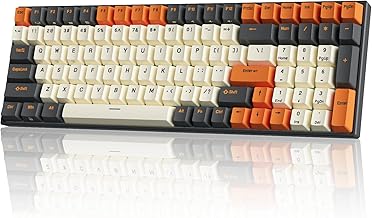
The RK ROYAL KLUDGE RK100 is a versatile 96 percent wireless mechanical keyboard tailored for typists, programmers, and gamers who need numeric entry without a bulky footprint. By clustering 100 keys into a compact frame measuring 14.5 by 4.1 inches, it retains crucial desktop space while keeping the full tenkey block intact.
Typing performance is driven by clicky blue switches that provide unmistakable tactile feedback and a sharp acoustic report. The board offers excellent flexibility via tri-mode connectivity, supporting Bluetooth 5.1 across three devices, low-latency 2.4GHz wireless, and Type-C wired mode with N-key rollover, alongside two handy USB pass-through ports and a substantial 3750mAh battery.
The loud, clicky nature of blue switches means this keyboard might disrupt coworkers in open offices or roommates during late-night sessions. Furthermore, the configuration software only functions on Windows when connected via USB cable, and the included three-month warranty is relatively short for everyday desktop hardware.
Bottom line: If you want a full-featured, hot-swappable clicky keyboard with expansive wireless options and a desk-friendly 96 percent layout, the RK ROYAL KLUDGE RK100 is an easy recommendation.
- Key Layout: 96% compact full size (100 keys, QWERTY)
- Switch Model: Cherry MX Blue style (Clicky/Tactile, hot-swappable 3-pin and 5-pin)
- Dimensions: 14.5"L x 4.1"W x 1.6"H
- Enclosure Material: Acrylonitrile Butadiene Styrene (ABS)
- Connectivity: Bluetooth 5.1, 2.4GHz wireless dongle, USB Type-C wired
- Battery Capacity: 3750mAh rechargeable battery
- Expansion: 2 built-in USB 2.0 pass-through ports
- System Compatibility: Windows, MacOS, Linux, Android, ChromeOS
- Warranty: 3 months
Switching between connection modes is handled directly via physical toggles on the keyboard. Slide the switch to B and turn power on to enable Bluetooth 5.1, then use the Fn and Q, W, or E shortcuts to pair and cycle between three different wireless devices. For latency-free gaming, flip the switch to G and insert the included 2.4GHz wireless dongle into your computer.
The keyboard is widely compatible across Windows, MacOS, ChromeOS, Linux, and Android systems. Dedicated multimedia secondary functions are pre-mapped for Windows shortcuts such as web browsing, volume, and playback control. Note that the optional RGB lighting and macro software suite is exclusively available for Windows systems and requires a wired USB connection during programming.
- RK ROYAL KLUDGE RK100 Mechanical Keyboard
- USB Type-C Cable for charging and wired mode
- Dual-purpose Keycap and Switch Puller
- Replacement Mechanical Switches
- User Manual
How to Choose the Best Blue Switch Keyboards: Buying Guide
Selecting the right clicky mechanical peripheral requires evaluating more than just the sound of the switches. A mechanical board is a complex assembly of mechanical stems, contact leaves, internal structural plates, logic controllers, and ergonomic contours. To ensure you invest in a keyboard that fits your daily workflow or competitive gaming habits, consider the critical criteria detailed below before making your purchase decision.
Switch Mechanics, Actuation Force, and Clicky Tactility

At the heart of every blue switch keyboard is an internal mechanism engineered around a mobile click jacket or slider. Unlike linear switches that glide smoothly from top to bottom, or standard tactile switches that offer a subtle rounded bump, a blue switch incorporates an audible click mechanism that snaps downward once you hit the actuation point. This mechanical separation creates both a crisp physical resistance bump and a sharp acoustic report. Because the electrical contact triggers at the exact moment the tactile resistance collapses, typists receive unmistakable physical and auditory confirmation that their input has registered without needing to push the key completely to the bottom plate.
Switch implementations vary across manufacturers, producing subtle differences in resistance, key travel, and acoustic pitch. The Logitech G PRO Mechanical TKL Tenkeyless Gaming utilizes pro-grade GX Blue Click switches engineered specifically for esports precision, delivering a snappy, tactile click that resets quickly for rapid double-taps. In comparison, the Redragon K580 Wired RGB Mechanical Gaming employs Outemu Blue switches, which provide a slightly firmer tactile bump and an unmistakable, resonant click on every press. Shoppers looking for classic switch profiles will appreciate the MageGee 75% Mechanical Gaming Keyboard and the RK ROYAL KLUDGE RK100 Wireless Mechanical Keyboard, both built around clicky blue switches with a crisp, tactile click on every press.
Understanding this mechanical behavior is essential for personal comfort and workplace etiquette. Because the click tells you the keypress has registered, you can let go of each key without pushing it all the way down to the frame. However, because blue switches are inherently loud, you must ensure that this pronounced acoustic snap aligns with your working environment, whether you work in an isolated home office or share space with roommates and colleagues.
Form Factors and Layout Efficiency

Mechanical keyboards are categorized by their overall physical footprint and total key count. Full-size configurations offer 104 keys, incorporating a dedicated alphanumeric section, function row, navigation cluster, and numeric keypad. While full-size boards are ideal for accounting, data analysis, and complex keybinds, they occupy significant desk space. Smaller layouts compress or eliminate specific key clusters to free up desk real estate. Choosing the right layout requires balancing your need for dedicated shortcut keys against your desire for ergonomic mouse positioning.
The products in our guide demonstrate the full spectrum of modern keyboard layouts. If you depend on a numeric keypad for daily office productivity, the RisoPhy Mechanical Gaming Keyboard provides a traditional 104-key design with integrated multimedia shortcuts. If you want tenkey functionality in a tighter frame, the RK ROYAL KLUDGE RK100 Wireless Mechanical Keyboard condenses 100 keys into a 96% form factor by eliminating the dead space between clusters. For gamers who prioritize mouse movement, tenkeyless options such as the Logitech G PRO Mechanical TKL Tenkeyless Gaming and the 87-key MageGee 75% Mechanical Gaming Keyboard remove the number pad altogether. Minimalists seeking ultimate desk clearance can choose the 68-key DIERYA T68SE 60% Gaming Mechanical Keyboard,Ultra or the ultra-compact 61-key 60% Wired Mechanical Gaming Keyboard with Blue.
Layout selection also has a direct impact on posture and repetitive motion risks. Cornell University’s tips for mouse use warn against using a mouse by stretching to the desk or out to the side of a keyboard. A board without a number pad leaves room to keep the mouse closer to your keyboard hand. If portability is your primary objective, you can also explore our broader coverage of portable computer keyboards for on-the-go computing.
Chassis Materials, Plate Rigidity, and Splash Protection

The build quality of a mechanical keyboard influences both its physical durability and its acoustic tone. When you strike a blue switch, the vibration travels through the switch housing, passes into the mounting plate, and resonates through the bottom enclosure. Keyboards constructed with flimsy plastic plates can flex under pressure, resulting in an inconsistent mushy bottom-out and a hollow, clattering echo. In contrast, keyboards with rigid metal mounting plates keep the switch stems firmly aligned, producing a solid, crisp click on every downstroke.
Manufacturers utilize different materials to balance structural stiffness, weight, and desktop stability. The MageGee 75% Mechanical Gaming Keyboard incorporates a solid alloy metal panel that resists surface scratching and eliminates deck flex. Similarly, the Redragon K580 Wired RGB Mechanical Gaming combines an aluminum top plate with an acrylonitrile butadiene styrene body, delivering a weighty 1200-gram chassis that remains anchored during intense gaming sessions. For mobile setups, the 60% Wired Mechanical Gaming Keyboard with Blue integrates an internal steel plate inside an ABS shell to maintain structural rigidity without excessive bulk. Environmental resilience is another practical consideration: the RisoPhy Mechanical Gaming Keyboard features four hydrophobic drainage holes on the bottom of its enclosure, allowing accidental liquid splashes to escape quickly before reaching internal electrical traces.
Material integrity plays a significant role in long-term reliability. Pairing an ABS enclosure with an aluminum or steel mounting plate keeps the switches aligned and limits deck flex. Investing in a well-braced frame ensures that your blue switches sound crisp, distinct, and uniform across every row of the keyboard.
Hot-Swappable Sockets versus Soldered Switch Construction
When purchasing a mechanical keyboard, deciding between a hot-swappable circuit board and a traditionally soldered board is a crucial long-term consideration. On a soldered keyboard, each switch is permanently connected to the printed circuit board via two solder points. If a switch stem breaks, develops chatter, or becomes sticky from dust ingress, repairing it requires desoldering equipment and technical know-how. Hot-swappable keyboards solve this maintenance hurdle by using specialized friction sockets mounted directly beneath each switch location, allowing users to pull out individual switches and snap in replacements in seconds.
Our product lineup offers both modular and fixed architectures. The Redragon K580 Wired RGB Mechanical Gaming features an upgraded hot-swap socket design that accepts almost any mechanical switch, giving you the freedom to swap out individual keys or experiment with different tactile resistances without soldering. Even greater modularity is found on the RK ROYAL KLUDGE RK100 Wireless Mechanical Keyboard, whose universal PCB supports both 3-pin and 5-pin MX-style switches from major brands like Cherry and Gateron. On the other end of the spectrum, the DIERYA T68SE 60% Gaming Mechanical Keyboard,Ultra has its switches soldered to the circuit board, so you cannot pull one out to swap in a different switch.
Choosing a hot-swappable board extends the lifespan of your peripheral, as a single failed switch does not force you to replace the entire unit. It also offers the freedom to tailor your typing feel by mixing switch types across different functional zones of the layout.
Connectivity Protocols: Wired Reliability versus Tri-Mode Wireless
How your keyboard communicates with your computer dictates input latency, setup flexibility, and daily cable management. Traditional wired connections provide consistent polling rates, zero battery maintenance, and complete immunity from radio frequency interference. For tournament environments and high-intensity gaming, hardwired connections remain the industry standard. However, modern multi-device users often prefer the flexibility of wireless peripherals that can seamlessly transition between desktop rigs, work laptops, tablets, and smartphones.
Wired connectivity remains prominent across dedicated gaming models. The Logitech G PRO Mechanical TKL Tenkeyless Gaming uses a heavy-duty detachable 1.8-meter Micro USB cable with a three-pronged support bracket to prevent accidental unplugging during intense tournament matches. The 60% Wired Mechanical Gaming Keyboard with Blue includes a detachable Type-C cable that unplugs easily for backpack transport, while the RisoPhy Mechanical Gaming Keyboard relies on a direct USB-A cable for plug-and-play simplicity. For maximum flexibility, the RK ROYAL KLUDGE RK100 Wireless Mechanical Keyboard features tri-mode connectivity, supporting low-latency 2.4GHz wireless, Bluetooth 5.1 pairing for up to three devices, and wired USB-C mode backed by a large 3750mAh battery and dual USB pass-through ports. Similarly, the DIERYA T68SE 60% Gaming Mechanical Keyboard,Ultra supports tri-mode operation across Bluetooth 5.0, 2.4GHz, and USB-C wired connections.
Wireless protocol selection directly impacts multi-device productivity and input reliability. While 2.4GHz wireless dongles offer near-instantaneous polling for fast-paced gaming, Bluetooth provides universal pairing across mobile platforms without occupying a USB port. If you want to explore more cord-free options, browse our dedicated roundup of cheap wireless gaming keyboards.
Ergonomic Profiles, Keycap Contours, and Fatigue Prevention
Typing comfort depends heavily on keycap profile, board elevation, and angle adjustability. Mechanical switches have greater overall height and deeper key travel than laptop scissor switches, which can force your wrists into an upward bend if the board lacks ergonomic consideration. Quality keyboards employ stepped, curved keycap profiles that follow the natural arc of your fingers, minimizing reaching distance and reducing muscle strain across long sessions of typing or gaming.
Several models in our review incorporate thoughtful physical designs to maintain hand comfort. Both the RisoPhy Mechanical Gaming Keyboard and the 60% Wired Mechanical Gaming Keyboard with Blue utilize a scientific stair-up keycap profile that aligns each row at an optimal angle, paired with foldable rear kickstands and rubber non-slip base pads. The Logitech G PRO Mechanical TKL Tenkeyless Gaming offers three-step angle adjustment kickstands, letting you dial in flat, intermediate, or steeper typing angles depending on your chair height. Keycap manufacturing methods also impact comfort and durability. Double-shot injection molding, utilized on the Redragon K580 Wired RGB Mechanical Gaming and the MageGee 75% Mechanical Gaming Keyboard, molds the legends directly through the keycap plastic, ensuring the legends never wear off or feel rough under your fingertips.
Cornell University’s computer workstation ergonomics guidelines recommend reaching the keys with your wrists as flat as possible, not bent up or down, and straight, not bent left or right. Its neutral posture typing tutorial describes a keyboard base gently sloped away from the user. If raising the kickstands bends your wrists upward, type with the keyboard flat instead.
Blue Switch Keyboard Feature Comparison
To help you compare core hardware specifications across our top recommendations, the table below compiles verified manufacturer data detailing key counts, chassis enclosure materials, connectivity technologies, and physical dimensions.
| Product | Button Quantity | Enclosure Material | Connectivity Technology | Item Dimensions (L x W x H) |
|---|---|---|---|---|
| Logitech G PRO Mechanical TKL Tenkeyless Gaming | 16 | Rubber | Wired | 14.96″L x 6.3″W x 1.97″H |
| Redragon K580 Wired RGB Mechanical Gaming | 104 | Acrylonitrile Butadiene Styrene, Aluminum | USB-C | 15.75″L x 5.91″W x 0.98″H |
| RisoPhy Mechanical Gaming Keyboard | 104 | Acrylonitrile Butadiene Styrene, Rubber | USB-A | 16.9″L x 4.72″W x 0.98″H |
| MageGee 75% Mechanical Gaming Keyboard | 87 | Metal | USB | 13.98″L x 5.04″W x 1.4″H |
| RK ROYAL KLUDGE RK100 Wireless Mechanical Keyboard | 100 | Acrylonitrile Butadiene Styrene | Bluetooth | 14.5″L x 4.1″W x 1.6″H |
Why You Should Trust Us
At Daily Deal Here, our computer hardware coverage is built on objective technical evaluation, spec verification, and deep analysis of user feedback across thousands of verified owners. Rather than relying on marketing claims or temporary brand hype, we dissect the foundational engineering of every keyboard we recommend. Our editorial team investigates switch construction, pin compatibility, debounce characteristics, circuit design, and chassis integrity.
We cross-examine manufacturer documentation against real consumer experiences, identifying how materials like double-shot ABS and alloy top plates hold up against everyday wear. By analyzing key rollover performance, firmware customizability, and backlighting consistency, we ensure our recommendations address the real-world demands of heavy typists, programmers, and gamers. We never accept payment for positive placements or rely on unverified claims. Our sole goal is to deliver clear, unbiased, and actionable advice that helps you find the most reliable input hardware for your workspace.
Final Thoughts
Investing in a blue switch keyboard transforms your daily computer experience, replacing dull, mushy keypresses with snappy, tactile feedback and distinct acoustic confirmation. Whether you spend your days drafting reports, compiling code, or competing in fast-paced online lobbies, the positive actuation of a clicky switch boosts confidence and typing cadence. Because individual desk setups and workflow demands vary, matching the right form factor, switch model, and connectivity protocol to your specific routine is the key to long-term typing satisfaction.
For shoppers seeking competition-grade performance and tournament-ready portability, our top overall recommendation is the Logitech G PRO Mechanical TKL Tenkeyless Gaming. Its esports-developed GX Blue Click switches, detachable three-pronged cable, onboard lighting memory, and durable tenkeyless frame make it an exceptional peripheral for serious gamers. If you want maximum functionality on a sensible budget, the RisoPhy Mechanical Gaming Keyboard earns our best value distinction. It provides a full 104-key layout, anti-ghosting matrix, comfortable stair-up keycaps, and four hydrophobic spill drainage holes that protect your investment from accidental desktop splashes.
For power users who demand advanced customization and multi-device versatility, the RK ROYAL KLUDGE RK100 Wireless Mechanical Keyboard serves as the ultimate multi-tasking pick. Its 96% compact full-size layout preserves the number pad while offering tri-mode wireless connectivity, dual USB pass-through ports, and a fully hot-swappable PCB compatible with 3-pin and 5-pin switches. If you are also upgrading other parts of your gaming battle station or workspace, check out our recommendations for gaming computer components and ergonomic VESA compatible monitors to complete your setup.
Frequently Asked Questions About Blue Switch Keyboards
What makes a blue switch keyboard different from keyboards with red or brown switches?
The primary distinction lies in how the switch delivers sensory feedback. A blue switch keyboard uses a two-piece slider mechanism that generates a distinct tactile bump accompanied by a sharp, audible click at the exact moment of electrical actuation. In contrast, red switches are completely linear, moving smoothly down without a bump or click, making them quieter and easier to press rapidly. Brown switches occupy a middle ground, providing a gentle tactile bump to signal actuation without the loud click mechanism, making them better suited for shared office settings.
Are blue switch keyboards too loud for shared office spaces or streaming?
Blue switches are intentionally engineered to produce an unmistakable acoustic snap on every keystroke, which makes them noticeably louder than membrane, red, or brown switches. In an open-plan office, quiet study area, or shared bedroom, this continuous clicking can distract nearby coworkers or roommates. For content creators and streamers, sensitive studio microphones can pick up the clicky sounds unless you use a dynamic microphone, configure strict noise gates, or utilize software-based background noise suppression. For private home offices, however, their acoustic feedback is celebrated.
Is a blue switch keyboard suitable for competitive, fast-paced gaming in 2026?
Yes, many competitive gamers prefer a blue switch keyboard because the tactile bump and audible snap provide absolute confirmation that an ability or movement command has triggered. This physical confirmation prevents accidental keypresses during high-stakes matches. However, because the click mechanism requires the switch slider to travel slightly upward to reset before it can be pressed again, some fast-action players find rapid button-mashing marginally slower compared to linear switches. If your gaming involves deliberate key inputs and precise movement, blue switches deliver dependable performance.
What are the benefits of a hot-swappable blue switch keyboard?
A hot-swappable blue switch keyboard features specialized sockets beneath each key that allow you to remove and replace switches without using a soldering iron. This modular design makes maintenance simple: if an individual switch fails or gets sticky, you can replace it in seconds using an included switch puller. It also gives you total freedom to customize your board over time. You can easily upgrade to higher-end switch brands, or mix different switch types across your board, such as using linear switches for gaming keys and clicky switches for typing.
How should you clean and maintain a blue switch keyboard for long-term use?
Regular maintenance ensures smooth switch actuation and keeps your desktop hygienic. Start by unplugging the keyboard or turning off its wireless power switch. Use the included keycap puller to safely remove the keycaps, soaking them in warm soapy water to dissolve skin oils. Clear accumulated dust, pet hair, and crumbs from the switch plate using compressed air and a soft brush. For sticky spots, wipe the plate with a microfiber cloth lightly dampened with isopropyl alcohol. You can find more peripheral care advice in our all buying guides and reviews directory.
Write Your Review
No reviews yet. Be the first to share your experience!