

Two numbers dominate this category and both are routinely misread. Three-in-one describes how many places a device can sit, not three devices charging at full speed simultaneously, because a single power adapter has a fixed budget that gets divided between the positions in use. And fifteen watts is only reachable on a dock that implements the Qi2 magnetic standard with an adapter capable of supplying it, which is frequently not the one in the box. Our top pick is the Anker MagGo for being explicit about both. This shortlist of 7 nightstand charging station options from VHBW, Anlmz, GETPALS and more is compared on total power budget, magnet standard, and the details that matter specifically at a bedside.
Every model here is a current listing with real customer ratings behind it, covering magnetic three position docks and multi port cable stations. For related gear, see our electronics guides.

Pros
- States Qi2 support explicitly rather than quoting a bare wattage
- Magnetic alignment makes the rated speed achievable in practice
- Established brand with consistent charging hardware
- Three positions cover phone, watch, and earbuds
- Stable base that does not lift when removing a phone
Cons
- Total output is still shared across all three positions
- Costs more than unbranded three-in-one docks
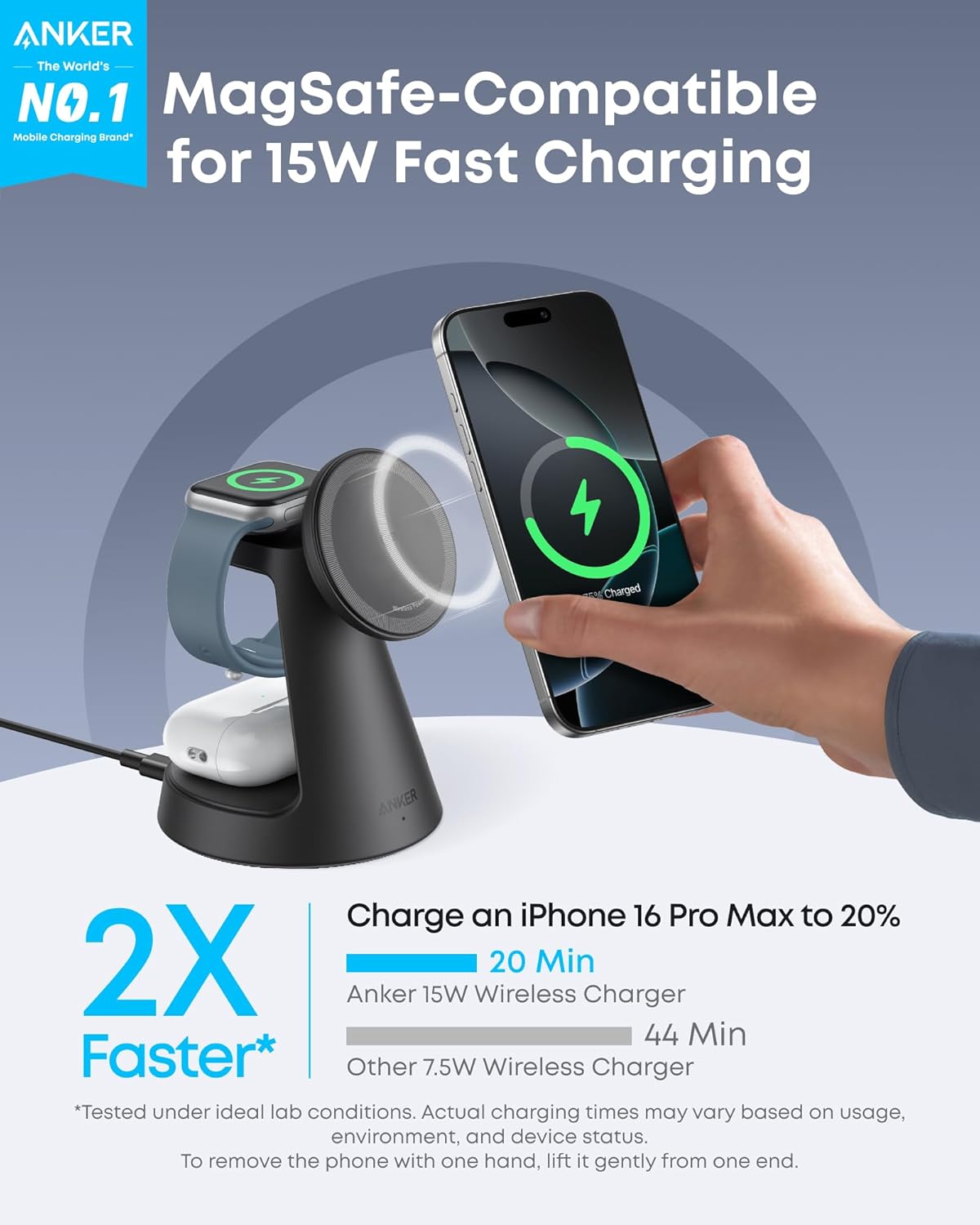
The MagGo takes the top spot for a reason that sounds pedantic and is not: it names the standard it implements. Qi2 brought magnetic alignment into the wireless charging specification itself, and alignment is what makes higher wattage genuinely achievable rather than theoretical, because a precisely centred coil transfers energy efficiently while an offset one wastes the difference as heat.
In practice that means a phone placed on this dock charges at the rate advertised, which is not something you can assume from a listing that says only magnetic and fifteen watts. The base is weighted properly too, so lifting the phone one handed does not bring the dock with it.
Two things remain true regardless of brand. The total power available is shared between positions, so charging all three devices at once is slower than charging one, and that is arithmetic rather than a fault. And it costs more than the unbranded docks here, which is what you pay for the standard being real.
Bottom line: the dock to buy if you want the wattage on the box to be the wattage you get.
- Standard: Qi2 magnetic wireless charging
- Phone position: 15W rated
- Positions: three, phone, watch, earbuds
- Alignment: magnetic
- Base: weighted for stability
- Power: shared across positions
- Design: fixed bedside dock
Confirm whether a power adapter is included and what wattage the dock needs to reach its rated output, since an underpowered adapter produces slow charging that gets blamed on the dock.
Check the watch position against your specific watch model, as watch charging is proprietary and varies between docks.
Remove cards from wallet cases before docking. Metal caught between phone and charger heats up and can damage magnetic stripes.
Keep the dock off soft surfaces that block airflow underneath and away from radiators or direct sun, since heat is the main thing you control at a bedside.

Pros
- Deepest rating history of any dock here
- States output for each position separately
- Covers all three common device types
- Conventional layout with no learning curve
- Widely reported as reliable over long periods
Cons
- 10W phone output rather than the 15W Qi2 ceiling
- Thick cases must be removed before charging
The Anlmz is the value pick on the strength of its record. In a category full of new listings with a few hundred ratings, a dock with tens of thousands of them has been through enough bedrooms to reveal whether it keeps working, and that evidence is worth more than most specification differences.
The layout is conventional and needs no explanation: phone at the front, watch on a puck, earbuds on a pad. Setup is plugging it in. For most households that is the entire requirement.
What it does not do is name its magnetic standard, which means any wattage figure should be treated as a ceiling rather than a promise. As with every dock here, the power available is divided between positions, so a fully loaded dock charges more slowly than an empty one.
Bottom line: the sensible middle choice, backed by more real world evidence than anything else in this shortlist.
- Positions: three
- Phone output: 10W
- Watch output: 3W
- Earbuds output: 5W
- Alignment: magnetic phone position
- Power: shared across positions
- Footprint: compact bedside
Households with a phone, watch, and earbuds who want a proven dock rather than the newest specification, and anyone who values a long rating history.
Buyers who specifically need guaranteed fifteen watt charging should choose a dock that names Qi2.
Check where the status indicator sits before placing it beside a pillow, and cover it if it proves bright in a dark room.
Empty wallet cases of cards before docking, and keep the dock ventilated rather than on fabric.

Pros
- Designed specifically around Apple device layout
- Very broad rating history
- Three positions in a compact body
- Simple setup with no configuration
- Reliable magnetic hold on the phone position
Cons
- 7.5W phone output is half the Qi2 ceiling
- Only works with cases up to 0.15 inches thick
The GETPALS is built around one ecosystem and does not pretend otherwise, which is a reasonable design choice given how many households own a matching phone, watch, and earbuds. Layout, spacing, and the watch position all assume that combination.
Its rating history is among the deepest here, which in this category matters more than it does in most, because charging hardware either keeps working for years or fails quietly after a few months and the difference only shows up in accumulated feedback.
The limits follow from the focus. Users with an Android watch or non standard earbuds will find positions that do not fit or do not charge, and watch charging speed varies depending on which generation of watch you own. Neither is a fault so much as a scope.
Bottom line: a solid, well proven dock for a matched set of devices, and the wrong choice for a mixed household.
- Positions: three
- Phone output: 7.5W
- Watch output: 3W
- Earbuds output: 5W
- Case limit: up to 0.15 inches
- Avoid: popsockets, metal cases, credit cards, ring stands
- Protection: overheat, overcharge, short circuit, foreign object detection
Households with a matched phone, watch, and earbuds set who want a dock that has been proven across a long period.
Mixed device households will get more use out of a multi port cable station.
Verify the watch position against your specific watch generation, particularly if you rely on fast charging for sleep tracking.
Check adapter inclusion and required wattage, as this determines whether you reach the stated speeds.

Pros
- Six ports handle far more devices than any magnetic dock
- Both connector types covered, three of each
- Charges tablets, older phones, and accessories alike
- No case or magnet compatibility issues at all
- Doubles as a phone and tablet stand
Cons
- Rated as a standard charger, not a fast charger
- Requires a cable for every device, which needs managing
The VHBW answers a different question from the magnetic docks here, and for many households it is the better question. A magnetic dock charges a phone, a watch, and earbuds. This charges six of anything: a tablet, a games controller, a reading light, an older phone with a different connector, and whatever a visitor brings.
Covering both connector types with three ports each is the sensible split, since most households are mid transition and own devices of both kinds. Cable charging also avoids every case, magnet, and alignment problem that wireless docks have.
One thing the listing states plainly and buyers should read: this is a standard charger rather than a fast charger. Overnight that is irrelevant, since eight hours charges anything, but it is the wrong purchase if you want a quick top up before leaving. Every device also needs its own cable, and six of them on a bedside table is untidy unless the layout is planned.
Bottom line: the most practical charger here for a household with many devices, provided you are charging overnight rather than in a hurry.
- Ports: six total
- USB-A outputs: three
- USB-C outputs: three
- Charging speed: standard, not fast charge
- Compatibility: any USB charged device
- Extra: doubles as a device stand
- Cables: not included for every device
Households with tablets, controllers, older devices, and mixed connector types, where a three position magnetic dock leaves most things uncharged.
Anyone who wants to drop a phone on a pad without plugging anything in should choose a magnetic dock.
Label cables at the plug end if several devices live on the same table, which removes the nightly guessing about which cable is which.
Use short cables to keep the table tidy, and route them behind the station rather than across the surface.

Pros
- Most charging positions of anything in this shortlist
- Combines wireless pads with cable ports
- Single unit replaces several chargers
- Suits households with many devices
- Recognised brand name on the product
Cons
- Total power is divided across many more positions
- Larger footprint than a three position dock
The Acer Gadget station is the maximalist option here, combining wireless positions with cable ports so one unit covers both the drop and go convenience of a magnetic dock and the flexibility of a multi port charger.
For a household where the bedside table is doing a lot of work, that combination is genuinely useful. A phone and watch charge wirelessly while a tablet and a pair of headphones charge on cables, all from one adapter and one wall socket.
The arithmetic gets less favourable as positions increase. One power budget divided across seven outputs means each gets less when everything is connected, so this station is at its best when most positions sit empty most of the time. The footprint is also larger than a compact three position dock, which matters on a small table.
Bottom line: the widest coverage in this shortlist, with power shared more thinly than any other option here.
- Positions: seven combined
- Charging types: wireless pads and cable ports
- Devices: phone, watch, earbuds, plus USB devices
- Design: stand with viewing angle
- Power: single adapter, shared output
- Footprint: larger than three position docks
- Use: multi device households
Bedside tables serving several devices at once, and households wanting one unit and one wall socket to cover everything.
Small tables and single device owners are better served by a compact dock or a simple stand.
Check the supplied adapter wattage carefully. A station with seven outputs needs considerably more total power than a three position dock to avoid slow charging when loaded.
Measure your table before ordering, since this is the largest unit in this shortlist.

Pros
- Folds flat for travel or to clear the table
- Dimmable warm night light built in
- Supports standby clock mode for bedside use
- Three positions in a compact folded size
- Rated up to 15W on the phone position
Cons
- Hinges make it less rigid than a fixed dock
- Smaller base can lift when removing a phone one handed
The Eazpower solves two problems with one hinge. For travellers it replaces three separate chargers in a bag, and at home it folds away when the bedside table needs to be a bedside table rather than a charging installation.
Three positions cover the usual devices, and magnetic alignment on the phone position means it docks properly rather than needing to be positioned by eye in the dark.
The compromise is rigidity. Hinges introduce movement, and a folding dock with a small base is more likely to lift when you pull a phone off one handed, which is exactly how phones get taken off at seven in the morning. Check reviews on base weight if that matters to you.
Bottom line: the right pick if you travel or want the table clear, with stability as the price of the hinge.
- Design: folding flat
- Positions: three
- Phone output: 7.5W to 15W depending on case
- Earbuds output: 5W
- Watch output: 2.5W, Apple Watch only
- Night light: dimmable warm light
- Extra: standby clock mode
Frequent travellers, small bedside tables, and anyone who wants a charger that also serves as a soft night light and a bedside clock in standby mode.
Users who want maximum stability when removing a phone should choose a fixed weighted dock.
Fold and unfold at the hinge rather than by pulling on the charging pads, which is what eventually loosens the mechanism.
Let devices cool before packing the dock away after use, and empty wallet cases of cards before docking.

Pros
- Designed around bedside use rather than desk use
- Three positions for phone, watch, and earbuds
- Stand angle suits viewing while lying down
- Compact footprint for small tables
- Straightforward setup
Cons
- Newer listing with limited long term feedback
- Fifteen watt figure depends on the adapter supplied
The KPON is designed for the bedside rather than adapted from a desk product, and the difference shows in the stand angle, which holds a phone where you can read it lying down rather than upright as if you were sitting at a desk.
Three positions cover the usual set, the footprint suits a small table, and setup is plugging it in. For a dock whose main job is to be reached half asleep, simplicity is the correct design goal.
Two reservations. This is a newer listing, so there is less accumulated evidence about how it holds up over years, which in charging hardware is the question that matters most. And the fifteen watt figure, as with every dock that does not name Qi2 explicitly, depends heavily on the adapter used and should be treated as a ceiling.
Bottom line: a thoughtfully shaped bedside dock, bought with less long term evidence than the established names here.
- Positions: three
- Phone position: 15W rated, magnetic
- Design: nightstand specific stand angle
- Devices: phone, watch, earbuds
- Power: shared across positions
- Footprint: compact
- Setup: plug and use
Bedside tables where the phone needs to be readable from a lying position, and buyers who want a compact dock shaped for that use.
Anyone who needs a guaranteed charging rate should choose a dock that names its standard.
Check the indicator light in a dark room before committing to a position beside a pillow, since bedside brightness is the most common complaint about docks in this category.
Keep the unit ventilated, off fabric, and away from heat sources, and remove cards from wallet cases before docking.
How to Choose a Nightstand Charging Station
These criteria are ordered by how often they cause a return, starting with the arithmetic behind the headline number.
Three Positions, One Power Budget

A three-in-one dock has three places to put devices. What it does not have is three independent power supplies. Everything runs from one adapter, and that adapter’s total output is split between whatever is charging at the time, usually with the phone position given priority.
The practical consequence appears at bedtime, when all three positions are occupied at once. A dock that charges a phone quickly with nothing else attached will charge it more slowly with a watch and earbuds also drawing, and the specification sheet quotes the best case rather than that one.
For overnight use this rarely matters, since eight hours is ample even at reduced speed. It matters a great deal for a quick top up before leaving the house, which is worth knowing before you rely on it for that.
The Adapter Is Usually the Missing Piece
Many docks ship without a power adapter, and a good number ship with one too weak to reach the speeds printed on the box. This is the single most common reason a new dock underperforms, and it is invisible until you compare charge times against your old cable.
Check two things in the listing: whether an adapter is included at all, and what wattage the dock requires to hit its stated output. A three position dock aiming at fifteen watts on the phone while also running a watch and earbuds needs meaningfully more than fifteen watts total, and a spare adapter from an old phone is often nowhere near enough.
If you are supplying your own, a modern power delivery adapter with sufficient headroom is the right choice. Underpowering a dock does not damage anything, it simply produces slow charging that gets blamed on the dock.
Qi2, Magnets, and the Fifteen Watt Claim
Qi2 is the wireless charging standard that brought magnetic alignment into the specification rather than leaving it to accessory makers. That alignment is what makes higher power practical, because a coil that is precisely centred transfers energy efficiently, while one that is slightly off wastes the difference as heat.
The gap shows up plainly across this shortlist: the Anlmz states 10W for the phone position and the GETPALS states 7.5W, while the Anker names Qi2 and 15W and shows the difference as twenty minutes to twenty percent against forty four on a 7.5W pad. A dock advertising fifteen watts without implementing Qi2 or a licensed magnetic system is usually quoting a theoretical ceiling. Placed on such a pad, many phones negotiate down to a lower rate, and the difference between the advertised figure and the delivered one is not something you can see happening.
The Anker MagGo in this shortlist states Qi2 explicitly, which is the kind of specificity worth looking for. Where a listing simply says magnetic and fifteen watts without naming a standard, treat the number as optimistic.
Watch Charging Is the Least Interchangeable Part
Smartwatch charging is proprietary in a way phone charging is not. An Apple Watch needs a charger built to Apple’s specification, and docks vary in whether they include a licensed module or a generic coil that works slowly, works only with older models, or does not work at all with the newest ones.
Fast charging on recent Apple Watch models is a separate capability again, and a dock that charges a watch at all may not charge it quickly. For a watch used to track sleep, where charging happens in short windows rather than overnight, that distinction decides whether the dock is usable.
If you use an Android watch, check compatibility even more carefully, since many docks in this category are designed around Apple devices and the watch position may simply not fit or charge another brand.
Cases, Magnets, and Metal Cards

Magnetic docks hold through a case, and how well depends on the case. A slim case with built in magnets works exactly as intended. A thick protective case without magnets weakens the hold and increases the distance between coils, which slows charging and generates more heat.
Grip rings and collapsible stands on the back of a phone are the other obstacle. They prevent the phone sitting flat against the dock, which for a magnetic charger means it either will not attach or attaches at an angle that misaligns the coils.
Metal objects between phone and charger are a genuine hazard rather than just an inconvenience. A card with a magnetic stripe, a hotel key, or a coin caught between the two heats up, and wallet cases holding cards should be emptied before docking.
Heat, Overnight, and Battery Health
Wireless charging is less efficient than a cable, and the energy that does not reach the battery becomes heat. On a bedside dock that heat sits next to a phone for eight hours, which is the longest exposure the device gets in a normal day.
Modern phones manage this themselves, throttling charge speed when temperature rises and often delaying the final portion of charging until shortly before you wake. Those features work better when the dock is not making the situation worse, which means keeping it out of direct sun, off soft surfaces that block airflow underneath, and away from a radiator.
Docks with ventilated bases or small fans run cooler, and a dock that gets uncomfortably warm to touch with a phone on it is telling you something about its efficiency.
Indicator Lights Belong Somewhere Else
This is a bedside product, and a bright blue status light at the level of your pillow is a genuine problem rather than a minor annoyance. Manufacturers photograph these docks in daylight where a small indicator looks tasteful, and the same light in a dark bedroom can be the brightest thing in the room.
Look for docks that dim or extinguish their indicators after a period, or that place them facing downward. Where a dock has a permanently lit ring, buyer reviews are the only reliable source on whether it is bearable at night.
The fallback is a piece of electrical tape, which works and looks like what it is. Better to choose a dock that solved this in the design.
Folding Designs Serve Two Purposes
Several docks here fold flat, which is sold as a travel feature and is equally useful at home. A folding dock takes less space on a crowded bedside table and can be closed when not in use, and for anyone who travels regularly it replaces three separate chargers in a bag.
The trade is rigidity. Hinges introduce movement, and a folding dock is generally less stable than a fixed one when you take the phone off one handed. Check whether the base is weighted enough that removing the phone does not lift the whole dock.
Folding designs also tend to have smaller footprints, which is good for space and less good for stability if a phone is docked in landscape with a case adding weight.
Where the Cable Goes
A dock is a permanent fixture on a small table, so cable entry position matters more than it would elsewhere. A cable entering from the rear routes tidily to a wall socket behind the table. One entering from the side puts a loop across the surface where a book or glass wants to go.
Cable length is the other half. Bedside sockets are often at skirting level behind furniture, and a short cable forces the dock to sit at the back edge of the table rather than where you can reach it lying down.
Where the cable is detachable, replacing it with a longer one later is trivial. Where it is captive, the length you buy is the length you have permanently.
If You Only Have a Phone
Multi position docks are designed around owning a phone, a watch, and wireless earbuds. If you own only a phone, most of what you are paying for sits empty, and a simple single position magnetic stand does the same job in less space for less money.
The counter argument is household use. A three position dock beside a bed shared by two people, or one that also charges a partner’s device, uses its positions differently than the marketing photograph suggests but still uses them.
Multi port cable stations, like the VHBW unit here, are the answer for households with mixed devices that do not all charge wirelessly. Six ports covering both connector types will charge a tablet, an older phone, a reading light, and a games controller at once, which no magnetic dock can do. Note that unit is rated as a standard charger rather than a fast one, which suits overnight charging and not a rushed top up.
| Model | Type | Positions | Notable |
|---|---|---|---|
| Anker MagGo | Magnetic dock | 3 | Qi2 standard stated explicitly |
| Anlmz | Magnetic dock | 3 | Deepest rating history here |
| GETPALS | Magnetic dock | 3 | Wide device compatibility |
| VHBW | Multi port cable station | 6 ports | Three USB-A and three USB-C |
| Acer Gadget | Multi function station | 7 in 1 | Most positions in this list |
| Eazpower | Folding magnetic dock | 3 | Folds flat, dimmable night light |
| KPON | Magnetic dock | 3 | Nightstand specific design |
If you need power away from an outlet rather than beside one, our guide to portable chargers covers that instead, and nightstands if the table itself is the problem.
Why You Should Trust Us
We lead with the power budget and the adapter question because those two together explain nearly every complaint about slow charging in this category, and neither is visible in a product photograph. Every dock here is a current listing with enough customer rating history to show how it behaves with all positions occupied.
We do not accept payment for placement. Where a dock quotes a wattage it can only reach under ideal conditions, or omits the adapter needed to get there, we say so.
Final Thoughts
The Anker MagGo is our best overall pick because it names the standard it implements rather than quoting a number in isolation, and Qi2 magnetic alignment is what makes higher wireless charging speeds real rather than theoretical.
The Anlmz three-in-one is our best value choice, with the deepest rating history in this shortlist and a conventional layout that covers phone, watch, and earbuds without complication. If your household charges more devices than a magnetic dock can hold, the VHBW six port station is the practical answer, and for anyone who travels, the Eazpower folds flat, replaces three chargers in a bag, and adds a dimmable warm night light with a standby clock mode.
Check whether an adapter is included, confirm the watch position supports your specific model, and look at where the status light sits before putting any of these next to a pillow. More gear is in our latest guides.
Frequently Asked Questions
Does a nightstand charging station charge all three devices at full speed?
No. All positions share one power adapter, so the total output is divided between whatever is charging, usually with the phone prioritised. Quoted speeds describe the best case with one device attached. Overnight this is irrelevant, since eight hours is ample, but it matters for a quick top up before leaving.
Do I need to buy a separate power adapter in 2026?
Often yes. Many docks ship without one, and some include an adapter too weak to reach their advertised speeds. Check both points in the listing, and if supplying your own, use a modern power delivery adapter with headroom above the dock’s stated requirement rather than an old phone charger.
Will it charge through a thick case?
Usually, but more slowly and with more heat, because extra distance between the coils reduces efficiency. Cases with built in magnets work best. Grip rings and collapsible stands on the back prevent the phone sitting flat and are the more common problem. Remove any cards from a wallet case before docking, as metal between phone and charger heats up.
Is overnight wireless charging bad for the battery?
Modern phones manage this themselves, reducing speed as temperature rises and often holding back the final portion of charge until shortly before your alarm. The thing you control is heat, so keep the dock off soft surfaces that block airflow, out of direct sun, and away from radiators.
Will it charge my smartwatch?
Check the specific model rather than assuming. Watch charging is proprietary, and docks differ in whether they use a licensed module or a generic coil that charges slowly, supports only older models, or does not work with the newest ones. Fast watch charging is a separate capability from charging at all. More gear is in our category directory.



Write Your Review
No reviews yet. Be the first to share your experience!