

Battery backup on an alarm clock means one of two completely different things, and the listings almost never say which. On most clocks the battery keeps the time running through a power cut, so the display goes dark and the alarm does not sound, but you wake to the correct time rather than a flashing panel. On a smaller number, the battery also powers the alarm itself, so the clock wakes you whether or not the electricity came back. Our top pick is the DreamSky Alarm Clock Radio for stating its backup behaviour plainly and pairing it with a dimmer that goes genuinely dark. This shortlist of 9 alarm clock with battery backup options from DreamSky, Emerson, uscce and more is compared on that distinction first, then on the details that decide whether a bedside clock is livable.
Every model here is a current listing with real customer ratings behind it. For more bedroom and home essentials, see our home and kitchen guides.

Pros
- States its battery backup behaviour clearly
- Large digits readable from a pillow without glasses
- Dimmer goes low enough for a dark bedroom
- FM radio as an alternative wake source
- Simple control layout that works half asleep
Cons
- Radio reception depends heavily on wire aerial placement
- Backup battery must be replaced on a schedule to stay useful
The DreamSky takes the lead here by being clear about what it does. In a category where the phrase battery backup covers two very different capabilities, a clock that states its behaviour plainly saves buyers from finding out during an outage.
The everyday details are right. Digits are large enough to read from a pillow without reaching for glasses, the dimmer goes low enough that the display is not lighting the room at three in the morning, and the snooze control sits where a hand finds it without aiming.
The radio is a genuine alternative to a buzzer, with the usual caveat that FM reception at a bedside depends on where the wire aerial ends up rather than on the tuner. And as with every clock in this shortlist, the backup battery is invisible until it matters, so it needs replacing on a schedule rather than on failure.
Bottom line: the most complete bedside clock here, and the one whose specification you can trust without decoding.
- Display: large digit LED
- Dimmer: adjustable brightness
- Backup: battery backup for timekeeping
- Radio: FM tuner with wire aerial
- Alarms: dual alarm capability
- Snooze: top mounted control
- Power: mains with backup battery
Check the cord reaches your bedside outlet before deciding which side of the bed the clock will live on. Short cords are the most avoidable disappointment in this category.
If your requirement is being woken during an outage rather than knowing the time afterwards, confirm the backup type against your need, since time retention alone will not sound an alarm.
Replace the backup battery once a year, ideally alongside smoke alarm batteries, since a flat cell gives no warning while mains power is present.
Route the aerial wire up and away from the mains lead for better reception, and keep the display out of direct sunlight to avoid washing out at dawn.

Pros
- Projection shows the time without turning over
- Rotatable projector suits different room layouts
- Five dimmer levels for the panel display
- Dual alarms for two schedules
- Deep rating history for a projection clock
Cons
- Projection brightness cannot suit every ceiling colour
- Stepped dimmer offers less control than a continuous one
The Mesqool solves a specific problem well: seeing the time without moving. For anyone who wakes in the night and does not want to roll over, reach for glasses, or pick up a phone, a projected display on the ceiling is the most direct answer available.
The rotatable head is what makes projection practical rather than gimmicky. A fixed projector aimed at the wrong angle is useless in half of all bedrooms, and being able to turn it means the display lands where you are actually looking.
Two limits. Projection brightness is fixed within a narrow range, so a dark or textured ceiling reads it poorly while a white one may show it too brightly for a light sleeper. And the panel dimmer works in five steps rather than continuously, so if the lowest step is still brighter than you want, there is no finer adjustment available.
Bottom line: the clock to buy if projection is the feature you want, with a panel dimmer that is good rather than exceptional.
- Display: LED panel plus ceiling projection
- Projector: 180 degree rotatable
- Dimmer: 5 levels
- Alarms: dual independent
- Backup: battery for timekeeping
- Snooze: standard function
- Power: mains with backup battery
Set the projector angle while lying in your normal sleeping position rather than standing beside the bed, since the two viewpoints are entirely different.
If the projection is too bright on a white ceiling, angling it slightly onto a wall instead usually softens it enough without losing legibility.
Light sleepers who check the time during the night, anyone who cannot read a bedside display without glasses, and shift workers who want the time visible without disturbing a partner with a lamp.
Those who want the room completely dark may find any projection intrusive.

Pros
- Continuous dimmer sets exactly the brightness you want
- Weekday mode removes weekend alarm switching
- Dual alarms for two people or two schedules
- Sleep timer for radio at bedtime
- USB port for charging a phone
Cons
- Interface has more functions than some users need
- Backup is timekeeping rather than full alarm
The continuous dimmer is the reason to choose this clock. Stepped dimmers are a lottery: if the lowest preset is brighter than your dark adapted eyes can tolerate, nothing can be done. A zero to one hundred percent control lets you find the exact point where digits remain legible and the room stays dark.
Weekday mode is the second genuinely useful feature. Being able to set an alarm for Monday to Friday only removes the Friday night switch off and Sunday night switch on ritual, which is the most common cause of a missed Monday alarm in any household.
The tradeoff is interface density. More functions mean more buttons and more menu behaviour, and for someone who wants a clock that shows the time and rings once, this is more than necessary. The backup here is timekeeping rather than full alarm power, so it will not wake you during an outage.
Bottom line: the best choice for anyone sensitive to display brightness or juggling weekday and weekend schedules.
- Dimmer: continuous 0 to 100 percent
- Alarms: dual with weekday and weekend modes
- Radio: FM with sleep timer
- Charging: USB port
- Backup: battery for timekeeping
- Volume: adjustable alarm level
- Power: mains with backup battery
Light sleepers who need a genuinely dark room, couples with different wake times, and anyone whose weekday and weekend schedules differ.
Users who want the simplest possible clock will find the feature set more than they need.
Set the dimmer at night with the room lights off rather than during the day, since a level that looks dim in daylight is often too bright once your eyes adapt.
Confirm the weekday mode is armed on Sunday evening the first few weeks, until you trust the indicator on the display.

Pros
- Three AAA cells keep the alarm working during an outage
- Auto set removes manual clock setting entirely
- Date display alongside the time
- Large digits with adjustable brightness
- Straightforward layout with few controls
Cons
- Automatic adjustment relies on a stored calendar
- Batteries are not included with every listing variation
This DreamSky variant is one of the few clocks in this shortlist that does the harder kind of backup. Three AAA cells sit behind the panel and the manufacturer states plainly that they exist to wake you at the same time the next day during a power cut, not merely to keep the clock counting while the display is dark.
That is the distinction most of this category glosses over, and it is worth paying for if your reason for shopping is a shift or a flight rather than tidiness after an outage. It also sets itself, which removes the four button ritual that makes digital clocks irritating.
Two things to note. Automatic setting works from a stored calendar rather than a broadcast signal, so a change to daylight saving rules would eventually need correcting by hand, and AAA cells doing real work drain faster than a coin cell that only keeps time.
Bottom line: the clock to buy if you want the alarm itself protected, with self setting as a bonus.
- Display: large digit LED with date
- Setting: automatic on power up
- Backup: three AAA cells, alarm continues during outage
- Dimmer: adjustable
- Alarms: dual capability
- Radio: none
- Power: mains adapter with battery backup
Anyone who dislikes setting clocks, households where the clock is used by someone who finds interfaces difficult, and buyers who do not need a radio.
If waking to radio matters, choose one of the tuner equipped models here instead.
Replace the AAA cells annually. Batteries that power an alarm rather than just a clock circuit drain faster, and a flat set removes exactly the protection you bought the clock for.
Check the time after each daylight saving transition in the first year, so you know whether the stored calendar matches current rules.

Pros
- SmartSet arrives with the time and date already correct
- Both AM and FM tuning rather than FM only
- Dual alarms with separate settings
- Digital tuning with presets
- Long established model with deep rating history
Cons
- Stored calendar approach to daylight saving
- Display styling is functional rather than modern
The CKS1900 has been on shelves long enough to have accumulated a rating history most competitors cannot match, and its SmartSet system is the feature that keeps it there. Plug it in and it knows the time and date, which removes the setup step entirely.
AM tuning is a genuine differentiator in this shortlist. Most bedside clocks offer FM only, and for listeners who want talk radio or sports coverage that broadcasts on AM, that omission rules them out. Digital tuning with presets makes station selection reliable rather than approximate.
The limitations are age related rather than functional. Styling is plain, and like every self setting clock it works from a stored calendar, so a change to daylight saving rules would eventually require manual correction. The automatic behaviour can be disabled for that reason.
Bottom line: the choice for AM listeners and for anyone who wants a proven design that sets itself.
- Setting: SmartSet automatic time and date
- Radio: AM and FM with digital tuning
- Presets: station memory
- Alarms: dual independent
- Backup: battery for timekeeping
- Display: adjustable brightness
- Functions: snooze and sleep timer
Radio listeners who need AM as well as FM, and anyone who values a long proven design over current styling.
Buyers who never listen to radio can save space with one of the simpler clocks here.
Store presets for the stations you actually use rather than scanning each time, which is far easier half awake.
Position the AM aerial away from other electronics, since interference on AM is far more noticeable than on FM.
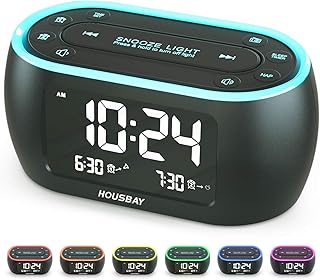
Pros
- Night light removes the need for a separate lamp
- FM radio with sleep timer for bedtime listening
- Dimmable display for dark rooms
- Designed as a phone free bedside solution
- Simple controls with distinct functions
Cons
- Night light brightness is fixed on some settings
- Backup covers timekeeping rather than the alarm
The HOUSBAY is built around the idea of a bedroom without a phone in it, and the night light is the part that makes that practical. A soft light for finding a glass of water or checking on a child removes the most common reason a phone ends up on the bedside table.
Radio with a sleep timer covers bedtime listening, the display dims for dark rooms, and the controls are distinct enough to operate without looking. For a guest room or a child's room, that combination is close to ideal.
Two notes. The night light is more useful as ambient light than as task light, so it will not replace a reading lamp. And like most clocks here the battery covers timekeeping rather than powering the alarm, so it will not wake you during an outage.
Bottom line: the best pick for a phone free bedroom, particularly a guest or child's room where a soft light matters.
- Display: dimmable LED
- Light: integrated night light
- Radio: FM with sleep timer
- Alarms: dual capability
- Charging: USB port
- Backup: battery for timekeeping
- Footprint: compact bedside
Households aiming to keep phones out of bedrooms, guest rooms, and children's rooms where a soft light at night is useful.
Anyone needing a reading light will still want a proper lamp alongside it.
Set the night light to its lowest useful level in a child's room, since ambient light that is too bright disrupts sleep more than darkness does.
Replace the backup battery yearly and confirm the alarm indicator is visible at the display brightness you normally use.

Pros
- Sets itself and handles daylight saving automatically
- Green LED is easier on dark adapted eyes than white
- Established brand with consistent build quality
- Simple interface with minimal setup
- Compact footprint for small bedside tables
Cons
- Automatic adjustment depends on stored rules
- No radio or additional wake sources
The AccuSet exists to eliminate clock setting, and it does the job thoroughly. Time, date, and daylight saving are all handled without input, which for anyone who finds button sequences frustrating is worth more than any feature list.
The green LED is a considered choice rather than a styling one. Green sits between red and white in terms of how much it disturbs dark adapted vision, and it remains legible at lower brightness than red on some displays, which suits a clock intended to be glanced at rather than read.
The limits are deliberate. There is no radio, no projection, and no USB port, because the product is aimed at people who want a clock rather than a bedside hub. The stored calendar caveat applies to daylight saving as it does to every self setting clock.
Bottom line: the simplest good clock here, and the right recommendation for someone who wants no setup at all.
- Setting: fully self setting
- Daylight saving: automatic adjustment
- Display: green LED, adjustable brightness
- Backup: battery for timekeeping
- Alarm: with snooze
- Radio: none
- Footprint: compact
Anyone who wants a clock with no setup, including as a gift for someone who struggles with digital interfaces, and small bedside tables where footprint matters.
Buyers wanting radio, projection, or charging should choose a more featured model here.
Verify the time after daylight saving transitions in the first year, so you know the stored calendar matches current rules in your region.
Change the backup battery annually. Self setting does not help if the clock lost power entirely and no one noticed.

Pros
- Large display in a genuinely compact body
- Five dimmer levels for varied room conditions
- Focused on the clock function without extras
- Easy to read from across a room
- Straightforward controls
Cons
- Backup batteries are not included and must be bought separately
- Stepped dimmer rather than continuous adjustment
The Peakeep is the value choice because it spends everything on the part that matters and nothing on features that pad a listing. The display is large relative to the body, which is an unusual combination: most large display clocks are large clocks, while this one fits a small bedside table.
Five dimmer levels give reasonable control across conditions, from a bright bedroom in summer to a fully dark one in winter. Controls are simple enough to operate without looking, and there is no menu to navigate.
What you give up is the fine adjustment of a continuous dimmer and any additional functions. No radio, no USB port, no projection. If any of those matter, this is not the clock, and if none of them do, everything you are paying for here is display and dimmer.
Bottom line: the best clock per pound in this shortlist, provided you want a clock rather than a bedside device.
- Display: large digits, compact body
- Dimmer: 5 levels
- Power: mains adapter, included
- Backup: optional AA cells, not supplied
- Alarms: dual capability
- Snooze: standard function
- Radio: none
Small bedside tables, guest rooms, and anyone who wants a readable clock without paying for functions they will never use.
Buyers needing very fine brightness control should choose the continuous dimmer model here instead.
Buy the backup cells at the same time as the clock, since they are not supplied and the clock is mains only without them.
Check the lowest dimmer level against your room at night in the first week. A stepped dimmer cannot be adjusted further if its minimum is too bright.

Pros
- Shows day and date alongside the time
- Large clear digits for reduced vision
- Simple interface with few controls
- Useful for anyone waking disoriented
- Adjustable display brightness
Cons
- Larger footprint than compact bedside clocks
- No radio or extra wake sources
The JALL puts the day of the week on the display alongside the time and date, and that is a more valuable feature than it sounds. Waking unsure which day it is happens to shift workers, to people recovering from illness, and to anyone whose routine has been disrupted, and a clock that answers the question without a phone is genuinely useful.
The large format is aimed at older users and reduced vision, and it delivers on that with clear digits and a simple button layout that does not require reading small labels. Brightness adjusts for night use.
The cost is footprint. Fitting time, day, and date at a readable size means a physically larger unit than a compact bedside clock, which needs space on the table. There is no radio and no charging port, because the product is focused on being read.
Bottom line: the clearest display here for anyone who needs day and date at a glance, at the cost of table space.
- Display: time, day of week, and date
- Format: large digits
- Brightness: adjustable
- Backup: battery for timekeeping
- Alarm: with snooze
- Controls: simple button layout
- Footprint: larger than compact clocks
Older users, anyone with reduced vision, shift workers with irregular schedules, and households where a clock across a room needs to be readable.
Small bedside tables may not have space for it, in which case a compact large digit clock is the better fit.
Position it where the display is not reflecting a streetlight or lamp, since glare defeats the point of a large clear display.
Replace the backup battery annually so day and date survive an outage rather than needing to be reset.
How to Choose an Alarm Clock With Battery Backup
The first criterion is the one the category is named after, and it is also the one most often misunderstood.
Backup That Keeps Time, or Backup That Wakes You

Time retention backup is the common type. A small battery powers only the internal timekeeping circuit, which draws almost nothing, so it can run for a long time on a coin cell. During a power cut the display is dark and no alarm will sound, but when power returns the clock shows the right time immediately instead of flashing zeros and needing to be reset.
Full alarm backup is rarer and needs more energy, because sounding an alarm and often lighting a display draws far more current than counting seconds does. Clocks that do this typically take larger cells and state the capability explicitly. The DreamSky auto set model here uses three AAA cells and says outright that they exist to wake you at the same time the next day during an outage, while the Peakeep takes AA cells that keep the display lit and does not supply them in the box.
Work out which you need before comparing anything else. If your concern is arriving at work on time after an overnight outage, time retention is enough. If your concern is being woken during an outage, for a shift or a flight, only full alarm backup does that, and buying the wrong one leaves you confident about a protection you do not have.
Which Battery, and When It Quietly Dies
Coin cells are the usual choice for time retention. They last years, they are cheap, and they fail silently. The clock keeps perfect time on mains power the entire time the cell is flat, so the failure is invisible until the one morning it matters, when the power blinked at three in the morning and the display is flashing at seven.
Larger cells appear on clocks with full alarm backup, since sounding an alarm needs real current. These are easier to check and more expensive to replace, and on some designs the battery compartment is under the unit, which means unplugging and turning the clock over to inspect it.
Whichever type your clock uses, replace it on a schedule rather than on failure. Once a year, at the same time as smoke alarm batteries, is a habit that costs almost nothing and removes the only failure mode this category has.
Self Setting Clocks and the Twice Yearly Problem
Several clocks here set themselves. The Emerson SmartSet and the Sharp AccuSet both arrive knowing the date and time, and both adjust automatically for daylight saving transitions, which removes the two mornings a year when a bedside clock is confidently wrong.
The mechanism is a pre programmed calendar rather than a radio signal, which matters in one specific way: if the rules for daylight saving change, a clock relying on a stored calendar will eventually be wrong twice a year until it is corrected manually. Most units allow the automatic adjustment to be switched off for exactly this reason.
For anyone who finds clock setting genuinely difficult, and that includes plenty of people with perfectly good eyesight facing a four button interface at midnight, self setting is the single most valuable feature in this category.
How Dark the Dimmest Setting Goes

This is the most common complaint about bedside clocks and the hardest thing to judge from a photograph. A display that looks pleasant in a lit room can be bright enough to read a book by at two in the morning, and in a dark bedroom the difference between the lowest setting on two clocks is enormous.
Dimmer implementations vary. A three step dimmer moves between preset levels, and if the lowest of those is still too bright there is nothing to be done. A continuous dimmer, like the zero to one hundred percent control on the uscce model here, lets you set the exact point where the digits are readable and nothing more. Clocks offering five levels, as the Mesqool and Peakeep do, sit between the two.
Colour matters alongside brightness. Red displays are traditionally used at night because red light is less disruptive in a dark room than blue or white, which is why several clocks here use red LEDs rather than the whiter displays that look better in shop lighting.
Digit Size Is About Distance, Not Preference

Large display clocks are sold as a feature for older users, and the underlying calculation applies to everyone. The question is whether you can read the time from your pillow without your glasses, at whatever distance your bedside table sits from your head.
Listings state digit height, and the difference between a small and a large clock in this category is substantial: the Peakeep and DreamSky large format models here are considerably taller in the digits than the compact radio clocks. For a clock across a room rather than beside a bed, that difference decides whether the product works at all.
Contrast helps as much as size. Digits on a matte black face read more clearly than the same digits on a glossy panel that reflects a streetlight, and a display angled upward toward a lying position is easier than one facing straight ahead.
What the Alarm Sounds Like and Whether You Can Turn It Down
Alarm volume adjustment is not universal, and a clock with a single loud setting is a problem for light sleepers and for shared bedrooms where one person wakes earlier. Look for stated volume levels rather than assuming.
Progressive alarms, which start quietly and build, are the most useful variation. They wake a light sleeper gently and still escalate to something that works on a heavy one, which is the closest thing to a universal setting in a product that has to serve both.
Snooze behaviour is worth checking too. Most clocks use a fixed interval, some allow it to be set, and a few limit how many times snooze can be used before the alarm gives up. That last behaviour is either a useful discipline or an unpleasant surprise, depending entirely on your morning.
Dual Alarms and Weekday Modes
Dual alarms serve two situations: two people waking at different times, and one person needing a different weekday and weekend schedule. Most clocks in this shortlist offer two independent alarms, and the Mesqool and uscce models both make this a headline feature.
Weekday and weekend modes are the more refined version. A clock that can be told to sound Monday to Friday only removes the ritual of switching the alarm off on Friday night and remembering to switch it back on Sunday, which is the single most common cause of a missed Monday alarm.
Check how alarm status is indicated. A small icon on a crowded display is easy to misread at bedtime, and knowing at a glance whether tomorrow’s alarm is armed is worth more than any additional alarm slot.
Radio, Projection, and Charging Ports
A radio adds a wake source that many people prefer to a buzzer, and it needs a wire aerial positioned sensibly rather than coiled behind the unit. FM reception at a bedside is often worse than expected because of building structure, so if radio is the main reason for the purchase, an external aerial connection is worth looking for.
Projection, as on the Mesqool model, throws the time onto a ceiling or wall. For anyone who wants the time visible without turning over or reaching for glasses, it is genuinely useful, and the important detail is whether the projection can be rotated and focused, since a fixed projector aimed at the wrong ceiling angle is useless.
USB charging ports on a bedside clock save an outlet and a plug. Check whether the port is powered when the clock is off and what current it supplies, since some are slow enough that a phone will barely gain charge overnight.
Finding the Right Button in the Dark
Control layout is a design detail that becomes important at exactly the moment you are least able to deal with it. A large snooze bar across the top of the unit can be hit with a palm without aiming. A cluster of identical small buttons on the rear requires you to be awake enough to look, which defeats the purpose of snooze entirely.
The related risk is hitting the wrong control. On clocks where snooze and alarm off sit adjacent and feel the same, turning the alarm off while intending to snooze is easy, and it is discovered an hour later. A physically distinct snooze control is worth prioritising over almost any other convenience.
Consider mounting position as well. A clock that must be lifted to reach its buttons will be knocked off a bedside table eventually, and one with a swivel base like the Sharp model can be angled without moving the unit itself.
Cord Length Decides Where It Can Live
Mains powered clocks come with a fixed cord, and its length quietly determines which side of the bed the clock can occupy. Bedside outlets are often behind furniture or at skirting level, and a short cord forces the clock to sit where the cord reaches rather than where you want to see it.
Some designs plug directly into the outlet with no cord at all, like the outlet powered clocks that mount at socket height. Those solve the cord problem and create a different one, since the clock is then at the height of the socket rather than at bedside level.
Measure before ordering. It is the most avoidable disappointment in this category and the one nobody thinks about until the box is open.
| Model | Display | Dimmer | Extra features |
|---|---|---|---|
| DreamSky Radio | Large digits | Adjustable | FM radio, battery backup |
| Mesqool | Projection plus panel | 5 levels | Projection, dual alarms |
| uscce | Standard panel | 0 to 100 percent | FM radio, weekday mode |
| DreamSky Auto Set | Large digits | Adjustable | Auto set, date display |
| Emerson CKS1900 | Standard panel | Adjustable | SmartSet auto time, AM and FM |
| HOUSBAY | Standard panel | Adjustable | Night light, FM radio |
| Sharp AccuSet | Green LED | Adjustable | Self setting with auto DST |
| Peakeep | Large display | 5 dimmers | Compact bedside format |
| JALL | Large with date and day | Adjustable | Day and date for easy reading |
If you are choosing a simpler clock without radio or projection, our guide to simple alarm clocks covers that end of the category.
Why You Should Trust Us
We lead with the two meanings of battery backup because it is the single most misunderstood specification in this category, and buyers routinely discover the difference during an outage rather than before one. Every clock here is a current listing with enough customer rating history to show how the display, dimmer, and backup behave in real bedrooms.
We do not accept payment for placement. Where a clock retains time only, we say so rather than repeating the phrase battery backup as though every implementation were the same.
Final Thoughts
The DreamSky Alarm Clock Radio is our best overall pick because it names its backup behaviour clearly, pairs large readable digits with a dimmer that goes properly dark, and adds radio without complicating the interface.
The Peakeep is our best value choice, with a large display and five dimmer levels in a compact bedside format that does not try to be anything else. If setting a clock is the part you dread, the Sharp AccuSet sets itself and handles daylight saving automatically, and for anyone who wants the time visible without turning over, the Mesqool projection model is the one to look at.
Decide which kind of backup you actually need, replace the backup battery once a year whether or not it seems necessary, and check the cord reaches the outlet on your side of the bed. More home essentials are in our latest guides.
Frequently Asked Questions
Will an alarm clock with battery backup still wake me during a power cut?
Only if it has full alarm backup rather than time retention backup. Most clocks use a small battery that powers the timekeeping circuit only, so the display goes dark and no alarm sounds, but the correct time appears when power returns. Clocks that sound an alarm on battery say so explicitly, because that is the feature people pay for.
How often should I change the backup battery?
Once a year, on a schedule, rather than when it fails. A flat backup battery is invisible while mains power is on, so the failure only reveals itself the morning after an overnight outage. Pairing the replacement with smoke alarm battery changes is the easiest way to remember.
Which display is easiest to read at night in 2026?
A large digit red display with a continuous dimmer, set as low as remains legible. Red light is less disruptive in a dark room than white or blue, digit height determines readability from a pillow without glasses, and a stepped dimmer whose lowest level is still bright cannot be fixed after purchase.
Do self setting clocks handle daylight saving?
The models here that advertise automatic time setting also adjust for daylight saving using a stored calendar. If the rules ever change, a stored calendar becomes wrong twice a year until corrected, which is why most such clocks let you disable automatic adjustment and set the time yourself.
Why did I sleep through my alarm after hitting snooze?
Often because the alarm off control was hit instead of snooze. On clocks where the two sit adjacent and feel identical, that mistake is easy half asleep and only discovered later. A physically distinct snooze bar that can be found by touch is worth prioritising. Some clocks also limit total snooze repetitions before giving up. More home picks are in our category directory.









Write Your Review
No reviews yet. Be the first to share your experience!