

A swivel mount solves a problem fixed brackets create: a television bolted flat to a wall looks right from exactly one seat. Being able to pull the screen out and angle it means the kitchen counter, the armchair in the corner and the sofa all get a usable picture. Our shortlist covers 7 swivel TV mount picks from Mounting Dream, Amazon Basics, ECHOGEAR and more, sorted by screen size, arm reach and the weight they will actually hold.
Our top pick is the Mounting Dream full motion mount for combining a 99 pound capacity across 32 to 70 inch screens with the highest rating average in a category where hundreds of thousands of people have left feedback. Before anything else, one warning that matters more than any product on this list: a swivel mount must be fixed into structural timber or masonry, never into plasterboard anchors. This list is current for September 2026.

Pros
- Published 99 pound capacity leaves large headroom over a typical 55 inch panel
- Dual arm design swivels, tilts and extends for corner or off axis seating
- 400 by 400 millimeter VESA maximum covers the mainstream 55 inch pattern
- Designed around standard 16 inch stud spacing
- One of the most reviewed articulating mounts on the market
Cons
- Dual arms sit noticeably proud of the wall even when folded
- Single stud installation puts all of the arm leverage into one piece of lumber
- Cable routing across a moving arm takes planning to look tidy
The MD2380 is the mount most people should look at first for a 55 inch television. It is a conventional dual arm articulating bracket sized for 32 to 70 inch panels, which puts a 55 inch screen comfortably in the middle of its range rather than at either edge. That matters more than it sounds: a mount stretched to its size limit is usually working near its mechanical limit too.
The published numbers are the strong part. A 99 pound rating against a 55 inch panel that typically weighs 30 to 60 pounds gives you a wide margin, and the 400 by 400 millimeter VESA maximum matches the pattern used by most 55 inch sets. The dual arm geometry is what you are really paying for, since it lets the screen come off the wall, swivel toward a kitchen or a side chair, and then fold back close when nobody is using it.
The compromises are the ones every articulating mount shares. Folded depth is greater than a tilting bracket, so the screen never sits truly flush. The single stud installation concentrates the entire prying moment from an extended arm into one stud, so the lag bolts have to be centered and fully seated, not just somewhere in the wood. Cables need slack routed along the arm or they bind at full extension.
Bottom line: if you want one bracket that handles almost any 55 inch room layout and you have a solid wood stud to work with, this is the safest all round choice on the list.
- Mount type: full motion, dual arm articulating
- Screen size range: 32 to 70 inches
- Published load capacity: 99 pounds
- Maximum VESA: 400 by 400 millimeters
- Stud compatibility: 16 inch on center
- Movement: swivel, tilt and extension
- Model: MD2380
Best for open plan rooms, corner placements and anyone who plugs and unplugs devices behind the screen often. Also a good fit for renters who plan to reuse the bracket on a different TV later, since the size range and VESA maximum cover a broad slice of the market.
Less ideal if you want the panel to look like art hanging flat against the wall. A tilting or fixed bracket is the better answer for that look.
Locate both edges of the stud and mark the center before drilling. Pilot holes sized to the lag bolt shank prevent splitting and let the threads bite fully. Re check the bolts after a few weeks of use, since wood can compress slightly under sustained load.
Never extend the arms to their limit while an adult is leaning on the screen, and keep the panel folded flat when children are unsupervised in the room.

Pros
- More customer feedback than anything else in this category
- 77 lb capacity suits screens up to 65 inches
- Extends, swivels and tilts
- Low price for a full motion design
Cons
- 77 lb is the lowest capacity here
- Not suitable for screens above 65 inches
Very few products in any category accumulate feedback on this scale, and in a market crowded with near-identical brackets from unfamiliar names that volume is the most useful thing a buyer has to go on.
The specification is sensible for its intended range: 26 to 65 inch screens up to 77 pounds, with the full extend, swivel and tilt movement that makes a mount worth buying over a fixed plate. For a bedroom, a kitchen or a mid-size living room television, it does everything most people need.
Its capacity is the lowest here, which matters if you own a heavier older set or expect to upgrade to something larger. Check your television's actual weight rather than assuming a modern figure, since sets from a decade ago are considerably heavier than current ones.
Bottom line: the value pick, backed by more real-world use than anything else on this list.
- Screen range: 26 to 65 inches
- Weight capacity: 77 lb
- Movement: extend, swivel, tilt
- Arm: full motion articulating
- Cable management: included
Check both your VESA pattern and your television's actual weight before ordering; older sets are heavier than current ones.
Step up to a higher capacity mount if your screen is over 65 inches or you plan to upgrade soon.
Fix into structural timber or masonry only, never plasterboard anchors.
Have a second person support the television during hanging; single-handed mounting is how screens get dropped.

Pros
- Published 80 pound capacity is well above a typical 55 inch panel
- Swivel and tilt at an entry level price
- Single stud installation simplifies wall layout
- Very large customer review base
- Compact folded footprint for an articulating mount
Cons
- A 55 inch screen sits exactly at the top of the stated range
- Shorter extension than the larger articulating picks
- Single stud design leaves no margin for an off center lag bolt
This is the value entry in the articulating group, and for a 55 inch television it is a legitimate option with one important caveat: 55 inches is the top of its stated range, not the middle. That is fine for a mainstream panel in the 30 to 45 pound band, and the published 80 pound rating gives real headroom, but it does mean there is no room to move up to a larger screen later.
What you get is genuine swivel and tilt at a price close to what better tilting mounts cost. For a bedroom, a small living room or a home office where you occasionally want to angle the screen toward a desk, that is often all the movement anyone needs. The single stud installation keeps the wall work simple, and the folded footprint is compact for an arm mount.
The compromises are extension range and margin for error. The arm does not reach as far as the larger picks here, which limits how far you can pull the panel into a room. And because everything loads into one stud, the two lag bolts need to be centered and fully driven. This is the mount where an optimistic anchor is most likely to show up as a sag later.
Bottom line: a sensible budget articulating choice for a 55 inch set, provided you accept that you are buying at the top of its size range.
- Mount type: full motion articulating
- Screen size range: 26 to 55 inches
- Published load capacity: 80 pounds
- Fitment: VESA compatible
- Stud requirement: single stud
- Movement: swivel and tilt
- Finish: black
Best for bedrooms, offices and secondary rooms where the screen is unlikely to be replaced with something larger, and where cost matters more than maximum reach.
Not the pick if you plan to upgrade to a 65 inch panel, since the range stops at 55 inches.
Weigh your television before installing if it is an older or unusually heavy 55 inch model. The published rating is generous but the size range is not.
Center the lag bolts in the stud and re check them after the first few weeks, since a single stud mount has the least redundancy of any design here.

Pros
- UL listing is meaningful third party safety verification
- Published 77 pound capacity clears a typical 55 inch panel
- 400 by 400 millimeter VESA maximum fits the mainstream pattern
- Centered design keeps the screen positioned over a single stud
- Swivel, tilt and articulation in a compact package
Cons
- 77 pounds is the lowest published capacity in this group
- Single stud mounting concentrates all arm leverage into one stud
- A 55 inch screen sits near the top of the stated size range
The XMM006-1 solves a specific and very common problem: you have exactly one usable stud where the television needs to go. Its centered design lets the panel sit visually centered on the wall while the load path stays over that single stud, and the articulating arm handles the angle adjustment from there.
The UL listing is the detail that separates it from a lot of similar looking brackets. Independent safety certification on load bearing hardware is not universal in this category, and it is a reasonable thing to prioritize when you are hanging glass above a sofa.
Two caveats. The published 77 pound rating is the lowest in this roundup, which still clears the 30 to 60 pounds a typical 55 inch panel weighs but leaves less margin than the 99 and 132 pound options. And a 55 inch screen sits near the upper end of its 26 to 65 inch range, so an unusually heavy 55 inch set is worth weighing before you commit. Single stud mounting also means the full prying force of the extended arm loads two bolts in one stud, so centered placement is not optional here.
Bottom line: the right pick when your wall gives you one stud and you want certified hardware rather than the cheapest arm available.
- Mount type: full motion articulating
- Screen size range: 26 to 65 inches
- Published load capacity: 77 pounds
- Maximum VESA: 400 by 400 millimeters
- Certification: UL listed
- Stud requirement: single stud, centered design
- Model: XMM006-1
Choose this when stud availability drives the decision. If you have two studs at a usable spacing, a two stud bracket will always spread the load better, but that is rarely a choice you get to make.
Confirm your set is at or under the 400 by 400 millimeter VESA maximum, since this bracket cannot reach a 600 millimeter horizontal pattern.
On a single stud installation the bolts must be dead center in the lumber. Find both edges of the stud, split the difference, and drill pilot holes to the depth the instructions specify.
Avoid hanging anything extra from the arms, including streaming boxes and cable bundles, since added weight at the end of a lever costs far more than the same weight at the wall plate.

Pros
- Built for large panels, so a 55 inch screen sits at the light end of its range
- Smooth swivel, tilt and extension in a single motion
- Included drill template makes stud layout much easier
- Universal design works across the major TV brands
- Complete hardware kit in the box
Cons
- Overbuilt and bulkier than a 55 inch panel strictly requires
- Long extension demands centered lag bolts in solid wood
- Folded depth is greater than a tilting bracket
The MaxMotion is aimed at big screens, and that is exactly why it is worth considering for a 55 inch television. When a mount is engineered for panels up to 90 inches, a 55 inch screen sits comfortably at the light end of the load range, which is where any piece of hardware behaves best. The arm geometry is generous and the motion is noticeably smoother than budget articulating brackets.
ECHOGEAR ships a paper drill template with this mount, which sounds like a small thing until you are standing on a ladder trying to transfer four hole positions onto a wall by eye. The template plus a hardware kit that actually includes what you need turns the install from a two person argument into a manageable solo job.
The trade is size. This is a physically substantial bracket, and on a 55 inch panel the arms are hidden but the folded depth is not. Its long reach also means real leverage at full extension, so this is a mount that wants centered lag bolts in solid framing rather than an optimistic anchor near the edge of a stud.
Bottom line: pick this when you want a lot of reach for a big open room and you would rather have capacity you do not need than a bracket working at its limit.
- Mount type: full motion articulating
- Screen size range: 42 to 90 inches
- Movement: swivel, tilt and extension
- Fitment: universal, works with major TV brands
- Included: mounting hardware and drill template
- Series: MaxMotion
A strong fit for open plan living spaces where the viewing angle changes, and for households that expect to upgrade to a larger screen without replacing the bracket.
Overkill in a small bedroom or a tight alcove where a tilting mount would do the same job in less depth.
Use the supplied template to keep the wall plate square, and verify each lag bolt lands in the middle of the stud rather than the edge. On a long arm mount, an off center bolt is the most common source of a slow sag.
Fold the arms back when the screen is not in use to reduce sustained leverage on the anchors, and keep extension movements slow to avoid shock loading.

Pros
- Long arm reaches much further from the wall
- Covers 42 to 90 inch screens
- Useful for corner and cross-room viewing
- Strong rating average
Cons
- More arm sections mean greater folded depth
- Long extension demands very secure fixing
Reach is the whole point of this mount. Where a standard full motion arm pulls a screen a modest distance from the wall, a long arm design lets the television come right out and turn, which is what makes a kitchen or a side room viewable from a set mounted in the living room.
It covers 42 to 90 inch screens, so the reach is available on large televisions rather than only small ones, which is unusual.
Two consequences follow. More arm sections stack thicker when folded, so the screen sits further from the wall at rest than a short arm would, and the leverage at full extension is considerable, which makes correct fixing into studs or masonry even more critical than usual.
Bottom line: the reach specialist, for rooms where the screen needs to travel.
- Screen range: 42 to 90 inches
- Arm: long arm full motion
- Movement: extend, swivel, tilt
- Use: corner and cross-room viewing
Open plan spaces and kitchens where one screen serves several viewing positions.
Not for anyone wanting the screen to sit as close to the wall as possible.
Long arms multiply load at the fixings; use every specified bolt and never skip one because a stud is awkward.
Test the full sweep before tidying cables, and check nothing collides with a door or lamp.

Pros
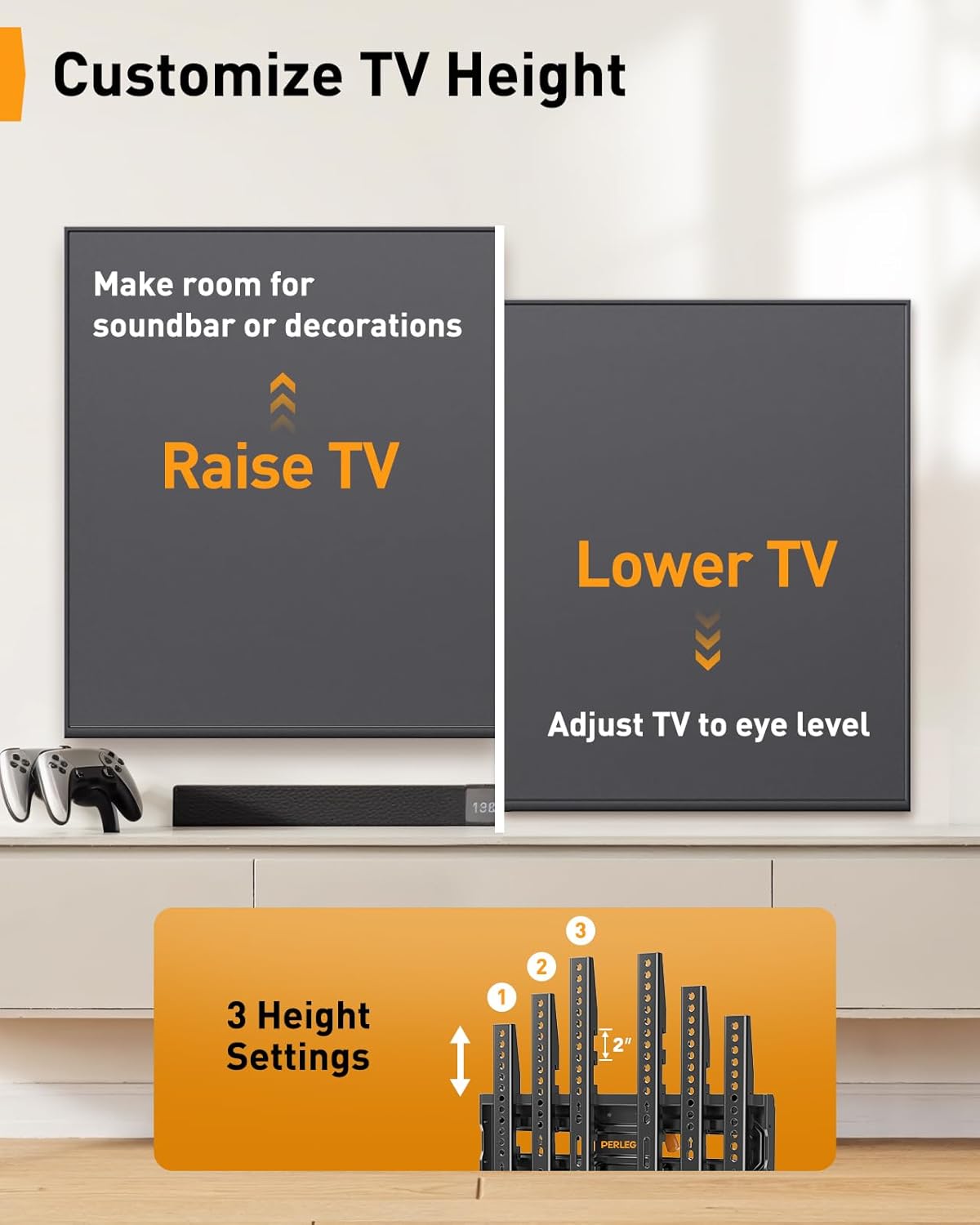
- Three height settings adjustable after fitting
- 99 lb capacity across 26 to 74 inch screens
- Excellent rating average
- Anchors supplied for concrete and brick
Cons
- VESA support tops out at 400 by 400
- Adjustment mechanism adds parts to the assembly
The most common regret after mounting a television is height, and it is the hardest thing to fix, because correcting it means a second set of holes in the wall. This mount addresses that directly by allowing the screen height to be adjusted after installation.
That matters more than it sounds. Screen centre should sit close to seated eye level, which is lower than most people expect and much lower than above a fireplace, and few people get it right first time from a template.
Beyond the adjustment it is a well specified full motion mount: 26 to 74 inch screens up to 99 pounds, VESA patterns to 400 by 400, extending 16.3 inches and retracting to three, with a rating average among the best here. The mechanism does add components, and the adjustment range is still bounded by where the wall plate goes, so it forgives a modest error rather than any error.
Bottom line: the pick for anyone unsure about height, which is most people mounting their first television.
- Screen range: 26 to 74 inches
- Weight capacity: 99 lb
- VESA: up to 400 x 400
- Height settings: 3
- Extension: 16.3 inches, retracts to 3 inches
- Swivel: up to 45 degrees each way
- Levelling: plus or minus 4 degrees
- Walls: wood studs 12 to 16 inches, concrete, brick
Sit on the sofa and have someone hold a cardboard template at several heights before drilling; the adjustment forgives a small error, not a large one.
Aim for screen centre near seated eye level rather than standing eye level.
Retighten the height adjustment fixings after setting the final position.
Fix the wall plate into studs or masonry as with any full motion mount.
How to Choose a Swivel TV Mount
Three numbers decide whether a mount fits your television: the screen size range, the VESA hole pattern, and the weight capacity. Two more decide whether it suits your room: how far the arm extends, and how thin the assembly sits when folded back.
Swivel, Tilt and Full Motion Are Not Three Products
Searching for a swivel mount returns mostly full motion mounts, and that is correct rather than confusing. Full motion describes a mount on an articulating arm that can do all three things: extend away from the wall, swivel left and right, and tilt up and down. Swivel is one of its capabilities, not a separate category.
A tilt-only mount sits close to the wall and angles downward, which suits a screen mounted high above a fireplace. A fixed mount does neither and sits closest of all. If you want the screen to turn toward a different seat, you need full motion, and every mount on this list provides it.
Single arm designs, such as the smaller USX MOUNT models, are lighter and cheaper. Dual arm designs carry more weight and hold larger screens with less sag at full extension. Above about 65 inches, prefer dual arm.
VESA: The Measurement People Get Wrong
VESA is the pattern of threaded holes on the back of your television, quoted as two numbers in millimetres, horizontal by vertical. Common patterns run from 100 by 100 on small screens up to 600 by 400 on large ones. Measure between hole centres rather than edges, and measure both directions, because rectangular patterns are common.
The mistake to avoid is assuming screen size predicts VESA. A 65 inch television from one manufacturer may use 400 by 400 while another uses 600 by 400, and mounts state a maximum pattern that must cover yours. Check the manual or measure before ordering; it takes two minutes and prevents the most common return in this category.
One further trap: some televisions have recessed or curved backs where the mounting bosses sit in a hollow, and those need spacers, which good mounts supply and cheap ones do not.
Weight Capacity and Why the Numbers Look Generous
Capacities here run from 77 pounds on the Pipishell through 99 on the Mounting Dream to 150 on the largest sliding designs, and modern televisions weigh far less than those figures suggest. A 65 inch LED set is commonly around 50 pounds, and many are lighter.
The headroom is not wasted. A full motion mount at full extension applies enormous leverage to its wall fixings, so a mount comfortably above your screen weight sags less, moves more smoothly, and puts less strain on both the arm joints and the wall. Treat published capacity as a comfort margin rather than a target.
UL listing, which the USX MOUNT states explicitly, means the design has been assessed against a recognised safety standard. In a product holding a heavy object over a sofa, that is a reasonable thing to want.
Fixing to the Wall: The Part That Actually Matters

Everything else in this guide is secondary to this. A full motion mount extended from the wall multiplies the load on its fixings several times over, and plasterboard anchors are not rated for that in any form. The mount must go into structural timber studs, into masonry with proper expansion anchors, or into a mounting plate spanning studs.
Manufacturers say this plainly on the packaging: both the Mounting Dream and the Perlegear state compatibility with concrete, brick and wood studs, each carrying an explicit warning not to install on drywall alone. In timber framed walls, studs are usually spaced 16 inches apart centre to centre, and these mounts are designed to span spacings between roughly 12 and 16 inches. Find them with a stud detector, confirm by drilling a small pilot hole, and fix into the centre of the timber rather than the edge. Most mounts here are designed to span either one or two studs at those spacings.
On masonry, use the manufacturer’s specified anchors and drill the stated diameter exactly. An oversized hole in brick is not recoverable with a longer screw. If your wall is dot and dab plasterboard over masonry, remember the fixings must reach and grip the masonry behind, which means longer anchors than the box supplies.
Extension, Folded Depth and the Gap Behind the Screen

The numbers are worth comparing directly. The Mounting Dream extends 17.5 inches and retracts to 3.4, while the Perlegear extends 16.3 and retracts to 3, so on both the screen sits around three inches off the wall at rest. Long arm mounts such as the PERLESMITH reach considerably further, which is what makes a screen usable from a kitchen or a side room. The cost is folded depth: more arm sections mean the assembly stacks thicker when closed, so the television sits further from the wall even when pushed back.
If a flush look matters most and you only need a little angle, a shorter arm sits closer. If reaching around a corner matters, accept the gap. Sliding designs are a third answer, moving the screen laterally along the wall rather than out from it.
Check the folded depth figure against your expectations before buying, because photographs of mounted televisions are always taken from an angle that hides it.
Cables, Height and Living With It
Leave far more cable slack than seems necessary. A mount at full extension and swivel can add two or three feet to the path a cable travels, and a taut HDMI lead either pulls out or eventually damages the socket. Route cables through the arm clips supplied, but leave a service loop at the wall plate.
Mounting height is where people most often regret their choice. The centre of the screen should sit close to seated eye level, which for most sofas puts it lower than instinct suggests, and considerably lower than above a fireplace. The Perlegear height adjustable design exists precisely because getting this wrong is common and drilling a second set of holes is unwelcome.
Finally, check the arm sweep against the room before drilling. A mount that swivels beautifully into a doorway or a lamp is a daily annoyance, and the time to discover that is with a cardboard template on the wall rather than with a television in your hands.
Fireplaces, Heat, and the Mount Above the Mantel
The single most requested television position is above a fireplace, and it is the one most worth arguing about. Two problems come with it. The first is height: a screen above a mantel sits far above seated eye level, which means looking up for hours and the neck ache that follows. The second is heat, because a working fireplace sends warm air up the chimney breast, and sustained heat shortens the life of the electronics behind the panel.
If the fireplace is decorative or electric, the heat problem largely disappears and only the height remains, which a full motion mount with a strong downward tilt partly solves. If the fireplace is used, measure the temperature at the intended mounting point after an evening’s fire before committing; if it is noticeably warm to the hand, choose another wall.
The mounting surface matters too. A chimney breast may be solid masonry, which is ideal, or it may be a stud-framed box around a flue, in which case the studs are not where a detector suggests and the cavity may contain the flue itself. Drilling blindly into a chimney breast is one of the few DIY mistakes that can be dangerous rather than merely expensive, so establish what is behind the surface before any hole is made.
| Pick | Screen range | Capacity | Arm type | Notable |
|---|---|---|---|---|
| Mounting Dream | 32 to 70 in | 99 lb | Extends 17.5 in, retracts 3.4 in | Swivel 45 degrees, tilt -15 to +5 |
| Pipishell | 26 to 65 in | 77 lb | Full motion | Largest rating history by far |
| Amazon Basics | Articulating | Not stated | Full motion | Swivel and tilt, budget option |
| USX MOUNT | Full motion range | Not stated | Swivel articulating tilt | UL listed |
| ECHOGEAR MaxMotion | 42 to 90 in | Not stated | Full motion | Large screen capability |
| PERLESMITH Long Arm | 42 to 90 in | Not stated | Long arm full motion | Extended reach |
| Perlegear | 26 to 74 in | 99 lb | Extends 16.3 in, retracts 3 in | 3 height settings, VESA to 400×400 |
Once the screen is on the wall, the sound usually needs attention next; our electronics section covers the rest of the setup.
Why You Should Trust Us
Every mount here was checked against its live listing for stated screen size range, weight capacity, arm type and any safety listing. Several listings state a screen range but no weight figure, which we have marked as not stated rather than inferring one, because capacity is the specification that determines how a mount behaves at full extension.
We have not hung televisions from these mounts, and we do not claim to have. What we can do is explain why a swivel mount and a full motion mount are the same thing, how to measure VESA correctly, and why the wall fixing rather than the bracket is what determines whether the installation is safe. More home technology guides live in our articles section.
Final Thoughts
The Mounting Dream full motion mount is our best overall pick. A 99 pound capacity across 32 to 70 inch screens leaves generous headroom over any modern television in that range, which is what keeps an extended arm steady, and its rating average is the highest here across a very large sample.
For best value, the Pipishell is difficult to argue with. It has accumulated more customer feedback than anything else in this category by a wide margin, covers 26 to 65 inch screens up to 77 pounds, and costs less than most rivals.
Beyond those, buy to the room. The ECHOGEAR MaxMotion or PERLESMITH long arm for screens up to 90 inches or where the arm needs real reach, the USX MOUNT if UL listing matters to you, the Perlegear if you suspect you will want to adjust height after living with it, and the Amazon Basics as the straightforward budget articulating option. Whichever you choose, fix it into studs or masonry and leave more cable slack than you think you need.
Frequently Asked Questions
Can I fit a swivel TV mount to plasterboard alone?
No. A full motion mount at full extension multiplies the load on its fixings several times over, and plasterboard anchors are not rated for that in any form. Fix into timber studs, into masonry with the specified expansion anchors, or onto a plate spanning studs. This is the one non-negotiable part of the installation.
How do I find my television’s VESA size?
Measure between the centres of the mounting holes on the back of the set, horizontally and vertically, in millimetres. Do not assume screen size predicts the pattern, since two 65 inch televisions can use different ones. The manual states it, and the mount must support a maximum pattern at least as large as yours.
Is a swivel mount different from a full motion mount?
No, swivel is one capability of a full motion mount, alongside extension and tilt. A tilt-only mount sits closer to the wall and angles downward but cannot turn. If you want to point the screen at a different seat, you need full motion, which is what these products are.
What height should I mount the television?
With the centre of the screen close to seated eye level, which is usually lower than instinct suggests and much lower than above a fireplace. Sit on the sofa and have someone hold a template at different heights before drilling. Height adjustable mounts exist because this is so often regretted afterwards.
How much cable slack do I need in 2026?
More than seems reasonable. Full extension plus swivel can add two or three feet to the cable path, and a taut lead pulls out of the socket or damages it over time. Route through the arm clips but leave a service loop at the wall plate, and test the full range of movement before tidying anything. More setup guides are in our category index.



Write Your Review
No reviews yet. Be the first to share your experience!