

Camera sensors got cheap fast, but audio is still the fastest way to tell a hobby channel from a channel people subscribe to. The good news is that you do not need a studio budget to fix it. We pulled together 10 picks for the budget microphone for vlogging, covering on-camera shotgun mics, plug-and-play wired lavaliers, desktop USB condensers and a couple of entry-level wireless clip-ons from BOYA, PowerDeWise, FIFINE and more, all of them rated by thousands of real buyers rather than by a press release.
Our top pick is the Movo VXR10 Universal Shotgun Microphone for its shock-mounted directional capsule, battery-free 3.5mm operation and included furry windscreen, which together solve the three problems that ruin most beginner vlog audio. If you shoot alone at arm’s length, a shotgun on the hot shoe is the least fiddly upgrade you can make. If you sit down to talk to camera at a desk, a USB condenser will beat it. This guide sorts out which shape fits your shoot before you spend anything, and it is current for September 2026. For a wider look at gear that pairs with these mics, browse our electronics deals and guides.

Pros
- No battery needed, draws power from the device
- Integrated rubber shock mount kills handling noise
- Ships with TRS and TRRS cables plus a furry windscreen
- Aluminium housing survives bag life
Cons
- No headphone monitoring jack
- Relies on the camera preamp, so noisy bodies stay noisy
- Hot-shoe mount adds height to a compact rig
The VXR10 is the microphone most vloggers should buy first. It is a compact supercardioid shotgun that slides into a hot shoe, plugs into a 3.5mm input and starts working with no batteries, no switches and no menu diving. That simplicity is exactly what a first audio upgrade should look like.
The two features that matter most here are often missing at this price. The capsule sits in a rubber suspension mount, so the thumps and knuckle taps that travel through a handheld camera do not end up in the recording. And the kit includes a furry windscreen rather than only a foam one, which is what lets it survive an outdoor shoot instead of turning into rumble.
The compromises are real but predictable. There is no headphone jack, so you cannot monitor from the mic itself, and because it is an unpowered design the recording quality depends heavily on how clean your camera or phone preamp is. On a body with aggressive automatic gain you will still hear the noise floor rise between sentences. It also does nothing about distance: at arm's length it captures your room as well as your voice.
Bottom line: for handheld walk-and-talk, travel footage and general b-roll, this is the highest-confidence budget buy on the list. Pair it with a quiet location and it punches far above its tier.
- Type: condenser shotgun, supercardioid
- Power: plug-in power from device, no battery
- Connections: 3.5mm TRS for camera, 3.5mm TRRS for phone
- Mount: cold shoe with integrated rubber shock mount
- Body: aluminium alloy
- Included: foam and furry windscreens, two cables, pouch
Handheld creators who film themselves at arm's length, travel vloggers who cannot stop to clip on a lav, and anyone shooting b-roll where the sound of the scene matters. It is also the easiest mic here to share between a camera and a phone, so it suits creators who switch devices mid-shoot.
It is a weaker choice for sit-down interviews in a reflective room, where a collar mic will sound noticeably cleaner.
Unplug by the connector body, never by pulling the cable, since strain at the plug is the usual failure point on 3.5mm mics. Store the furry windscreen loose rather than compressed so the fibres stay lofted and keep blocking wind.
Keep the shock mount bands away from oil and heat, and replace them if they slacken, because a tired band lets handling noise straight through.

Pros
- Sits inches from your mouth for the cleanest voice on the list
- No battery and no pairing, it just works
- Long cable plus extension covers a fixed camera position
- Metal clip holds better than typical plastic ones
Cons
- Cable limits how far you can move
- Omnidirectional pattern picks up room noise if you are not close
- Needs an adapter for phones without a headphone jack
This is the classic wired lavalier that has been quietly outperforming its price for years. The whole argument for it is placement: clipped to a collar, the capsule sits a hand's width from your mouth, and that proximity buys you more perceived quality than any amount of spending on a microphone that sits across the room.
Build quality is better than the tier suggests. The clip is metal rather than brittle plastic, the cable is long enough to reach a tripod-mounted camera without an extension in most rooms, and a foam windscreen and adapter come in the box so you are not immediately buying accessories.
The honest drawbacks are the cable and the pickup pattern. Omnidirectional capsules hear everything, so in a noisy kitchen or a room with an air conditioner you will hear that too, and the fix is to get the clip higher and closer rather than to reach for noise reduction later. On phones without a headphone jack you will need a dongle that passes microphone input, and cheap charge-only adapters will not do it.
Bottom line: if you sit down and talk to camera, this is the best-sounding money on this page. Buy it first, then add a shotgun for handheld days.
- Type: wired lavalier, omnidirectional condenser
- Power: plug-in power, no battery
- Connection: 3.5mm, adapter supplied for camera and phone use
- Cable: long lead plus extension for tripod distance
- Clip: metal alligator clip
- Included: foam windscreen, adapter, carry pouch
Clip the mic to the centre of your collar, roughly a hand's width below your chin, and let the cable loop downward so fabric does not rub the capsule. Run the cable inside your shirt and out at the waist to keep it invisible on camera.
Record ten seconds and play it back before every shoot. Wired lavs fail silently when a plug sits half-seated, and ten seconds of checking has saved more footage than any feature on any spec sheet.
Buy this if your camera stays on a tripod and you stay within a few steps of it. Buy a wireless set instead if you present standing up, move between rooms or film two people at once.
If you also record voiceover at a desk, pair it with a USB condenser rather than trying to make one microphone do both jobs.

Pros
- Solid metal body at an entry-level price
- Plug and play on Mac and Windows, no drivers
- Cardioid pattern rejects a good deal of room noise
- Folding tripod stand included
Cons
- Not portable, this is a desk microphone
- No headphone monitoring jack on the body
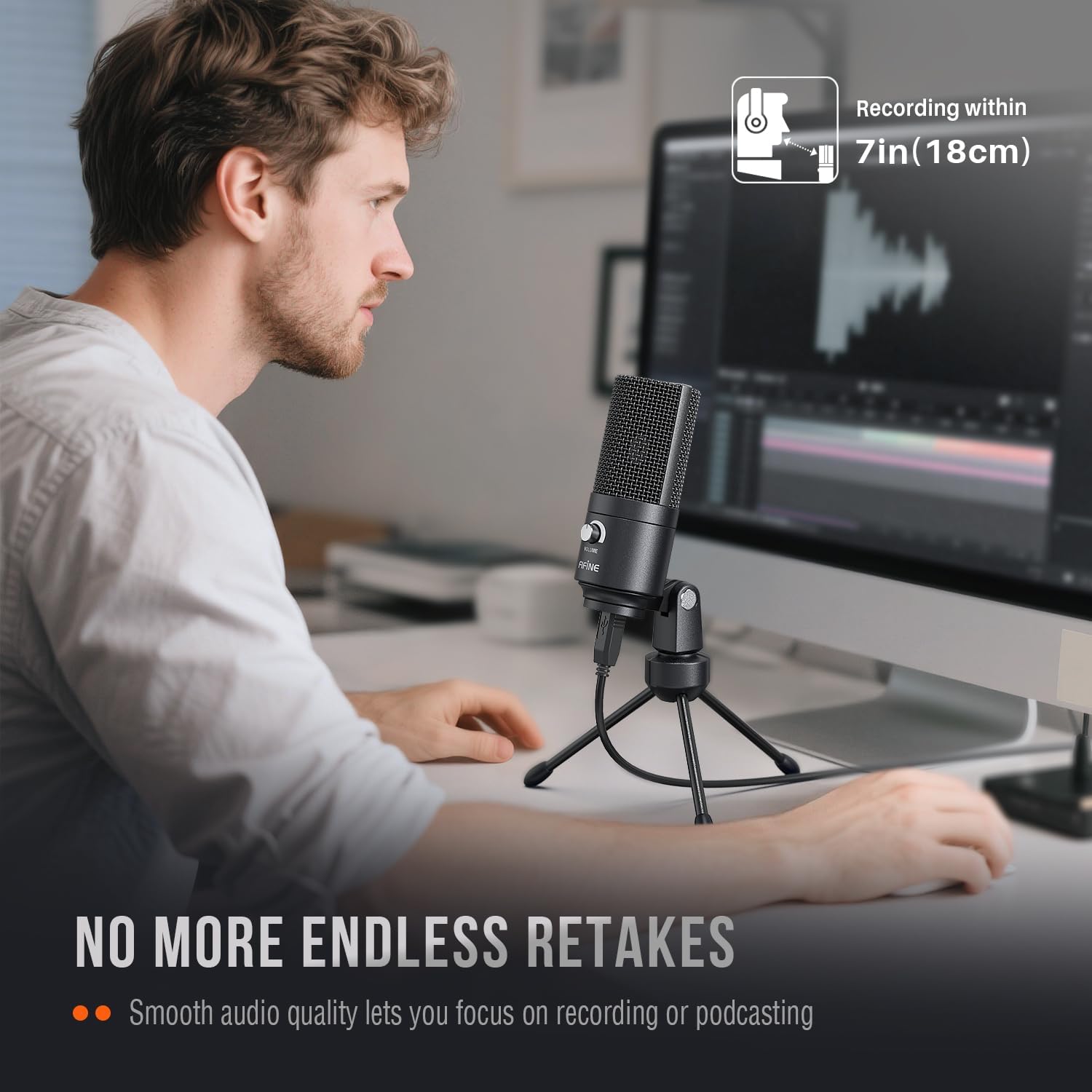
- Short stand puts the capsule low unless you raise it
If a good share of your uploads is recorded at a desk, a USB condenser is the cheapest large jump in quality you can make, and this FIFINE is the archetype. It connects over a single USB cable, appears as an input device with no drivers to install, and sounds immediately more solid than any laptop microphone.
The metal housing is the standout at this price, and it matters for more than looks: a heavier body resists desk vibration and stays put when you nudge it. The cardioid pattern is genuinely useful too, rejecting enough of what is behind the mic to make an untreated room usable.
Two limitations should shape how you use it. There is no headphone jack, so monitoring has to happen through your computer, which introduces a little delay on some systems. And the included tripod is short, which puts the capsule near desk level and encourages you to lean; a cheap boom arm or a stack of books fixes the geometry and improves the sound more than any setting will.
Bottom line: the best pick here for voiceover, tutorials and seated pieces to camera, provided the microphone never needs to leave the desk.
- Type: USB condenser, cardioid
- Connection: USB to computer, plug and play
- Compatibility: Windows and Mac, no driver install
- Body: metal housing
- Included: folding tripod stand, USB cable
- Best distance: a hand's width to a forearm from the capsule
Speak into the front grille, not the top, and keep a consistent distance so your level does not swing between takes. Angle the mic slightly off-axis from your mouth to soften plosives if you do not have a pop filter.
Set the input level in your operating system so peaks land well below the top of the meter. Recording with headroom and lifting later is how you avoid clipping that cannot be undone.
Condenser capsules dislike moisture, so keep the mic away from drinks and do not breathe directly into the grille from close range. A basic pop filter protects the capsule as well as the recording.
Unplug the USB cable at the connector and avoid sharp bends where the cable meets the body, which is the most common failure point on desktop mics.

Pros
- Complete kit, tripod and pop filter included
- Plug and play with no drivers
- Cardioid pattern focuses on the voice in front
- Among the most reviewed budget USB mics available
Cons
- Plastic and lightweight compared with metal rivals
- Low tripod means the capsule sits below mouth height
- No gain control or monitoring on the body
The TC-777 is the kit answer for someone who wants to start recording tonight. The box holds the microphone, a folding tripod and a pop filter, so there is no second order and no discovering that your plosives sound like wind three videos in.
Sound-wise it does the important thing right: a cardioid pattern that concentrates on what is directly in front and lets you record in an ordinary room without it sounding like a corridor. For spoken word, tutorials and voiceover it is a clear jump from any built-in mic.
Where it gives ground is physical. The body is lighter and more plastic than metal-bodied rivals, so it picks up desk knocks more readily, and the short tripod puts the capsule low unless you raise it on something. There is also no gain knob or headphone socket, so all level setting happens in software. None of this is a dealbreaker at this price, but it is why heavier rivals cost a little more.
Bottom line: the most complete starter package on the list, best suited to a fixed desk setup where nothing gets knocked.
- Type: USB condenser, cardioid
- Connection: USB, plug and play
- Compatibility: Windows and Mac laptops and desktops
- Included: folding tripod stand, pop filter, USB cable
- Controls: none on body, level set in software
- Placement: front-address, speak into the grille face
Raise the tripod onto a small stack of books or a low stand so the capsule sits at mouth height, then set the pop filter a couple of finger widths in front of the grille. That single change does more for the sound than any software plugin.
Keep the mic off the same surface as your keyboard if you type while recording, since a light plastic body transmits desk noise easily.
Choose this over a metal-bodied rival if you want the accessories included and you value a lower entry point. Choose the heavier metal option if your desk gets bumped or you record several hours a week.
It is not a travel microphone, so pair it with a lavalier or shotgun if you also film away from the desk.

Pros
- Extremely compact and light on a small camera
- Made by a specialist audio brand
- Integrated suspension mount and furry windscreen supplied
- No battery required
Cons
- Costs more than generic shotgun mics
- No gain switch or monitoring
- Short body means less directionality than a long shotgun
The VideoMicro II is what you buy when your camera is small and you refuse to bolt a large tube on top of it. It is one of the most compact on-camera shotguns available, built by a company that has spent decades making microphones, and it shows in the details rather than the specs.
The suspension mount is built into the body instead of being a separate cradle, so the whole assembly stays tiny while still isolating handling noise. It needs no battery and no power switch, and the supplied cables cover both camera and phone use. A furry windscreen is included, which is the accessory that decides whether outdoor footage is usable.
The trade-offs are honest ones. It sits at the upper edge of what most people would call budget, and you pay for the brand and the build rather than for extra features: there is no gain switch and no headphone jack. Its short barrel also means it is less aggressively directional than a longer shotgun, so it hears more of the room than the length of the category suggests.
Bottom line: the pick for compact mirrorless and gimbal shooters who want a specialist brand and the smallest possible footprint on the camera.
- Type: compact condenser shotgun, directional
- Power: plug-in power from device, no battery
- Connections: 3.5mm TRS and TRRS cables supplied
- Mount: cold shoe with integrated suspension
- Weight: ultra-light, suited to gimbals
- Included: furry windscreen, both cables
Creators shooting on compact mirrorless bodies, gimbals or phone rigs where every gram and centimetre counts, and anyone who prefers buying from a dedicated audio brand for warranty and support reasons.
If your camera is larger and you want maximum directionality for the money, a longer generic shotgun will reject more of the room.
Do not lift the camera by the microphone, since the suspension is designed to absorb vibration rather than carry weight. Fit the furry windscreen for anything outdoors, including a light breeze that seems harmless.
Store the mic with the cable coiled loosely rather than wrapped tightly around the body to protect the connector.

Pros
- Switch selects camera or smartphone mode
- Very long cable reaches a tripod across a room
- Battery gives it a bit of extra output level
- Established budget standard with a long track record
Cons
- Needs a coin cell for camera mode
- Long cable is a tangle risk without a wrap
- Omnidirectional pattern hears the room as well as you
The BY-M1 has been the default first lavalier for a long time, and the reason is flexibility. A small switch on the body flips it between camera and smartphone wiring, which removes the single most common compatibility headache in this category without you needing to buy the right adapter.
The cable is the other selling point. It is long enough to clip on and still reach a camera on a tripod several steps away, which is exactly the geometry of a one-person interview setup. A foam windscreen and clip are included, so there is nothing else to buy before the first shoot.
Two things to know before buying. The mic uses a coin cell in camera mode, and although it will pass audio without one on some devices, the level drops noticeably, so keep a spare. And that long cable is genuinely long, which means it tangles if you drop it loose into a bag rather than coiling it.
Bottom line: the most versatile cheap lavalier here, and the best pick if one microphone has to serve a camera, a recorder and a phone.
- Type: wired lavalier, omnidirectional condenser
- Power: LR44 coin cell for camera mode
- Connection: 3.5mm with camera and smartphone mode switch
- Cable: extra long lead for tripod distance
- Included: foam windscreen, clip, pouch
- Compatibility: DSLR, camcorder, recorder, smartphone
Set the switch to the correct mode before you record, since the wrong position is the usual cause of very quiet or one-sided audio. Clip the capsule high on the collar and loop the cable so it does not brush clothing.
Coil the long cable over and under rather than around your hand, which stops the twist that eventually breaks the conductor near the plug.
Pick this when you own several devices and want one lav for all of them. Pick a native USB-C lavalier instead if you only ever shoot on a modern phone and want to skip adapters and coin cells entirely.
For two people on camera, buy two of these plus a splitter, or move up to a dual-transmitter wireless set.

Pros
- Longer barrel gives tighter directional pickup
- Battery-free operation
- Both foam and furry windscreens supplied
- Aluminium body with shock-absorbing mount
Cons
- Bulkier on a small camera than compact rivals
- No monitoring jack or gain switch
- Requires the right cable for phone use
The CVM-V30 LITE is the pick for people who want directionality rather than compactness. Its longer barrel gives a tighter super-cardioid pattern than the stubby mics in this class, which means more of your subject and less of the street behind them when the camera is a few steps away.
It runs on plug-in power with no batteries, sits in a shock-absorbing mount on the hot shoe, and comes with both a foam windscreen for indoors and a furry one for outdoors. The aluminium body feels considerably more solid than its price suggests, and it is the sort of mic that survives being packed and unpacked repeatedly.
The cost of that pattern is size. On a small mirrorless body it looks and feels top-heavy, and it will intrude into a gimbal's balance. There is no headphone jack and no gain control either, so you are still relying on the camera to set a sensible level, and a noisy camera preamp will still be audible under quiet dialogue.
Bottom line: the most directional budget shotgun here, best on a larger camera where interviews are shot from a normal conversational distance.
- Type: condenser shotgun, super-cardioid
- Power: plug-in power, no battery
- Connection: 3.5mm output to camera or recorder
- Mount: cold shoe with shock absorption
- Body: aluminium alloy, longer barrel
- Included: foam and furry windscreens
Interview and event shooters using a DSLR or larger mirrorless body, where the microphone can be a few steps from the subject and the priority is rejecting everything to the sides.
Less suited to phone rigs and small gimbals, where the length works against balance and framing.
Support the barrel when you transport the camera assembled, since a long shotgun exerts leverage on the hot shoe. Keep the furry windscreen dry and brush rather than wash it to preserve the fibres.
Check the 3.5mm plug periodically for looseness, which is what causes intermittent audio in one channel.

Pros
- Stereo capture adds a sense of space
- Very small and discreet on camera
- Made by a major electronics brand
- No battery required
Cons
- Stereo is a liability for interview dialogue
- Short cable compared with rivals
- Fewer reviews than the volume leaders here
The ECM-LV1 is the odd one out here, and deliberately so. Almost every cheap lavalier is mono and omnidirectional; this one is stereo, which means it captures a sense of left and right around you as well as your voice. For travel diaries, food markets and any footage where the environment is part of the story, that changes the feel of a clip.
It is also genuinely tiny, easy to hide on a collar or a strap, and needs no battery. As a Sony product it carries the build standards and the support network you would expect, which is not a given among no-name lavaliers.
Understand what stereo costs you, though. For a straight interview, stereo capture spreads room noise across the image and gives you less of the focused, dry dialogue that editing prefers, so a mono lav is the better tool for talking heads. The cable is also on the short side, which pushes you toward phone and pocket-recorder use rather than a camera on a tripod across the room.
Bottom line: a specialist choice that shines for ambience-led vlogging, and the wrong choice if your videos are mostly one person talking.
- Type: stereo lavalier condenser
- Power: plug-in power, no battery
- Connection: 3.5mm stereo
- Size: compact, discreet clip-on body
- Cable: short lead suited to phone or pocket recorder
- Use case: voice plus ambience capture
Clip it high on a jacket or a bag strap facing forward so the stereo image lines up with what the camera sees. Walking through a market or along a busy street is exactly the material this mic was made for.
Record a few seconds of the location with nobody talking. Those clean ambience clips are invaluable for smoothing cuts in the edit.
Choose this as a second microphone when you already own a mono lav or a shotgun and want atmosphere in your footage. Do not choose it as your only mic if interviews and sit-down pieces are your main format.
Check your camera or recorder accepts a stereo 3.5mm input rather than a mic-level mono input before ordering.

Pros
- Adapters for phone, camera and computer in one box
- Frees you from a cable while presenting
- Noise reduction mode for busy locations
- Simple pairing with nothing to configure
Cons
- Battery life is the real limit on shooting time
- 2.4GHz link can stutter in crowded radio environments
- Plastic build feels light compared with wired rivals
Cables are the main complaint people have about affordable lavaliers, and this GoorDik set is the cheapest sensible way out of them. It bundles USB-C, Lightning, 3.5mm and camera connections with one receiver, so the same kit follows you from a phone to a camera to a laptop without extra purchases.
Setup is deliberately dull. Take the pieces out of the case, plug the receiver into the device, clip the transmitter to your collar and it connects on its own. A noise reduction mode helps in busier locations, and the charging case keeps the small parts from disappearing into a bag.
The compromises are the ones that define budget wireless. Runtime is finite and shorter in cold weather, so long shoots need a charging break that a wired lav would not. The 2.4GHz link shares airspace with every router and phone nearby, and in a dense environment you can hear brief artefacts that cannot be repaired afterwards. The plastic housings also feel light next to metal-clipped wired mics.
Bottom line: worth it if freedom of movement is the reason your current audio is bad. If your camera stays on a tripod, a wired lav will sound more reliable for less.
- Type: wireless lavalier, 2.4GHz digital
- Connections: USB-C, Lightning, 3.5mm, camera adapter
- Power: rechargeable transmitter and receiver with charging case
- Features: noise reduction mode, automatic pairing
- Mount: clip-on transmitter
- Use: phone, camera, laptop video and streaming
Presenters who stand and move, creators filming in shops or workshops, and anyone whose camera and subject cannot be joined by a cable. Also useful for filming a second person without running a lead across the floor.
Not the right pick for long unattended recordings, where battery runtime becomes the weak link.
Charge the case and both units the night before a shoot rather than on the way out, since these small cells take longer to fill than their size suggests. Keep the receiver clear of the phone's own radios when possible to reduce interference.
Store the transmitter in the case rather than loose, because the clip and the charging contacts are the parts that fail first.

Pros
- Plug and play on iPhone and iPad, no app needed
- Small transmitter clips out of shot easily
- Noise reduction helps in ordinary indoor rooms
- Low cost entry into wireless recording
Cons
- Range and stability trail pricier wireless systems
- Battery runtime limits long sessions
- Lightweight plastic clip is easy to lose
This Labstandard set exists for one job: getting clean voice into an iPhone or iPad without a cable and without learning anything. The receiver plugs into the port, the transmitter clips to your collar, and the phone's own camera app records the improved audio with no extra software involved.
For its intended use it works well. The transmitter is small enough to hide behind a lapel, the noise reduction takes the edge off an ordinary room, and the whole kit fits in a pocket, so it is easy to carry as a just-in-case microphone.
It is also the clearest illustration of the budget wireless trade-off on this page. Range and link stability are behind the better-known wireless systems, so obstacles and crowded WiFi cause more trouble than they would with a pricier set. Runtime is modest, and the clip is the light plastic type that goes missing. Treat it as a convenience buy rather than a workhorse.
Bottom line: a low-risk way to find out whether wireless changes how you shoot, particularly for phone-only creators. If it does, the money you save here funds a sturdier set later.
- Type: wireless lavalier, 2.4GHz digital
- Compatibility: iPhone and iPad, plug-in receiver
- Power: rechargeable transmitter and receiver
- Features: noise reduction, automatic connection
- Setup: no app or driver required
- Mount: clip-on transmitter with windscreen
Seat the receiver fully in the port before opening the camera app, because a partly seated receiver leaves the phone recording on its own microphone without warning you. Watch the level meter on the first take to confirm the phone switched inputs.
Keep the transmitter on the same side of your body as the phone where possible, since your own body is the most common obstacle in a short wireless link.
Buy this if you shoot only on an iPhone or iPad and want the lowest-cost path to cordless audio. Buy a wired lavalier instead if quality per unit of money is the priority and you can live with a lead.
If you already know you will film two people regularly, a dual-transmitter kit will save you buying twice.
How to Choose the Best Budget Microphone for Vlogging
Every mic on this list will sound better than your phone or your camera’s built-in capsule. Which one sounds better for you depends almost entirely on where the microphone sits relative to your mouth, and on what your camera or phone can physically accept. Work through the criteria below in order and the shortlist usually collapses to two or three options.
Match the Microphone Type to How You Shoot

A shotgun mic mounts in the camera’s hot shoe and points where the lens points. It is the right answer for handheld walk-and-talk, arm’s-length selfie framing and b-roll where you want ambient sound that is a bit tighter and cleaner than the built-in mic. Because the capsule is still a foot or two from your mouth, a shotgun always picks up more room than a body mic does, so it rewards quiet locations.
A lavalier clips to your collar and sits a hand’s width from your mouth. That short distance is why a simple wired lav often sounds dramatically cleaner than a much fancier microphone placed far away. It is the strongest choice for interviews, sit-down pieces, cooking videos and anything filmed in a room with hard walls. The cable is the only real annoyance, and for a fixed camera position it is barely an annoyance at all.
A desktop USB condenser never moves, and it does not care about your camera at all. If most of your uploads are talking-head segments, tutorials, reaction videos or voiceover recorded after the fact, this is the category that gives you the biggest audible jump for the least money. Many creators end up owning one of these plus one portable mic, and that pairing covers almost every shoot.
| Mic type | Best for | Typical connection | Main weakness |
|---|---|---|---|
| On-camera shotgun | Handheld vlogging, b-roll, outdoors | 3.5mm TRS into camera, TRRS into phone | Picks up more room tone than a body mic |
| Wired lavalier | Interviews, sit-down talks, tutorials | 3.5mm or USB-C, no battery | Cable run limits how far you move |
| USB desktop condenser | Voiceover, tutorials, streaming | USB to computer or phone adapter | Not portable, needs a quiet room |
| Entry-level wireless lav | Movement, two-person shoots | USB-C or Lightning receiver | Battery life, occasional dropouts |
Check the Connection Before Anything Else

This is where most first purchases go wrong. A 3.5mm TRS plug is what mirrorless and DSLR bodies expect. A 3.5mm TRRS plug is what a headphone-jack phone expects. They are not the same wiring, which is why good budget mics ship with both cables or with a small adapter in the box. Check that the mic you want includes the cable for the device you actually own, because buying the adapter separately can cost as much as the discount you were chasing.
Modern phones complicate this further. Most current iPhones and nearly all recent Android handsets have dropped the headphone jack entirely, so a 3.5mm mic needs a USB-C or Lightning dongle, and not every dongle passes microphone input. Mics that terminate in a native USB-C plug skip that whole problem. If you shoot on a phone and want zero troubleshooting, prioritise a native USB-C connector over any spec on the box.
Cameras add one more wrinkle: many bodies apply automatic gain that you cannot disable, which can pump the noise floor up between sentences. If your camera lets you set audio levels manually, do it once and leave it there. If it does not, a mic with its own gain switch gives you a way to keep the camera’s preamp working in a comfortable range.
Know What You Trade Away at the Budget End
An honest guide has to say this plainly. Cheap microphones give up ground in four predictable places, and knowing which ones you can live with is the whole skill of shopping in this tier. First, the noise floor: inexpensive capsules and preamps hiss more, and that hiss becomes obvious the moment you lift a quiet clip in editing. Recording a touch louder at the source, rather than boosting later, hides most of it.
Second, wireless latency and dropouts. Budget wireless systems use crowded 2.4GHz airspace, and in a busy street or a venue with heavy WiFi traffic you can hear brief digital artefacts that no amount of editing repairs. Third, battery life. Entry-level transmitters and charging cases quote optimistic hours, and cold weather cuts them further, so plan on shorter shooting windows than the box promises.
Fourth, build quality. Lightweight plastic housings, thin cables and stiff clips are how a low price gets hit. Nothing about that ruins your audio on day one, but a strain-relieved cable and a metal body are the parts that decide whether the mic still works after a year in a camera bag. If you shoot several times a week, spending a little more on the housing is usually the better trade than chasing a spec sheet. For the wireless side specifically, our roundup of wireless mics for vlogging goes deeper into range, transmitter weight and dual-channel recording if you decide the cable is the dealbreaker.
Wind, Plosives and Handling Noise
Outdoor audio is ruined by wind long before it is ruined by a mediocre capsule. A foam windscreen handles indoor breath and light air movement. A furry windscreen, the fuzzy cover creators call a deadcat, is what you need outdoors, and a mic that includes one saves you a separate purchase. Check the listing photos rather than the bullet points, because some kits show a deadcat that is sold separately.
Handling noise is the other silent killer. Every bump on the camera body travels up the hot shoe into the microphone unless a rubber suspension mount absorbs it. Shotgun mics with a proper shock mount stay usable handheld; rigid ones do not. For lavaliers, the equivalent problem is fabric rub, which you fix by clipping the mic so the cable loops downward and the capsule does not touch your shirt.
Think About the Room, Not Just the Mic
Doubling the distance between your mouth and the capsule roughly quarters the direct sound reaching it, while the room reflections stay where they are. That is the physics behind the single most useful budget tip in this whole guide: get closer. A modest mic close to your mouth beats an expensive mic across the room, every time, which is why a wired lavalier so often outperforms gear that costs several times as much.
If you cannot get closer, soften the room. A rug, a curtain, a bookshelf, even a duvet on a stand behind the camera will kill the flutter echo that makes footage sound amateur. Creators who shoot in a kitchen or a bare home office usually gain more from ten minutes of rearranging than from upgrading a microphone. Our computers and accessories section covers the desk-side gear that helps if your setup lives on a desk permanently.
Monitoring and Recording Safety Nets
A headphone jack on the microphone or the receiver lets you hear exactly what is being recorded instead of hoping. It is the feature most often cut to hit a low price, and it is the feature that saves whole shoots. If your chosen mic lacks it, get into the habit of recording ten seconds, playing it back and only then filming for real.
The second safety net is a backup track. Leave your camera’s internal mic running, or start a voice memo on your phone in your pocket. If a wireless link drops or a cable works loose, a rough backup track is the difference between re-shooting a day and salvaging it in the edit.
Why You Should Trust Us
We build these shortlists from live Amazon listing data rather than from marketing copy. Every product here cleared a rating and review-volume threshold, which filters out new listings with a handful of glowing comments and keeps microphones that have survived long enough for durability complaints to surface. We then read the pattern of what buyers actually complain about, because in this category the recurring complaints, hiss, dropouts, flimsy clips, are far more informative than the star average.
We deliberately built a mixed list rather than ten versions of the same clip-on. Vloggers shoot in different ways, and a roundup that ignores that just sells whatever is trending. Where a product is a strong performer but a poor fit for a particular style of shooting, we say so in its review rather than leaving it out. We do not claim hands-on lab work we have not done, and we update these picks as listings change. You can see how we approach every category on our guides and reviews page.
Final Thoughts
Best overall goes to the Movo VXR10 Universal Shotgun Microphone. It needs no battery, mounts straight to a hot shoe or a phone rig, ships with both TRS and TRRS cables plus a furry windscreen, and its rubber suspension mount keeps handheld bumps out of the recording. For someone whose first upgrade is happening today, it is the pick with the fewest ways to go wrong.
Best value is the PowerDeWise Professional Grade Lavalier Clip On Microphone. It is a wired omnidirectional lav with a long cable, a metal clip and an included adapter for camera and phone use, and because it sits inches from your mouth it delivers the cleanest voice of anything here at this end of the market. If you sit down to talk to camera, buy it before you buy anything else. For desk-bound creators, the FIFINE USB Metal Condenser Microphone is the best home-studio option on the list, while the TONOR TC-777 Podcast Microphone covers the same job with a tripod and pop filter already in the box.
For specific situations: choose the RODE VideoMicro II if you want the most compact hot-shoe shotgun from an audio specialist, the BOYA BY-M1 Collar Microphone if you need one lav that works with cameras, recorders and phones alike, and the Sony Compact Stereo Lavalier Microphone ECM-LV1 if you want stereo ambience captured alongside your voice. If you move around a lot and the cable is genuinely in your way, the GoorDik 4-in-1 wireless set is the cheapest sane entry into cordless, and our dedicated wireless vlogging mic guide covers that side in full.
Frequently Asked Questions
Is a shotgun or a lavalier the better budget microphone for vlogging?
A lavalier gives cleaner voice because it sits inches from your mouth, so it wins for interviews, tutorials and any sit-down format. A shotgun is more convenient because there is nothing to clip on and nothing to hide, so it wins for handheld walk-and-talk and travel footage. If you can only own one and you mostly talk to camera at arm’s length, start with the shotgun. If you mostly sit and talk, start with the lavalier.
Can I use these microphones directly with my phone in 2026?
Yes, but check the plug. Mics with a native USB-C connector work with current iPhones and most Android phones with no adapter. A 3.5mm mic needs a TRRS cable plus a USB-C or Lightning adapter that supports microphone input, and cheap charge-only dongles will not work. Several picks in this list include both cable types, which is the simplest way to stay compatible with a phone and a camera at the same time.
Do I need phantom power or a battery?
None of these picks need phantom power. Wired lavaliers and plug-in shotguns like the Movo VXR10 draw the tiny amount of power they need from the device, so there is nothing to charge and nothing to fail mid-shoot. USB condensers are powered by the computer over the same cable that carries the audio. Only the wireless sets have batteries, and those are the picks where you should check runtime before a long shoot.
Will a cheap microphone really sound better than my camera?
Almost always, and the reason is placement rather than components. A built-in camera mic sits behind the lens, points at everything and captures the whole room plus every handling bump. Moving the capsule to your collar, or even just to the hot shoe with a directional pattern and a windscreen, changes the ratio of your voice to everything else. That ratio is what listeners perceive as quality.
What accessories should I budget for alongside the mic?
A furry windscreen if you shoot outdoors and the kit does not include one, a short right-angle cable so the connector is not strained at the camera, and a spare clip for lavaliers because clips are the first part to break. A small pouch matters more than it sounds: loose cables in a bag are the leading cause of dead microphones. You can find more gear picks in our phone accessories section if you shoot mainly on a handset.

Write Your Review
No reviews yet. Be the first to share your experience!