

Bad audio kills a vlog faster than shaky footage ever will. Viewers forgive a soft focus shot, but they click away the second your voice disappears under traffic noise, wind, or room echo. That is why a clip-on wireless mic has become the single cheapest upgrade most creators can make. Our top pick is the DJI Mic Mini for its ultralight transmitters, genuinely long battery life, and clean noise cancelling that holds up outdoors. We compared 9 wireless mics for vlogging from brands like Ecomxia, DJI, Hollyland and more to find the ones that hold a signal, survive a full shooting day, and sound good enough to publish straight out of the box.
This shortlist is built for people who actually film, not for spec sheet collectors. Some of these kits plug straight into a phone and need no menus at all. Others record a backup track internally so a clipped shout does not ruin the take. We looked at real customer ratings, connectivity, transmitter weight, and how each system behaves when you walk away from the camera. If you are still choosing a body to pair the mic with, our guide to the best mirrorless cameras is a good companion read. Prices and availability move constantly, so treat this as a snapshot for September 2026.

Pros
- Transmitters are light enough to hang on a thin shirt collar
- Charging case carries the system through a full shooting day
- Two transmitters in the box, so a second speaker costs nothing extra
- Noise cancelling is tuned gently and keeps voices natural
- Receiver covers phones and cameras out of the box
Cons
- No 32-bit float or internal backup recording
- Receiver screen is small and fiddly to read in bright sun
- Windscreens are easy to lose given how small they are
The DJI Mic Mini is the kit most vloggers should buy first. It strips the DJI formula down to the parts that matter on a shoot: two tiny transmitters, one receiver, and a case that recharges everything between takes. The transmitters are light enough that a thin t-shirt collar holds them without sagging, which is exactly where cheaper units fall down.
Audio is clean and natural rather than heavily processed. The two level noise cancelling does real work on street noise and air conditioning hum without hollowing out the voice, and the supplied windscreen handles a light breeze. Pairing is automatic once the units leave the case, so you can be rolling within seconds of arriving on location.
The main compromise is the lack of 32-bit float capture and internal backup recording. If a guest suddenly shouts and you were not watching levels, that peak is gone. The receiver display is also small, which makes level checks awkward in direct sunlight. Neither is a problem for a scripted piece to camera at a steady volume.
Bottom line: for solo vlogging and everyday creator work, this is the best balance of weight, battery, and sound on the list, and the two transmitter bundle means it grows with you.
- Kit layout: 2 transmitters, 1 receiver, charging case
- Intended use: vlogging, streaming, interviews
- Noise cancelling: two level intelligent processing
- Total runtime: up to 48 hours with the charging case
- Mounting: clip and magnetic attachment
- Compatibility: iPhone, Android, and cameras
Solo vloggers, travel creators, and anyone who films outdoors and wants to stop thinking about audio. The two transmitter layout also suits creators who occasionally interview a guest but do not want to buy a second kit for it.
Less suited to podcasters chasing a rich low end, or to documentary shooters who need internal backup recording on every take.
Take the units out of the case and they pair automatically. Clip the transmitter to a firm part of the garment about a hand span below the chin, then fit the furry windscreen before you step outside, even on a calm day.
Set noise cancelling to the lowest level that clears the background you are actually standing in. Heavy processing is the fastest way to make a voice sound thin, and it cannot be undone in the edit.

Pros
- 32-bit float internal recording rescues clipped peaks in the edit
- Onboard storage keeps a backup track even if the link drops
- Long rated transmission range for walkthroughs and events
- Touchscreen receiver makes level changes quick
- Magnetic mount hides the transmitter neatly under clothing
Cons
- Ships with a single transmitter, so a second speaker costs extra
- Larger and heavier on the collar than the Mini
- Priced well above entry level kits
The DJI Mic 2 is the safety net option. Its transmitter writes a 32-bit float file to internal storage while it also sends audio to the receiver, which means a shout, a laugh, or a sudden burst of applause that would clip on a conventional recorder can still be pulled back down cleanly in your editor.
Sound out of the box is a step up from budget kits in dynamic range and low end body, and the intelligent noise cancelling copes with busy streets without turning voices into a whisper. The touchscreen receiver is the nicest interface on this list and makes gain changes fast when you are working quickly.
The trade offs are size and kit contents. The transmitter is noticeably chunkier than the Mini on a light shirt, and this bundle ships with a single transmitter, so a two person setup means buying more hardware. The price sits well above the entry level competition.
Bottom line: if you shoot interviews, events, or anything where the audio only happens once, the internal recording alone justifies the upgrade.
- Kit layout: 1 transmitter, 1 receiver
- Recording: 32-bit float internal capture
- Onboard storage: 8GB on the transmitter
- Rated range: up to 250m line of sight
- Noise cancelling: intelligent processing
- Compatibility: iPhone, Android, cameras
Interviews are where this kit earns its money. Guests are unpredictable, and you cannot ask someone to repeat a genuine reaction because a peak clipped. The internal 32-bit float track means you always have a recoverable version of what was said.
The long rated range also lets you leave the camera locked off and walk a guest through a space without losing the link, which is exactly how most location interviews are actually shot.
Keep the magnetic mount away from cards, older camera meters, and anything with a magnetic stripe. Store the transmitter with a partial charge rather than fully flat if it will sit unused for weeks.
Offload the internal recordings after every shoot. Onboard storage is generous but it is not a backup archive, and clearing it before each job avoids running out mid take.

Pros
- Multiple receivers cover phone, camera, and computer without adapters
- Very light transmitters that sit flat on a collar
- 48kHz 24-bit capture with clear, natural voice reproduction
- Long rated range with stable handover in open space
- Charging case gives a long total working day
Cons
- More pieces to keep track of in the bag
- No 32-bit float or internal backup recording
- Companion app is not required but adds a learning step
The Lark M2 solves the connector problem better than anything else here. By bundling several receiver types, it lets one kit feed a phone in the morning and a mirrorless camera in the afternoon without hunting for an adapter, which is the single most common frustration with wireless lavaliers.
Sound is excellent for the class: 48kHz 24-bit capture, a neutral voice profile, and electronic noise cancellation that clears traffic and room hum without leaving artefacts. The transmitters are among the lightest available and sit flat enough to be almost invisible on camera.
The downsides are practical rather than sonic. More receivers mean more pieces to lose, and the kit lacks the 32-bit float safety net that the DJI Mic 2 offers. If you shoot alone and always on the same device, you are paying for flexibility you may never use.
Bottom line: the smartest buy for a creator who genuinely shoots on more than one device, and a strong all rounder even if you do not.
- Kit layout: 2 transmitters, 3 receivers, charging case
- Audio: 48kHz 24-bit
- Rated range: up to 300m line of sight
- Noise cancelling: electronic noise cancellation
- Runtime: around 10 hours per transmitter, longer with the case
- Compatibility: iPhone, Android, camera, PC
Creators with a mixed kit bag: a phone for short form clips, a camera for the main channel, and a computer for streaming. One purchase covers all three, which is unusual at this level.
It is also a sensible pick for small teams, since two transmitters and multiple receivers can be split across two shooting setups when needed.
Check which receiver you will use most and keep that one charged and paired as your default. Leaving the spare receivers in the case reduces clutter and keeps them topped up for the day you need them.
Because there is no internal backup recording, set your gain conservatively and check the first few seconds of every take. A quick level check costs less time than a reshoot.

Pros
- Two transmitters and a charging case at a budget price
- Three level noise cancelling gives real control outdoors
- 48kHz 24-bit audio well above the price class
- Very compact case that fits a jacket pocket
- Plug and play over USB-C with no app required
Cons
- USB-C receiver only, so cameras need a separate solution
- Shorter rated range than the flagship kits
- No internal backup recording
The Lark A1 is the value pick because it delivers a complete system rather than a gadget. Two transmitters, a proper charging case, and three level noise cancelling at this price point is what unbranded single mics were charging not long ago.
Audio quality is genuinely good. The 48kHz 24-bit capture is clean, and the noise cancelling steps are useful rather than cosmetic: level one for a quiet room, level three for a busy street. The case is small enough to live permanently in a jacket pocket, which means the mic is actually with you when a moment happens.
The limitation is the receiver. It is USB-C only, so this is a phone and tablet kit, not a camera kit. Rated range is shorter than the flagship systems, and there is no internal recording, so gain discipline matters.
Bottom line: if you film on a phone and want the most complete wireless system for the least money, this is the one to buy.
- Kit layout: 2 transmitters, USB-C receiver, charging case
- Audio: 48kHz 24-bit
- Noise cancelling: three level intelligent processing
- Compatibility: recent iPhone models and USB-C Android devices
- Finish: black
- Intended use: YouTube, podcast, vlogging
This kit is built around the way most vlogs are actually shot now: a phone on a small tripod, a creator a few steps away, and no time to configure anything. The receiver plugs into USB-C and the phone recognises it immediately.
Because both transmitters pair at once, you can hand one to a guest for a street interview and be recording both voices within seconds.
Seat the receiver firmly in the phone port before opening your camera app, otherwise the app may keep using the internal microphone. If you use a thick phone case, check the plug is not being held proud of the socket.
Start at noise cancelling level one and only step up if the background is genuinely intrusive. Level three is powerful and can thin the voice in a quiet room.

Pros
- No setup, no app, and no menus to learn
- Large jump in clarity over a phone's built in microphone
- Small and light enough for everyday carry
- Noise cancelling keeps voices intelligible in busy places
Cons
- Audio processing is handled by the phone, so dynamic range is limited
- No camera connection
- Build quality is basic compared with the flagship kits
The Mini Mic Pro exists to solve one problem: a phone's built in microphone sounds terrible more than an arm's length away. Clip this on, plug the receiver in, and the difference is immediate and obvious to any viewer.
It is a simple device. There is no app, no gain menu, and no multi level processing to configure. Voices come through clear and intelligible, and the noise cancelling takes the worst of the room tone out. For talking to camera in a shop, a kitchen, or a quiet street, that is enough.
The ceiling is real, though. Processing happens on the phone rather than in a dedicated transmitter, so dynamic range and low end body do not match the DJI and Hollyland kits, and there is no route to a camera. Build quality is functional rather than premium.
Bottom line: the right first upgrade for a phone creator on a tight budget, and a sensible backup mic once you move up.
- Design: clip on lavalier transmitters with receiver
- Compatibility: iPhone and Android phones
- Processing: noise cancelling for voice
- Intended use: TikTok, YouTube, interviews
- Setup: plug and play, no app required
Creators making their first move away from the built in microphone, and anyone who films short form content on a phone and wants a mic that lives in a pocket permanently.
Not the right choice if you own a camera, since there is no path to a 3.5mm input.
Confirm the connector variant matches your phone before ordering, since USB-C and Lightning versions are sold under very similar listings.
Keep expectations calibrated. This is a large upgrade over a phone mic and a clear step below a flagship wireless system, which is exactly what the price reflects.

Pros
- Three connection options cover phone and camera in one purchase
- Two transmitters included for interviews
- Simple operation with no app or pairing menus
- Compact clip on design in a discreet finish
Cons
- Sound quality trails the flagship systems in dynamic range
- Rated range figures are optimistic in crowded environments
- Windscreens supplied are basic foam rather than fur
This PQRQP kit is aimed at creators who own several devices and do not want to buy several microphones. The three connector approach means the same transmitters can feed a phone today and a camera tomorrow, which is unusual at this price.
In use it is straightforward. Clip on, plug in the matching adapter, and record. Speech is clear and the noise cancelling takes the edge off background hum. For street clips, product demos, and everyday vlogging it does the job without fuss.
Where it falls behind is refinement. Dynamic range is narrower than the DJI and Hollyland kits, so loud passages can sound compressed, and the rated range assumes ideal conditions that a busy city rarely provides. The supplied foam windscreens need upgrading before serious outdoor use.
Bottom line: a lot of practical flexibility for a low outlay, best suited to creators who value covering every device over squeezing out the last of the audio quality.
- Design: three in one connectivity for phone and camera
- Kit layout: clip on transmitters with receiver adapters
- Processing: noise cancelling for voice clarity
- Intended use: recording, live streaming, clips
- Finish: black
If your gear has accumulated rather than been planned, this is a sensible bridge. One purchase gives you a mic that works with an old phone, a new phone, and a camera with a 3.5mm input.
That flexibility also makes it a useful travel spare, since it will connect to whatever device happens to be in the bag.
Store the small adapters in a zip pouch rather than loose in a bag. They are the parts most likely to disappear, and losing one removes a whole connection option.
Fit a fur windscreen for outdoor work. The supplied foam covers handle indoor air movement but not a real breeze.

Pros
- Charging case included at a budget price
- Three selectable denoise modes for different rooms
- Two microphones make two person filming easy
- Clip on design that works on a variety of garments
Cons
- Transmitter runtime is shorter than premium kits
- Rated range is modest, so stay near the camera
- No camera connection in the standard bundle
The Ecomxia kit hits a useful sweet spot for creators who need two microphones and a case but cannot stretch to a name brand system. Everything charges from one box, pairing happens automatically as the units come out, and the three denoise modes give more control than most budget rivals offer.
Voice reproduction is clean and intelligible for interviews and pieces to camera. The middle denoise setting is the most useful for typical indoor and light outdoor work, with the strongest mode reserved for genuinely noisy environments.
The compromises are runtime and range. Transmitter battery life is shorter than the flagship kits, so the case is not optional, and the modest rated range means you should film within a few steps of the camera. There is no camera output in the standard bundle.
Bottom line: a practical two person kit for phone and tablet creators who want a charging case without paying flagship prices.
- Kit layout: 2 microphones with charging case
- Runtime: around 7 hours of use
- Rated range: around 70 feet
- Noise reduction: three selectable modes
- Compatibility: iPhone, iPad, and Android
Two transmitters in the box makes this an easy pick for co hosted channels, couple travel vlogs, and short interview segments where both voices need to be usable.
Both units feed one receiver, so there is no second device to manage and no extra sync work in the edit.
Choose the denoise mode to match the room before you record rather than after. The strongest setting is powerful and will thin a voice in a quiet space.
Return both microphones to the case between takes. Runtime is modest, and the case is what turns this into an all day kit.

Pros
- Two microphones and a case at a very low price
- Cordless clip on design keeps the frame clean
- Noise reduction improves clarity in ordinary rooms
- Small enough to carry every day without noticing
Cons
- Six hour transmitter runtime needs case top ups
- Short rated range restricts how far you can move
- Audio quality is basic next to branded systems
This twin pack is the cheapest way on the list to get two wireless microphones and a charging case in one purchase. For creators making short form video on a phone, it removes the biggest audio problem instantly and costs very little to try.
Speech comes through clearly at conversational distance and the noise reduction cleans up ordinary room tone. The clip on transmitters are small and cordless, so there is nothing trailing through the frame, which matters more than people expect in a handheld vlog.
Expect budget limits. Six hours per charge means the case does real work through a shooting day, the rated range is short enough that you should stay close to the camera, and the overall sound lacks the body and headroom of the branded kits.
Bottom line: a sensible low risk entry point, particularly for two person talking head videos where a branded twin kit would cost several times more.
- Kit layout: 2 transmitters with receiver and charging case
- Rated range: around 65 feet
- Runtime: around 6 hours per charge
- Processing: noise reduction
- Compatibility: iPhone and Android phones
Beginners, students, and anyone producing social clips who wants usable audio without a meaningful outlay. It is also a reasonable spare to keep in a bag as a backup.
Not the right pick for outdoor work in wind or for anyone who needs to move a long way from the camera.
Confirm the receiver connector matches your phone, since these listings often appear in both USB-C and Lightning variants under near identical names.
Buy a fur windscreen alongside it if you film outside at all. It is a small extra cost that makes a large difference on a breezy day.

Pros
- Direct USB-C connection with no adapter needed
- Rotatable clip lets you angle the capsule away from plosives
- Works with tablets and computers as well as phones
- Very small footprint that suits everyday carry
Cons
- Single transmitter, so interviews need a second unit
- USB-C only, with no camera or Lightning option
- Basic processing compared with branded systems
This is the simplest kit here and, for the right person, the most sensible. A single transmitter, a USB-C receiver, and nothing else to configure. Plug it into an Android phone, a tablet, or a laptop and it works immediately.
The rotatable clip is the standout detail. Being able to angle the capsule slightly away from the mouth softens plosive sounds, which is the most common flaw in cheap lavalier audio and something far more expensive kits leave you to solve with tape and guesswork.
Limitations are clear cut. One transmitter means no interviews without buying a second, USB-C only rules out cameras and older iPhones, and the processing is basic. But nothing here is hidden, and the kit does exactly what its listing describes.
Bottom line: an excellent low cost pick for a solo Android or tablet creator, and the wrong choice for anyone who needs two voices or a camera input.
- Kit layout: 1 transmitter with USB-C receiver
- Clip: rotatable for capsule angle adjustment
- Processing: noise reduction for recording
- Compatibility: USB-C Android phones, tablets, PC
- Intended use: vlogging, TikTok, YouTube, podcasts
Most budget wireless mics are designed around iPhone first and treat USB-C as an afterthought. This one starts from USB-C, which makes it a cleaner fit for Android phones and tablets.
It also doubles as a simple wireless mic for a laptop, which is useful for calls and screen recordings where a headset is not wanted on camera.
Rotate the clip so the capsule points slightly across your mouth rather than straight at it. This one adjustment removes most popping on hard consonants.
Plug the receiver in before launching the camera app so the device selects the external microphone rather than defaulting to its own.
How to Choose a Wireless Mic for Vlogging
Wireless lavalier systems all look alike in thumbnails: two little transmitters, one receiver, a charging case. The differences that matter show up on location, when the wind picks up or when you step behind a wall. Here are the criteria we weighted most heavily, roughly in the order they affect the finished video.
Audio Quality and Recording Format
Almost every current system captures 48kHz audio, which is the standard sample rate for video. The more meaningful split is bit depth and internal recording. Kits like the DJI Mic 2 write a 32-bit float file to onboard storage, which means a sudden laugh or a shout that would normally clip stays recoverable in your editor. That safety net is worth a lot if you shoot run and gun and cannot ride levels while filming.
Systems that top out at 24-bit, such as the Hollyland Lark M2 and Lark A1, still sound excellent. You just need to set your gain sensibly before rolling, because a clipped 24-bit peak is gone for good. For most talking head vlogs at conversational volume, 24-bit is completely fine and the difference in the delivered file is inaudible.
At the budget end, plug and play mics like the Mini Mic Pro and the USB-C lavalier options hand all the processing to your phone. They will not match a DJI or Hollyland kit in dynamic range, but they beat a phone’s built in mic by an enormous margin, which is the comparison that actually matters for a first upgrade.
Noise Cancelling and Wind Handling

Vlogging happens outside, so wind is the enemy. Two things fight it: the foam or fur windscreen that ships in the box, and the electronic noise cancelling built into the transmitter. Multi level noise reduction, as found on the Lark A1 and DJI kits, lets you dial the processing up in a busy street and back it off in a quiet room where heavy processing can make a voice sound thin and robotic.
Our advice is simple: always fit the furry windscreen when you are outdoors, even on a calm day, and keep electronic noise cancelling on the lowest setting that gets the job done. Aggressive processing chews into the natural body of a voice, and that is very hard to fix later. If a kit ships with only one flat foam cover, budget for a fur muff separately.
Range and Signal Stability
Manufacturer range figures are measured line of sight in open space with nothing else on the 2.4GHz band. Real world numbers in a city with crowded WiFi are a fraction of that. The good news is that vlogging rarely needs distance. Most creators stand within a few steps of the camera, so even a modest 65 foot rating is plenty for a piece to camera.
Range only becomes decisive if you film walkthroughs, property tours, or events where you leave the camera behind while you keep talking. In that case the longer rated systems from DJI and Hollyland give you headroom, and models with internal recording remove the risk entirely because the audio is stored on the transmitter regardless of what the link does.
Battery Life and the Charging Case
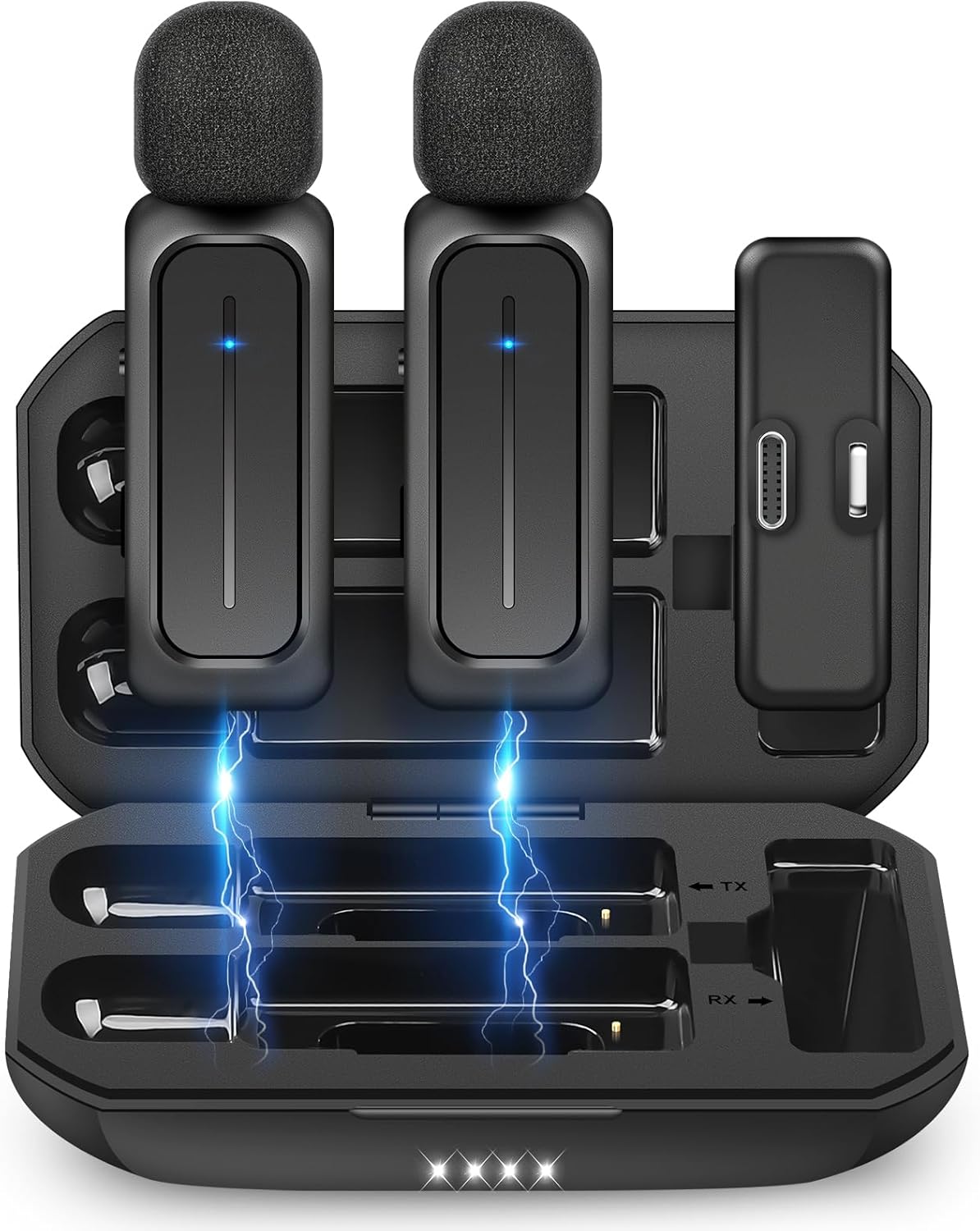
Transmitters typically run six to ten hours on their own. The headline numbers you see quoted, like 48 hours, are total system runtime including the charging case topping the units back up between takes. That case is the feature that turns a mic into a travel kit, because it stores, protects, and recharges everything from one USB-C port.
If you shoot all day away from power, prioritise a kit with a case and pack a power bank for it. Our roundup of the best portable chargers covers options that will refill a mic case and a phone several times over. Budget two packs also exist, and they usually trade case capacity for a lower price, which is a fair swap for shorter shoots.
Connectivity: Phone, Camera, or Both

This is where buyers most often get it wrong. A receiver that only offers USB-C will not feed a mirrorless camera, and a receiver with only a 3.5mm TRS output needs an adapter to reach a modern phone. Check which of the three connections you need today: USB-C for Android and recent iPhones, Lightning for older iPhones, and 3.5mm TRS for cameras and recorders.
The most flexible kits ship several receiver bodies or adapters in one box. The Hollyland Lark M2 bundle with multiple receivers and the three in one style kits from PQRQP and similar brands are aimed squarely at creators who switch between a phone and a camera on the same day. If you shoot only on a phone, a single USB-C receiver keeps the rig smaller and cheaper. Browse more gear in our electronics category if you are building out a full creator kit.
Size, Clips, and How It Looks on Camera
A transmitter that weighs around ten grams can hang on a t-shirt collar without dragging the fabric down. Heavier units need a sturdier garment or a magnetic mount that clamps through the cloth. Magnets are the neatest solution for on camera work because you can hide the transmitter behind the fabric entirely and leave only a tiny capsule visible.
Colour matters more than people expect. A black transmitter on a white shirt is a distraction in every single frame. Several kits ship in both black and white shells for this reason, and some include a small cover to blend the unit into your outfit. It is a small detail that separates a video that looks produced from one that looks improvised.
| Model | Kit Layout | Audio | Best Suited To |
|---|---|---|---|
| DJI Mic Mini | 2 TX + 1 RX + case | 24-bit, no internal rec | All day vlogging, lightest setup |
| DJI Mic 2 | 1 TX + 1 RX | 32-bit float, onboard storage | Interviews and unpredictable levels |
| Hollyland Lark M2 | 2 TX + 3 RX + case | 48kHz 24-bit | Switching between phone and camera |
| Hollyland Lark A1 | 2 TX + USB-C RX + case | 48kHz 24-bit | Phone first creators on a budget |
| Mini Mic Pro | 2 TX + RX | Phone processed | First upgrade from the built in mic |
| PQRQP 3 in 1 | 2 TX + 3 adapters | Phone processed | Mixed devices at the lowest cost |
| Ecomxia 2 Pcs | 2 TX + RX + case | 3 denoise modes | Short form clips and interviews |
| 2-Pack Mini Lavalier | 2 TX + RX + case | Basic noise reduction | Two person talking head videos |
| USB-C Lavalier | 1 TX + USB-C RX | Phone processed | Android and tablet creators |
Why You Should Trust Us
We build these guides from verifiable evidence rather than marketing copy. Every product here was pulled from live Amazon listings, then filtered on customer rating and on the volume of ratings behind it, so a mic with a perfect score from a handful of buyers never outranks a proven seller. We then read through the specification sheets to confirm the claims, and we cut anything that turned out to be a colour variant or a repackaged version of a model already on the list.
We do not pretend to have run these systems through a lab. What we do is compare documented capability against what vloggers consistently report in owner feedback, and we say plainly when a cheap kit is good enough and when it is not. Our recommendations shift when the evidence shifts, and we refresh these roundups as new models land and as ratings accumulate. You can see how we approach every category on our articles hub.
Final Thoughts
Best overall goes to the DJI Mic Mini. It is the kit we would hand to almost any vlogger without asking further questions, because the transmitters are light enough to forget about, the charging case carries the system through a long shooting day, and the noise cancelling is tuned well enough that outdoor footage needs very little cleanup. Two transmitters in the box also means you can add a second speaker the day you need to, with no extra purchase.
Best value is the Hollyland Lark A1. It brings a proper charging case, two transmitters, and multi level noise cancelling to a price point that used to buy an unbranded single mic. If you shoot mainly on a phone and want a system rather than a gadget, this is the smart place to spend. For creators who need a rescue net on every take, the DJI Mic 2 and its 32-bit float internal recording is the pick, and it is the one to choose if you shoot interviews where a guest may suddenly get loud.
If you switch constantly between a phone and a camera, the Hollyland Lark M2 with its multiple receivers is the least fiddly answer. And if you simply want to stop your phone’s built in mic from ruining a clip, the Mini Mic Pro or the USB-C lavalier will do that for the price of a takeaway meal. Whichever way you go, pair the mic with decent monitoring: even a modest set from our noise cancelling headphones roundup will let you catch a bad level before you have filmed the whole thing.
FAQs
Do I need two transmitters for solo vlogging?
No, one transmitter covers a solo piece to camera. Two transmitter kits are still worth buying because the second unit acts as a spare when the first runs flat mid shoot, and it opens the door to interviews and two person videos without a new purchase. Since most kits bundle the pair at a small premium over a single, the flexibility is usually cheap to buy up front.
Will a wireless lavalier work with my camera as well as my phone?
Only if the receiver has a 3.5mm TRS output or ships with an adapter that provides one. Many phone focused kits use a fixed USB-C or Lightning plug and cannot connect to a camera at all. Check the receiver, not the mic, before buying. Kits described as three in one usually cover USB-C, Lightning, and 3.5mm, which is the safest choice if you use several bodies. Our roundup of the best cameras under 100 lists affordable bodies that accept an external mic input.
Is 32-bit float recording worth paying extra for in 2026?
It is worth it if you record unpredictable audio: interviews, reactions, live events, or anything where you cannot watch a meter while filming. The format captures such a wide dynamic range that a peak which would clip on a conventional recorder can be pulled back down in editing with no distortion. For a scripted talking head video filmed at a steady volume, a well set 24-bit system delivers the same finished result for less money.
How do I stop clothing rustle on a clip-on mic?
Mount the capsule on a firm part of the garment, roughly a hand span below the chin, and keep it clear of anything that can brush against it such as a scarf, a zip pull, or a jacket lapel. Point the capsule slightly away from your mouth rather than straight at it to soften plosive sounds, and use the magnetic mount if the kit includes one so the fabric is not pulled taut over the unit.
Are budget wireless mics for vlogging good enough to publish with?
Yes, for most creators. The gap between a phone’s built in mic and an entry level wireless lavalier is enormous, while the gap between an entry level kit and a premium one is comparatively small and mostly about consistency, range, and recovery from mistakes. Start cheap, learn where the weak points are in your own shooting style, and upgrade only when a specific limitation is actually costing you takes.
Can I use wireless mics for vlogging for indoor podcasts too?
You can, and the results are perfectly usable, but a lavalier is optimised for mobility rather than for the rich low end that podcast listeners expect. In a room where you can sit still, a wired desktop microphone will sound fuller. Where the wireless kit wins indoors is in multi camera setups, standing presentations, and anything filmed on the move, because nobody has to work around a cable.

Write Your Review
No reviews yet. Be the first to share your experience!