

The front door lock is the one piece of hardware in a house that every family member, house sitter and delivery driver interacts with, so it is worth getting right the first time. Our top pick is the Schlage Encode Smart WiFi Deadbolt for its built-in Wi-Fi, its BHMA AAA certification and the keyed cylinder it keeps on the outside for the day the batteries run flat. This shortlist of 10 picks pulls from Schlage Encode, Schlage, Kwikset Halo and more, and it spans everything from a keypad deadbolt with no radio at all to a Matter over Thread model that answers to Apple Home. If you are working through a wider round of upgrades, the rest of our tools and home improvement guides cover the doors, openers and hardware that sit alongside it.
Three questions settle almost every purchase in this category. How much of the existing hardware are you willing to replace? How does the lock talk to your phone, and can it reach you when you are not home? And what happens the moment the batteries die? Every product below is scored on real customer ratings rather than a marketing claim, and the picks were refreshed for September 2026. Nothing here is a lock-picking tutorial or a workaround guide; it is a straight comparison of what each smart lock for front door actually does.

Pros
- Wi-Fi is built in, so remote lock, unlock and code management work with no hub or bridge
- Certified BHMA AAA, the highest residential mark for security, durability and finish
- Keeps a real keyed cylinder outside as the dead battery fallback
- Holds up to 100 access codes, enough for family, cleaners and short stay guests
- Fits standard 2-1/8 inch door prep with a screwdriver on most doors
Cons
- No fingerprint reader, so every entry is a code, the app or a key
- No Apple Home or Apple Home Key support, and Schlage confirms the BE489 cannot be upgraded to it
- An always connected Wi-Fi radio works the four AA cells harder than a Bluetooth lock
The Schlage Encode is the default recommendation in this category for a reason. It is a straight deadbolt replacement, so the touchscreen keypad and keyway go on the outside of the door and the motor, batteries and Wi-Fi radio sit in the interior housing. Once it is on the network you get remote lock and unlock, a running activity log and the ability to issue or revoke a code from anywhere, all without a hub, a bridge or a subscription.
Its real advantage is that Schlage did not cut the mechanical side to fund the electronics. The lock carries a BHMA AAA certification, the top mark for security, durability and finish, and it keeps a full keyed cylinder outside. The keypad holds up to 100 codes, which is more headroom than most households will ever use, and codes can be scheduled or made temporary for a contractor or a house sitter.
The gaps are specific rather than general. There is no fingerprint reader, so entry is a code, the app or a key. There is no Apple Home or Home Key support, and Schlage states clearly that the BE489 cannot be upgraded to it, which pushes iPhone-first households toward the Encode Plus. Battery life is respectable but not class leading, because a Wi-Fi radio that stays reachable costs power that a Bluetooth lock does not spend.
Bottom line: if you want one lock that covers remote access, guest codes, a serious mechanical grade and a backup key without adding any other hardware to your house, this is the one to buy. Only move off it if you specifically need fingerprints or Apple Home Key.
- Lock type: full deadbolt replacement, single cylinder
- Connectivity: 2.4 GHz Wi-Fi and Bluetooth built in, no hub required
- Ways to unlock: touchscreen keypad code, Schlage Home app, voice with PIN, mechanical key
- Mechanical key backup: yes, keyed cylinder included
- Published grade: BHMA AAA for security, durability and finish
- User codes: up to 100
- Battery: 4 x AA
- Works with: Alexa, Google Assistant, Ring, Key by Amazon
- Trim and finish shown: Camelot, Satin Nickel
Homeowners who want remote access without buying into a smart home platform first. It is also the easiest lock here to hand to a family member who is not technical, because the keypad works exactly like a keypad and the app is optional.
It is a strong fit for short stay hosts thanks to scheduled codes and Ring integration. It is the wrong lock if you want to open the door with a fingerprint, or if your household runs on Apple Home.
Before ordering, measure your cross bore at 2-1/8 inches and confirm a backset of 2-3/8 or 2-3/4 inches. The Encode ships in several trims, and Camelot, Century and Greenwich differ only in the shape of the exterior plate, so choose on looks alone.
Buy quality alkaline AA cells rather than the cheapest multipack, and note that the lock reports low battery in the app before the keypad shows any sign of trouble.

Pros
- Highest customer rating in this roundup by a clear margin
- No radio at all, so nothing to pair, nothing to update and nothing to leak
- ANSI Grade 3 stated on the listing, plus an IP54 weather rating
- Rated for more than a year on four AA cells
- Two mechanical backup keys in the box
Cons
- No app and no remote access of any kind, so you cannot let anyone in while you are out
- Only 20 user codes, and no activity log to review
- Grade 3 is the entry level residential rating, not Grade 1
The TE001 is the pick for anyone who wants to stop carrying keys but has no interest in putting the front door on the internet. It is a full deadbolt replacement with a backlit keypad outside and a battery pack inside, and that is the whole system. There is no app, no Bluetooth pairing and no Wi-Fi setup, which is why it installs in about fifteen minutes and then simply works.
What it does, it does well. Twenty user codes cover a family plus a cleaner and a dog walker, one time codes handle a delivery or a repair visit, and the anti-peep feature lets you pad the real code with random digits so a neighbour watching from the street learns nothing. TEEHO states an ANSI Grade 3 rating and an IP54 weather rating on the listing, and rates it at more than a year on four AA cells, which is the natural reward for having no radio to feed.
The limits are the direct consequence of that simplicity. You cannot unlock this door from your office, you cannot see who came and went, and you cannot revoke a code from your phone: you have to walk to the lock and reprogram it. Grade 3 is also the entry level residential rating rather than the top one, so this is a convenience upgrade over a basic deadbolt rather than a security upgrade over a Grade 1 unit.
Bottom line: the best value on this list and the most honest product on it. Buy it if keyless entry is the goal and remote control genuinely is not.
- Lock type: full deadbolt replacement, single cylinder
- Connectivity: none, no app, no Bluetooth, no Wi-Fi
- Ways to unlock: keypad code, one time code, mechanical key
- Mechanical key backup: yes, two keys included
- Published grade: ANSI Grade 3
- User codes: 20, plus one time codes
- Battery: 4 x AA, rated at more than 12 months
- Weather rating: IP54, minus 22 to 158 degrees Fahrenheit
- Auto lock: adjustable 10 to 99 seconds
Families who lose keys, households with teenagers, and anyone who wants a keypad on a back door or a garage entry door where remote control adds nothing. It is also the sensible choice for a second property where you would rather not maintain another Wi-Fi device.
Skip it if you host guests remotely, if you want an entry log, or if you expect the lock to appear in a smart home app.
Change the master code away from the factory default during setup and delete any code you gave to a one off visitor. Because there is no log, code hygiene is the only record you have.
Replace all four AA cells as a set at the first low battery warning, and keep one of the two supplied keys somewhere outside the house rather than in a kitchen drawer.
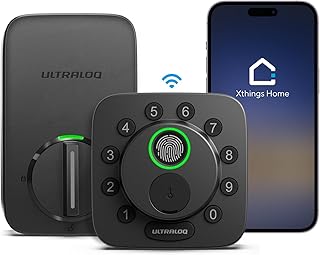
Pros
- Matter over Thread plus built-in Wi-Fi, so it joins Apple Home, Alexa and Google through one certification
- Fingerprint entry is the fastest way in when your hands are full
- Up to 18 months of claimed battery life, the longest of any connected lock here
- Mechanical key is included among the seven unlocking methods
- Screwdriver installation on standard door prep
Cons
- ULTRALOQ states ANSI/BHMA certification but does not publish a numeric grade for this model
- Matter over Thread needs a border router in the house, which not every home has
- Fingerprint readers are the part most affected by wet or cold hands
The Bolt SE is the most future proof lock in this group. It carries both built-in Wi-Fi and Matter over Thread, which means it can present itself to Apple Home, Alexa and Google through one certification instead of three separate integrations, and it can do so without a vendor bridge sitting in a cupboard. For a household that is not committed to a single ecosystem, that is a genuine advantage rather than a spec sheet line.
The entry experience is the other draw. ULTRALOQ counts seven ways in, and in daily use the ones that matter are the fingerprint reader, the keypad and the app, with a mechanical key held in reserve. Thread is also far less power hungry than a permanently awake Wi-Fi connection, which is how ULTRALOQ arrives at an 18 month claim on four AA cells, comfortably the longest runtime of any connected lock on this list.
Two caveats are worth naming. ULTRALOQ describes the Bolt SE as ANSI/BHMA certified but does not state a numeric grade on the listing, so we are not going to attach one to it. And Matter over Thread only pays off if you already have a Thread border router in the house, a role filled by recent Apple TV, HomePod and Echo hardware but not by an ordinary router.
Bottom line: the best pick for a mixed platform smart home and for anyone who resents changing batteries. Take one of the Schlage models instead if a published Grade 1 or AAA mark is a hard requirement.
- Lock type: full deadbolt replacement
- Connectivity: built-in Wi-Fi plus Matter over Thread
- Ways to unlock: fingerprint, keypad code, app, remote control, mechanical key and more, seven in total
- Mechanical key backup: yes, backup key included
- Published grade: ANSI/BHMA certified, numeric grade not stated on the listing
- Battery: 4 x AA, claimed up to 18 months
- Works with: Apple Home, Alexa, Google
- Installation: screwdriver, around 10 minutes on standard prep
Enrol each finger twice from slightly different angles during setup. Reader accuracy is far more about enrolment quality than about the sensor itself, and two passes per finger removes most of the rejections people complain about.
If you have a Thread border router, add the lock through Matter first and then to the individual assistants, rather than the other way around. Doing it in that order avoids duplicate device entries across apps.
Check whether you actually own a Thread border router before paying for Thread. Without one the lock still works over Wi-Fi, but you are buying a capability you cannot use yet.
Lithium AA cells outperform alkaline in cold weather on motorised locks, which matters if this door faces the weather in winter.

Pros
- Your existing key keeps working because the exterior hardware never changes
- The only pick here a renter can install and remove without altering the door
- Wi-Fi and Bluetooth built in, no bridge or hub needed
- About 45 percent smaller than the previous August generation
- Includes DoorSense so the app can tell locked from actually closed
Cons
- No keypad in the box, so codeless entry needs the separate August Smart Keypad
- Two CR123 lithium cells rated at roughly three months, the shortest runtime here
- No ANSI or BHMA grade is published, because the graded hardware is your existing deadbolt
The August is the odd one out here in the most useful way. Instead of replacing the lock, it clamps over the thumbturn on the inside of the door and turns your existing deadbolt for you. Nothing changes on the street side: the same escutcheon, the same keyway, the same key on your ring. For anyone who rents, shares a building entry, or simply does not want to touch the outside of a nice door, that is the entire argument.
The fourth generation is much smaller than the units that gave August a reputation for bulk, and it has Wi-Fi and Bluetooth built in, so there is no bridge to plug into a hallway socket. Auto unlock as you walk up, auto lock behind you and the included DoorSense sensor together mean the app can tell you the difference between locked and actually closed, which is a distinction most locks cannot make.
The compromises are real. There is no keypad in the box, so if you want anyone to get in without a phone or a key you need the separate August Smart Keypad. Power comes from two CR123 lithium cells that August rates at around three months, the shortest runtime in this comparison. And no ANSI or BHMA grade applies, because the mechanical strength of the door is still whatever your existing deadbolt was rated at.
Bottom line: the right answer for renters and for anyone unwilling to change the exterior of their door, and the wrong answer if you want a keypad and long battery life in one box.
- Lock type: retrofit, interior side only, fits over an existing single cylinder deadbolt
- Connectivity: Wi-Fi and Bluetooth built in, no bridge required
- Ways to unlock: app, auto unlock on approach, voice, your existing mechanical key, optional keypad accessory
- Mechanical key backup: yes, your existing key continues to work
- Published grade: none, the graded hardware remains your existing deadbolt
- Battery: 2 x CR123 lithium, rated by August at around 3 months
- Included: lock, DoorSense sensor, lock adapter, batteries, mounting hardware
- Works with: Alexa, Google Assistant, Siri
Renters first, because it is the only lock here that leaves the landlord's hardware and the landlord's key completely alone and removes without a trace. It is equally good for households where some members want a phone-free key and others want an app.
Skip it if your deadbolt is a double cylinder or a non-standard unit, and skip it if you were counting on a keypad without buying an accessory.
Check your thumbturn shape against the supplied adapters before you commit. The August fits most single cylinder deadbolts, but an unusual thumbturn is the common reason an install stalls.
Mount the DoorSense magnet carefully on the frame. Getting it right is what lets the app distinguish a locked door from a door that was left ajar, which is the feature most owners end up relying on.

Pros
- Fingerprint plus keypad plus app plus key, four independent ways in
- Wi-Fi built in with no bridge, so remote access works out of the box
- BHMA Grade 3 certification is stated on the listing
- Eight AA cells give a claimed eight months of runtime
- IP53 weather rating for exposed front doors
Cons
- No Matter support, so it is tied to the eufy app and its integrations
- Grade 3 is the entry level residential rating
- Eight AA cells is a lot of batteries to replace at once
The C220 is eufy's answer to the question of how to get fingerprint entry and true remote access into one deadbolt without a hub. The scanner sits in the exterior escutcheon above the keypad, Wi-Fi is built in so no bridge is needed, and the eufy Security app handles codes, schedules and the activity log. In practice it covers six ways in: fingerprint, keypad code, app, mechanical key, Apple Watch and a voice assistant with a spoken PIN.
eufy is unusually specific about the mechanical side, publishing a BHMA Grade 3 certification earned across more than 100,000 lock and unlock cycles, along with an IP53 weather rating. Runtime is quoted at around eight months, which is respectable for a lock running both a Wi-Fi radio and a biometric sensor, although it gets there by using eight AA cells rather than the usual four.
The one strategic gap is Matter. The C220 does not support it, so it lives inside the eufy app and whatever integrations eufy chooses to maintain, rather than presenting itself natively to Apple Home. If cross platform portability is a priority the ULTRALOQ Bolt SE is the better structural bet, and if a top tier grade is the priority the Schlage models are.
Bottom line: the most complete fingerprint plus Wi-Fi package here at a sensible price. Buy it if you want biometrics without a hub and you are comfortable staying in one vendor's app.
- Lock type: full deadbolt replacement
- Connectivity: built-in Wi-Fi, no bridge required, no Matter support
- Ways to unlock: fingerprint, keypad code, app, mechanical key, Apple Watch, voice with PIN
- Mechanical key backup: yes, keys included
- Published grade: BHMA Grade 3, certified over 100,000 cycles
- Battery: 8 x AA, claimed around 8 months
- Weather rating: IP53
- Fingerprint recognition: quoted at 0.3 seconds
Wipe the fingerprint scanner clean every few weeks. Grease and dust on the sensor cause far more failed reads than a badly enrolled finger does, and the IP53 rating covers spray, not a jet wash.
Enrol at least two fingers per household member, ideally on different hands, so a bandage or a cold morning does not force everyone back to the keypad.
Budget for eight AA cells at every change, and buy them as a matched set from one pack. Mixing old and new cells across eight slots is a fast way to lose the claimed runtime.
If you expect to move between smart home platforms in the next few years, weigh the lack of Matter support seriously before choosing this over the ULTRALOQ.

Pros
- Apple Home Key tap to unlock with an iPhone or Apple Watch, no app launch needed
- Full Apple Home support alongside Alexa, which the standard Encode does not offer
- BHMA AAA certification, the top residential mark
- Built-in Wi-Fi means remote control with no hub
- Keyed cylinder retained for battery-out access
Cons
- The tap to unlock advantage only pays off in an Apple household
- No fingerprint reader
- Carries a clear price premium over the standard Encode for one headline feature
The Encode Plus is the standard Encode with one significant addition, and it is an addition that changes how the door feels. Apple Home Key puts a house key in the Wallet app, so you raise an iPhone or an Apple Watch to the escutcheon and the deadbolt turns. No app to open, no code to type, no phone to unlock first. On a door you use ten times a day that difference is more meaningful than it sounds on paper.
Underneath it is the same well judged hardware. Wi-Fi is built in so remote access needs no hub, the touchscreen keypad handles guests and contractors with scheduled codes, and Schlage certifies the lock at BHMA AAA for security, durability and finish. A keyed cylinder stays on the outside as the fallback, which keeps the whole system honest when the batteries run out.
The case against it is narrow but firm. Everything that makes the Plus special is Apple specific, so an Android household is paying a premium for a feature it will never use, and should buy the standard Encode instead. There is no fingerprint reader either, so if biometrics rather than tap entry is the goal, the ULTRALOQ or the eufy are the relevant comparisons.
Bottom line: the clear best choice for an iPhone household that wants tap to unlock, and an unnecessary premium for anyone else. Schlage confirms the standard Encode cannot be upgraded to Home Key, so this decision has to be made at purchase.
- Lock type: full deadbolt replacement
- Connectivity: built-in Wi-Fi, Bluetooth and NFC for Home Key
- Ways to unlock: Apple Home Key tap, iPhone or Apple Watch, keypad code, app, mechanical key
- Mechanical key backup: yes, keyed cylinder included
- Published grade: BHMA AAA for security, durability and finish
- Battery: 4 x AA
- Works with: Apple Home, Apple Home Key, Alexa, short stay rental platforms
- Finish shown: Matte Black
Add the lock to the Home app first and let it provision the Home Key into Wallet, then set up your keypad codes. Doing it in that order avoids having to repair the lock later.
Express Mode lets the Watch or phone open the door without Face ID or a passcode. It is faster, and it is worth deciding deliberately whether you want that on your front door.
Households where everyone carries an iPhone or an Apple Watch, and anyone who already runs the rest of the house through Apple Home. The tap gesture is also the easiest smart entry method to explain to a family member who dislikes apps.
If even one regular resident is on Android, look hard at the standard Encode and put the difference toward better strike hardware.

Pros
- SmartKey cylinder lets you rekey the lock yourself without a locksmith
- Built-in Wi-Fi with no hub, bridge or subscription
- Listed as Grade AAA certified, the top residential mark
- Geofence auto unlock as you arrive home
- Lifetime finish warranty from Kwikset
Cons
- No fingerprint reader
- No Apple Home support
- Lowest customer rating of the picks in this roundup, though still above our 4.0 filter
The Halo is Kwikset's mainstream Wi-Fi deadbolt and it competes with the Schlage Encode on almost identical terms: direct Wi-Fi with no hub, a backlit keypad, app managed codes and a top tier certification. Kwikset lists it as Grade AAA certified, and the app handles remote lock and unlock, temporary codes and an activity history without asking for a subscription.
What separates it is the SmartKey Security cylinder. With the supplied tool you can rekey the lock yourself in about a minute, so a new key works and every old key stops. For anyone who has just bought a house, ended a tenancy, or lost a key they cannot account for, that is a practical piece of security that no amount of app functionality replaces. Geofence auto unlock rounds it out by opening the door as you arrive rather than as you reach for the keypad.
The omissions are the same as the Encode's: no fingerprint reader and no Apple Home. Its customer rating is also the lowest of the picks that made this list, still comfortably past our 4.0 filter but a step behind the leaders, with most of the criticism aimed at app behaviour rather than at the hardware.
Bottom line: buy the Halo when self rekeying matters to you, which is a stronger argument than it first appears in a house that has changed hands or changed tenants recently.
- Lock type: full deadbolt replacement
- Connectivity: built-in Wi-Fi, no hub required
- Ways to unlock: backlit keypad code, app, geofence auto unlock, mechanical key
- Mechanical key backup: yes, SmartKey Security rekeyable cylinder
- Published grade: Grade AAA certified per the Kwikset listing
- Battery: 4 x AA
- Warranty: lifetime finish warranty
- Finish shown: Satin Nickel
Rekey the cylinder the day you move in. Keep the SmartKey tool and the original learn key together somewhere you will find them again, because the rekey process needs both.
Pair the lock with three inch strike screws that reach the door frame stud. On any deadbolt, that single change does more against a forced entry attempt than the lock grade does.
New homeowners, landlords between tenants, and anyone who has ever wondered how many copies of their key exist. The Halo is the only lock here that lets you answer that question yourself in under a minute.
Look elsewhere if you want fingerprints or Apple Home, both of which the Halo leaves out.

Pros
- Z-Wave Plus integrates cleanly with Ring, SmartThings and other controllers
- BHMA AAA certification, the top residential mark
- Built-in alarm technology senses activity at the door
- No Wi-Fi radio means less power draw and no cloud dependency
- Keyed cylinder retained for battery-out access
Cons
- Requires a Z-Wave hub for any remote access at all
- No app of its own, everything runs through the hub's app
- Nothing to gain here if you do not already own a controller
The Connect BE469 is the hub lock, and it should be judged on that basis. It speaks Z-Wave Plus rather than Wi-Fi, which means it does nothing remotely on its own. Add a Ring Alarm, SmartThings or Hubitat controller and it becomes fully remote, appears in the same app as your sensors and cameras, and participates in automations such as locking the door when the alarm is armed.
Unpaired, it remains a genuinely good keypad deadbolt. The resistive touchscreen resists smudges, the keypad handles user codes locally, and the built-in alarm technology senses activity at the door and sounds an alert with adjustable sensitivity. Schlage certifies the lock at BHMA AAA for security, durability and finish, which is the same top tier mark the Encode carries, and a keyed cylinder stays on the outside.
Skipping Wi-Fi is a deliberate design choice with real benefits: less power draw, no cloud account for the lock itself, and a mesh protocol built for exactly this job. It is only a drawback if you were expecting the lock to be remote out of the box, which it very much is not.
Bottom line: the right buy if a Z-Wave hub is already in the house, and the wrong buy if it is not. Anyone starting fresh should take the Encode instead and skip the controller entirely.
- Lock type: full deadbolt replacement
- Connectivity: Z-Wave Plus, hub or controller required for remote access
- Ways to unlock: touchscreen keypad code, hub app once paired, mechanical key
- Mechanical key backup: yes, keyed cylinder included
- Published grade: BHMA AAA for security, durability and finish
- Battery: 4 x AA
- Alarm: built-in alarm technology with adjustable sensitivity
- Works with: Ring Alarm, SmartThings and other Z-Wave controllers
- Trim and finish shown: Century, Bright Brass
Confirm your controller supports Z-Wave Plus and door lock secure pairing before ordering. Some older or cheaper hubs handle sensors but not locks, which use an encrypted pairing class.
Pair the lock while it is close to the hub if your setup allows it, then move it to the door. Distant first pairings are the most common source of setup trouble on Z-Wave locks.
Tune the alarm sensitivity to your door. On a lightweight door the highest setting will trigger on ordinary knocking, which trains the household to ignore it.
Build one automation that locks the door when the alarm arms and one that alerts you when a specific user code is entered. Those two cover most of what a hub adds over a plain keypad lock.

Pros
- Complete matched set with deadbolt and two lever handles in one box
- Fingerprint recognition quoted at 0.3 seconds
- One time codes that delete themselves after use
- ANSI Grade 3 and IP54 both stated on the listing
- More than a year of claimed runtime on four AA cells
Cons
- No app, no Wi-Fi and no Bluetooth, so no remote access and no activity log
- Grade 3 is the entry level residential rating
- Replacing a full handle set is a bigger job than swapping a deadbolt, and a poor fit for a rental
Most smart locks leave you with a modern deadbolt above a handle that no longer matches it. The Veise set solves that by shipping the fingerprint keypad deadbolt and two lever handles together in the same finish, which is why it appears on this list despite being the least connected product on it. If your front door hardware is tired and you were going to replace all of it anyway, buying one coordinated set is cheaper and tidier than buying pieces.
Functionally it is a local lock done properly. Fingerprint recognition is quoted at 0.3 seconds, codes can be permanent or one time with the temporary ones deleting themselves after use, and anti-peep entry lets you bury the real code inside random digits. Veise lists ANSI Grade 3 and IP54, and rates it at more than a year on four AA cells, which is the payoff for having no radio.
The limits follow from that. There is no app, no Wi-Fi and no Bluetooth on this model, so you cannot let anyone in remotely, cannot revoke a code from your phone and cannot review a log. Grade 3 is also the entry level residential rating. And because it replaces the handles as well as the deadbolt, it is the wrong product for a rental and a longer job than a simple deadbolt swap.
Bottom line: the pick when you want the whole door replaced in one coordinated set and you have no interest in remote access. If you want the same fingerprint convenience with an app behind it, look at the eufy C220 instead.
- Lock type: full front door set, keypad deadbolt plus two lever handles
- Connectivity: none, no app, no Bluetooth, no Wi-Fi
- Ways to unlock: fingerprint, keypad code, one time code, mechanical key
- Mechanical key backup: yes, keys included
- Published grade: ANSI Grade 3
- Battery: 4 x AA, rated at more than 12 months
- Weather rating: IP54, minus 31 to 158 degrees Fahrenheit
- Auto lock: adjustable 10 to 90 seconds
- Finish shown: Matte Black
Owner occupiers refreshing a whole front door at once, and anyone who cares that the deadbolt and the handle match. It also suits households that actively do not want the front door connected to anything.
Not for renters, and not for anyone who needs to let a guest or a contractor in while they are away.
Check the handing of your door before ordering a lever set, and confirm the backset. Levers are handed hardware in a way deadbolts are not, and this is where returns come from.
Because there is no log and no remote revocation, delete visitor codes manually once the visit is over, and keep a spare mechanical key off the property.

Pros
- Fingerprint reader and keypad built into the knob, no separate deadbolt needed
- Bluetooth app manages codes, fingerprints and key fobs locally
- Supports temporary, permanent, one time and recurring codes
- Mechanical key backup included
- DIY installation with a screwdriver on standard prep
Cons
- Remote access needs an optional Wi-Fi gateway, which is not in the box
- No ANSI or BHMA grade is published for this model
- A knob unit is not a substitute for a deadbolt on a main entry door
The Yamiry knob takes the opposite approach to everything else here: instead of adding electronics above the handle, it puts them inside it. The fingerprint reader sits in the knob face, the keypad wraps the escutcheon, and the whole unit replaces your latch hardware. On a door where a full deadbolt swap is impractical, or where you want keyless entry on an interior or secondary door, that is a genuinely useful shape.
The app side is more capable than the format suggests. Over Bluetooth it stores up to 50 passwords, fingerprints and key fobs, and it supports temporary, permanent, one time and recurring codes with an event log. Add the optional Wi-Fi gateway and you gain remote unlock and Alexa voice control, which is how a Bluetooth lock reaches beyond the front step.
Two things need to be clear. That gateway is sold separately, so out of the box this lock is a local device and nothing more. And Yamiry does not publish an ANSI or BHMA grade for this model, so we are not going to assign it one. More importantly, a knob is not a deadbolt: on a main entry door this should sit alongside a deadbolt rather than instead of one.
Bottom line: a well specified knob unit for secondary doors and for entries where you want the electronics in the handle. Choose a deadbolt from higher up this list if this is the only lock on your front door.
- Lock type: knob and latch unit with integrated keypad
- Connectivity: Bluetooth; Wi-Fi gateway sold separately for remote access
- Ways to unlock: fingerprint, keypad code, Bluetooth app, key fob, mechanical key
- Mechanical key backup: yes, keys included
- Published grade: none stated for this model
- Capacity: up to 50 passwords, fingerprints and fobs
- Code types: permanent, temporary, one time and recurring
- Construction: corrosion resistant aluminium
- Warranty: 1 year
Decide first whether you are replacing a knob or a deadbolt. This unit is knob format, so if your door currently has both, this covers the handle and leaves the deadbolt untouched.
If remote unlock is a requirement, price the Wi-Fi gateway into the comparison before deciding, because that changes the value against a lock with Wi-Fi already built in.
Do not treat a knob unit as the primary security on a street facing door. Keep a graded deadbolt above it and let the knob handle daily convenience.
Clean the sensor face regularly and reenrol any finger that starts needing two attempts, rather than adding more codes to work around it.
How to Choose a Smart Lock For Front Door
Smart locks look interchangeable in a product grid and behave very differently once they are on a door. The five criteria below are the ones that change day to day life, and they are also the ones most likely to make a lock the wrong purchase for your particular door, your particular lease and your particular phone.
Replacement Type: Full Deadbolt, Retrofit, or Handle Set

There are three physical formats and they are not interchangeable. A full deadbolt replacement swaps out both halves of your existing deadbolt: the keypad or touchscreen goes outside, the motor and battery pack go inside, and you get a brand new keyed cylinder. Most of this list falls in that category, including the Schlage Encode, the TEEHO TE001, the ULTRALOQ Bolt SE, the eufy Security C220, the Kwikset Halo and the Schlage Connect.
A retrofit unit is the interior-only design that August popularised. It clamps over the thumbturn on the inside of the door and turns your existing deadbolt for you. The outside of the door does not change at all, which means your existing key still works and the exterior escutcheon your landlord installed stays exactly where it is. The August Wi-Fi Smart Lock is the only retrofit model on this list, and it is the one a renter can install and remove without touching the outside of the door or the strike plate.
The third format is a handle set or knob unit, where the electronics live in the lever or knob rather than in a separate deadbolt. The Veise unit ships as a full front door set with a fingerprint deadbolt plus two matching lever handles, and the Yamiry model puts the keypad and fingerprint reader directly into a knob that replaces the latch hardware. These give you one coordinated finish across the whole door, but they involve more hardware coming off, which makes them a poor fit for a rental.
Connectivity: Bluetooth, Wi-Fi, Z-Wave, and Matter over Thread
This is where marketing copy does the most damage, because “smart” covers four very different radios. Bluetooth-only locks talk to your phone from roughly across the room. They are cheap on batteries and they are genuinely useful for auto-unlock as you walk up, but they cannot let a plumber in while you are at work unless you add a plug-in gateway. The Yamiry knob is a Bluetooth lock in this sense: the app manages codes and fingerprints locally, and remote control needs a Wi-Fi gateway that is sold separately.
Built-in Wi-Fi is the option most buyers actually want. The Schlage Encode, the Schlage Encode Plus, the eufy Security C220, the Kwikset Halo, the ULTRALOQ Bolt SE and the August all join your 2.4 GHz network directly, with no bridge and no hub in the middle. You get remote lock and unlock, a live activity log and the ability to issue a code from anywhere. The trade is battery life, because a Wi-Fi radio that wakes up regularly costs more power than a Bluetooth one.
Z-Wave and Zigbee are the hub-dependent standards. The Schlage Connect BE469 uses Z-Wave Plus, which means it does nothing remotely on its own: pair it to a Ring, SmartThings or Hubitat controller and it becomes fully remote, leave it unpaired and it is a very good keypad deadbolt with an alarm sensor. That is a reasonable design if you already run a hub, and a frustrating one if you do not. Matter over Thread is the newest path and the ULTRALOQ Bolt SE is the example here, joining Apple Home, Alexa and Google through a single certification rather than three separate integrations. If you are already running connected gear outdoors, our guide to the best wireless outdoor security cameras covers the same hub versus no hub decision from the camera side.
Ways to Unlock and Whether There Is a Backup Key

Count the entry methods, then count the ones that work with a dead phone and a dead lock. Keypad codes are the baseline and every lock here except the August has one built in. Fingerprint readers appear on the ULTRALOQ Bolt SE, the eufy C220, the Veise handle set and the Yamiry knob, and they are the fastest way in when your hands are full. App entry is convenient but useless if your phone is dead. Voice unlock through Alexa or Google always requires a spoken PIN, which is a sensible restriction rather than a limitation.
Apple Home Key is worth calling out separately because only one lock here supports it. The Schlage Encode Plus stores a house key in the Wallet app so you tap an iPhone or Apple Watch against the lock to open it, no app launch and no code. Schlage does not offer that on the standard Encode and confirms the BE489 cannot be upgraded to it, so if tap to unlock matters to you it has to be the Encode Plus from the start.
The mechanical key is the point that decides emergencies, and it is the reason this list has no keyless-only models on it. Every pick here keeps a physical key path. Nine of them ship with a keyed cylinder in the exterior housing, and the August is the interesting exception: because it never touches the outside of the door, the key that already opens your deadbolt keeps working exactly as before. The Kwikset Halo goes a step further with a SmartKey cylinder you can rekey yourself in under a minute, which matters if you have just moved in and do not know who else holds a copy.
ANSI and BHMA Security Grades
ANSI and BHMA grades measure the physical lock, not the software. ANSI/BHMA Grade 1 is the strongest residential rating, Grade 2 sits in the middle and Grade 3 is the basic residential level. Separately, BHMA publishes a three-letter mark that scores security, durability and finish in that order, so AAA is the top result across all three. Manufacturers are not obliged to publish either number, and plenty of listings simply do not.
Among these picks, four publish a top-tier mark: Schlage certifies the Encode, the Encode Plus and the Connect BE469 at BHMA AAA, and Kwikset lists the Halo as Grade AAA certified. Three publish the entry-level residential grade: TEEHO states ANSI Grade 3 on the TE001, eufy states BHMA Grade 3 on the C220, and Veise states ANSI Grade 3 on its handle set. ULTRALOQ describes the Bolt SE as ANSI/BHMA certified without naming a numeric grade, and neither August nor Yamiry publishes a grade for the models here. That is not the same as saying those locks are weak, and we are not going to invent a number that the manufacturer never claimed. In the August case in particular the graded hardware is your existing deadbolt, because that is the part still doing the mechanical work.
Batteries and What Happens When They Die

Battery format and claimed runtime vary more than you would expect. Most of the field runs on four AA cells: the Schlage Encode, the Encode Plus, the Connect BE469, the Kwikset Halo, the ULTRALOQ Bolt SE, the TEEHO TE001, the Veise set and the Yamiry knob all use that format. The eufy C220 uses eight AA cells for a claimed eight months. The August is the outlier with two CR123 lithium cells rated by August at roughly three months, which is the price you pay for a compact interior unit that has to run a Wi-Fi radio.
Claimed runtime tracks the radio more than the brand. The TEEHO TE001 has no radio at all and is rated for more than a year on four AAs. The ULTRALOQ Bolt SE claims up to 18 months because Thread is far less power hungry than always-on Wi-Fi. Anything with a constantly connected Wi-Fi radio and a fingerprint sensor sits in the six to twelve month range in normal use. Whatever you buy, every lock here gives you a low battery alert well before it stops working, and every one of them still opens with a key when you ignore that alert.
Installation and What Renters Can Actually Do
Almost every lock on this list fits a standard North American door prep: a 2-1/8 inch cross bore, a 1 inch edge bore and a backset of 2-3/8 or 2-3/4 inches. If your current deadbolt is a normal single-cylinder unit, a full replacement is a screwdriver job that takes about fifteen minutes and needs no drilling. Measure the bore and the backset before ordering anyway, because thick doors, metal doors and non-standard prep are exactly where returns come from.
Renters are the group that needs to read this criterion closely. A full deadbolt replacement is reversible in the sense that you can box up the original lock and reinstall it when you move out, but it does change the outside of the door, and plenty of leases have something to say about that. The August retrofit avoids the problem entirely: the exterior hardware, the strike plate and the landlord’s key all stay untouched, and removing it leaves no trace. Handle sets and knob units are the opposite end of that scale and are best treated as owner-occupier hardware. If you are also upgrading the other opening into the house, our roundup of the best garage door opener brands works through a similar install versus hire decision.
| Lock | Replacement type | Connectivity | Mechanical key | Published grade |
|---|---|---|---|---|
| Schlage Encode | Full deadbolt | Wi-Fi built in | Keyed cylinder | BHMA AAA |
| TEEHO TE001 | Full deadbolt | None, keypad only | Two keys included | ANSI Grade 3 |
| ULTRALOQ Bolt SE | Full deadbolt | Wi-Fi plus Matter over Thread | Keyed cylinder | ANSI/BHMA certified, grade not stated |
| August Wi-Fi Smart Lock | Retrofit, interior only | Wi-Fi and Bluetooth built in | Your existing key | Not published |
| eufy Security C220 | Full deadbolt | Wi-Fi built in | Keyed cylinder | BHMA Grade 3 |
| Schlage Encode Plus | Full deadbolt | Wi-Fi, Bluetooth, Apple Home Key | Keyed cylinder | BHMA AAA |
| Kwikset Halo | Full deadbolt | Wi-Fi built in | SmartKey rekeyable cylinder | Grade AAA certified |
| Schlage Connect BE469 | Full deadbolt | Z-Wave Plus, hub required | Keyed cylinder | BHMA AAA |
| Veise fingerprint handle set | Deadbolt plus two levers | None, on-device only | Keys included | ANSI Grade 3 |
| Yamiry fingerprint knob | Knob and latch unit | Bluetooth, gateway sold separately | Keys included | Not published |
Why You Should Trust Us
We build these shortlists from what buyers report and what manufacturers are willing to put in writing, not from press releases. Every product here cleared the same filter before it was considered: a customer rating of at least 4.0 stars and a meaningful volume of ratings behind it, so a single enthusiastic review cannot carry a listing onto the page. We then removed duplicate colour and trim variants of the same lock, because a satin nickel and a matte black version of one product are not two options.
For a security product we hold one extra line. Specifications such as ANSI and BHMA grades, battery format, radio type and the presence of a backup key are reported only where the manufacturer or the listing actually states them. Where a grade is not published we say so rather than filling the gap with an assumption, because a made-up Grade 1 claim on a lock is worse than no claim at all. We have not disassembled these locks and we do not pretend otherwise, and we deliberately do not cover bypass or defeat techniques of any kind.
Final Thoughts
The Schlage Encode Smart WiFi Deadbolt is our best overall for the simple reason that it gets the fundamentals right at once: Wi-Fi with no hub, BHMA AAA certification, a hundred access codes and a real key on the outside. It has no fingerprint reader and no Apple Home support, and if either of those is a requirement you should move sideways in the same family. Choose the Schlage Encode Plus if you want to tap an iPhone or Apple Watch to open the door, and the Schlage Connect BE469 if you already run a Z-Wave hub and want the lock inside that system.
The TEEHO TE001 is the best value pick and it earns that by being honest about what it is. There is no app, no Wi-Fi and no Bluetooth, so there is nothing to unlock remotely and nothing to break in a firmware update. What you get is an ANSI Grade 3 deadbolt with twenty codes, two backup keys and more than a year on four AA cells, at the price where most connected locks are still an accessory. For renters the answer is the August Wi-Fi Smart Lock, the only retrofit on this list, because it leaves the outside of the door and the existing key completely alone.
For everyone else the split is straightforward. Pick the ULTRALOQ Bolt SE if you want fingerprint entry with Matter over Thread and the longest claimed battery life here, the eufy Security C220 if you want fingerprint entry with plain built-in Wi-Fi, and the Kwikset Halo if a self-rekeyable cylinder is worth more to you than biometrics. The Veise handle set and the Yamiry knob are the picks when you want the electronics in the handle rather than in a separate deadbolt. More comparisons like this one live in our articles archive, and the wider tools and home improvement category covers the rest of the hardware on the door.
Frequently Asked Questions
Does a smart lock for front door still open if the batteries die?
Every lock on this list does, because each one keeps a physical key path. Nine of the picks include a keyed cylinder in the exterior housing, and the August retrofit leaves your original keyed deadbolt in place so the key you already carry still works. All of them also warn you well in advance with a low battery alert, usually for weeks before the motor actually stops turning. The practical advice is to keep one spare key somewhere off the property rather than relying on the alert.
Can I install a smart lock for front door in a rental in 2026?
A retrofit model such as the August Wi-Fi Smart Lock is the safe answer, because it mounts on the inside of the door over your existing deadbolt and changes nothing a landlord can see. Full deadbolt replacements are physically reversible, and you can keep the original lock in a box and refit it when you leave, but they do replace the exterior hardware and many leases treat that as an alteration. Handle sets and knob units involve the most hardware coming off and are the hardest to justify in a rental. Ask before you drill, and browse the rest of our shopping categories if you want lower commitment upgrades.
Which locks on this list can I open remotely?
The six with built-in Wi-Fi work remotely out of the box with no extra hardware: the Schlage Encode, the Schlage Encode Plus, the ULTRALOQ Bolt SE, the August Wi-Fi Smart Lock, the eufy Security C220 and the Kwikset Halo. The Schlage Connect BE469 needs a Z-Wave hub before it can do anything remotely. The Yamiry knob needs an optional Wi-Fi gateway. The TEEHO TE001 and the Veise handle set have no radio at all, so remote access is not possible on either, by design.
Is ANSI Grade 1 worth paying for on a front door?
On the door that faces the street, a higher grade is usually worth the difference. Grade 1 and the BHMA AAA mark reflect longer cycle life and higher force resistance in the mechanical lock, which is the part that has to survive weather and daily use for years. That said, a strong deadbolt bolted to a weak frame is not much of an upgrade, so long strike screws that reach the stud frequently do more for the door than moving up a grade. Note that four picks here publish a top-tier mark, three publish Grade 3, and three publish no grade at all.
Do I need a hub for a smart lock for front door?
Only if the lock uses Z-Wave or Zigbee. Locks with built-in Wi-Fi connect straight to your router, and locks using Matter over Thread such as the ULTRALOQ Bolt SE need a Thread border router, a role already filled by devices most smart homes already own, including recent Apple TV, HomePod and Echo models. Bluetooth-only locks do not need a hub for local use, but they do need a gateway if you want to open the door while you are away.
What is the difference between a smart deadbolt and a smart handle set?
A smart deadbolt replaces only the deadbolt, so the handle or knob below it stays as it is and the two pieces may not match visually. A handle set puts a fingerprint reader or keypad into the lever or knob itself, sometimes with a matching deadbolt in the same package, as with the Veise set on this list. Handle sets give you one coordinated look and one set of electronics to manage, but they replace more hardware, they are heavier on the door, and they leave you fewer upgrade paths later.
Write Your Review
No reviews yet. Be the first to share your experience!